Effect Diagram
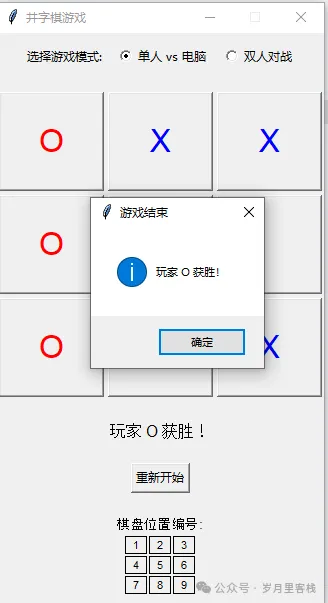
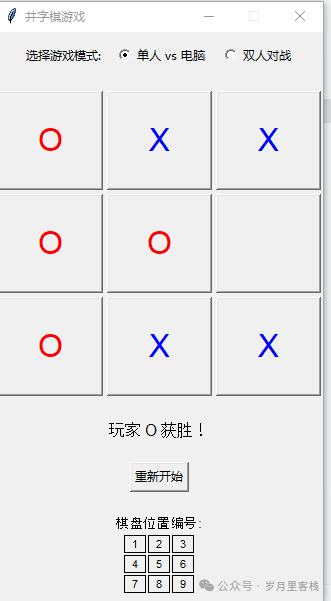
Hi! Today we will create a Tic-Tac-Toe game with less than 200 lines of Python code, which can be played by one or two players. Don’t underestimate its simplicity; it integrates GUI, events, AI, and state machines. I will guide you through it step by step: starting with the interface, then the logic, followed by AI, and finally packaging and summarizing, ensuring clarity and progression!
1. Overall Overview
| Level | File/Class | Function |
|---|---|---|
| L0 | <span>081403_tictactoe.py</span> |
Entry script, starts the Tkinter main loop |
| L1 | <span>TicTacToe</span> class |
Encapsulates all data and behavior |
| L2 | <span>__init__</span> |
Initializes the root window and member variables |
| L2 | <span>create_widgets</span> |
Builds the entire GUI (mode selection + board + status + reset) |
| L2 | <span>make_move</span> |
Entry point for player moves |
| L2 | <span>computer_move</span> |
AI move strategy |
| L2 | <span>update_game_state</span> |
Updates win/loss/draw/turn after a move |
| L2 | <span>check_winner</span> |
Determines the winner |
| L2 | <span>is_board_full</span> |
Checks for a draw |
| L2 | <span>reset_game</span> |
Resets the game |
Memory mnemonic: “Entry class, class division; interface logic AI three-legged stool”.
2. Layered Deep Dive
1. Entry Script (L0)
if __name__ == "__main__":
    root = tk.Tk()
    game = TicTacToe(root)
    root.mainloop()
- Only 4 lines, yet it accomplishes four tasks: “create window → pass root → attach object → run main loop”.
- Injects
<span>root</span>into<span>TicTacToe</span>, making all subsequent controls children of it, ensuring clear hierarchy.
2. Constructor (L2-<span>__init__</span>)
def __init__(self, root):
    self.root = root
    self.root.title("Tic-Tac-Toe Game")
    self.root.resizable(False, False)

    self.board = [" "] * 9          # Board data, one-dimensional list mapping 0~8
    self.current_player = "X"       # Current player
    self.game_mode = 1              # 1 single player 2 two players
    self.buttons = []               # Stores 9 tk.Button instances
    self.create_widgets()           # Set up the interface all at once
- Member variables have single responsibilities:
<span>board</span>stores logic,<span>buttons</span>stores visuals,<span>current_player</span>acts as a state machine.- Call chain: entry →
<span>__init__</span>→<span>create_widgets</span>, completing UI initialization in one go.
3. Building the Interface (L2-<span>create_widgets</span>)
# 1. Mode selection
mode_frame = tk.Frame(self.root)
mode_frame.pack(pady=10)
tk.Label(mode_frame, text="Select Game Mode:").pack(side=tk.LEFT, padx=5)
self.mode_var = tk.IntVar(value=1)
tk.Radiobutton(mode_frame, text="Single vs Computer", variable=self.mode_var,
               value=1, command=self.reset_game).pack(side=tk.LEFT)
tk.Radiobutton(mode_frame, text="Two Player", variable=self.mode_var,
               value=2, command=self.reset_game).pack(side=tk.LEFT)

# 2. Board buttons
self.board_frame = tk.Frame(self.root)
self.board_frame.pack(pady=10)
for i in range(9):
    btn = tk.Button(self.board_frame, text="", font=('Arial', 24),
                    width=5, height=2,
                    command=lambda idx=i: self.make_move(idx))
    row, col = i // 3, i % 3
    btn.grid(row=row, column=col, padx=2, pady=2)
    self.buttons.append(btn)

# 3. Status label
self.status_label = tk.Label(self.root, text="Player X's Turn", font=('Arial', 12))
self.status_label.pack(pady=10)

# 4. Reset button
reset_btn = tk.Button(self.root, text="Restart", command=self.reset_game)
reset_btn.pack(pady=10)

# 5. Position instructions
info_frame = tk.Frame(self.root)
info_frame.pack(pady=10)
tk.Label(info_frame, text="Board Position Numbers:").pack()
pos_frame = tk.Frame(info_frame)
pos_frame.pack()
for i in range(9):
    tk.Label(pos_frame, text=str(i + 1), font=('Arial', 8),
             width=3, height=1, borderwidth=1, relief="solid").grid(
        row=i // 3, column=i % 3, padx=1, pady=1)
- Uses the “Frame nesting” concept:
<span>mode_frame</span>manages mode,<span>board_frame</span>manages the board,<span>info_frame</span>manages help.<span>lambda idx=i</span>technique: captures loop variable i in closure to prevent all buttons from sharing the same i.<span>grid</span>row-column calculation:<span>row=i//3</span>,<span>col=i%3</span>, one-dimensional to two-dimensional, very intuitive.
4. Player Move (L2-<span>make_move</span>)
def make_move(self, idx):
    # Boundary check
    if self.board[idx] != " " or self.check_winner() is not None:
        return

    # 1. Update data
    self.board[idx] = self.current_player
    # 2. Update view
    self.buttons[idx].config(text=self.current_player,
                             fg="blue" if self.current_player == "X" else "red")

    # 3. Check for win
    winner = self.check_winner()
    if winner:
        self.status_label.config(text=f"Player {winner} Wins!")
        messagebox.showinfo("Game Over", f"Player {winner} Wins!")
        return

    # 4. Check for draw
    if self.is_board_full():
        self.status_label.config(text="Draw!")
        messagebox.showinfo("Game Over", "Draw!")
        return

    # 5. Switch player
    self.current_player = "O" if self.current_player == "X" else "X"
    self.status_label.config(text=f"Player {self.current_player}'s Turn")

    # 6. AI delay trigger
    if self.mode_var.get() == 1 and self.current_player == "O":
        self.root.after(500, self.computer_move)
- Six-step pipeline: validate → update data → update view → check win/loss → check draw → switch turn/AI.
<span>messagebox.showinfo</span>will block the main thread, preventing user clicks.<span>root.after(500, ...)</span>non-blocking delay, giving the player the illusion that the computer is “thinking”.
5. AI Strategy (L2-<span>computer_move</span>)
def computer_move(self):
    # 1. Win if possible
    for i in range(9):
        if self.board[i] == " ":
            self.board[i] = "O"
            if self.check_winner() == "O":
                self.buttons[i].config(text="O", fg="red")
                self.update_game_state()
                return
            self.board[i] = " " # Backtrack

    # 2. Block if necessary
    for i in range(9):
        if self.board[i] == " ":
            self.board[i] = "X"
            if self.check_winner() == "X":
                self.board[i] = "O"
                self.buttons[i].config(text="O", fg="red")
                self.update_game_state()
                return
            self.board[i] = " "

    # 3. Take center
    if self.board[4] == " ":
        self.board[4] = "O"
        self.buttons[4].config(text="O", fg="red")
        self.update_game_state()
        return

    # 4. Randomly select empty
    available_moves = [i for i, spot in enumerate(self.board) if spot == " "]
    if available_moves:
        move = random.choice(available_moves)
        self.board[move] = "O"
        self.buttons[move].config(text="O", fg="red")
        self.update_game_state()
- Four-level fallback:
- Win (victory check O) →
- Block (victory check X) →
- Center (tactical point) →
- Random fallback.
<span>update_game_state()</span> reuses unified ending logic to avoid code duplication.6. State Updates and Utility Functions
6.1 update_game_state
def update_game_state(self):
    winner = self.check_winner()
    if winner:
        self.status_label.config(text=f"Player {winner} Wins!")
        messagebox.showinfo("Game Over", f"Player {winner} Wins!")
        return
    if self.is_board_full():
        self.status_label.config(text="Draw!")
        messagebox.showinfo("Game Over", "Draw!")
        return
    self.current_player = "X"
    self.status_label.config(text=f"Player {self.current_player}'s Turn")
- Logic is highly similar to that in
<span>make_move</span>, but designed specifically for AI calls, not switching O→X but directly returning to X, reflecting “AI turn ends → player’s turn”.
6.2 check_winner
def check_winner(self):
    win_combinations = [
        [0, 1, 2], [3, 4, 5], [6, 7, 8],  # Rows
        [0, 3, 6], [1, 4, 7], [2, 5, 8],  # Columns
        [0, 4, 8], [2, 4, 6]              # Diagonals
    ]
    for combo in win_combinations:
        a, b, c = combo
        if self.board[a] == self.board[b] == self.board[c] != " ":
            return self.board[a]
    return None
- Uses a “victory table” to hard-code 8 winning combinations, with clear and readable logic.
- Time complexity O(1), as it always iterates 8 times.
6.3 is_board_full
def is_board_full(self):
    return " " not in self.board
- Pythonic one-liner to check if full.
6.4 reset_game
def reset_game(self):
    self.board = [" "] * 9
    self.current_player = "X"
    self.game_mode = self.mode_var.get()
    for btn in self.buttons:
        btn.config(text="", fg="black")
    self.status_label.config(text=f"Player {self.current_player}'s Turn")
- Resets three main components: data, player, view.
- Each time the radio button is clicked, it also triggers
<span>command=self.reset_game</span>, achieving “switch mode and restart immediately”.
3. Knowledge Points Overview
| Theme | Specific Technical Points | Code Representation |
|---|---|---|
| GUI | Basic tkinter | <span>tk.Tk()</span>, <span>Frame</span>, <span>Button</span>, <span>Label</span>, <span>Radiobutton</span> |
| Events | Callback/command binding | <span>command=lambda idx=i: ...</span> |
| MVC | Data-view separation | <span>self.board</span> vs <span>self.buttons</span> |
| State Machine | Player rotation | <span>current_player</span>, <span>game_mode</span> |
| AI | Minimax prototype | Four-level strategy |
| Defensive Programming | Boundary checks | <span>if self.board[idx] != " "</span> |
| Code Reuse | Function extraction | <span>update_game_state</span>, <span>check_winner</span> |
4. Project Goals and Learning Path
- Beginner: Able to read and modify. Change the AI strategy to random, or replace X/O icons with emojis.
- Intermediate: Introduce the minimax algorithm to make the AI truly “unbeatable”.
- Advanced:
- Expand the board to 4×4/5×5;
- Use
<span>Canvas</span><span> to draw the board;</span> - Add online battle (
<span>socket</span><span> or </span><code><span>asyncio</span><span>).</span>
5. Conclusion
This small project of less than 200 lines is comprehensive:
- Uses
<span>tkinter</span><span> to create an interactive GUI;</span> - Implements a prototype of MVC with “data + view” dual arrays;
- Uses “four-level fallback” to implement lightweight AI;
- Manages game flow with a “state machine”;
- Keeps code clean with “function decomposition”.
By following this article step by step, you not only learned how to write a Tic-Tac-Toe game but also mastered the general approach of “how to break down a requirement into modules and implement them layer by layer”. Have fun and happy coding!
Click 【Follow + Collect】 to get the latest practical code examples
Python 20-day learning plan
7-day learning plan for Python
Python creative drawing board code
Python character stroke query tool: from GUI interface to stroke animation implementation
Python emoji maker code
Python Chinese chess game code analysis
Python seal generator implementation
Python simulation of Jinshan typing software
Python super useful Markdown to rich text tool – full code analysis
Python snake game source code analysis
Python QR code generator implementation
Python video player implementation
Python online seal maker implementation
Python + AI to create a simple smart voice assistant
Python simple notepad implementation
Python Markdown to HTML tool code implementation
Python simple drawing tool code implementation
Python video player implementation
Python simple notepad implementation
Python implementation of the link game code analysis
Python simple computer process manager implementation
A super useful tool in Python – word frequency statistics tool
Python simple web scraper for weather
Python scheduled task reminder tool
Python “Guess the Number Game Code Analysis”
Python “Simple Calculator Code Analysis”
Python + AI online document generation assistant
Python “Password Generator Code Analysis”
Python | + AI to create a simple smart voice assistant
Python simple drawing tool code implementation
Python Markdown to HTML implementation
Python video player implementation
Python implementation of the link game code analysis
Python implementation of Huashan AI call to generate stories
Python implementation of Doubao AI call to generate stories
Python simple notepad implementation
Python simple computer process manager implementation
【Practical 1】
-
Python: QR code generator
-
Python-pgame to implement maze
-
Python – implement weather clock assistant
-
Python-QrCode to implement various QR codes
-
Python-pyglet to implement Hongmeng clock
-
Python-pickle to parse and get WeChat friend information
-
Python-wxPy initial version to implement WeChat message bombing
-
Python to implement the Eight Trigrams starry sky clock
-
Python to implement the National Day red flag avatar effect
-
Python-PIL to add icons at specified positions on images
【Practical 2】
-
Python-wxPy initial version to implement WeChat message bombing
-
Python-PIL library Image class parsing
-
Python-tlinter to implement a simple student management system
-
Python-itChat to implement WeChat message push
-
Python to implement Pdf to Word conversion
-
Python – implement automatic generation of couplet assistant
-
Py2Exe another way to package
-
Python-tts to generate voice conversion assistant
-
python-win32 etc. to automatically add exe to computer startup options
-
python to implement desktop video recording
-
PySimpleGUI-checkboxPython to implement image clipping into a grid
-
python to package into exe file
-
Python-faker to generate virtual data
-
python to implement player Python-FastApi simple implementation
-
python to scrape Douban movie reviews
-
Python to scrape public account article collections
【Practical 3】
-
python to implement a simple flower order
-
python – get the image for guessing idioms
-
python-menu implementation
-
Python-pySimpleGUI to implement interface
-
Python – convert color images to black and white
-
Python-moviepy – implement audio and video player
-
Python to operate SQLite database
-
Python-PySimpleGUI to implement menu
-
python-Tkinter to implement personalized signature
-
Python-WordCloud cloud word map
-
Python-customTkinter usage
-
Python-tkinter (down)
-
Python-tkinter (middle)
-
python-tkinter (1)
-
Python to implement video assistant
【Practical 4】
-
Python to implement video assistant
-
Python-flask-1: build main page
-
Python ttkbootstrap interface
-
python-PyQt5 to implement image display and simple reader
-
Configure Qt Designer and Pyuic on Pycharm
-
Python to implement cropping and generating images of one inch and two inches
-
Python to scrape Jinshan dictionary query results
-
python to generate personalized QR codes
AI human-computer battle version of Gomoku game (AI + pygame implementation)
python to implement garbage classification query tool
python – implement menu
Python field application: automated testing
Python field application: Web development
Python field application: automated operations
Follow the public account below for the latest articles
Emperors of the Ming Dynasty – 16: In order as follows:
1: Ming Taizu Zhu Yuanzhang (Hongwu, 1368–1398)
Starting with a bowl, ending with a nation: Zhu Yuanzhang’s entrepreneurial history of reversal
2: Ming Huizong Zhu Yunwen (Jianwen, 1398–1402)
Jianwen Emperor: The most tragic entrepreneur in history, losing the billion-dollar empire left by his grandfather in four years
3:Ming Chengzu Zhu Di (Yongle, 1402–1424)
Zhu Di: From street thug to eternal emperor, how did this usurper become the king of the Ming Dynasty?
4: Ming Renzong Zhu Gaochi (Hongxi, 1424–1425)
Zhu Gaochi: The “fat Renzong” of the Ming Dynasty who reigned for ten months, how did he become a great ruler through eating and lying down?
5:Ming Xuan Zong Zhu Zhanji (Xuan De, 1425–1435)
Zhu Zhanji: An artist delayed by the throne, if Emperor Xuan De had a social media account
6:Ming Yingzong Zhu Qizhen (Zheng Tong, 1435–1449; later restored, Tian Shun, 1457–1464)
Ming Yingzong Zhu Qizhen: The first emperor to go from emperor to captive and then back to power
7: Ming Daizong Zhu Qiyu (Jingtai, 1449–1457)
Ming Daizong Zhu Qiyu: From prince to CEO: the throne that fell from the sky
8:Ming Xian Zong Zhu Jian Shen (Chenghua, 1464–1487)
Ming Xian Zong Zhu Jian Shen: The multifaceted emperor of a legendary life
9: Ming Xiao Zong Zhu Youzhuang (Hongzhi, 1487–1505)
Ming Xiao Zong Zhu Youzhuang: The warmest emperor of the Ming Dynasty’s reversal script
10:Ming Wu Zong Zhu Houzhao (Zhengde, 1505–1521)
Ming Wu Zong Zhu Houzhao: The entertainment blogger delayed by the throne
11: Ming Shi Zong Zhu Houxuan (Jiajing, 1521–1566)
Ming Shi Zong Zhu Houxuan: The power game in the alchemy furnace – the absurd entrepreneurial history of the Ming Dynasty’s immortal CEO
12:Ming Mu Zong Zhu Zaiqi (Longqing, 1566–1572)
Ming Mu Zong Zhu Zaiqi: The economic reformer delayed by the throne
13: Ming Shen Zong Zhu Yijun (Wanli, 1572–1620)
Ming Shen Zong Zhu Yijun: The “homebody emperor” buried in memorials
14:Ming Guang Zong Zhu Changluo (Taichang, 1620, only one month)
One-month emperor Zhu Changluo: The roller coaster of a 30-day reign
15: Ming Xi Zong Zhu Youjiao (Tianqi, 1620–1627)
Ming Xi Zong Zhu Youjiao: The “Lu Ban” emperor delayed by the throne
16: Ming Si Zong Zhu Youjian (Chongzhen, 1627–1644)
Chongzhen Zhu Youjian: A “fallen nation CEO” tragedy of KPI
Note:
Ming Yingzong reigned twice (Zheng Tong, Tian Shun), replaced in between by his brother Ming Daizong.
The Southern Ming regime (such as Hongguang Emperor, etc.) is not considered legitimate Ming Dynasty emperors.
Legendary Story Series
The Great Tang Criminal Investigation Record: When Di Renjie Meets the Theatrical Water Bandit
Go Determines Lifelong: How the Chess God of the Song Dynasty Won the First Female Chess Child of Liao with Two Games
Half a Gold Box Marriage Fraud: How a Scholar of the Ming Dynasty Became a Son-in-law of a Wealthy Family with Antiques
Incense Pilgrims Recklessly Read the Diamond Sutra: A Hand-Copied Manuscript from the Tang Dynasty Leads to a Political Revelation
Ancient Version of “Sweeping Black Wind”: Unveiling the Strange Cases in Volume Four of “Two Eras of Surprises”
Du Shiniang Angrily Sinks the Treasure Chest: The Tragedy and Survival Insights of an Ancient Socialite with “Love Brain”
When the Roll King Meets the Virgin: The Blood-Stained Friendship of the Han Dynasty Version of “China Partner”
From “Naked Resignation to Save a Friend” to “Ten Years of Debt Repayment”: The Ceiling of Loyalty for Tang Dynasty Workers
From “Starving to Death” to “Prime Minister’s Fate”: The Reversal of Life in the Tang Dynasty Version of “Counterattack Star Path”
From Pancake Seller to Prime Minister of the Tang Dynasty: How High is the Investment Return Rate of This Aunt Selling Pancakes?
When the Abstinent General Meets the Love-Brain Bodyguard: The Blood-Stained Romance of the Five Dynasties Version of “Yanxi Strategy”
Ming Dynasty “Immortal Jump” Record: The Bloody Entanglement of the Rich Second Generation and the Green Tea Bitch
Gold Hairpin Blood Case: The Reversal of the Ming Dynasty’s Son-in-law, the Green Tea Cousin Turned Out to Be the Ultimate Boss?
Did the Wrong Question Book Harm Him? A Ming Dynasty Scholar Missed the Top Scholar Due to a Typo, but Found a Provincial Governor in a Tea House