Let’s Get Straight to the Point – What is Solara? In simple terms, Solara is a framework implemented in pure Python that mimics the concepts of React. It brings good front-end practices such as componentization and reactive state management into Jupyter and web application development. In other words, you can build clear, reusable, and scalable interactive data applications without writing JavaScript, which can run both in a Notebook and as an independent web service.
Core Concepts
- • Component (@solara.component): Similar to React’s functional components, you combine UI and local logic together.
- • Reactive Variables (solara.reactive): Declare states that need to be shared globally or across components as reactive, which will trigger a re-render of related components when changed. This is much more convenient than manually triggering re-renders.
- • Based on ipywidgets: This means you can reuse a large number of existing widgets and run seamlessly in the Jupyter family (Lab, Notebook, Voilà, Colab, etc.).
- • Standalone Server: You can start it as a web service by running
solara run your_app.py(internally it uses FastAPI), making deployment easy.
Installation and Quick Start (Step by Step) Installation is very simple, suitable for lazy people:
- 1. Install (Terminal):pip install solara
- 2. Write a minimal example (file sol.py or directly in a Notebook cell):
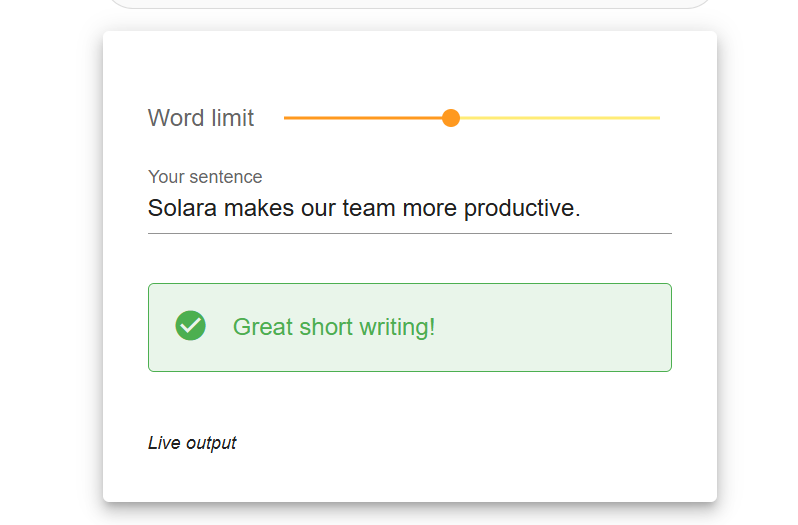
import solara sentence = solara.reactive("Solara makes our team more productive.") word_limit = solara.reactive(10) @solara.component def Page(): word_count = len(sentence.value.split()) solara.SliderInt("Word limit", value=word_limit, min=2, max=20) solara.InputText(label="Your sentence", value=sentence, continuous_update=True) if word_count >= int(word_limit.value): solara.Error(f"With {word_count} words, you passed the word limit of {word_limit.value}.") elif word_count >= int(0.8 * word_limit.value): solara.Warning(f"With {word_count} words, you are close to the word limit of {word_limit.value}.") else: solara.Success("Great short writing!") Page() # Call in Notebook; run in script with solara run sol.py - 3. Run:
- • Notebook: Place the code in a cell and execute; the component will display.
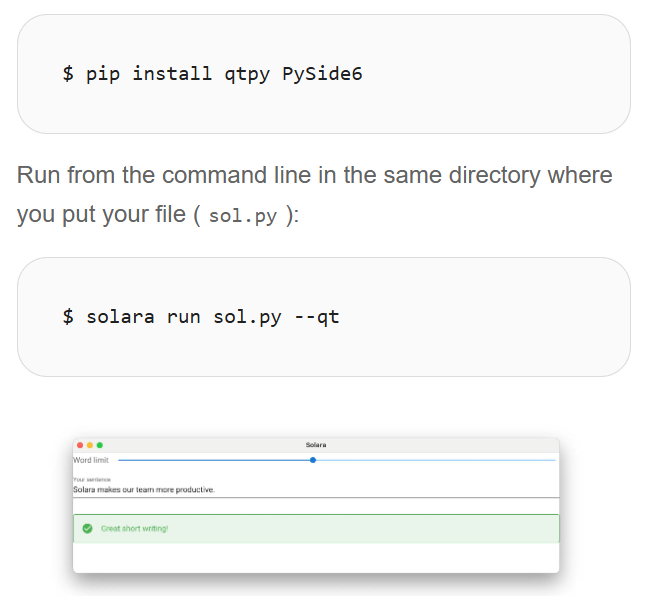
- • Local server: Run
solara run sol.pyin the directory where the file is located, which will start the page at http://localhost:8765 by default.
For more examples and interactive demos, you can check the official documentation and example pages for real-time effects (e.g., the scatter plot demo allows you to select points and download filtered data).
Overview of Advantages (Table Format for Easy Comparison)
| Advantage | Description |
| Pure Python, Zero JS/TS Barrier | Python developers can get started directly, reducing cross-language communication costs. |
| React-Style Componentization | Supports reusable, layered UI structures, making the code clearer. |
| Reactive State Management | Reactive variables automatically trigger re-renders of related components, eliminating manual state synchronization. |
| Supports Notebook and Standalone Web | The same code can run in Jupyter and Colab, and can also be published using solara run. |
| Based on ipywidgets Ecosystem | Can reuse a large number of existing widgets, compatible with multiple platforms. |
| User-Friendly Development Experience | Supports hot reloading, type hints, and rapid iteration. |
Disadvantages and Considerations
- • Performance is not optimized for extremely high concurrency like traditional web frameworks; complex large front-end interactions may require dedicated front-end rewrites in extreme cases.
- • Following a pure Python route means that some front-end effects or fine-grained control may not be as flexible as writing React/JS directly.
- • The maturity of the ecosystem and community size may temporarily be less than that of the React + JS combination; when encountering very specific plugin needs, you may need to implement or bridge them yourself.
- • If the team already has a mature front-end line, adopting Solara requires weighing the consistency of the technology stack.
Who is it Suitable For, and When Should You Choose Solara?
- • Data scientists and analysts who want to share interactive prototypes directly with colleagues or product teams without writing front-end code.
- • Small teams that need to quickly publish web applications from Notebooks and want to save on front-end development costs.
- • Those who wish to organize code in a componentized and maintainable way but do not want to leave the Python ecosystem.Not suitable for: Large consumer products with strict requirements for extremely high concurrency and top-notch front-end interactions (in such cases, dedicated front-end frameworks are more appropriate).
Conclusion Solara brings the React philosophy into the pure Python world, allowing you to seamlessly switch between Jupyter and the web, quickly creating clear and reusable interactive applications – very suitable for data-related and internal tool applications. However, for top-notch front-end experiences or extremely high-traffic services, it is still necessary to combine with traditional front-end or other architectures.
Project Address: https://github.com/nwutils/widgetti/solara