 Source | TLPI System Programming Notes
Compiled & formatted | Embedded Application Research Institute
Overview
The most common use of pipes is in the shell, for example:
$ ls | wc -lTo execute the above command, the shell creates two processes to execute <span>ls</span> and <span>wc</span> (achieved through <span>fork()</span> and <span>exec()</span>), as shown below:
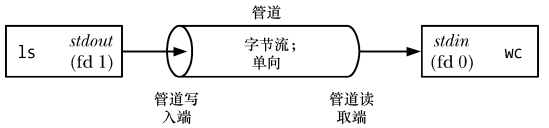
From the above diagram, we can see that a pipe can be viewed as a set of water pipes, allowing data to flow from one process to another, which is also the origin of the name “pipe”.
As shown in the diagram, two processes are connected to the pipe, where the writing process <span>ls</span> connects its standard output (file descriptor 1) to the writing end of the pipe, while the reading process <span>wc</span> connects its standard input (file descriptor 0) to the reading end of the pipe. In fact, these two processes are unaware of the existence of the pipe; they simply read and write data from standard file descriptors. The shell must handle the related work.
A pipe is a byte stream
A pipe is a byte stream, meaning that there is no concept of messages or message boundaries when using a pipe:
-
The process reading data from the pipe can read any size of data block, regardless of the size of the data block written by the writing process.
-
The data passed through the pipe is sequential; the order of bytes read from the pipe is exactly the same as the order in which they were written to the pipe. The
<span>lseek()</span>function cannot be used for random access to data in the pipe.
If there is a need to implement the concept of discrete messages in a pipe, this must be done within the application. While this is feasible, it is better to use other IPC mechanisms, such as message queues and datagram sockets, if such a requirement arises.
Reading data from a pipe
Attempting to read data from an empty pipe will block until at least one byte is written to the pipe.
If the writing end of the pipe is closed, the process reading data from the pipe will see an end-of-file (EOF) after reading all remaining data in the pipe (i.e., <span>read()</span> returns 0).
Pipes are unidirectional
The direction of data transfer in a pipe is unidirectional. One end of the pipe is for writing, and the other end is for reading.
In some other UNIX implementations, particularly those evolved from System V Release 4, pipes are bidirectional (known as stream pipes). Bidirectional pipes are not specified in any UNIX standard, so even in implementations that provide bidirectional pipes, it is best to avoid relying on this semantics. As an alternative, UNIX domain stream socket pairs (created via the <span>socketpair()</span> system call) provide a standard bidirectional communication mechanism, and their semantics are equivalent to stream pipes.
Operations that ensure writing does not exceed PIPE_BUF bytes are atomic
If multiple processes write to the same pipe, it can be ensured that the data written will not intermingle if the amount of data they write at any one time does not exceed PIPE_BUF bytes.
SUSv3 requires that PIPE_BUF be at least <span>_POSIX_PIPE_BUF(512)</span>. An implementation should define PIPE_BUF (in <span><limits.h></span>) and/or allow calling <span>fpathconf(fd,_PC_PIPE_BUF)</span> to return the actual limit for atomic write operations.
Different UNIX implementations have different PIPE_BUF values; for example, in FreeBSD 6.0, its value is 512 bytes, in Tru64 5.1, it is 4096 bytes, in Solaris 8, it is 5120 bytes, and in Linux, the value of PIPE_BUF is 4096.
-
When the size of the data block written to the pipe exceeds PIPE_BUF bytes, the kernel may split the data into several smaller fragments for transmission, appending subsequent data when the reader consumes data from the pipe (
<span>write()</span>calls will block until all data is written to the pipe). -
When only one process writes data to the pipe (the usual case), the value of PIPE_BUF does not matter.
-
However, if there are multiple writing processes, large data block writes may be broken into segments of arbitrary size (possibly smaller than PIPE_BUF bytes), and there may be instances of data interleaving with data written by other processes.
The PIPE_BUF limit only takes effect when data is being transferred to the pipe. When the data reaches PIPE_BUF bytes, <span>write()</span> will block as necessary until there is enough available space in the pipe to atomically complete this operation. If the data being written exceeds PIPE_BUF bytes, then <span>write()</span> will transfer as much data as possible to fill the pipe and then block until some reading process removes data from the pipe. If such a blocking <span>write()</span> is interrupted by a signal handler, this call will be unblocked and return the number of bytes successfully transferred to the pipe, which will be less than the requested number of bytes (known as a partial write).
The capacity of a pipe is limited
A pipe is essentially a buffer maintained in kernel memory, and this buffer has a limited storage capacity. Once the pipe is filled, subsequent write operations to the pipe will block until the reader removes some data from the pipe.
SUSv3 does not specify the storage capacity of pipes. In Linux kernels prior to 2.6.11, the storage capacity of pipes was consistent with the size of the system page (e.g., 4096 bytes on x86-32), while from Linux 2.6.11 onwards, the storage capacity of pipes is 65,536 bytes. The storage capacity of pipes in other UNIX implementations may vary.
Generally, an application does not need to know the actual storage capacity of a pipe. If it is necessary to prevent the writing process from blocking, the process reading data from the pipe should be designed to read data from the pipe as quickly as possible.
Creating and using pipes
#include <unistd.h>

int pipe(int fd[2]);-
<span>pipe()</span>creates a new pipe. -
A successful call returns two open file descriptors in the array
<span>fd</span>, one representing the reading end of the pipe<span>fd[0]</span>, and the other representing the writing end of the pipe<span>fd[1]</span>
When calling the <span>pipe()</span> function, a buffer is first allocated in the kernel for communication, which has a read end and a write end, and then two file descriptors are passed to the user process through the <span>fd</span> parameter, where <span>fd[0]</span> points to the read end of the pipe, and <span>fd[1]</span> points to the write end of the pipe.
Do not write data using <span>fd[0]</span> or read data using <span>fd[1]</span>; such behavior is undefined, but on some systems, it may return -1 indicating a failure. Data can only be read from <span>fd[0]</span> and written to <span>fd[1]</span>, not the other way around.
As with all file descriptors, the <span>read()</span> and <span>write()</span> system calls can be used to perform IO on the pipe. Once data is written to the writing end of the pipe, it can be immediately read from the reading end of the pipe. The <span>read()</span> call on the pipe will read the smaller of the requested number of bytes and the number of bytes currently in the pipe. When the pipe is empty, the read operation blocks.
It is also possible to use stdio functions (<span>printf()</span>, <span>scanf()</span>, etc.) on the pipe, but first, you need to use <span>fdopen()</span> to obtain a file stream corresponding to one of the descriptors in <span>filedes</span>. However, when doing this, you need to address the stdio buffering issue.
Pipes can be used for inter-process communication:
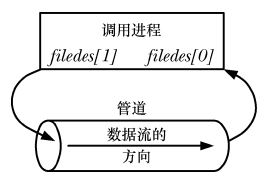
Pipes can be used for communication between related processes (child processes inherit copies of file descriptors from the parent process):
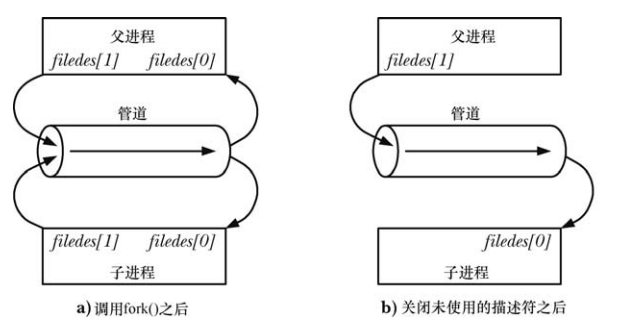
It is not advisable to use a single pipe as full-duplex, or to not close the corresponding read end/write end when used as half-duplex, as this can easily lead to deadlocks: if two processes attempt to read data from the pipe simultaneously, it cannot be determined which process will read successfully first, resulting in competition for data between the two processes. To prevent such competition, some synchronization mechanism is required. At this point, deadlock issues must be considered, as if both processes attempt to read from an empty pipe or write to a full pipe, deadlock may occur.
If we want a bidirectional data flow, we can create two pipes, one for each direction.
Pipes allow communication between related processes
In fact, pipes can be used for communication between any two or more related processes, as long as a pipe is created by a common ancestor process before the series of <span>fork()</span> calls to create child processes.
Closing unused pipe file descriptors
Closing unused pipe file descriptors is not only to ensure that processes do not exhaust their file descriptor limits.
The process reading data from the pipe will close its writing descriptor, so that when other processes finish output and close their writing descriptors, the reader will see the end of the file. Conversely, if the reading process does not close the writing end of the pipe, then after other processes close the writing descriptor, even if the reader has read all the data in the pipe, it will not see the end of the file. This is because the kernel knows that at least one writing descriptor of the pipe is still open, causing <span>read()</span> to block.
When a process attempts to write data to a pipe but no process has an open reading descriptor for that pipe, the kernel sends a <span>SIGPIPE</span> signal to the writing process, which by default will kill the process, but the process can choose to ignore it or set a signal handler, so that <span>write()</span> will fail with an <span>EPIPE</span> error. Receiving a <span>SIGPIPE</span> signal and getting an <span>EPIPE</span> error is significant for identifying the state of the pipe, which is why it is necessary to close unused reading descriptors of the pipe. If the writing process does not close the reading end of the pipe, then even after other processes have closed the reading end of the pipe, the writing process can still write data to the pipe, eventually filling the entire pipe, and subsequent write requests will block forever.
Using pipes to connect filters
Once a pipe is created, the file descriptors allocated for the two ends of the pipe are the two smallest available descriptors. Since processes typically already use descriptors 0, 1, and 2, some larger descriptor values will be allocated for the pipe. If you need to use a pipe to connect two filters (i.e., reading from <span>stdin</span> and writing to <span>stdout</span>), so that the standard output of one program is redirected to the pipe, you need to use the file descriptor duplication technique.
int pfd[2];
pipe(pfd);

close(STDOUT_FILENO);
dup2(pfd[1], STDOUT_FILENO);
The result of these calls is that the standard output of the process is bound to the writing end of the pipe, and a corresponding set of calls can be used to bind the standard input of the process to the reading end of the pipe.
Communicating with shell commands through pipes: <span>popen()</span>
#include <stdio.h>

FILE *popen (const char *command, const char *mode);-
<span>pipe()</span>and<span>close()</span>are the lowest-level system calls, and their further encapsulation is provided by<span>popen()</span>and<span>pclose()</span> -
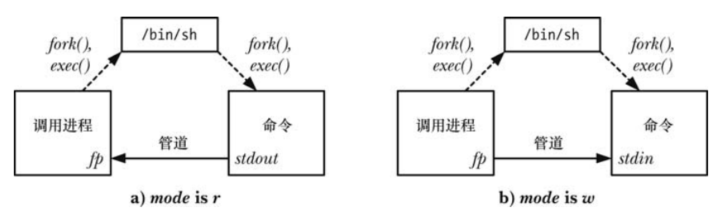
<span>popen()</span>creates a pipe, then creates a child process to execute the shell, which in turn creates a child process to execute the<span>command</span>string. -
<span>mode</span>parameter is a string: -
It determines whether the calling process reads data from the pipe (
<span>mode</span>is<span>r</span>) or writes data to the pipe (<span>mode</span>is<span>w</span>). -
Since pipes are unidirectional, bidirectional communication cannot be performed in the executed
<span>command</span>. -
<span>mode</span>value determines whether the standard output of the executed command is connected to the writing end of the pipe or its standard input is connected to the reading end of the pipe.
-
<span>popen()</span>returns a file stream pointer for use with<span>stdio</span>library functions upon success. When an error occurs,<span>popen()</span>returns<span>NULL</span>and sets<span>errno</span>to indicate the reason for the error. -
After the
<span>popen()</span>call, the calling process uses the pipe to read the output of the<span>command</span>or sends input to it. As with pipes created using<span>pipe()</span>, when reading data from the pipe, the calling process will see the end of the file after the<span>command</span>closes the writing end of the pipe; when writing data to the pipe, if the<span>command</span>has already closed the reading end of the pipe, the calling process will receive a<span>SIGPIPE</span>signal and get an<span>EPIPE</span>error.
#include <stdio.h>

int pclose ( FILE * stream);-
Once IO is finished, the
<span>pclose()</span>function can be used to close the pipe and wait for the child process’s shell to terminate (the<span>fclose()</span>function should not be used, as it will not wait for the child process). -
<span>pclose()</span>returns the termination status of the shell in the child process upon success (i.e., the termination status of the last command executed by the shell, unless the shell was killed by a signal). -
Like
<span>system()</span>, if the shell cannot be executed,<span>pclose()</span>will return a value as if the shell terminated by calling<span>_exit(127)</span>. -
If other errors occur,
<span>pclose()</span>returns -1. One possible error is the inability to obtain the termination status.
When waiting to obtain the status of the shell in the child process, SUSv3 requires that <span>pclose()</span> behaves like <span>system()</span>, meaning that if the internal <span>waitpid()</span> call is interrupted by a signal handler, that call is automatically restarted.
Like <span>system()</span>, <span>popen()</span> should never be used in privileged processes.
<span>popen</span> advantages and disadvantages:
-
Advantages: In Linux, all parameter expansions are performed by the shell. Therefore, before starting the
<span>command</span>command, the program first starts the shell to analyze the<span>command</span>string, allowing the use of various shell expansions (such as wildcards), enabling very complex shell commands to be executed through the<span>popen()</span>call. -
Disadvantages: For each
<span>popen()</span>call, not only is the requested program started, but a shell is also started. Thus, each<span>popen()</span>will start two processes. From an efficiency and resource perspective, the call to<span>popen()</span>is slower than the normal method.
<span>pipe()</span> VS <span>popen()</span>
-
<span>pipe()</span>is a low-level call, while<span>popen()</span>is a high-level function. -
<span>pipe()</span>simply creates a pipe, while<span>popen()</span>creates a pipe and forks a child process at the same time. -
<span>popen()</span>requires a shell to interpret the requested command when passing data between two processes;<span>pipe()</span>does not require starting a shell to interpret the requested command, while providing more control over reading and writing data (<span>popen()</span>must be a shell command, while<span>pipe()</span>has no such requirement). -
<span>popen()</span>works with file streams (FILE), while<span>pipe()</span>works with file descriptors, so after using<span>pipe()</span>, data must be read and sent using the lower-level<span>read()</span>and<span>write()</span>calls.
Pipes and stdio buffering
Since the file stream pointer returned by the <span>popen()</span> call does not reference a terminal, the stdio library applies block buffering to such streams. This means that when calling <span>popen()</span> with a mode value of w, the data sent to the child process at the other end of the pipe will only be sent when the stdio buffer is full or when the pipe is closed using <span>pclose()</span>. In many cases, this behavior is not an issue. However, if it is necessary to ensure that the child process can immediately receive data from the pipe, it is necessary to periodically call <span>fflush()</span> or use <span>setbuf(fp, NULL)</span> to disable stdio buffering. This technique can also be used when creating a pipe with the <span>pipe()</span> system call and then using <span>fdopen()</span> to obtain a stdio stream corresponding to the writing end of the pipe.
If the process calling <span>popen()</span> is reading data from the pipe (i.e., <span>mode</span> is <span>r</span>), things are not so simple. In this case, if the child process is using the stdio library, then—unless it explicitly calls <span>fflush()</span> or <span>setbuf()</span>—its output will only be available to the calling process after the child process fills the stdio buffer or calls <span>fclose()</span>. (If reading data from a pipe created with <span>pipe()</span> and the process writing to the other end is also using the stdio library, the same rules apply.) If this is an issue, the measures that can be taken are quite limited unless the source code of the program running in the child process can be modified to include calls to <span>setbuf()</span> or <span>fflush()</span>.
If modifying the source code is not possible, a pseudo-terminal can be used to replace the pipe. A pseudo-terminal is an IPC channel that behaves like a terminal to processes. As a result, the stdio library will output data from the buffer line by line.
Named pipes (FIFO)
While the above pipes achieve inter-process communication, they have certain limitations:
-
Anonymous pipes can only communicate between related processes.
-
They can only allow one process to write and another to read; if both need to occur simultaneously, a new pipe must be opened.
To enable communication between any two processes, named pipes (FIFO) were introduced:
-
Difference between FIFO and pipes: FIFO has a name in the file system and can be opened like a regular file, allowing communication between any two processes. Anonymous pipes are not visible to the file system and are limited to communication between parent and child processes.
-
Once a FIFO is opened, IO system calls such as
<span>read()</span>,<span>write()</span>, and<span>close()</span>can be used on it just like with pipes and other files. Like pipes, FIFO also has a writing end and a reading end, and always follows the first-in-first-out principle, meaning the first data in will be the first to be read. -
Like pipes, when all references to a FIFO are closed, all unread data will be discarded.
-
The
<span>mkfifo</span>command can be used in the shell to create a FIFO:
mkfifo [-m mode] pathname-
<span>pathname</span>is the name of the created FIFO, and the<span>-m</span>option specifies permissions<span>mode</span>, which works like the<span>chmod</span>command. -
<span>fstat()</span>and<span>stat()</span>functions will return<span>S_IFIFO</span>in the<span>st_mode</span>field of the<span>stat</span>structure; when listing files with<span>ls -l</span>, the type of FIFO files in the first column is<span>p</span>, and<span>ls -F</span>will append a pipe symbol to the FIFO pathname.
#include <sys/types.h>
#include <sys/stat.h>

int mkfifo(const char *pathname, mode_t mode);-
<span>mode</span>parameter specifies the permissions for the new FIFO, which will be masked by the process’s<span>umask</span>value. -
Once a FIFO is created, any process can open it as long as it passes the regular file permission checks.
-
The only sensible practice when using FIFO is to set up a reading process and a writing process at both ends. This way, by default, opening a FIFO for reading (
<span>open() O_RDONLY</span>flag) will block until another process opens the FIFO for writing (<span>open() O_WRONLY</span>flag). Correspondingly, opening a FIFO for writing will block until another process opens the FIFO for reading. In other words, opening a FIFO synchronizes the reading and writing processes. If one end of a FIFO is already open (possibly because a pair of processes have opened both ends of the FIFO), then the<span>open()</span>call will succeed immediately.
In most Unix implementations (including Linux), when opening a FIFO, you can bypass the blocking behavior by specifying the <span>O_RDWR</span> flag. This way, the <span>open()</span> call will return immediately, but you cannot read and write data using the returned file descriptor on the FIFO. This practice breaks the IO model of FIFO, and SUSv3 explicitly states that the result of opening a FIFO with the <span>O_RDWR</span> flag is undefined, so for portability reasons, developers should not use this technique. For those needing to avoid blocking when opening a FIFO, the <span>open()</span> call with the <span>O_NONBLOCK</span> flag provides a standardized way to accomplish this:
open(const char *path, O_RDONLY | O_NONBLOCK);
open(const char *path, O_WRONLY | O_NONBLOCK);
Another reason to avoid using the <span>O_RDWR</span> flag when opening a FIFO is that after calling it that way, the calling process will never see the end of the file when reading data from the returned file descriptor, as there will always be at least one file descriptor open waiting for data to be written to the FIFO, which is the descriptor from which the process is reading data.
Using FIFO and <span>tee</span> to create dual pipelines
One feature of shell pipelines is that they are linear; each process in the pipeline can read the data produced by the previous process and send it to the next process. Using FIFO allows creating subprocesses in the pipeline, so that in addition to sending the output of one process to the next process in the pipeline, the output can also be copied and sent to another process. To accomplish this task, the <span>tee</span> command is needed, which reads data from standard input and copies it, outputting one copy to standard output and the other to a file specified by command line arguments.
mkfifo myfifo
wc -l < myfifo &&
ls -l | tee myfifo | sort -k5n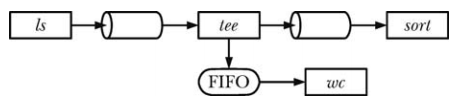
Non-blocking IO
When a process opens one end of a FIFO, if the other end of the FIFO has not yet been opened, that process will be blocked. However, sometimes blocking is not the desired behavior, and this can be achieved by specifying the <span>O_NONBLOCK</span> flag when calling <span>open()</span>.
If the other end of the FIFO is already open, the <span>O_NONBLOCK</span> flag will have no effect on the <span>open()</span> call, which will succeed immediately as if the other end of the FIFO had been opened. The <span>O_NONBLOCK</span> flag will only take effect when the other end of the FIFO has not been opened, and the specific effects depend on whether the FIFO is being opened for reading or writing:
-
If the FIFO is opened for reading and the writing end is currently open, the
<span>open()</span>call will succeed immediately (as if the other end of the FIFO had been opened). -
If the FIFO is opened for writing and the other end has not been opened for reading, the
<span>open()</span>call will fail and set<span>errno</span>to<span>ENXIO</span>
The different effects of the <span>O_NONBLOCK</span> flag when opening a FIFO for reading and writing are for a reason. It is not a problem to open a FIFO for reading when there is no writer on the other end, as any attempts to read data from the FIFO will not return any data. However, attempting to write to a FIFO with no reader will result in the generation of a <span>SIGPIPE</span> signal and the <span>write()</span> call will return an <span>EPIPE</span> error.
The semantics of calling <span>open()</span> on a FIFO can be summarized as follows:
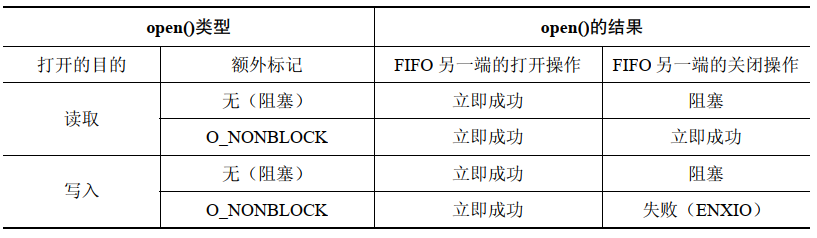
When opening a FIFO, using the <span>O_NOBLOCK</span> flag serves two purposes:
-
It allows a single process to open both ends of a FIFO, where the process first opens the FIFO for reading by specifying the
<span>O_NOBLOCK</span>flag, and then opens the FIFO for writing. -
It prevents deadlocks from occurring between processes that open both ends of two FIFOs.
For example, the following situation will lead to a deadlock:
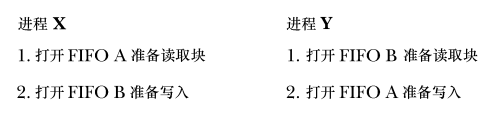
Non-blocking <span>read()</span> and <span>write()</span>
<span>O_NONBLOCK</span> flag not only affects the semantics of the <span>open()</span> call, but also affects—because this flag is still set in the open file description—the semantics of subsequent <span>read()</span> and <span>write()</span> calls.
Sometimes there is a need to modify the state of the <span>O_NONBLOCK</span> flag for an already opened FIFO (or another type of file), and specific scenarios where this need arises include:
-
Using
<span>O_NONBLOCK</span>to open a FIFO but needing subsequent<span>read()</span>and<span>write()</span>to operate in blocking mode. -
Need to enable non-blocking mode for a file descriptor returned from
<span>pipe()</span>. More generally, there may be a need to change the non-blocking state of any file descriptor obtained from other calls, such as one of the three standard descriptors automatically opened by the shell for each new program run or a file descriptor returned from<span>socket()</span>. -
For some special application requirements, there may be a need to toggle the state of the
<span>O_NONBLOCK</span>setting on and off.
When encountering the above needs, the <span>fcntl()</span> function can be used to enable or disable the <span>O_NONBLOCK</span> state flag for an open file. The following code (ignoring error checks) can enable this flag:
int flags;

flags = fcntl(fd, F_GETFL);
flags |= O_NONBLOCK;
fcntl(fd, F_SETFL, flags);
The following code can disable this flag:
flags = fcntl(fd, F_GETFL);
flags &= ~O_NONBLOCK;
fcntl(fd, F_SETFL, flags);
Semantics of <span>read()</span> and <span>write()</span> in pipes and FIFOs
The <span>read()</span> operation on a FIFO:

There is only a difference between blocking and non-blocking reads when there is no data and the writing end is not open. In this case, a normal <span>read()</span> will block, while a non-blocking <span>read()</span> will fail and return <span>EAGAIN</span> error.
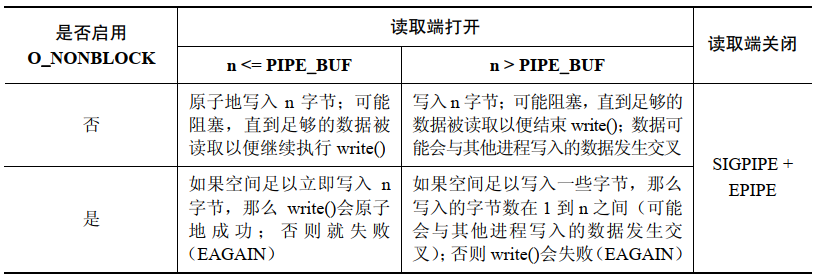
When the <span>O_NONBLOCK</span> flag and the <span>PIPE_BUF</span> limit work together, the effects of the <span>O_NONBLOCK</span> flag on writing data to pipes or FIFOs become complex.
The <span>write()</span> operation on a FIFO:
-
When data cannot be transmitted immediately, the
<span>O_NONBLOCK</span>flag will cause a<span>write()</span>on a pipe or FIFO to fail (the error is<span>EAGAIN</span>). This means that after writing<span>PIPE_BUF</span>bytes, if there is not enough space in the pipe or FIFO, then<span>write()</span>will fail because the kernel cannot complete this operation immediately and cannot perform a partial write, otherwise it would violate the atomicity requirement for write operations not exceeding<span>PIPE_BUF</span>bytes. -
When the amount of data written exceeds
<span>PIPE_BUF</span>bytes, that write operation does not need to be atomic. Therefore,<span>write()</span>will transfer as many bytes as possible (partial write) to fill the pipe or FIFO. In this case, the value returned from<span>write()</span>is the actual number of bytes transferred, and the caller must then retry to write the remaining bytes. However, if the pipe or FIFO is already full, causing even a single byte to be unable to be transmitted, then<span>write()</span>will fail and return<span>EAGAIN</span>error.
Copyright belongs to the original author or platform, for learning reference and academic research only. If there is any infringement, please contact for deletion. Thank you.The author has collected some embedded learning materials; reply with 【1024】 in the public account to find the download link!
Recommended good articles, click the blue text to jump
☞ Collection | Comprehensive Guide to Linux Application Programming
☞ Collection | Learn Some Networking Knowledge
☞ Collection | Handwritten C Language
☞ Collection | Handwritten C++ Language
☞ Collection | Experience Sharing
☞ Collection | From Microcontrollers to Linux
☞ Collection | Electric Power Control Technology
☞ Collection | Essential Mathematics for Embedded Systems
☞ Collection | MCU Advanced Collection
☞ Collection | Embedded C Language Advanced Collection