Keil is a widely used tool in embedded development, and many tips are discovered gradually during use. Among them, I find several techniques to be extremely valuable. Today, I want to share a method for using automation scripts to compile and generate the desired files!
The main issues addressed are as follows:
1. After completing embedded software development, a release version is needed. If the software supports remote upgrades, the released version must package bootloader.hex and app.hex. How is this achieved?
2. The remote upgrade file (bin) needs to have a checksum added at the end of the entire file to verify its correctness. How is this implemented?
Have you ever performed these operations?
-
Open the merging tool, manually select two Hex files, and click merge…
-
Manually flash the bootloader and app into the chip, then use a tool to read the chip’s flash content and save it as a file…
-
Open a binary tool to calculate the CRC checksum, and then add it to the end of the Bin file?
These methods are feasible, as I have done them all ^V^. However, they are a bit cumbersome, especially when performing repetitive tasks. Don’t you find it annoying? In today’s increasingly intelligent society, as embedded engineers, we shouldn’t be doing such repetitive mechanical work. Automating these tasks to save a lot of time is much more appealing!
Today, I will share a Keil automation script technique that I have been using, which addresses the above pain points: automatically merging files after compilation + automatically adding CRC checks, truly achieving “compile and release”.
1. How to achieve this
It only requires a simple two-step configuration for a one-time setup:
1. Open Keil
Click on the magic wand → Options for Target → User → After Build/Rebuild
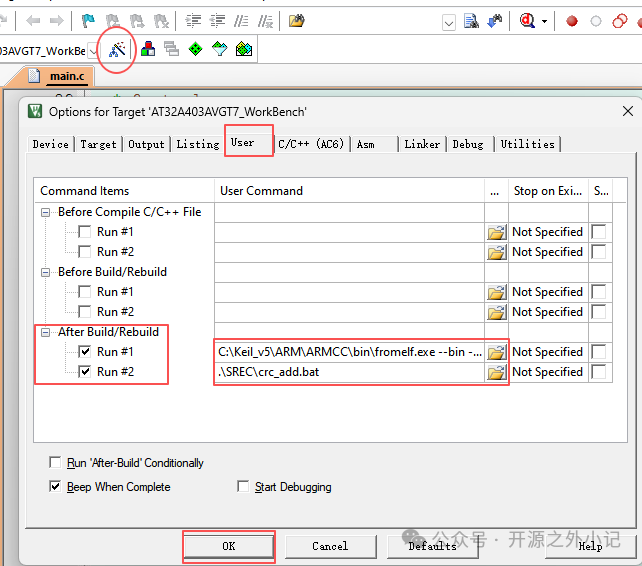
2. Check Run #1 and Run #2, and fill in the following commands in the respective boxes:
-
Run#1 (to generate the original bin file):
C:\Keil_v5\ARM\ARMCC\bin\fromelf.exe --bin -o .\SREC\original_app .\output\app.axfThis command uses Keil’s built-in fromelf.exe tool to generate the bin file!
Note: The fromelf.exe file is located in your Keil installation directory, and the location may vary.
-
Run#2 (to execute the packaging and CRC addition script):
.\SREC\crc_add.bat What does this script do? Below is a detailed introduction.
2. What does crc_add.bat do?
This batch script primarily does two things:
① Merges the bootloader and app
It uses the mergeHEX tool to combine bootloader.hex and app.hex into a complete boot-app.hex file.
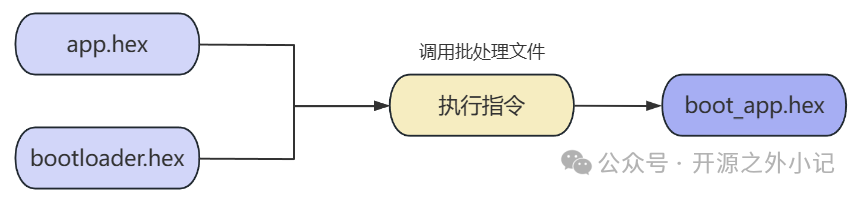
② Adds a CRC checksum to the generated bin file
It uses the crc_gen tool to calculate the CRC32 of the merged file and automatically appends it to the end of the file.

The specific commands in crc_add.bat are as follows:
@echo off
ECHO Add CRC32 At the end of the document
ECHO -------------------------------------
cd .\SREC
SET SREC_PATH=.
for /f %%i in ('dir /b .\original_app') do (set indexdx=%%~zi)
ECHO %indexdx%
ECHO %SREC_PATH%\srec_cat.exe original_app -Binary -crop 0 %indexdx% -crc32-b-e %indexdx% -o app.bin -Binary
ECHO %SREC_PATH%\mergeHEX.exe .\Bootloader.hex ..\output\app.hex .\boot-app.hex
%SREC_PATH%\srec_cat.exe original_app -Binary -crop 0 %indexdx% -crc32-l-e %indexdx% -o .\app.bin -Binary
%SREC_PATH%\mergeHEX.exe .\Bootloader.hex ..\output\app.hex .\boot-app.hex
3. SREC File Structure Illustration:
All tools required by crc_add.bat are placed in the SREC folder, and the generated files are also located in that folder:
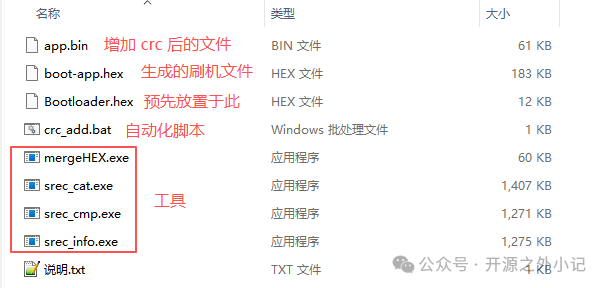
It is important to note: You need to copy your bootloader.hex file to the SREC folder.
4. Final Results
Each time you click compile, Keil will automatically execute the subsequent actions, ultimately generating:
app.bin: the pure app binary file for remote upgrades
boot-app.hex: the flashing file that has merged the bootloader and includes the CRC checksum
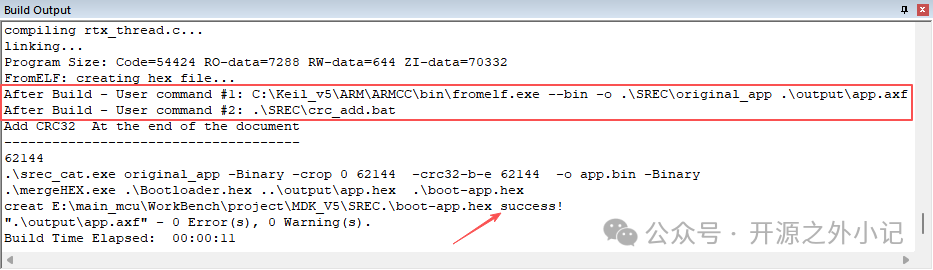
Truly achieving “compile and release”, eliminating all manual operations. This liberates your hands, allowing you to spend time on truly valuable activities—like slacking off, haha!
The scripts and tools used in this article (crc_add.bat, mergeHEX.exe, etc.) have been packaged. If you need them, please reply with 【Keil Automation】 in the public account backend!
If you find this useful, feel free to like, bookmark, and share, as this will motivate me to keep sharing!