Hello, everyone! In the previous chapters, we learned about the Python Programming Practical Series. Let’s write more and get familiar with it; welcome to check out the new practical tools series.
1. Let’s get straight to the code
"""Hot Series Search Tool"""
import requests
import re
import time
from enum import Enum

class SearchType(Enum):
    """Search Type Enumeration"""
    COMPREHENSIVE = ("Comprehensive Ranking", 'https://list.iqiyi.com/www/1/-------------24-1-1-iqiyi--.html')
    HOT = ("Hot Ranking", 'https://list.iqiyi.com/www/1/-------------11-1-1-iqiyi--.html')
    PRAISE = ("Praise Ranking", 'https://list.iqiyi.com/www/1/-------------8-1-1-iqiyi--.html')
    NEW = ("New Releases", 'https://list.iqiyi.com/www/1/-------------4-1-1-iqiyi--.html')

class IQiyiMovieSearcher:
    def __init__(self):
        self.session = requests.Session()
        self.headers = {
            'User-Agent': 'Mozilla/5.0 (Windows NT 10.0; Win64; x64) AppleWebKit/537.36'
        }

    def display_menu(self):
        """Display Main Menu"""
        print("\nSelect the ranking to search:")
        print("1. Comprehensive Ranking")
        print("2. Hot Ranking")
        print("3. Praise Ranking")
        print("4. New Releases")
        print("5. All Rankings")
        print("0. Exit Program")

    def get_user_choice(self):
        """Get User Choice"""
        while True:
            try:
                choice = input("\nPlease enter the option number (0-5): ").strip()
                if choice == '':
                    continue
                choice = int(choice)
                if 0 <= choice <= 5:
                    return choice
                else:
                    print("Please enter a number between 0-5")
            except ValueError:
                print("Please enter a valid number")

    def get_page(self, url):
        """Get Page Content"""
        try:
            print("Fetching data...", end='', flush=True)
            response = self.session.get(url, headers=self.headers, timeout=10)
            response.raise_for_status()
            print("Done")
            return response.text
        except Exception as e:
            print("Failed")
            print(f"Network request failed: {e}")
            return None

    def parse_page(self, html):
        """Parse Page Content"""
        if not html:
            return []
        # Match each li tag and its content
        pattern = re.compile(
            r'<li class="qy-mod-li".*?'
            r'<span class="text-score">(.*?)</span>.*?'
            r'<a.*?title="(.*?)".*?<span>(.*?)</span>.*?'
            r'<p class="sub">(.*?)</p>.*?'
            r'</li>',
            re.S
        )
        results = []
        items = re.findall(pattern, html)
        for item in items:
            # Since there are multiple actors, take the main category first, then extract each a tag's title
            actors = re.findall(r'title="(.*?)"', item[3])
            results.append({
                'name': item[1],
                'actor': ', '.join(actors),
                'score': item[0]
            })
        return results

    def display_results(self, results, search_name):
        """Display Search Results"""
        if not results:
            print("No related film and television information found")
            return
        print(f"\nSearch results for 【{search_name}】")
        print("-" * 80)
        print(f"{'Film Name':<10} {'Actor':<10} {'Score':<6}")
        print("-" * 80)
        for item in results:
            # Here the print results can be beautified later
            print(item)
        print(f"Found a total of {len(results)} film and television works")

    def search_single(self, search_type):
        """Search Single Ranking"""
        search_name, url = search_type.value
        print(f"\nSearching 【{search_name}】...")
        html = self.get_page(url)
        if not html:
            return
        results = self.parse_page(html)
        self.display_results(results, search_name)
        input("\nPress Enter to continue...")

    def search_all(self):
        """Search All Rankings"""
        print("\nSearching all rankings...")
        for search_type in SearchType:
            search_name, url = search_type.value
            print(f"\nProcessing: {search_name}")
            html = self.get_page(url)
            if html:
                results = self.parse_page(html)
                self.display_results(results, search_name)
            time.sleep(1)
        print("\nAll rankings search completed")

    def run(self):
        """Run Main Program"""
        print("Hot Series Search Tool")
        while True:
            self.display_menu()
            choice = self.get_user_choice()
            if choice == 0:
                print("Goodbye!")
                break
            elif choice == 1:
                self.search_single(SearchType.COMPREHENSIVE)
            elif choice == 2:
                self.search_single(SearchType.HOT)
            elif choice == 3:
                self.search_single(SearchType.PRAISE)
            elif choice == 4:
                self.search_single(SearchType.NEW)
            elif choice == 5:
                self.search_all()


def main():
    """Main Function"""
    try:
        searcher = IQiyiMovieSearcher()
        searcher.run()
    except KeyboardInterrupt:
        print("\nProgram interrupted by user")
    except Exception as e:
        print(f"Program error: {e}")

if __name__ == "__main__":
    main()
        # Install PyInstaller
    # pip install pyinstaller
    # Package into a single EXE file
    # pyinstaller --onefile --console --name iqiyi_searcher iqiyi_searcher.py
    # Run after packaging
    # dist/iqiyi_searcher.exe
2. Function Overview
Data Acquisition
-
Use the
<span>requests</span>library to send HTTP requests to obtain the HTML content of the iQIYI ranking page -
Set reasonable request headers to simulate browser access, avoiding being blocked by anti-scraping mechanisms
-
Implement timeout handling and exception capture to ensure program stability
Data Parsing Module
-
Use regular expression matching technology to extract key information from HTML
-
Through a multi-level matching strategy: first locate the film and television project container (
<span><li class="qy-mod-li"></span>), then extract specific data -
Extract the following:
-
Film and television ratings: match
<span><span class="text-score"></span>tag -
Film and television name: match a tag
<span>title</span>attribute -
Actor information: match
<span><a title=""></span>tag title content and join them into a string with commas
PS: The regular expression here is not rigorous enough; later, exception capture can be added, and how to return when there is no data should be judged. As for index extraction, it should also be based on the premise of having data. For beginners, it is recommended to use native functions; those popular third-party libraries are built on top of the native ones after familiarizing themselves with them.
Finally, console interaction input3. Packaging EXE Single File
# Install PyInstaller
pip install pyinstaller
# Package into a single EXE file
pyinstaller --onefile --console --name iqiyi_searcher iqiyi_searcher.py
# Run after packaging
dist/iqiyi_searcher.exe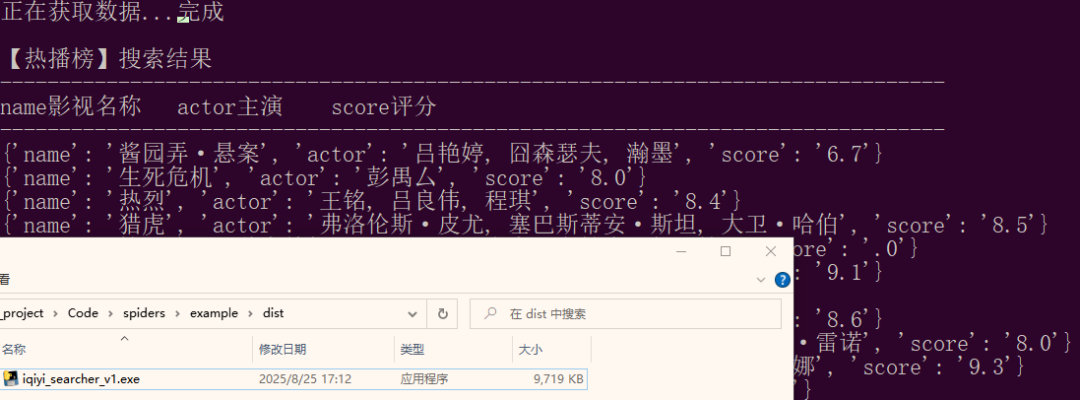 Package it yourself to prevent exe downloads, verify md5, etc.Finally, I declare that this is only for learning purposes.Why do I say this? Because some may cause trouble; in fact, if you understand a little basic browser knowledge, you can find it by opening F12. It cannot be prevented; even JS encryption can be solved with code. Currently, 80% of internet companies have crawlers to capture competitive companies or important information.Just posted this type of article, still unclear how the public account treats this, so this article is just a test…Conclusion I have been thinking about what to write for the first article, let’s take it step by step. As the old saying goes, if you really want to learn, you have to get your hands on the code; just looking is useless, find something you are interested in. You can try more, gradually expand the functionality according to the code.
Thank you for browsing, following, liking, sharing, and saving
😘😛😜🤪