Introduction
Typically, after generating Vivado IP, we submit the .xci files to the version control system. However, once we change the FPGA device or upgrade the Vivado version, these IPs often cannot be directly re-added, leading to significant challenges in project compatibility and migration. If we could automatically generate IPs solely through scripts, it would be much more convenient. Fortunately, Vivado also provides this capability, allowing us to achieve cross-version and cross-device migration of projects in a more elegant manner.
Instructions
Get IP Names
get_ipswrite_ip_tcl
We need to use the command <span>write_ip_tcl</span>.
Description
Writes a Tcl script to disk that can be used to recreate the specified IP.
Syntax
write_ip_tcl [-force] [-no_ip_version] [-ip_name <arg>] [-show_defaults]
             [-multiple_files] [-quiet] [-verbose] [<objects>] [<tcl_filename>...]
Returns
The generated IP TCL file.
Parameter Description
| Parameter | Explanation |
|---|---|
| -force | Overwrite existing files. |
| -no_ip_version | Do not include the IP version information in the <span>create_ip</span> command (no version written in VLNV).Note: If there are significant differences in IP versions, it may lead to reconstruction issues. |
| -ip_name <arg> | Set the name of the IP.Note: Cannot be used when exporting multiple IPs. |
| -show_defaults | Add comments in the generated Tcl file to show the default values of all parameters. |
| -multiple_files | If multiple IPs are provided, generate a .tcl file for each IP. |
| -quiet | Ignore command errors. |
| -verbose | Pause message limits during execution (output more logs). |
| <objects> | IP instances to be exported. Value: IP objects obtained using <span>get_ips <instance_name></span>. |
| <tcl_filename>… | Path for the exported Tcl file. If the specified path is a directory and multiple IPs are provided, Vivado will generate a file for each IP in that directory. Default: Current directory <span>./</span> |
Generate IP TCL
Single IP
write_ip_tcl -force [get_ips gt_sata] gt_sata.tclMultiple IPs (automatically generate multiple files)
write_ip_tcl -multiple_files -force [get_ips *] ip_tcl_out/If <span>ip_tcl_out/</span> does not exist, you need to:
file mkdir ip_tcl_out
write_ip_tcl -multiple_files -force [get_ips *] ip_tcl_out/
If you want better compatibility
write_ip_tcl -multiple_files -no_ip_version -force [get_ips *] ip_tcl_out/Processing TCL
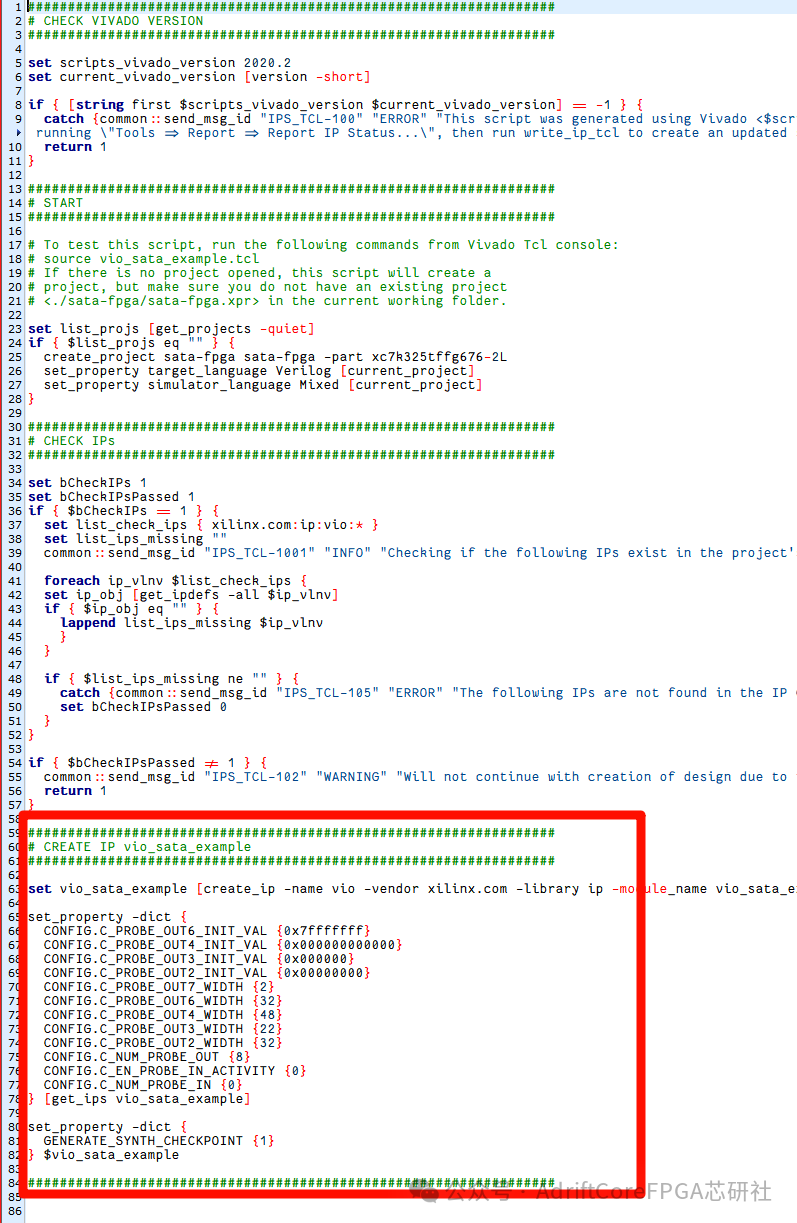
The Tcl files generated by Vivado are usually very lengthy, but in practical use, we only need the create_ip configuration section. Extracting this part and saving it separately not only makes it more concise but also allows for stable script-based reconstruction of the corresponding IP across most Vivado versions.
Conclusion
In project collaboration and long-term maintenance, the portability of Vivado IP is often the most troublesome part: the same <span>.xci</span> file may not be re-importable under different devices and different Vivado versions, leading to project non-reproducibility, version rollback issues, and migration difficulties. By generating IPs through scripts, we not only address these pain points but also provide true controllability and reconfigurability for the project.
With the help of Vivado’s <span>write_ip_tcl</span>, we can elegantly solidify all IP configurations into Tcl scripts, achieving:
- • Cross-device reconstruction
- • Cross-version migration
- • Automated project management
- • Configurable auditing and tracking
Moreover, in most scenarios, we only need to retain the core <span>create_ip</span> section to achieve a more lightweight and general versioning method for IP scripts.
I hope this article provides you with clearer and more feasible ideas for project management, environment migration, and automated builds. If you are building a long-term maintainable FPGA project, consider generating a Tcl for your IP immediately, making “reconstruction” a reality.
Previous Reviews
EDA Toolchain
PCIE Series
SATA Protocol Series
Learn a bit every day about comprehensive SystemVerilog syntax (collection)
Other Technical Columns
Appendix A
Welcome to join the FPGA/IC exclusive AI knowledge base, where you can access more knowledge without downloading an app,just use the WeChat mini-program for one-click access.
IMA Knowledge Base
Appendix B
Welcome to join the FPGA and digital IC learning exchange group! Here, you can ask questions, share your learning experiences, or participate in interesting discussions.
Link: FPGA Chip Research Society