Follow and star to learn new Python skills every day
Due to changes in the public account’s push rules, please click “View” and add “Star” to get exciting technical shares at the first time
Source from the internet, please delete if infringing
The Jupyter MCP server is an extension component of the Jupyter environment based on the Model Context Protocol (MCP), enabling seamless integration of large language models with real-time coding sessions. This server allows AI models to securely access and manipulate Jupyter’s core components, including kernel management, file systems, and terminal environments, through standardized protocol interfaces. This article will delve into the technical architecture, core functionalities, and deployment configuration methods of the Jupyter MCP server.

The Model Context Protocol (MCP) server is a specially designed middleware architecture aimed at establishing a standardized communication mechanism between AI assistants and external computing environments. The core value of the MCP server lies in providing state awareness capabilities for AI models, enabling them to obtain real-time execution context information, including variable states, code execution history, dataset contents, and computation results.
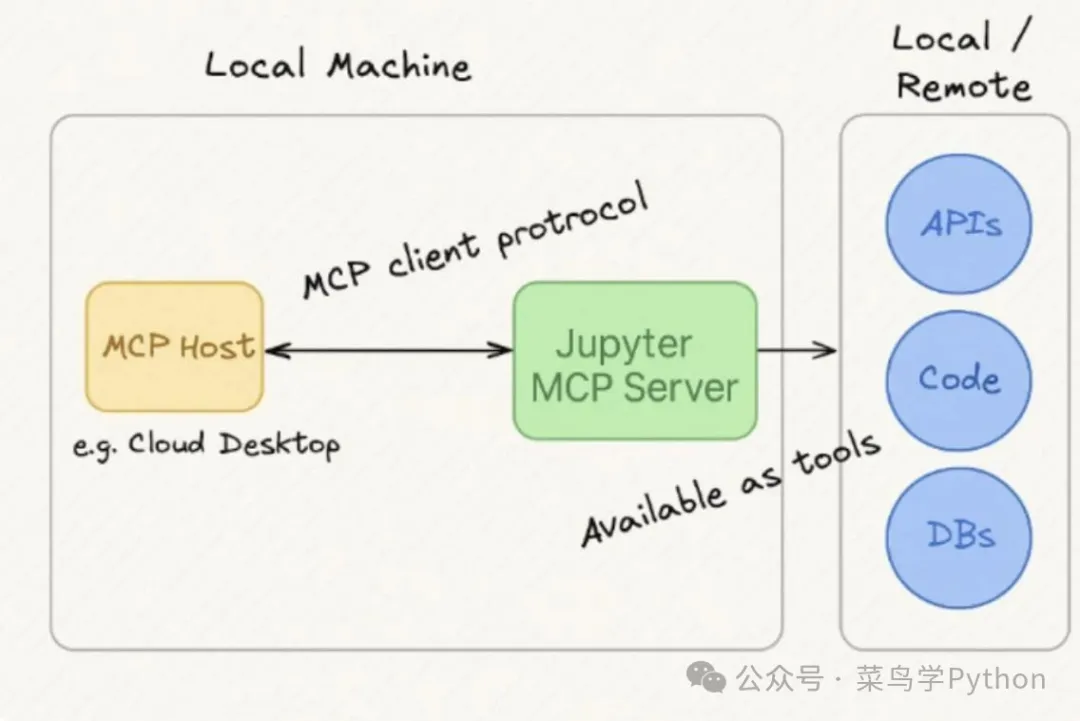
Traditional AI models face significant limitations when handling programming tasks, primarily due to their lack of awareness of the current execution environment, making it impossible to obtain real-time variable states and context information. This isolation leads AI models to often rely on code snippets and data manually provided by users, reducing interaction efficiency and increasing the probability of errors. The MCP server establishes standardized protocol interfaces, allowing AI models to reason and make decisions in real running environments, significantly enhancing their practicality, accuracy, and work efficiency.
Technical Architecture of the Jupyter MCP Server
The Jupyter MCP server, as a specific implementation of the Model Context Protocol within the Jupyter ecosystem, serves as a technical bridge between large language models and users’ Jupyter working environments. The design goal of this server is to eliminate the workflow limitations of manually copying and pasting code and data in traditional modes. By implementing the MCP protocol specifications, the Jupyter MCP server provides AI models with a secure channel to access various components of the Jupyter ecosystem, achieving truly integrated and context-aware intelligent programming assistance.
Core Functional Features Analysis
Based on the Model Context Protocol, the Jupyter MCP server provides structured interfaces for external applications to interact with Jupyter’s core components. The functional architecture of this server mainly includes the following key modules:
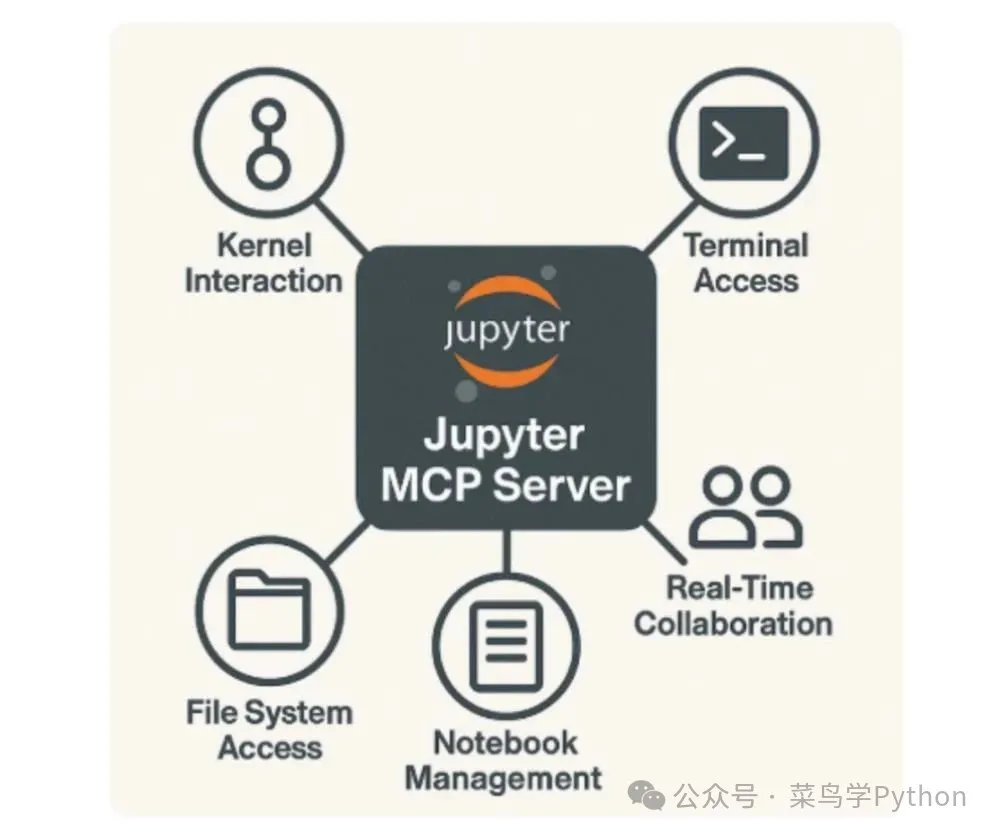
The kernel interaction module supports executing code in active Jupyter kernel environments, obtaining variable state information, and managing the kernel lifecycle. The file system access module provides controlled access to the user’s workspace through Jupyter’s content manager, supporting reading, writing, and managing files and directories. The terminal access module allows interaction with Jupyter’s terminal sessions, enabling shell command execution, package installation, and system task automation.
Additionally, this server supports real-time collaboration features, allowing multiple users or AI agents to simultaneously view and edit notebook files. The notebook management functionality ensures efficient file management, including saving and retrieving notebook information while ensuring data integrity and accessibility.
Detailed Functional Module Analysis
Kernel Interaction Mechanism
The kernel interaction module is one of the core components of the Jupyter MCP server, enabling external applications to execute code operations in the user’s active kernel environment. This module not only supports code execution but also checks kernel status, retrieves execution results, and manages the entire kernel lifecycle.
In terms of technical implementation, the MCP client sends requests to the server via the MCP API, explicitly specifying the target kernel and the type of operation to be executed. Upon receiving the request, the Jupyter MCP server communicates with Jupyter’s kernel manager to complete the corresponding operation processing.
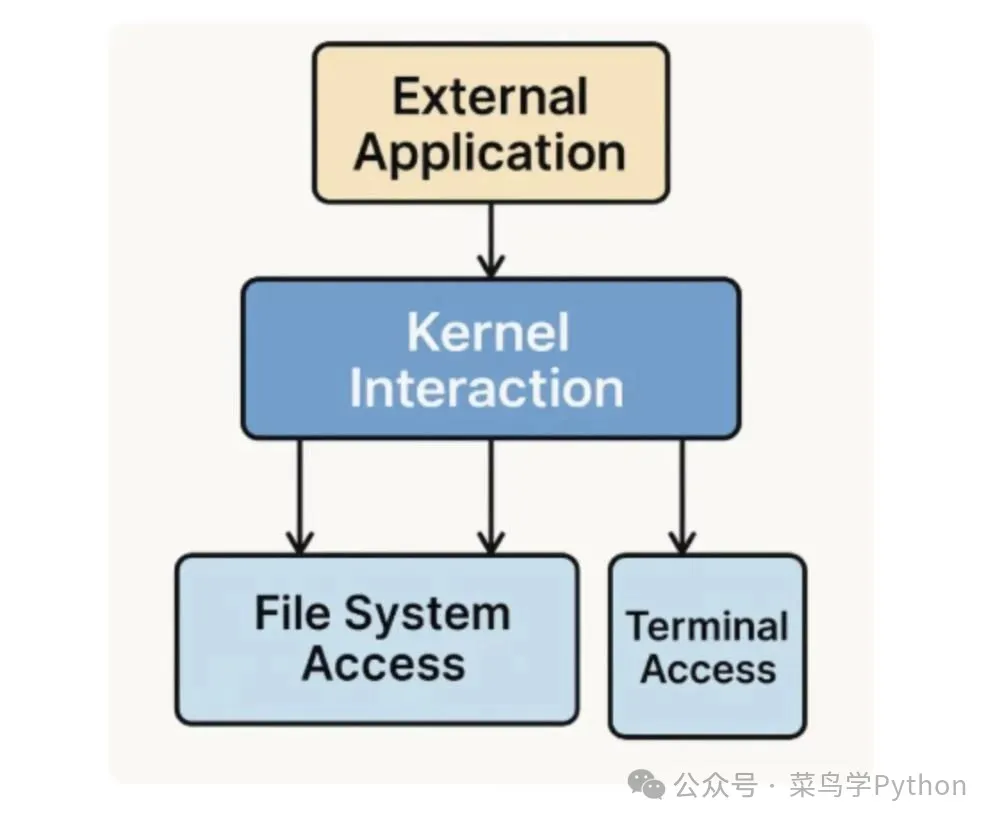
The main operations supported by this module include executing code cells, retrieving variable values, checking kernel status, and interrupting or restarting the kernel. These functionalities provide AI models with complete control over the code execution environment.
File System Access Control
The file system access module provides a secure access mechanism for external applications to the user’s workspace. This module is implemented based on Jupyter’s content manager and strictly adheres to the security policies of the MCP protocol, ensuring the safety and controllability of file operations.
When the MCP client needs to perform file operations, the system verifies and processes the request based on the access rules set by Jupyter’s content manager and the security policies of the MCP. Supported operations include reading file contents, writing or modifying files, and creating or deleting files and folders.
Terminal Interaction Functionality
The terminal access module enables the Jupyter MCP server to establish interactive connections with Jupyter’s terminal sessions. This module is implemented based on Jupyter’s terminal manager, which handles requests and returns execution outputs when the MCP client sends commands to specific terminal sessions.
Supported operations include executing shell commands, installing packages, managing background processes, and automating various system tasks. This provides AI models with complete system-level operational capabilities.
Deployment and Integration Configuration
System Requirements
Before deploying the Jupyter MCP server, ensure that the system meets the basic technical requirements. The system needs to have Python 3.8 or higher installed, as this server relies on advanced features of modern Python. Additionally, Jupyter Server must be installed since the MCP server runs as an extension module of Jupyter Server. If Jupyter Server is not yet installed, it can be installed via pip:
pip install jupyter-server
Installation Configuration Process
The Jupyter MCP server offers two installation methods to meet different usage needs.
For general users, it is recommended to install the Jupyter MCP server directly from PyPI using pip:
pip install jupyter-mcp-server
For users who need to develop or customize, a development installation method can be adopted. First, clone the project repository:
 git clone https://github.com/datalayer/jupyter-mcp-server.git
 cd jupyter-mcp-server
Then install the package in editable mode, so modifications to the source code will take effect in real-time:
pip install -e .
If you need to run tests and contribute to the project, you can install the complete version with development dependencies:
pip install -e ".[dev]"
Extension Activation
Regardless of the installation method, after installation, the extension needs to be enabled for the Jupyter server. This operation will load the MCP server functionality and modify the Jupyter configuration:
jupyter server extension enable jupyter_mcp_server
After installation, you can verify the installation status with the following command:
jupyter server extension list
If you see the <span>jupyter_mcp_server</span> entry in the output list, it indicates that the extension has been successfully activated.
System Operation Mechanism
The Jupyter MCP server operates in a background service mode, without providing a standalone user interface, but is integrated into the running environment of JupyterLab or Jupyter Notebook. This server provides standard HTTP API interfaces for other tools and applications to call, including Claude Desktop, AI models, backend services, and various plugins.
When using clients like Claude Desktop, configuration settings need to be made in the corresponding configuration files. For Windows systems, the <span>claude_desktop_config.json</span> file needs to be modified. When the Jupyter notebook is running, the corresponding TOKEN value and NOTEBOOK_PATH information can be obtained from the terminal:
 {
  "mcpServers": {
    "jupyter": {
      "command": "docker",
      "args": [
        "run",
        "-i",
        "--rm",
        "-e",
        "SERVER_URL",
        "-e",
        "TOKEN",
        "-e",
        "NOTEBOOK_PATH",
        "datalayer/jupyter-mcp-server:latest"
      ],
      "env": {
        "SERVER_URL": "http://host.docker.internal:8888",
        "TOKEN": "MY_TOKEN",
        "NOTEBOOK_PATH": "notebook.ipynb"
      }
    }
  }
 }
For Linux systems, the configuration method is as follows:
 CLAUDE_CONFIG=${HOME}/.config/Claude/claude_desktop_config.json
cat <<EOF > $CLAUDE_CONFIG
{
"mcpServers": {
    "jupyter": {
      "command": "docker",
      "args": [
        "run",
        "-i",
        "--rm",
        "-e",
        "SERVER_URL",
        "-e",
        "TOKEN",
        "-e",
        "NOTEBOOK_PATH",
        "--network=host",
        "datalayer/jupyter-mcp-server:latest"
      ],
      "env": {
        "SERVER_URL": "http://localhost:8888",
        "TOKEN": "MY_TOKEN",
        "NOTEBOOK_PATH": "notebook.ipynb"
      }
    }
  }
}
EOF
 cat $CLAUDE_CONFIG
API Interface Mechanism
When external applications need to interact with Jupyter sessions, they send corresponding requests to the MCP API. The MCP server is responsible for processing these requests, including permission verification, communication with the corresponding Jupyter components (such as kernels, file systems, or terminals), and returning response data.
The API endpoints provided by the MCP extension are located at <span>/mcp/v1</span> path, which is an extension path on the base URL of the Jupyter server. For example, if the Jupyter server is running locally at <span>http://localhost:8888/</span>, then the access address for the MCP API is <span>http://localhost:8888/mcp/v1</span>. External tools will communicate with the Jupyter environment through this address.
The Jupyter MCP server sends corresponding HTTP requests based on different task types, including GET, POST, PUT, or DELETE methods. Each request is sent to a specific sub-path under <span>/mcp/v1</span>. The format and data structure specifications of these requests constitute the technical standards of the Model Context Protocol (MCP).
Security and Context Management
The MCP protocol not only provides access capabilities but also ensures the security and controllability of access. This protocol implements strict authorization and scope limitation mechanisms, strictly restricting access permissions to clearly authorized ranges. Users can view and control which applications can access their session environments and the specific operations those applications can perform. This design effectively prevents unauthorized access, protects user data security, and ensures the safe operation of the entire Jupyter environment.
Conclusion
The Jupyter MCP server, as an innovative technical solution, brings intelligent AI interaction capabilities to the Jupyter environment. By implementing the Model Context Protocol (MCP), this server achieves deep integration of AI models with the Jupyter environment in a secure and standardized manner. Currently, this server is ready for practical use and has good usability. With the continuous development of technology and the increase in user adoption rates, we have reason to expect more intelligent, context-aware tools to emerge, which can not only provide programming assistance but also truly understand and adapt to users’ workflows, thereby establishing a closer technical bridge between powerful AI models and dynamic computing environments.

▲ Click to follow - Get free resources
Recommended Reading
Python Web Framework Based on Rust Runtime, Three Times Faster than FastAPI
Best Python Mirror Source Switching Tool: PyPI Plugin
Python Collection of QQ Music Hot Song List Data
Share 7 Databases Developed with Python


Click to read the original text