


1. Founding Time and Author
-
Founding Time:The SQLite project began in May 2000, with the first version (1.0) released in August 2000
-
Core Developer:
-
D. Richard Hipp: Project founder and lead developer
-
Open Source Community Contributions: Maintained by developers worldwide
-
Project Positioning:A self-contained, serverless, zero-configuration, transactional SQL database engine
2. Official Resources
-
Official Website:https://www.sqlite.org/index.html
-
Download Link:https://www.sqlite.org/download.html
-
Documentation Link:https://www.sqlite.org/docs.html
-
GitHub Mirror:https://github.com/sqlite/sqlite
3. Core Features
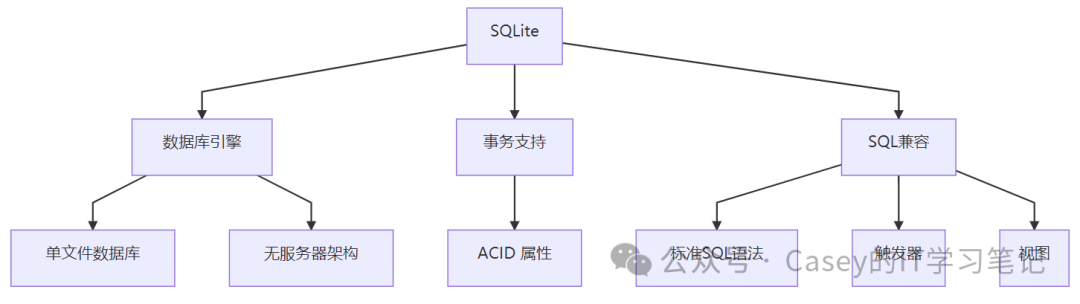
4. Application Scenarios
1. Database for Embedded Devices
import sqlite3

# Create an in-memory database
conn = sqlite3.connect(':memory:')
cursor = conn.cursor()

# Create table
cursor.execute('''CREATE TABLE devices (
                  id INTEGER PRIMARY KEY,
                  name TEXT NOT NULL,
                  status INTEGER)''')

# Insert data
cursor.execute("INSERT INTO devices (name, status) VALUES ('Device1', 1)")
conn.commit()

# Query data
cursor.execute("SELECT * FROM devices")
print(cursor.fetchall())
2. Storage for Desktop Applications
import sqlite3
import os

# Create or connect to a local database file
db_path = os.path.expanduser('~/app_data.db')
conn = sqlite3.connect(db_path)
cursor = conn.cursor()

# Create configuration table
cursor.execute('''CREATE TABLE IF NOT EXISTS settings (
                  key TEXT PRIMARY KEY,
                  value TEXT)''')

# Save configuration
cursor.execute("REPLACE INTO settings (key, value) VALUES ('theme', 'dark')")
conn.commit()

# Read configuration
cursor.execute("SELECT value FROM settings WHERE key='theme'")
theme = cursor.fetchone()[0]
print(f"Current theme: {theme}")
3. Local Storage for Mobile Applications
import sqlite3
from datetime import datetime

# Create mobile application database
conn = sqlite3.connect('mobile_app.db')
cursor = conn.cursor()

# Create user table
cursor.execute('''CREATE TABLE IF NOT EXISTS users (
                  id INTEGER PRIMARY KEY AUTOINCREMENT,
                  username TEXT UNIQUE,
                  created_at TIMESTAMP DEFAULT CURRENT_TIMESTAMP)''')

# Insert user
cursor.execute("INSERT INTO users (username) VALUES (?)", ('user123',))
conn.commit()

# Query user
cursor.execute("SELECT * FROM users")
for row in cursor.fetchall():
    print(f"ID: {row[0]}, Username: {row[1]}, Created At: {row[2]}")
4. Web Site Caching
import sqlite3
import requests

# Create cache database
conn = sqlite3.connect('cache.db')
cursor = conn.cursor()

# Create cache table
cursor.execute('''CREATE TABLE IF NOT EXISTS http_cache (
                  url TEXT PRIMARY KEY,
                  response TEXT,
                  timestamp TIMESTAMP)''')

def get_cached_response(url):
    cursor.execute("SELECT response FROM http_cache WHERE url=?", (url,))
    row = cursor.fetchone()
    return row[0] if row else None

def cache_response(url, response):
    cursor.execute("REPLACE INTO http_cache (url, response, timestamp) VALUES (?, ?, CURRENT_TIMESTAMP)",
                   (url, response))
    conn.commit()

# Example usage
url = 'https://api.example.com/data'
cached = get_cached_response(url)
if cached:
    print("Using cached data")
    data = cached
else:
    print("Fetching new data")
    response = requests.get(url)
    data = response.text
    cache_response(url, data)
5. Underlying Logic and Technical Principles
Core Architecture

Key Technologies
-
B-tree Storage:
-
Table data is stored in a B-tree structure
-
Indexes are implemented using B+ trees
-
Supports efficient range queries
Transaction Processing:
-
ACID (Atomicity, Consistency, Isolation, Durability) support
-
Uses rollback logs to achieve atomic commits
-
Locks during write operations (no locks for read operations)
Serverless Architecture:
-
Directly reads and writes to disk files
-
No intermediate server processes
-
Applications link directly to the SQLite library
Zero Configuration:
-
No installation or management required
-
Database files are created automatically
-
Cross-platform compatibility
6. Installation and Configuration
Python Integration
# SQLite3 is included in the Python standard library
# No additional installation required
import sqlite3
Standalone Installation
-
Windows:
-
Download precompiled binaries:https://www.sqlite.org/download.html
-
Unzip and add sqlite3.exe to PATH
Linux:
sudo apt update
sudo apt install sqlite3 libsqlite3-devmacOS:
brew install sqliteEnvironment Requirements
| Component | Requirements |
|---|---|
| Operating System | Cross-platform support |
| Memory | Minimum 1MB RAM |
| Storage | Disk space greater than database file |
| Dependencies | No external dependencies |
7. Performance Metrics
| Operation Type | Performance Metrics | Description |
|---|---|---|
| Insert Speed | 50,000 rows/second | Batch insert using transactions |
| Query Speed | 100,000 rows/second | Simple queries |
| Concurrency Capability | Multiple reads, single write | Supports multiple read connections |
| Database Size | Up to 140TB | Theoretical limit |
| Memory Usage | Hundreds of KB to several MB | Depends on database size |
Test Environment: SSD hard drive, Intel i7 processor
8. Advanced Feature Usage
1. Database Encryption
import sqlite3
from pysqlitecipher import sqlitewrapper

# Create an encrypted database
db = sqlitewrapper.SqliteCipher("encrypted.db", password="mysecret")
db.createTable("secrets", ["name", "value"], makeSecure=True, commit=True)

# Insert encrypted data
db.insertIntoTable("secrets", ["name", "value"], ["API_KEY", "12345-67890"], commit=True)

# Query data
result = db.getDataFromTable("secrets")
for row in result:
    print(f"Name: {row[0]}, Value: {row[1]}")
2. Full-Text Search
import sqlite3

# Create a database that supports full-text search
conn = sqlite3.connect('search.db')
cursor = conn.cursor()

# Create a virtual table
cursor.execute("CREATE VIRTUAL TABLE docs USING fts5(title, content)")

# Insert documents
cursor.execute("INSERT INTO docs (title, content) VALUES (?, ?)",
               ('Document 1', 'SQLite full-text search feature example'))
cursor.execute("INSERT INTO docs (title, content) VALUES (?, ?)",
               ('Document 2', 'Another example about SQLite'))

# Execute full-text search
cursor.execute("SELECT * FROM docs WHERE docs MATCH 'SQLite'")
for row in cursor.fetchall():
    print(f"Title: {row[0]}, Content: {row[1]}")
3. Backup and Recovery
import sqlite3

def backup_db(source, dest):
    """Backup SQLite database"""
    src_conn = sqlite3.connect(source)
    dest_conn = sqlite3.connect(dest)

    with dest_conn:
        src_conn.backup(dest_conn)

    src_conn.close()
    dest_conn.close()

# Example usage
backup_db('original.db', 'backup.db')
print("Database backup completed")
4. JSON Support
import sqlite3
import json

# Create database
conn = sqlite3.connect('json_data.db')
conn.execute("CREATE TABLE IF NOT EXISTS data (id INTEGER PRIMARY KEY, json_data TEXT)")

# Insert JSON data
data = {
    "name": "John",
    "age": 30,
    "address": {
        "street": "123 Main St",
        "city": "Anytown"
    }
}
conn.execute("INSERT INTO data (json_data) VALUES (?)", (json.dumps(data),))
conn.commit()

# Query and parse JSON
cursor = conn.cursor()
cursor.execute("SELECT json_extract(json_data, '$.name') AS name FROM data")
name = cursor.fetchone()[0]
print(f"Name: {name}")

# Use JSON1 extension features
cursor.execute("SELECT json_extract(json_data, '$.address.city') AS city FROM data")
city = cursor.fetchone()[0]
print(f"City: {city}")
9. Comparison with Similar Databases
| Feature | SQLite | MySQL | PostgreSQL | Microsoft Access |
|---|---|---|---|---|
| Architecture | Embedded | Client-Server | Client-Server | File Database |
| Installation | Zero Installation | Requires Installation | Requires Installation | Requires Installation |
| Configuration | Zero Configuration | Complex | Complex | Moderate |
| Performance | High | High | High | Moderate |
| Concurrency | Multiple Reads, Single Write | High Concurrency | High Concurrency | Low Concurrency |
| Storage | Single File | Multiple Files | Multiple Files | Single File |
| Applicable Scenarios | Embedded/Local | Web Applications | Complex Applications | Desktop Applications |
10. Enterprise Application Cases
-
Apple macOS & iOS
-
System configuration storage
-
Application data storage
-
Core Data framework backend
Google Chrome
-
Browser history
-
Cookie storage
-
Extension data
Adobe Systems
-
Photoshop Lightroom database
-
File metadata storage
Skype
-
Chat history storage
-
Contact information
Airbus Aircraft
-
Flight data recording
-
System configuration storage
Conclusion
SQLite is the most widely deployed database engine globally, with core values in:
-
Lightweight and Efficient: Small codebase, fast execution
-
Zero Configuration: No installation or management required
-
Cross-Platform: Supports all major operating systems
-
High Reliability: Transaction support with ACID properties
Technical Highlights:
-
Single disk file stores the entire database
-
Supports standard SQL syntax
-
Complete ACID transaction processing
-
Rich extension features (JSON, full-text search, etc.)
Applicable Scenarios:
-
Embedded devices and IoT applications
-
Desktop and mobile applications
-
Databases for small to medium websites
-
Application caching systems
-
Data analysis prototype development
Installation and Usage:
# Built-in support in Python
import sqlite3
Learning Resources:
-
Official Documentation:https://www.sqlite.org/docs.html
-
Online Tutorials:SQLite Tutorial
-
Interactive Learning:SQLite Online Practice
-
Recommended Book: “The Definitive Guide to SQLite”
As of 2023, SQLite is installed on over 1 billion devices daily, making it the most widely used database engine globally. The project follows the Public Domain license, allowing free use for any purpose.