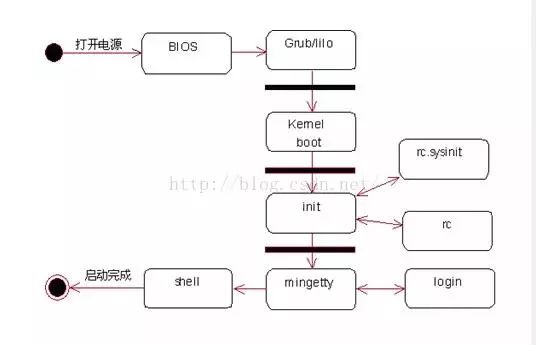
Kernel Boot Stage
1. bootsect stage
2. setup stage
3. head.S stage
4. main.c stage
Init Stage 1. Determine User Login Mode
In “/etc/inittab”, the following login modes are listed: single-user maintenance mode, multi-user without network mode, text interface multi-user mode, and X-Windows multi-user mode. The single-user maintenance mode (runlevel 1) is similar to “Safe Mode” in Windows, where the system does not load complex modes, allowing the system to boot normally. The most common modes are 3 or 5, with 5 being the default for this system, which is the X-Windows multi-user mode.
#Default runlevel. The runlevels used by RHS are:
# 0 – halt (Do NOT set initdefault to this)
# 1 – Single user mode
# 2 – Multiuser, without NFS (The same as 3, if you do not have networking)
# 3 – Full multiuser mode (Text interface startup mode)
# 4 – unused
# 5 – X11 (Graphical interface startup mode)
# 6 – reboot (Do NOT set initdefault to this)
#
id:5:initdefault:
Init Stage 2. Execute Script /etc/rc.d/rc.sysinit
After determining the login mode, the Linux host information needs to be read into the Linux system, which is contained in the file “/etc/rc.d/rc.sysinit”. By examining this file, we can see that the default path, hostname, and network information recorded in “/etc/sysconfig/network” are determined here.
#System initialization.
si::sysinit:/etc/rc.d/rc.sysinit
init Stage 3. Start Kernel Modules and Runlevel Scripts
This stage mainly reads the module loading configuration file (/etc/modules.conf) to confirm which modules need to be loaded. Next, based on different runlevels, the script “/etc/rc.d/rc” is executed with parameters (runlevel) to load different modules and start system services. The init process will wait for the return of the “/etc/rc.d/rc” script.
l0:0:wait:/etc/rc.d/rc 0
l1:1:wait:/etc/rc.d/rc 1
l2:2:wait:/etc/rc.d/rc 2
l3:3:wait:/etc/rc.d/rc 3
l4:4:wait:/etc/rc.d/rc 4
l5:5:wait:/etc/rc.d/rc 5
l6:6:wait:/etc/rc.d/rc 6
Init Stage 4. Enter User Login Interface
The system also needs to configure some handling for abnormal shutdowns. Finally, several virtual terminals (tty1~tty6) are opened using “/sbin/mingetty” for user login. If the runlevel is 5 (graphical interface startup), the xdm program is run to provide users with a graphical login method. If a virtual terminal is opened locally and no one logs in or there is no keystroke for too long, that terminal will exit. The “respawn” in the script tells the init process to reopen that terminal; otherwise, after a period, the terminal will disappear, making it impossible to switch using ALT+Fn.
Init Stage 5. #Trap CTRL-ALT-DELETE
ca::ctrlaltdel:/sbin/shutdown-t3 -r now
#When our UPS tells us power has failed, assume we have a few minutes
pf::powerfail:/sbin/shutdown-f -h +2 “Power Failure; System Shutting Down”
#If power was restored before the shutdown kicked in, cancel it.
pr:12345:powerokwait:/sbin/shutdown-c “Power Restored; Shutdown Cancelled”
#Run getty in standard runlevels
1:2345:respawn:/sbin/mingetty tty1
2:2345:respawn:/sbin/mingetty tty2
3:2345:respawn:/sbin/mingetty tty3
4:2345:respawn:/sbin/mingetty tty4
5:2345:respawn:/sbin/mingetty tty5
6:2345:respawn:/sbin/mingetty tty6
#Run xdm in runlevel 5
x:5:respawn:/etc/X11/prefdm-nodaemon
The program flow is as follows:

 1. Has the microcontroller fallen from grace? Or are you too narrow-minded?
2.Bookmark post | 10 Years of Bug Debugging Experience for Embedded Programmers!
3.Self-balancing scooter, try developing with a microcontroller system!
4.Embedded Learning Notes: Detailed Explanation of GPIO
5.Embedded Linux Plan Suitable for Beginners!
6.How NASA’s Top Programmers Code? There Are Actually Ten Principles

Disclaimer: This article is a network reprint, and the copyright belongs to the original author. If there are copyright issues, please contact us, and we will confirm copyright based on the materials you provide and pay for the article or delete the content.