Last Session Review: The previous lecture systematically organized the testing and assertion practices in C language, covering the selection of automated testing frameworks, best practices for assertions, and the processes, structures, and tools for implementing Test-Driven Development (TDD) in C projects, emphasizing the engineering strategies of “test-first, automation, mock isolation, and boundary exception coverage.”
1. Step-by-Step Explanation of Theme Principles and Details
C language open source projects are widely used in fields such as systems, embedded systems, networks, databases, and drivers. Mastering the ability to efficiently read and analyze C open source projects not only allows for quick absorption of others’ excellent experiences and architectural references but also helps improve one’s coding style, design capabilities, and debugging skills.
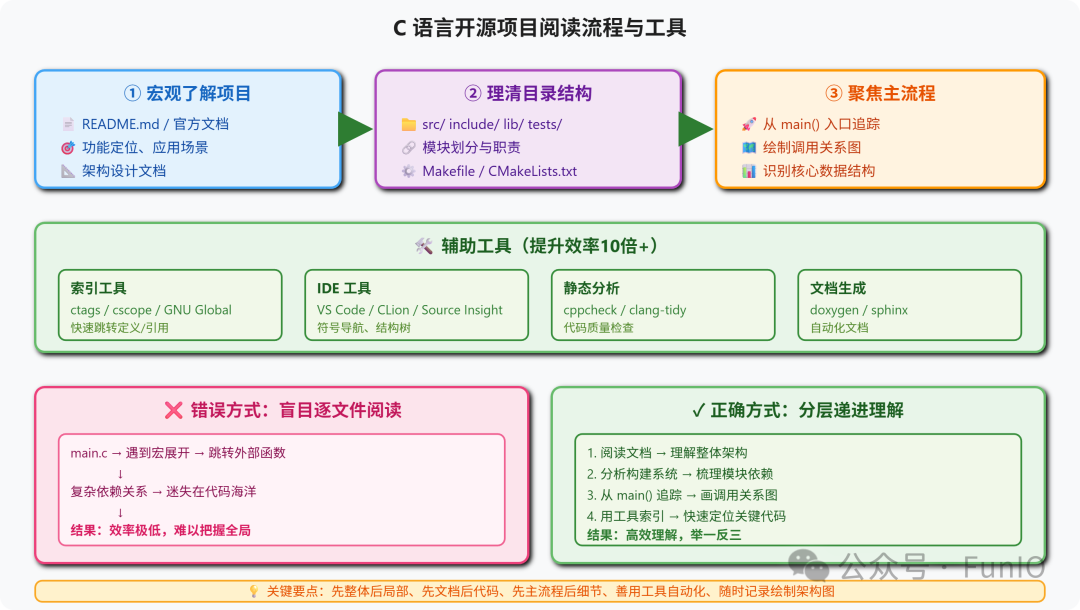
1.1 Basic Steps for Reading C Language Projects
- 1. Gain a Macro Understanding of the Project Background
- • Familiarize yourself with the project’s functional positioning, main features, and typical application scenarios.
- • Read the project’s README, official documentation, and design documents.
- • Pay attention to directories such as src, include, lib, tests, and docs.
- • Understand the responsibilities of each module and their relationships.
- • Analyze build scripts such as Makefile and CMakeLists.txt.
- • Identify third-party library dependencies, external interfaces, and platform adaptations.
- • Start from the main function or entry point to trace the main business process and key data structures.
- • Use flowcharts or sequence diagrams to organize call relationships.
- • Analyze structures/unions, focusing on global state and static/dynamic memory management.
- • Read implementations of API interfaces, plugin mechanisms, event callbacks, and extension registrations.
- • Familiarize yourself with test code, assertions, error handling, and logging systems.
2. Common Traps/Defects in C Language Projects and Their Causes
2.1 Inconsistent Code Style and Lack of Comments
- • In large projects with multiple collaborators, style differences greatly increase reading difficulty.
2.2 Macros/Conditional Compilation and Platform Relevance
- • Excessive complex macros and interleaved #ifdef/#endif make code branches difficult to track.
2.3 Over-Reliance on Global Variables
- • Chaotic state management increases understanding and maintenance difficulty.
2.4 Lack of Documentation or Outdated Documentation
- • Incomplete comments, design documents, and interface descriptions create a high entry barrier.
2.5 Disorganized Code Structure
- • Functional coupling and unclear directory layout make it difficult to locate target modules.
3. Avoidance Methods and Best Design Practices
3.1 Make Good Use of Auxiliary Tools
- • Use
<span>ctags</span>/<span>cscope</span>/<span>GNU Global</span>to establish an index for quick navigation to definitions/references. - • Utilize IDEs (such as VS Code, CLion), Source Insight, and other integrated analysis tools.
- • Use
<span>doxygen</span>/<span>sphinx</span>to generate documentation, combined with static analysis tools (such as cppcheck, clang-tidy).
3.2 Start from Entry Points and Main Processes, Gradually Delve Deeper
- • Start from the main/initialization function/core API to clarify the “main trunk” first.
- • Combine the project’s flowcharts/architecture diagrams or create brief module diagrams yourself.
3.3 Focus on Data Structures and State Management
- • Definitions of structures, buffers, linked lists/trees, and other core data structures are key to understanding the project.
- • Clarify global states, thread/process synchronization, and memory allocation/release points.
3.4 Understand Module Interfaces and Dependency Relationships
- • Pay attention to header files, interface definitions, and API comments to understand how components interact.
- • Organize external dependencies and platform-specific adaptation schemes.
3.5 Read Test Code and Examples
- • Test code and cases often showcase API usage and typical processes.
3.6 Record Reading Notes and Draw Flow/Architecture Diagrams
- • Record key structures, function calls/data flows, and module relationships to aid memory and team communication.
4. Comparison of Typical Error Code and Optimized Correct Code
Error Example 1: Directly Reading “File by File” is Extremely Inefficient
main.c -> Complex macro calls -> A bunch of external functions -> Getting lost in jumpsOptimized Example 1: First Clarify Main Processes and Module Relationships
- • First look at README/documents to understand functionality and main processes
- • Trace from the main function or main entry to draw module relationships
- • Use ctags/cscope and other tools for efficient navigation
Error Example 2: Ignoring Build Systems and Dependency Relationships
- • Directly reading code without understanding Makefile/CMake leads to missing dependencies and entry points.
Optimized Example 2:
- • First analyze build scripts to understand how to compile, link, and test each module
- • Track generated targets and dependencies to clarify code organization
Error Example 3: Code Analysis Relies Solely on Manual Efforts
- • Manually traversing function by function is inefficient and prone to omissions.
Optimized Example 3:
- • Use ctags/cscope to automatically index definitions/references for quick tracing of call chains
- • Combine IDE’s structure tree, symbol navigation, and “find references” features
5. In-Depth Explanation of Underlying Principles When Necessary
- • Complex Macro Expansion/Conditional Compilation: Use the preprocessor
<span>gcc -E</span>to view the code after macro expansion and understand multi-platform adaptation branches. - • Memory Management/Debugging: Analyze malloc/free distributions, combined with tools like valgrind to assist in detecting memory leaks.
- • Multithreading/Concurrency: Understand the implementation of locks/semaphores/atomic operations, focusing on race conditions and synchronization mechanisms.
- • Modularization/Plugin Mechanisms: Dynamic libraries, callback registrations, function pointer tables, understanding extensibility design.
6. Illustration: C Project Structure and Main Process Organization
7. Summary and Practical Suggestions
- • When reading C language open source projects, first clarify the project structure, main business processes, and key data structures, make good use of indexes and IDE tools, and avoid blindly reading file by file in a “carpet-style” manner.
- • Prioritize starting from documentation, entry functions, and main processes, gradually decompose and abstract module relationships, and use flowcharts/architecture diagrams to deepen understanding.
- • When encountering a large number of macros and conditional compilation branches, combine preprocessor expansion and build scripts to clarify platform/configuration differences.
- • Read test code, cases, and API documentation to understand usage and discover boundary and exception handling mechanisms.
- • Record reading notes at any time, abstract project architecture diagrams and call relationships, which will help with subsequent maintenance and secondary development.
“Understanding a C open source project is not just about comprehending the code, but also about gaining insights into architecture, design philosophy, and engineering details. Effectively using tools and layered analysis can lead to a deeper understanding and integration of knowledge.”