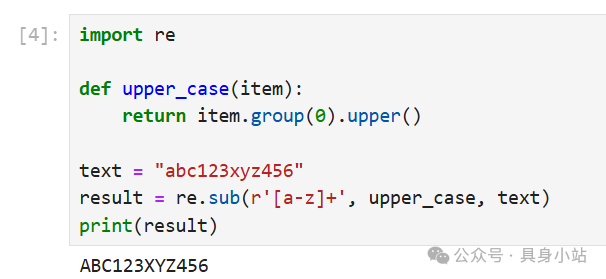
1. Python re Library
The re module in Python (short for regular expression) is a built-in library for handling regular expressions. It is primarily used for matching, searching, replacing, and splitting strings, making it a powerful tool for processing text data.
Raw String Prefix rIn regular expressions, you often see strings prefixed with r, such as r’\d+’. This r indicates a “raw string”.
Its core function is to treat the backslash \ as a regular character rather than an escape character.
For example:
A regular string “\n” represents a newline character, while a raw string r”\n” represents two characters: a backslash \ and the letter n. This is crucial for regular expressions, as backslashes are heavily used to denote special meanings (e.g., \d represents a digit). Without using a raw string, it would need to be written as “\d”, which is not only harder to read but also prone to errors.
re.sub FunctionThe re.sub() function is the core function in the re library used for replacing matches in a string. Its basic syntax is as follows:
# pattern: Regular expression pattern (it is recommended to use raw string r'...')# repl: The string or function to replace with# string: The original string to process# count: Optional, the maximum number of replacements (default 0 means replace all)# flags: Optional, matching mode (e.g., re.IGNORECASE to ignore case)re.sub(pattern, repl, string, count=0, flags=0)2. Function Usage Examples
Example 1
import re
text = "abc123xyz456"
result = re.sub(r'\d+', '*', text)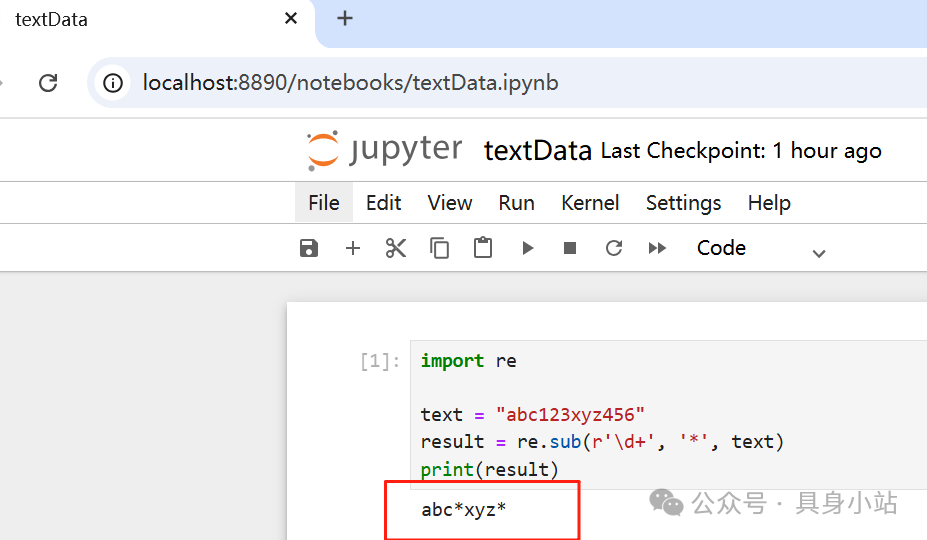
Example 2 (Replace all letters with *)
re.sub(r'[A-Za-z]', '*', text)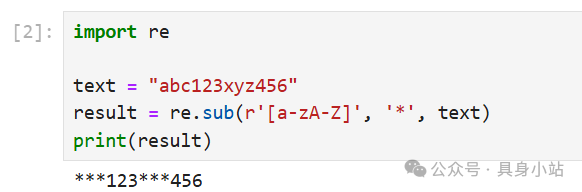
Example 3 (Replace the first digit)
re.sub(r'\d+', '*', text, count=1)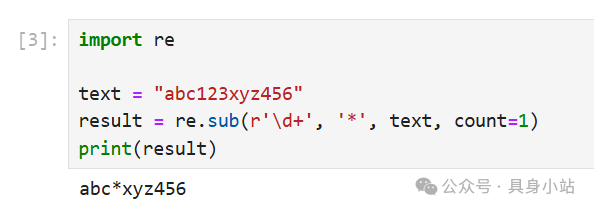
Example 4 (Function Replacement)
def upper_case(item):
    return item.group(0).upper()
re.sub(r'[a-z]+', upper_case, text)