Multidimensional arrays are arrays composed of multiple one-dimensional arrays, where each one-dimensional array is referred to as a sub-array. Similar to one-dimensional arrays, each element of a multidimensional array can be of any type; for example, integer, character, floating-point, etc.
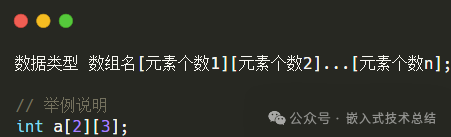
The declaration format for multidimensional arrays is as follows.
Initialization of Multidimensional Arrays
Multidimensional arrays can be initialized using the format “array object <span><span>= {{val11, val12, val13}, {val21, val22, val23}...}</span><span>"</span></span>, where val11, val12, val13, etc. are specific values. For common cases, this section mainly illustrates using two-dimensional arrays as an example, while other multidimensional array initialization methods are similar.
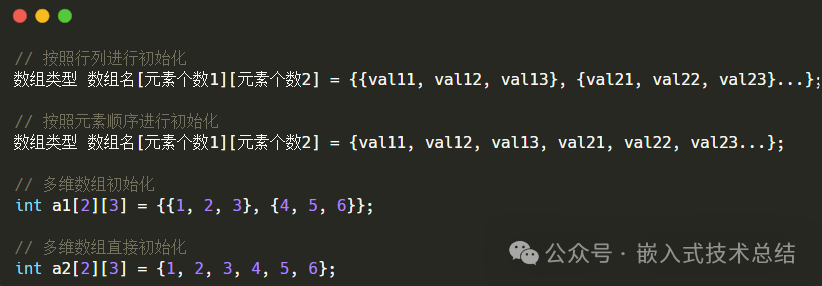
As can be seen, multidimensional arrays support initialization by rows and columns, as well as complete scattering, with no difference in the output results. However, generally speaking, initializing by rows and columns makes the results clearer and easier to modify and maintain.
Additionally, after the C99 standard, multidimensional arrays also support initialization using designated initializers.
-
Designated position initialization, directly specifying the exact position, corresponding to the format “[0][1] = 1“.
-
Designated row initialization, using designated initialization for rows and general initialization for columns, corresponding to the format “[0] = {1, 2, 3}“.
-
Column specified initialization within a row, using general initialization for rows and designated initialization for columns, corresponding to the format “{ [0] = {1}, ….. }“.
Specific examples are shown below.
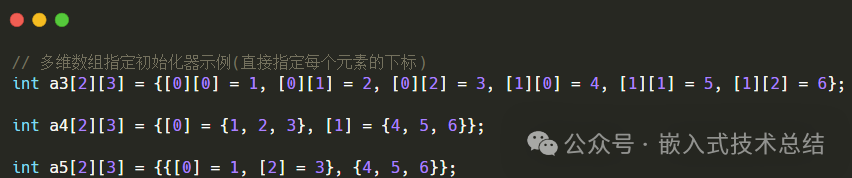
Using initialization for multidimensional arrays is more flexible compared to one-dimensional arrays, but it is also more complex and needs to be used selectively based on actual situations.
Moreover, if the number of rows in a multidimensional array can be determined during initialization, for example, <span><span>int a[2][3]</span></span>, it can also be omitted. For example, <span><span>int a[][3] = {{1, 2, 3}, {4, 5, 6}};</span><span> However,</span></span> the number of elements in each row cannot be omitted; otherwise, it will result in a compilation error.
Length of Multidimensional Arrays
For multidimensional arrays, the length characteristics include the number of elements per row (number of columns), the total number of rows, the total number of elements, and the length in bytes occupied.
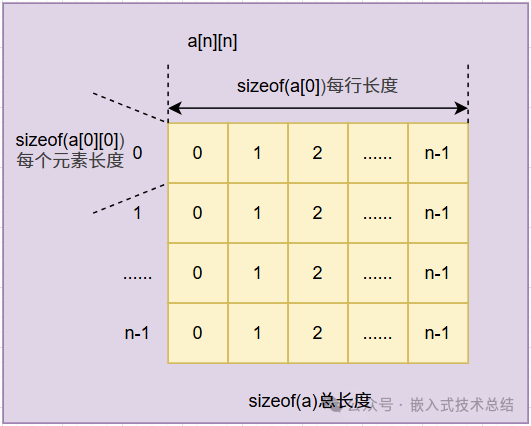
Taking <span><span>int a[2][3]</span></span> as an example, the specifics are as follows.
- The length in bytes occupied by the multidimensional array can be obtained using the sizeof operator, formatted as:
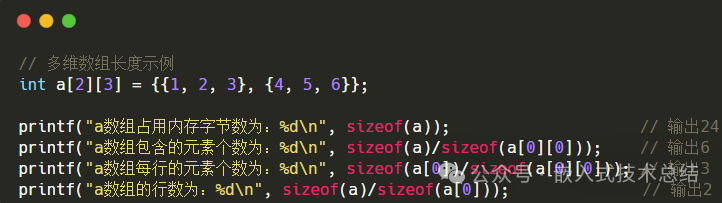
<span><span>sizeof(a)</span></span>, which returns the number of bytes occupied by the array in memory. - The total number of elements contained in the multidimensional array is
<span><span>sizeof(a)/sizeof(a[0][0])</span></span>or<span><span>sizeof(a)/sizeof(int)</span></span>. - The number of elements per row in the multidimensional array is
<span><span>sizeof(a[0])/sizeof(a[0][0])</span></span>or<span><span>sizeof(a[0])/sizeof(int)</span></span>. - The number of rows in the multidimensional array is
<span><span>sizeof(a)/sizeof(a[0])</span><span>.</span></span>
Specific examples are shown below.
Accessing Multidimensional Arrays
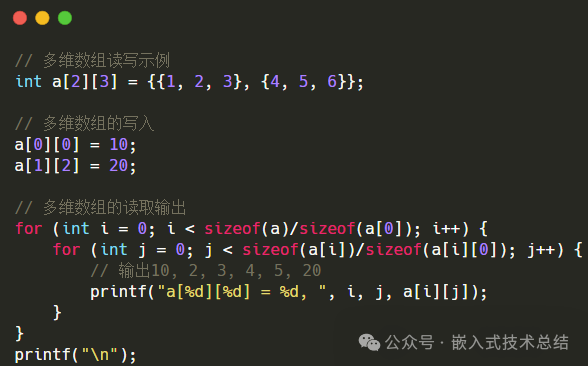
The access format for multidimensional arrays is <span><span>array name[row number][column number]</span></span>, for example, assigning a value as follows:<span><span>a[0][0] = 10</span><span>;</span> The reading method is similar, structured as: <span>b = a[0][0];</span></span> This indicates assigning the value of 10 to the first row and first column of the multidimensional array a, and reading the first element of the array, which is generally used for reading and writing single elements.
For reading and writing multiple elements, loop structures can be used, which can be for, while, do-while loops, etc., or functions like memset, memcpy can be used for batch operations.
Examples of reading and writing multidimensional arrays are shown below.