
Click the blue text above to follow me~
Recently, a friend asked me to help debug a Bluetooth printer. I had no choice but to take on the task, so I immediately bought an HC-05 Bluetooth module (note that it is HC-05).
Below, I will share my debugging method:
-
Power on while pressing the button to enter AT mode
-
Obtain module information (hold the button)
-
AT+RMAAD
-
AT+CMODE=0 Allow all devices to connect
-
AT+INIT (press the button)
-
AT+INQ
-
AT+PAIR=2,A,544CF,9
-
AT+BIND=2,A,544CF
-
AT+CMODE=1
-
AT+LINK=2,A,544CF
Computer Software Connection Setup Steps
1. Power on while holding the button, hold the button to get module information
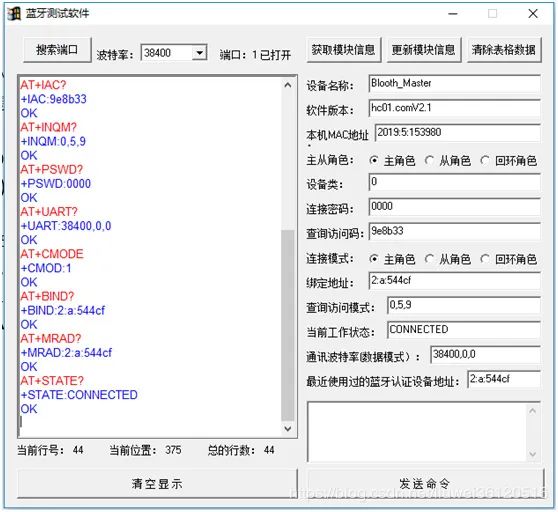
2. AT+RMAAD
Input to disconnect all links
3. AT+CMODE=0 Allow all devices to connect
4. Binding address: Fill in the printer address. Click to update module information
If it shows AT+BIND=2,a,544cf
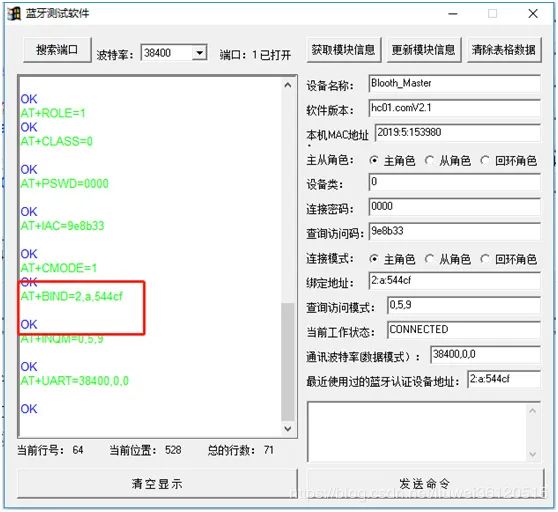
OK
Then the setup is successful.
Method to Obtain Printer Device Address
1. AT+INIT (press the button)
2. AT+INQ
Scanning devices may take some time, please be patient.
/ The End /
This article is an original production by Embedded Case Show. Please do not reproduce without permission.

Scan to follow us
See more embedded cases

If you like this content, please give us a thumbs up