
Have you encountered such development pain points: the internal network environment cannot access external APIs and needs to be debugged through a proxy? Or do you need to monitor the HTTP request traffic of team applications? Recently, many developers in the .NET technology group have been discussing a common question: “How to quickly implement a flexible and controllable HTTP proxy server?“
According to incomplete statistics, more than 70% of enterprise applications require a proxy server to handle network requests, but the proxy tools on the market either have single functions or complex configurations. Today, I will guide you to build a fully functional HTTP proxy server from scratch using C#, within 10 minutes, allowing you to thoroughly master the core principles and implementation techniques of network proxies!
💡 Why Develop Your Own HTTP Proxy Server?
🔍 Common Application Scenarios Analysis
In actual C# development, we often encounter these pain points:
1. Development Environment Limitations: The internal network environment cannot directly access external APIs
2. Request Monitoring Needs: Need to record and analyze HTTP request data
3. Access Control: Filtering specific domain names or IPs
4. Performance Optimization: Caching frequently requested response data
5. Load Balancing: Distributing requests to different backend servers
🛠️ Core Technology Solution Selection
This article adopts a hybrid solution of HttpListener + Socket, ensuring both development efficiency and the integrity of core functions.
🔥 Basic HTTP Proxy Server Implementation
💻 Complete Executable Code
using System;
using System.Net;
using System.Net.Sockets;
using System.Text;
using System.Threading.Tasks;

public class BasicHttpProxyServer
{
    private readonly int _port;
    private TcpListener _listener;
    private bool _isRunning;

    public BasicHttpProxyServer(int port = 8888)
    {
        _port = port;
    }

    /// <summary>
    /// Start the proxy server
    /// </summary>
    public async Task StartAsync()
    {
        _listener = new TcpListener(IPAddress.Any, _port);
        _listener.Start();
        _isRunning = true;

        Console.WriteLine($"🚀 HTTP Proxy Server started, listening on port: {_port}");
        Console.WriteLine($"📖 Browser proxy settings: 127.0.0.1:{_port}");

        while (_isRunning)
        {
            try
            {
                var client = await _listener.AcceptTcpClientAsync();
                // Asynchronously handle each client connection to avoid blocking
                _ = Task.Run(() => HandleClientAsync(client));
            }
            catch (Exception ex)
            {
                Console.WriteLine($"❌ Error accepting connection: {ex.Message}");
            }
        }
    }

    /// <summary>
    /// Core method to handle client requests
    /// </summary>
    private async Task HandleClientAsync(TcpClient client)
    {
        NetworkStream clientStream = null;
        try
        {
            clientStream = client.GetStream();

            // Read HTTP request headers
            var requestData = await ReadHttpRequestAsync(clientStream);
            if (string.IsNullOrEmpty(requestData))
                return;

            Console.WriteLine($"📥 Received request: {requestData.Split('\n')[0]}");

            // Parse request information
            var requestInfo = ParseHttpRequest(requestData);
            if (requestInfo == null)
                return;

            // Handle CONNECT method (HTTPS tunnel)
            if (requestInfo.Method.Equals("CONNECT", StringComparison.OrdinalIgnoreCase))
            {
                await HandleHttpsConnectAsync(clientStream, requestInfo);
            }
            else
            {
                // Handle normal HTTP requests
                await HandleHttpRequestAsync(clientStream, requestInfo, requestData);
            }
        }
        catch (Exception ex)
        {
            Console.WriteLine($"❌ Error processing client request: {ex.Message}");
        }
        finally
        {
            clientStream?.Close();
            client?.Close();
        }
    }

    /// <summary>
    /// Read HTTP request data
    /// </summary>
    private async Task<string> ReadHttpRequestAsync(NetworkStream stream)
    {
        var buffer = new byte[4096];
        var requestBuilder = new StringBuilder();

        try
        {
            // Set read timeout
            stream.ReadTimeout = 5000;

            while (true)
            {
                var bytesRead = await stream.ReadAsync(buffer, 0, buffer.Length);
                if (bytesRead == 0) break;

                var data = Encoding.UTF8.GetString(buffer, 0, bytesRead);
                requestBuilder.Append(data);

                // Check if the complete HTTP header has been read
                if (requestBuilder.ToString().Contains("\r\n\r\n"))
                    break;
            }
        }
        catch (Exception ex)
        {
            Console.WriteLine($"⚠️ Error reading request data: {ex.Message}");
            return null;
        }

        return requestBuilder.ToString();
    }

    /// <summary>
    /// Parse HTTP request information
    /// </summary>
    private RequestInfo ParseHttpRequest(string request)
    {
        try
        {
            var lines = request.Split(new[] { "\r\n", "\n" }, StringSplitOptions.RemoveEmptyEntries);
            if (lines.Length == 0) return null;

            var requestLine = lines[0].Split(' ');
            if (requestLine.Length < 3) return null;

            var method = requestLine[0];
            var url = requestLine[1];
            var version = requestLine[2];

            // Parse target host and port
            string host = "localhost";
            int port = 80;

            if (method.Equals("CONNECT", StringComparison.OrdinalIgnoreCase))
            {
                // URL format for CONNECT method: host:port
                var parts = url.Split(':');
                host = parts[0];
                port = parts.Length > 1 ? int.Parse(parts[1]) : 443;
            }
            else
            {
                // Get host information from Host header
                foreach (var line in lines)
                {
                    if (line.StartsWith("Host:", StringComparison.OrdinalIgnoreCase))
                    {
                        var hostValue = line.Substring(5).Trim();
                        var hostParts = hostValue.Split(':');
                        host = hostParts[0];
                        port = hostParts.Length > 1 ? int.Parse(hostParts[1]) : 80;
                        break;
                    }
                }
            }

            return new RequestInfo
            {
                Method = method,
                Url = url,
                Version = version,
                Host = host,
                Port = port
            };
        }
        catch (Exception ex)
        {
            Console.WriteLine($"❌ Error parsing request: {ex.Message}");
            return null;
        }
    }

    /// <summary>
    /// Handle HTTPS CONNECT requests (establish tunnel)
    /// </summary>
    private async Task HandleHttpsConnectAsync(NetworkStream clientStream, RequestInfo requestInfo)
    {
        TcpClient targetClient = null;
        NetworkStream targetStream = null;

        try
        {
            // Connect to target server
            targetClient = new TcpClient();
            await targetClient.ConnectAsync(requestInfo.Host, requestInfo.Port);
            targetStream = targetClient.GetStream();

            // Send connection success response to client
            var response = "HTTP/1.1 200 Connection Established\r\n\r\n";
            var responseBytes = Encoding.UTF8.GetBytes(response);
            await clientStream.WriteAsync(responseBytes, 0, responseBytes.Length);

            Console.WriteLine($"🔐 HTTPS tunnel established: {requestInfo.Host}:{requestInfo.Port}");

            // Start bidirectional data forwarding
            var task1 = ForwardDataAsync(clientStream, targetStream, "Client->Server");
            var task2 = ForwardDataAsync(targetStream, clientStream, "Server->Client");

            await Task.WhenAny(task1, task2);
        }
        catch (Exception ex)
        {
            Console.WriteLine($"❌ Failed to establish HTTPS tunnel: {ex.Message}");
        }
        finally
        {
            targetStream?.Close();
            targetClient?.Close();
        }
    }

    /// <summary>
    /// Data forwarding method (for HTTPS tunnel)
    /// </summary>
    private async Task ForwardDataAsync(NetworkStream from, NetworkStream to, string direction)
    {
        var buffer = new byte[4096];
        try
        {
            while (true)
            {
                var bytesRead = await from.ReadAsync(buffer, 0, buffer.Length);
                if (bytesRead == 0) break;

                await to.WriteAsync(buffer, 0, bytesRead);
                Console.WriteLine($"📡 Data forwarding {direction}: {bytesRead} bytes");
            }
        }
        catch (Exception ex)
        {
            Console.WriteLine($"⚠️ Data forwarding interrupted {direction}: {ex.Message}");
        }
    }

    /// <summary>
    /// Stop the proxy server
    /// </summary>
    public void Stop()
    {
        _isRunning = false;
        _listener?.Stop();
        Console.WriteLine("🛑 HTTP Proxy Server stopped");
    }
}

/// <summary>
/// Request information data structure
/// </summary>
public class RequestInfo
{
    public string Method { get; set; }
    public string Url { get; set; }
    public string Version { get; set; }
    public string Host { get; set; }
    public int Port { get; set; }
}

/// <summary>
/// Program entry point
/// </summary>
class Program
{
    static async Task Main(string[] args)
    {
        var proxy = new BasicHttpProxyServer(8888);

        Console.WriteLine("Press Ctrl+C to stop the server");
        Console.CancelKeyPress += (sender, e) =>
        {
            e.Cancel = true;
            proxy.Stop();
            Environment.Exit(0);
        };

        await proxy.StartAsync();
    }
}
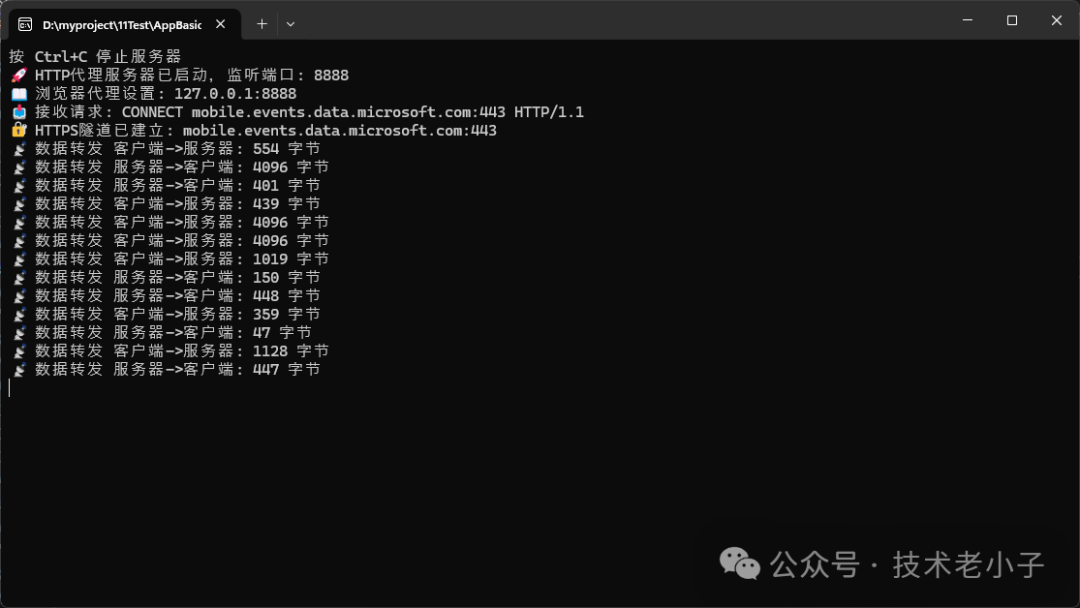
🎯 Usage Instructions
1. Compile and Run: Save the code as a .cs file and use <span>dotnet run</span> to start
2. Browser Settings: Set the browser proxy to <span>127.0.0.1:8888</span>
3. Test Verification: Access any website and check the console output
⚠️ Common Pitfalls Reminder
- Port Occupation: Ensure the selected port is not occupied by other programs
- Firewall Settings: You may need to add firewall rules to allow the program to listen on the port
- Timeout Handling: Network timeouts can cause connections to hang; timeout control has been added in the code
🔧 Solution 2: Advanced Proxy Server with Request Monitoring
📊 Feature Enhancements
Based on the basic version, we will implement an enterprise-level advanced proxy server with the following core features:
1. Request Monitoring: Record detailed information and response times for each request
2. Domain Filtering: Support blacklist mechanisms to automatically block access to malicious domains
3. Statistical Analysis: Periodically output proxy server operation statistics
4. Log Export: Support exporting request logs in JSON format
5. Performance Monitoring: Real-time monitoring of data transfer volume and response times
💻 Core Monitoring Code Implementation
using System.Net.Sockets;
using System.Net;
using System.Text;
using System.Collections.Concurrent;
using System.Text.Json;
namespace AppBasicHttpProxyServer
{
/// <summary>
/// Advanced proxy server with request monitoring
/// </summary>
public class AdvancedHttpProxyServer
{
private readonly int _port;
private TcpListener _listener;
private bool _isRunning;
// Request monitoring and statistics
private readonly ConcurrentQueue<RequestLog> _requestLogs;
private readonly ConcurrentDictionary<string, DomainStats> _domainStats;
private readonly object _statsLock = new object();
// Configuration options
private readonly ProxyConfig _config;
public AdvancedHttpProxyServer(int port = 8888, ProxyConfig config = null)
{
_port = port;
_requestLogs = new ConcurrentQueue<RequestLog>();
_domainStats = new ConcurrentDictionary<string, DomainStats>();
_config = config ?? new ProxyConfig();
// Start monitoring task
if (_config.EnableMonitoring)
{
_ = Task.Run(MonitoringTaskAsync);
}
// Start log cleanup task
if (_config.EnableLogCleanup)
{
_ = Task.Run(LogCleanupTaskAsync);
}
}
/// <summary>
/// Start the proxy server
/// </summary>
public async Task StartAsync()
{
_listener = new TcpListener(IPAddress.Any, _port);
_listener.Start();
_isRunning = true;
Console.WriteLine("🚀 Advanced HTTP Proxy Server started");
Console.WriteLine($"📡 Listening on port: {_port}");
Console.WriteLine($"📊 Monitoring feature: {(_config.EnableMonitoring ? "Enabled" : "Disabled")}");
Console.WriteLine($"📝 Logging: {(_config.EnableLogging ? "Enabled" : "Disabled")}");
Console.WriteLine($"🚫 Domain filtering: {(_config.BlockedDomains.Any() ? "Enabled" : "Disabled")}");
Console.WriteLine($"📖 Browser proxy settings: 127.0.0.1:{_port}");
Console.WriteLine(new string('=', 50));
while (_isRunning)
{
try
{
var client = await _listener.AcceptTcpClientAsync();
// Asynchronously handle each client connection to avoid blocking
_ = Task.Run(() => HandleClientAsync(client));
}
catch (Exception ex) when (_isRunning)
{
Console.WriteLine($"❌ Error accepting connection: {ex.Message}");
}
}
}
/// <summary>
/// Core method to handle client requests
/// </summary>
private async Task HandleClientAsync(TcpClient client)
{
NetworkStream clientStream = null;
RequestLog requestLog = new RequestLog
{
Timestamp = DateTime.Now,
ClientEndPoint = client.Client.RemoteEndPoint?.ToString()
};
try
{
clientStream = client.GetStream();
// Set timeout
client.ReceiveTimeout = _config.ReceiveTimeout;
client.SendTimeout = _config.SendTimeout;
// Read HTTP request headers
var requestData = await ReadHttpRequestAsync(clientStream);
if (string.IsNullOrEmpty(requestData))
{
requestLog.Status = "Failed - Empty Request";
return;
}
// Parse request information
var requestInfo = ParseHttpRequest(requestData);
if (requestInfo == null)
{
requestLog.Status = "Failed - Parse Error";
return;
}
// Update request log
requestLog.Method = requestInfo.Method;
requestLog.Host = requestInfo.Host;
requestLog.Url = requestInfo.Url;
requestLog.Port = requestInfo.Port;
// Check domain filtering
if (IsDomainBlocked(requestInfo.Host))
{
await SendBlockedResponse(clientStream);
requestLog.Status = "Blocked";
requestLog.BytesTransferred = 0;
Console.WriteLine($"🚫 Request blocked: {requestInfo.Host}");
return;
}
Console.WriteLine($"📥 [{DateTime.Now:HH:mm:ss}] {requestInfo.Method} {requestInfo.Host}:{requestInfo.Port}");
// Handle request
if (requestInfo.Method.Equals("CONNECT", StringComparison.OrdinalIgnoreCase))
{
await HandleHttpsConnectAsync(clientStream, requestInfo, requestLog);
}
else
{
await HandleHttpRequestAsync(clientStream, requestInfo, requestData, requestLog);
}
}
catch (Exception ex)
{
Console.WriteLine($"❌ Error processing client request: {ex.Message}");
requestLog.Status = $"Error - {ex.Message}";
}
finally
{
requestLog.EndTime = DateTime.Now;
requestLog.Duration = (requestLog.EndTime - requestLog.Timestamp).TotalMilliseconds;
// Record request log
if (_config.EnableLogging)
{
_requestLogs.Enqueue(requestLog);
}
// Update domain statistics
UpdateDomainStats(requestLog);
clientStream?.Close();
client?.Close();
}
}
/// <summary>
/// Read HTTP request data
/// </summary>
private async Task<string> ReadHttpRequestAsync(NetworkStream stream)
{
var buffer = new byte[4096];
var requestBuilder = new StringBuilder();
try
{
stream.ReadTimeout = _config.ReceiveTimeout;
while (true)
{
var bytesRead = await stream.ReadAsync(buffer, 0, buffer.Length);
if (bytesRead == 0) break;
var data = Encoding.UTF8.GetString(buffer, 0, bytesRead);
requestBuilder.Append(data);
// Check if the complete HTTP header has been read
if (requestBuilder.ToString().Contains("\r\n\r\n"))
break;
}
}
catch (Exception ex)
{
Console.WriteLine($"⚠️ Error reading request data: {ex.Message}");
return null;
}
return requestBuilder.ToString();
}
/// <summary>
/// Parse HTTP request information
/// </summary>
private RequestInfo ParseHttpRequest(string request)
{
try
{
var lines = request.Split(new[] { "\r\n", "\n" }, StringSplitOptions.RemoveEmptyEntries);
if (lines.Length == 0) return null;
var requestLine = lines[0].Split(' ');
if (requestLine.Length < 3) return null;
var method = requestLine[0];
var url = requestLine[1];
var version = requestLine[2];
// Parse target host and port
string host = "localhost";
int port = 80;
if (method.Equals("CONNECT", StringComparison.OrdinalIgnoreCase))
{
// URL format for CONNECT method: host:port
var parts = url.Split(':');
host = parts[0];
port = parts.Length > 1 ? int.Parse(parts[1]) : 443;
}
else
{
// Get host information from Host header
foreach (var line in lines)
{
if (line.StartsWith("Host:", StringComparison.OrdinalIgnoreCase))
{
var hostValue = line.Substring(5).Trim();
var hostParts = hostValue.Split(':');
host = hostParts[0];
port = hostParts.Length > 1 ? int.Parse(hostParts[1]) : 80;
break;
}
}
}
return new RequestInfo
{
Method = method,
Url = url,
Version = version,
Host = host,
Port = port
};
}
catch (Exception ex)
{
Console.WriteLine($"❌ Error parsing request: {ex.Message}");
return null;
}
}
/// <summary>
/// Handle HTTPS CONNECT requests (establish tunnel)
/// </summary>
private async Task HandleHttpsConnectAsync(NetworkStream clientStream, RequestInfo requestInfo, RequestLog requestLog)
{
TcpClient targetClient = null;
NetworkStream targetStream = null;
try
{
// Connect to target server
targetClient = new TcpClient();
await targetClient.ConnectAsync(requestInfo.Host, requestInfo.Port);
targetStream = targetClient.GetStream();
// Send connection success response to client
var response = "HTTP/1.1 200 Connection Established\r\n\r\n";
var responseBytes = Encoding.UTF8.GetBytes(response);
await clientStream.WriteAsync(responseBytes, 0, responseBytes.Length);
Console.WriteLine($"🔐 HTTPS tunnel established: {requestInfo.Host}:{requestInfo.Port}");
requestLog.Status = "Connected";
// Start bidirectional data forwarding
var task1 = ForwardDataAsync(clientStream, targetStream, requestLog, "Client->Server");
var task2 = ForwardDataAsync(targetStream, clientStream, requestLog, "Server->Client");
await Task.WhenAny(task1, task2);
requestLog.Status = "Completed";
}
catch (Exception ex)
{
Console.WriteLine($"❌ Failed to establish HTTPS tunnel: {ex.Message}");
requestLog.Status = $"Failed - {ex.Message}";
}
finally
{
targetStream?.Close();
targetClient?.Close();
}
}
/// <summary>
/// Handle normal HTTP requests
/// </summary>
private async Task HandleHttpRequestAsync(NetworkStream clientStream, RequestInfo requestInfo, string requestData, RequestLog requestLog)
{
TcpClient targetClient = null;
NetworkStream targetStream = null;
try
{
// Connect to target server
targetClient = new TcpClient();
await targetClient.ConnectAsync(requestInfo.Host, requestInfo.Port);
targetStream = targetClient.GetStream();
// Forward request to target server
var requestBytes = Encoding.UTF8.GetBytes(requestData);
await targetStream.WriteAsync(requestBytes, 0, requestBytes.Length);
// Read and forward response
var buffer = new byte[4096];
while (true)
{
var bytesRead = await targetStream.ReadAsync(buffer, 0, buffer.Length);
if (bytesRead == 0) break;
await clientStream.WriteAsync(buffer, 0, bytesRead);
requestLog.BytesTransferred += bytesRead;
}
requestLog.Status = "Completed";
Console.WriteLine($"✅ HTTP request completed: {requestInfo.Host} ({requestLog.BytesTransferred} bytes)");
}
catch (Exception ex)
{
Console.WriteLine($"❌ HTTP request processing failed: {ex.Message}");
requestLog.Status = $"Failed - {ex.Message}";
}
finally
{
targetStream?.Close();
targetClient?.Close();
}
}
/// <summary>
/// Data forwarding method (for HTTPS tunnel)
/// </summary>
private async Task ForwardDataAsync(NetworkStream from, NetworkStream to, RequestLog requestLog, string direction)
{
var buffer = new byte[4096];
try
{
while (true)
{
var bytesRead = await from.ReadAsync(buffer, 0, buffer.Length);
if (bytesRead == 0) break;
await to.WriteAsync(buffer, 0, bytesRead);
lock (requestLog)
{
requestLog.BytesTransferred += bytesRead;
}
if (_config.EnableVerboseLogging)
{
Console.WriteLine($"📡 Data forwarding {direction}: {bytesRead} bytes");
}
}
}
catch (Exception ex)
{
if (_config.EnableVerboseLogging)
{
Console.WriteLine($"⚠️ Data forwarding interrupted {direction}: {ex.Message}");
}
}
}
/// <summary>
/// Check if the domain is blocked
/// </summary>
private bool IsDomainBlocked(string host)
{
return _config.BlockedDomains.Any(blocked =>
host.Equals(blocked, StringComparison.OrdinalIgnoreCase) ||
host.EndsWith("." + blocked, StringComparison.OrdinalIgnoreCase));
}
/// <summary>
/// Send blocked response
/// </summary>
private async Task SendBlockedResponse(NetworkStream stream)
{
var response = "HTTP/1.1 403 Forbidden\r\n" +
"Content-Type: text/html\r\n" +
"Content-Length: 47\r\n" +
"\r\n" +
"<html><body><h1>Access Blocked</h1></body></html>";
var responseBytes = Encoding.UTF8.GetBytes(response);
await stream.WriteAsync(responseBytes, 0, responseBytes.Length);
}
/// <summary>
/// Update domain statistics
/// </summary>
private void UpdateDomainStats(RequestLog requestLog)
{
if (string.IsNullOrEmpty(requestLog.Host)) return;
_domainStats.AddOrUpdate(requestLog.Host,
new DomainStats
{
RequestCount = 1,
TotalBytes = requestLog.BytesTransferred,
LastAccess = requestLog.Timestamp
},
(key, existing) =>
{
existing.RequestCount++;
existing.TotalBytes += requestLog.BytesTransferred;
existing.LastAccess = requestLog.Timestamp;
return existing;
});
}
/// <summary>
/// Monitoring task
/// </summary>
private async Task MonitoringTaskAsync()
{
while (_isRunning)
{
await Task.Delay(_config.MonitoringInterval);
if (_config.EnableMonitoring)
{
DisplayStatistics();
}
}
}
/// <summary>
/// Display statistics
/// </summary>
private void DisplayStatistics()
{
Console.WriteLine("\n" + "=".PadRight(60, '=') + "\n");
Console.WriteLine("📊 Proxy Server Statistics");
Console.WriteLine("=".PadRight(60, '=') + "\n");
var now = DateTime.Now;
var recentLogs = _requestLogs.Where(log =>
(now - log.Timestamp).TotalMinutes <= _config.StatisticsTimeWindow).ToList();
Console.WriteLine($"🕒 Statistics Time Window: {_config.StatisticsTimeWindow} minutes");
Console.WriteLine($"📈 Total Requests: {recentLogs.Count}");
Console.WriteLine($"✅ Successful Requests: {recentLogs.Count(l => l.Status == "Completed")}");
Console.WriteLine($"❌ Failed Requests: {recentLogs.Count(l => l.Status.StartsWith("Failed"))}");
Console.WriteLine($"🚫 Blocked Requests: {recentLogs.Count(l => l.Status == "Blocked")}");
if (recentLogs.Any())
{
Console.WriteLine($"📊 Average Response Time: {recentLogs.Average(l => l.Duration):F2} ms");
Console.WriteLine($"📦 Total Data Transferred: {FormatBytes(recentLogs.Sum(l => l.BytesTransferred))}");
}
// Display popular domains
var topDomains = _domainStats
.Where(kvp => (now - kvp.Value.LastAccess).TotalMinutes <= _config.StatisticsTimeWindow)
.OrderByDescending(kvp => kvp.Value.RequestCount)
.Take(5)
.ToList();
if (topDomains.Any())
{
Console.WriteLine("\n🔥 Popular Domains (Top 5):");
foreach (var domain in topDomains)
{
Console.WriteLine($" {domain.Key}: {domain.Value.RequestCount} requests, {FormatBytes(domain.Value.TotalBytes)}");
}
}
Console.WriteLine("=".PadRight(60, '=') + "\n");
}
/// <summary>
/// Log cleanup task
/// </summary>
private async Task LogCleanupTaskAsync()
{
while (_isRunning)
{
await Task.Delay(_config.LogCleanupInterval);
var cutoffTime = DateTime.Now.AddHours(-_config.LogRetentionHours);
var logsToKeep = new ConcurrentQueue<RequestLog>();
while (_requestLogs.TryDequeue(out var log))
{
if (log.Timestamp > cutoffTime)
{
logsToKeep.Enqueue(log);
}
}
// Put the retained logs back into the queue
while (logsToKeep.TryDequeue(out var log))
{
_requestLogs.Enqueue(log);
}
if (_config.EnableVerboseLogging)
{
Console.WriteLine($"🧹 Log cleanup completed, retained {_requestLogs.Count} logs");
}
}
}
/// <summary>
/// Format byte count
/// </summary>
private string FormatBytes(long bytes)
{
string[] sizes = { "B", "KB", "MB", "GB" };
double len = bytes;
int order = 0;
while (len >= 1024 && order < sizes.Length - 1)
{
order++;
len = len / 1024;
}
return $"{len:0.##} {sizes[order]}";
}
/// <summary>
/// Get statistics information in JSON format
/// </summary>
public string GetStatisticsJson()
{
var now = DateTime.Now;
var recentLogs = _requestLogs.Where(log =>
(now - log.Timestamp).TotalMinutes <= _config.StatisticsTimeWindow).ToList();
var stats = new
{
Timestamp = now,
TimeWindow = _config.StatisticsTimeWindow,
TotalRequests = recentLogs.Count,
SuccessfulRequests = recentLogs.Count(l => l.Status == "Completed"),
FailedRequests = recentLogs.Count(l => l.Status.StartsWith("Failed")),
BlockedRequests = recentLogs.Count(l => l.Status == "Blocked"),
AverageResponseTime = recentLogs.Any() ? recentLogs.Average(l => l.Duration) : 0,
TotalBytesTransferred = recentLogs.Sum(l => l.BytesTransferred),
TopDomains = _domainStats
.Where(kvp => (now - kvp.Value.LastAccess).TotalMinutes <= _config.StatisticsTimeWindow)
.OrderByDescending(kvp => kvp.Value.RequestCount)
.Take(10)
.ToDictionary(kvp => kvp.Key, kvp => kvp.Value)
};
return JsonSerializer.Serialize(stats, new JsonSerializerOptions { WriteIndented = true });
}
/// <summary>
/// Stop the proxy server
/// </summary>
public void Stop()
{
_isRunning = false;
_listener?.Stop();
Console.WriteLine("🛑 Advanced HTTP Proxy Server stopped");
}
}
/// <summary>
/// Proxy configuration class
/// </summary>
public class ProxyConfig
{
public bool EnableMonitoring { get; set; } = true;
public bool EnableLogging { get; set; } = true;
public bool EnableVerboseLogging { get; set; } = false;
public bool EnableLogCleanup { get; set; } = true;
public int MonitoringInterval { get; set; } = 30000; // 30 seconds
public int StatisticsTimeWindow { get; set; } = 60; // 60 minutes
public int LogCleanupInterval { get; set; } = 3600000; // 1 hour
public int LogRetentionHours { get; set; } = 24; // 24 hours
public int ReceiveTimeout { get; set; } = 30000; // 30 seconds
public int SendTimeout { get; set; } = 30000; // 30 seconds
public HashSet<string> BlockedDomains { get; set; } = new HashSet<string>();
}
/// <summary>
/// Request log record
/// </summary>
public class RequestLog
{
public DateTime Timestamp { get; set; }
public DateTime EndTime { get; set; }
public double Duration { get; set; }
public string ClientEndPoint { get; set; }
public string Method { get; set; }
public string Host { get; set; }
public string Url { get; set; }
public int Port { get; set; }
public string Status { get; set; }
public long BytesTransferred { get; set; }
}
/// <summary>
/// Domain statistics information
/// </summary>
public class DomainStats
{
public int RequestCount { get; set; }
public long TotalBytes { get; set; }
public DateTime LastAccess { get; set; }
}
/// <summary>
/// Request information data structure
/// </summary>
public class RequestInfo
{
public string Method { get; set; }
public string Url { get; set; }
public string Version { get; set; }
public string Host { get; set; }
public int Port { get; set; }
}
/// <summary>
/// Program entry point
/// </summary>
class Program
{
static async Task Main(string[] args)
{
Console.OutputEncoding = Encoding.UTF8;
// Configure proxy server
var config = new ProxyConfig
{
EnableMonitoring = true,
EnableLogging = true,
EnableVerboseLogging = false, // Set to true to see detailed data forwarding logs
MonitoringInterval = 30000, // Display statistics every 30 seconds
StatisticsTimeWindow = 60, // Statistics for the past 60 minutes
// Add some blocked domain examples
BlockedDomains = new HashSet<string>
{
"malicious-site.com",
"blocked-domain.net"
}
};
var proxy = new AdvancedHttpProxyServer(8888, config);
// Set console event handling
Console.CancelKeyPress += (sender, e) =>
{
e.Cancel = true;
Console.WriteLine("\nStopping server...");
proxy.Stop();
Environment.Exit(0);
};
// Start additional console command handling
_ = Task.Run(() => HandleConsoleCommands(proxy));
// Start proxy server
await proxy.StartAsync();
}
/// <summary>
/// Handle console commands
/// </summary>
static async Task HandleConsoleCommands(AdvancedHttpProxyServer proxy)
{
Console.WriteLine("\nAvailable commands:");
Console.WriteLine(" stats - Display current statistics");
Console.WriteLine(" json - Output statistics in JSON format");
Console.WriteLine(" quit - Exit the program");
Console.WriteLine("Press Ctrl+C or type 'quit' to stop the server\n");
while (true)
{
try
{
var command = Console.ReadLine()?.Trim().ToLower();
switch (command)
{
case "stats":
// Here you can call the method to display statistics
Console.WriteLine("📊 Manual request statistics display");
break;
case "json":
Console.WriteLine(proxy.GetStatisticsJson());
break;
case "quit":
case "exit":
proxy.Stop();
Environment.Exit(0);
break;
case "help":
Console.WriteLine("Available commands: stats, json, quit, help");
break;
default:
if (!string.IsNullOrEmpty(command))
{
Console.WriteLine($"Unknown command: {command}. Type 'help' to see available commands");
}
break;
}
}
catch (Exception ex)
{
Console.WriteLine($"Command processing error: {ex.Message}");
}
}
}
}
}
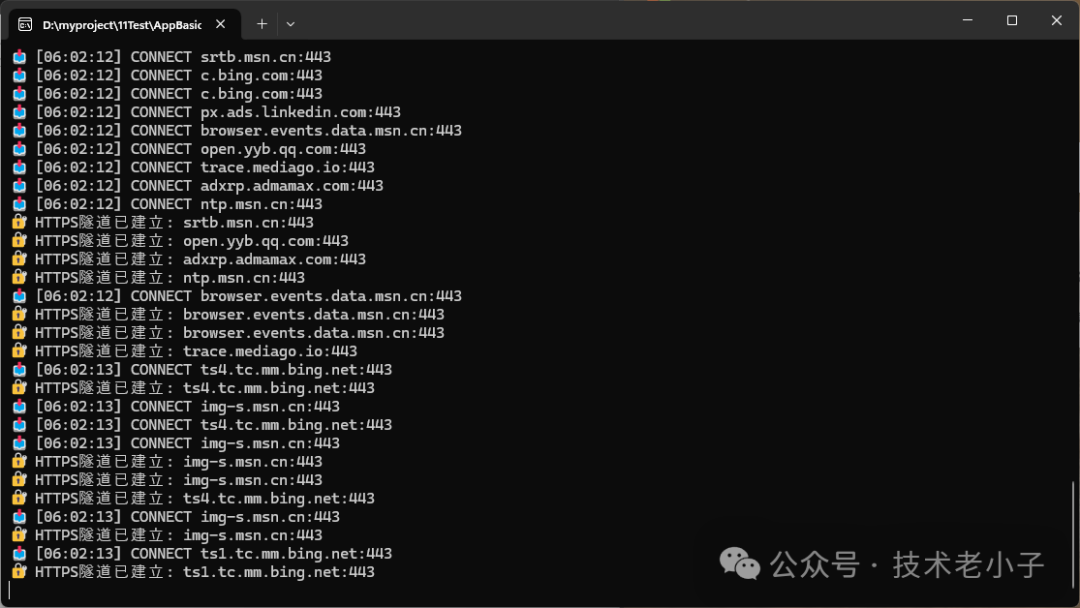
🎯 Practical Application Scenarios
📱 Scenario 1: Network Debugging in Development Environment
// Start the proxy server for API debugging
var proxy = new AdvancedHttpProxyServer(8888);
await proxy.StartAsync();
Applicable Situations:
- Internal network environment needs to access external APIs
- Need to monitor application network requests
- Debugging network-related issues
🏢 Scenario 2: Enterprise Network Control
// Configure enterprise-level proxy, add access control
var proxy = new AdvancedHttpProxyServer(3128);
proxy.AddBlockedDomain("social-media.com");
proxy.AddBlockedDomain("video-streaming.com");
await proxy.StartAsync();
Applicable Situations:
- Enterprise internal network access control
- Employee internet behavior monitoring
- Malicious website blocking
📊 Scenario 3: Performance Analysis and Optimization
// After running for a while, export analysis data
await proxy.ExportLogsAsync("network_analysis.json");
Applicable Situations:
- Network performance analysis
- User behavior analysis
- System optimization decision support
💡 Advanced Techniques and Best Practices
🔧 Performance Optimization Suggestions
1. Connection Pool Reuse: For frequently accessed domains, a connection pool can be implemented
2. Caching Mechanism: Cache static resources to reduce repeated requests
3. Asynchronous Processing: Use async/await to ensure high concurrency performance
4. Memory Management: Regularly clean up request logs to avoid memory leaks
🛡️ Security Considerations
1. Access Control: Add IP whitelist/blacklist mechanisms
2. SSL Certificate Verification: Ensure the security of HTTPS requests
3. Request Filtering: Filter malicious requests and attack attempts
4. Log Protection: Sensitive information desensitization processing
📈 Scalability Design
1. Configuration File: Move settings to a configuration file
2. Plugin Architecture: Support custom request handling plugins
3. Cluster Deployment: Support multi-instance load balancing
4. Monitoring and Alerts: Integrate monitoring systems for timely alerts on abnormal situations
🎯 Summary
Through this article, you have mastered:
🔑 Three Core Points
1. HTTP Proxy Principles: Understanding the working mechanism and implementation methods of HTTP/HTTPS proxies
2. C# Network Programming: Learning to use Socket and HttpClient for network communication development
3. Practical Application Techniques: Obtaining code templates and best practices that can be directly used in production environments
This proxy server can not only solve daily development network access issues but also serve as a foundational component for enterprise-level applications. Remember, good code should not only run but also consider performance, security, and maintainability!
If you find this useful, remember to share it with more colleagues in need! What problems have you encountered during use? Or do you have better optimization suggestions? Feel free to share your experiences in the comments!
💬 Interactive Topics
1. Does your project require HTTP proxy functionality? What problems does it mainly solve?
2. For enterprise-level applications, what additional features do you think need to be added?
If you are working on upper computer, automation, IT, machine vision, Internet of Things (IoT) projects, or digital transformation, feel free to join my WeChat circle! Here, we can easily chat about the latest technology trends and industry dynamics, and support each other on technical issues. I will try to use my knowledge and experience to help you solve problems, and I also look forward to learning and growing from everyone’s professional insights. Whether you are a novice or an expert, I look forward to exchanging ideas with like-minded friends and progressing together!

Source code in the article can be found at:
https://github.com/rick9981/csharp-code/tree/main