

Introduction:
In the previous articles, we have basically understood how to link a third-party library. This article and the next will supplement two methods for detecting external libraries.
So far, we have learned two methods for detecting external dependencies:
-
Using the built-in
CMakefind-module, but not all packages can be found in theCMakefindmodule. -
Using
<package>Config.cmake,<package>ConfigVersion.cmake, and<package>Targets.cmake, which are provided by the package vendor and installed in the standardcmakefolder with the package.
If a dependency does not provide a find module or vendor’s CMake files, in this case:
-
Depend on the
pkg-configprogram to find packages on the system. This relies on the package vendor’s.pcconfiguration file, which contains metadata about the release package. -
Write your own
find-packagemodule for the dependency.
Next, we will demonstrate the use of the first method through ZMQ.
✦
Installation of ZMQ
✦
Download ZMQ:
https://github.com/zeromq
After downloading, extract it and enter the directory:
tar -xzvf  libzmq-4.3.4.tar.gz .

cd libzmq-4.3.4
Start the installation
./autogen.sh
Use prefix to specify the installation directory
./configure --prefix=/opt/zmq/ --without-libsodium
make
sudo make install
✦
Project Structure
✦
.
├── CMakeLists.txt
├── zmq_client.cpp
└── zmq_server.cpp
Project address:
https://gitee.com/jiangli01/tutorials/tree/master/cmake-tutorial/chapter3/05
✦
CMakeLists.txt
✦
cmake_minimum_required(VERSION 3.10 FATAL_ERROR)

project(test_zmq LANGUAGES CXX)

set(CMAKE_CXX_STANDARD 11)
set(CMAKE_CXX_EXTENSIONS OFF)
set(CMAKE_CXX_STANDARD_REQUIRED ON)
set(CMAKE_PREFIX_PATH /opt/zmq)

find_package(PkgConfig REQUIRED QUIET)

pkg_search_module(
  ZeroMQ
  REQUIRED libzeromq libzmq lib0mq
  IMPORTED_TARGET
)

if(TARGET PkgConfig::ZeroMQ)
    message(STATUS "Found ZeroMQ")
endif()

add_executable(hw_server zmq_server.cpp)
target_link_libraries(hw_server PkgConfig::ZeroMQ)

add_executable(hw_client zmq_client.cpp)
target_link_libraries(hw_client PkgConfig::ZeroMQ)
Use pkg_search_module to search for any libraries or programs that come with a .pc file to find and import the ZeroMQ library. This command will find and configure the ZeroMQ library in CMake using the PkgConfig tool.
pkg_search_module(
  ZeroMQ
  REQUIRED libzeromq libzmq lib0mq
  IMPORTED_TARGET
)
Information about ZeroMQ will be stored in an imported target named PkgConfig::ZeroMQ, which can be linked to executables or libraries. 
✦
Related Source Code
✦
zmq_client.cpp
#include <stdio.h>
#include <string.h>
#include <unistd.h>
#include <zmq.h>

int main() {
  void *context = zmq_ctx_new();
  void *requester = zmq_socket(context, ZMQ_REQ);
  int rc = zmq_connect(requester, "tcp://localhost:5555");

  if (rc != 0) {
    perror("Failed to connect to server");
    return 1;
  }

  while (true) {
    char buffer[] = "Hello";
    zmq_send(requester, buffer, sizeof(buffer), 0);

    char reply[10];
    zmq_recv(requester, reply, sizeof(reply), 0);
    printf("Received: %s\n", reply);

    sleep(10);
  }

  zmq_close(requester);
  zmq_ctx_destroy(context);

  return 0;
}
zmq_server.cpp
#include <stdio.h>
#include <string.h>
#include <unistd.h>
#include <zmq.h>

int main() {
  void *context = zmq_ctx_new();
  void *responder = zmq_socket(context, ZMQ_REP);
  int rc = zmq_bind(responder, "tcp://*:5555");

  if (rc != 0) {
    perror("Failed to bind socket");
    return 1;
  }

  while (1) {
    char buffer[10];
    zmq_recv(responder, buffer, sizeof(buffer), 0);
    printf("Received: %s\n", buffer);

    zmq_send(responder, "World", 5, 0);
  }

  zmq_close(responder);
  zmq_ctx_destroy(context);

  return 0;
}
Build the project and execute
$ mkdir -p build
$ cd build
$ cmake ..
$ cmake --build .
Execute the results of the two generated processes: 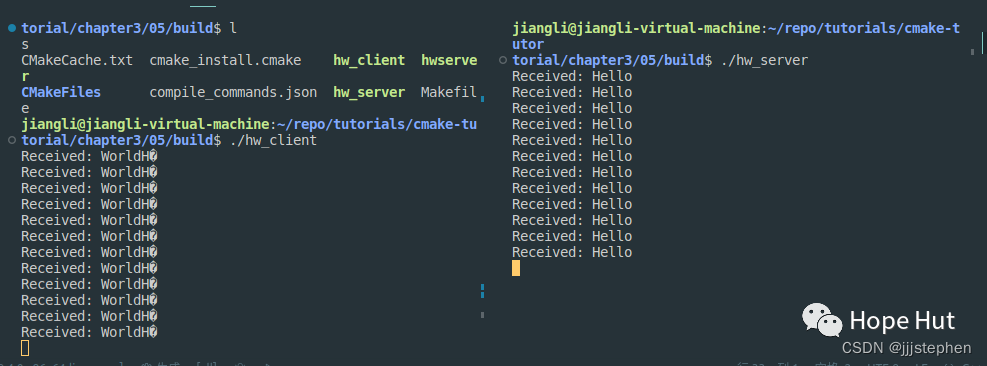
Finally, I wish everyone to become stronger!!!