Follow and star our public account for exciting content

Source: txp plays Linux
Author: txp
Editor: Li Xiaoyao
Recently, many readers have been asking about CMake and its differences from Makefile in the group. Today, I have organized an article for everyone, which is quite lengthy, and I hope it will be helpful.
Today, I will share the project management tool CMake, without first introducing the Makefile project management tool (to be honest, these two are quite similar; CMake ultimately generates Makefile, but CMake syntax is somewhat simpler and not as complex as Makefile).
From my personal experience, nowadays, most companies rarely write Makefile or CMake (of course, you can still see this skill requirement on job recruitment websites, so being able to write it yourself is ideal!). Generally, they directly use the manufacturer’s Makefile or CMake;
However, for learning purposes, it is still essential to study the principles behind it. For example, if an error occurs, you need to be able to locate and resolve it, as the error may lie within the configured Makefile or CMake. Therefore, you need to understand the meaning of the code inside (that is, you know how to use this tool, but you also need to understand its underlying principles, achieving both knowledge of the facts and understanding of the reasons!). This way, you can solve the problem.
Moreover, in my personal view, traditional Linux project management often uses Makefile (U-Boot also extensively uses Makefile for project management); in newer fields, such as IoT development (especially in some open-source projects), CMake is more commonly used (though there may be exceptions!). Now, without further ado, let’s start learning:
1. Learning to Use CMake:
1. Installing the CMake Management Tool:
In actual embedded Linux development, almost all development is done using Ubuntu because it is very convenient to install applications; you only need one command “apt install + application name” to get most of it done without further configuration (with some exceptions requiring additional configurations!). Installing CMake can be done with a single command:
root@txp-virtual-machine:/home/txp# apt install cmake
Reading package lists... Done
Building dependency tree
2. Let’s start with a simple example to derive the general writing steps:
Here, I will write a simple code project main.c and then use our CMake to manage the code project:
#include <stdio.h>

int main(void)
{
    printf("TXP Embedded\n");
    return 0;
}
Then, I will start writing the CMake project management file. I will create a CMakeLists.txt file in the current directory and start writing the project management code inside it.
root@txp-virtual-machine:/home/txp/test# pwd
/home/txp/test
root@txp-virtual-machine:/home/txp/test# touch CMakeLists.txt
root@txp-virtual-machine:/home/txp/test# ls
CMakeLists.txt  main.c
The content of the CMakeLists.txt file is as follows:
cmake_minimum_required (VERSION 2.8)

project (main)

add_executable(main main.c)
Let me explain what these three statements mean:
1. Indicates that the minimum version of CMake required to manage our project is 2.8.
2. Indicates that the project name is main.
3. Indicates that the final generated ELF file will be named main, using the source file main.c.
Now, let’s implement the functionality of CMake. In the current directory, use the command “cmake .” (the dot represents the current directory, while .. represents the parent directory) to generate Makefile and other related files; then execute the make command to compile the project, which will generate the executable file main, and also generate the Makefile file. Finally, we can execute the main executable file to get the desired result:
root@txp-virtual-machine:/home/txp/test# cmake .
-- The C compiler identification is GNU 4.8.4
-- The CXX compiler identification is GNU 4.8.4
-- Check for working C compiler: /usr/bin/cc
-- Check for working C compiler: /usr/bin/cc -- works
-- Detecting C compiler ABI info
-- Detecting C compiler ABI info - done
-- Check for working CXX compiler: /usr/bin/c++
-- Check for working CXX compiler: /usr/bin/c++ -- works
-- Detecting CXX compiler ABI info
-- Detecting CXX compiler ABI info - done
-- Configuring done
-- Generating done
-- Build files have been written to: /home/txp/test

root@txp-virtual-machine:/home/txp/test# ls
CMakeCache.txt  CMakeFiles  cmake_install.cmake  CMakeLists.txt  main  main.c  Makefile

root@txp-virtual-machine:/home/txp/test# make
Scanning dependencies of target main
[100%] Building C object CMakeFiles/main.dir/main.c.o
Linking C executable main
[100%] Built target main


root@txp-virtual-machine:/home/txp/test# ./main
TXP Embedded
If you are curious, you can open and see what the Makefile contains. It is easy to think that it is used to manage the project main in the Makefile way, so I will not elaborate further by pasting the source code here. cmake_install.cmake contains some related configuration options:
# Install script for directory: /home/txp/test

# Set the install prefix
IF(NOT DEFINED CMAKE_INSTALL_PREFIX)
  SET(CMAKE_INSTALL_PREFIX "/usr/local")
ENDIF(NOT DEFINED CMAKE_INSTALL_PREFIX)
STRING(REGEX REPLACE "/$" "" CMAKE_INSTALL_PREFIX "${CMAKE_INSTALL_PREFIX}")

# Set the install configuration name.
IF(NOT DEFINED CMAKE_INSTALL_CONFIG_NAME)
  IF(BUILD_TYPE)
    STRING(REGEX REPLACE "^[^A-Za-z0-9_]+" ""
           CMAKE_INSTALL_CONFIG_NAME "${BUILD_TYPE}")
  ELSE(BUILD_TYPE)
    SET(CMAKE_INSTALL_CONFIG_NAME "")
  ENDIF(BUILD_TYPE)
  MESSAGE(STATUS "Install configuration: \"${CMAKE_INSTALL_CONFIG_NAME}\"")
ENDIF(NOT DEFINED CMAKE_INSTALL_CONFIG_NAME)

# Set the component getting installed.
IF(NOT CMAKE_INSTALL_COMPONENT)
  IF(COMPONENT)
    MESSAGE(STATUS "Install component: \"${COMPONENT}\"")
    SET(CMAKE_INSTALL_COMPONENT "${COMPONENT}")
  ELSE(COMPONENT)
    SET(CMAKE_INSTALL_COMPONENT)
  ENDIF(COMPONENT)
ENDIF(NOT CMAKE_INSTALL_COMPONENT)

# Install shared libraries without execute permission?
IF(NOT DEFINED CMAKE_INSTALL_SO_NO_EXE)
  SET(CMAKE_INSTALL_SO_NO_EXE "1")
ENDIF(NOT DEFINED CMAKE_INSTALL_SO_NO_EXE)

IF(CMAKE_INSTALL_COMPONENT)
  SET(CMAKE_INSTALL_MANIFEST "install_manifest_${CMAKE_INSTALL_COMPONENT}.txt")
ELSE(CMAKE_INSTALL_COMPONENT)
  SET(CMAKE_INSTALL_MANIFEST "install_manifest.txt")
ENDIF(CMAKE_INSTALL_COMPONENT)

FILE(WRITE "/home/txp/test/${CMAKE_INSTALL_MANIFEST}" "")
FOREACH(file ${CMAKE_INSTALL_MANIFEST_FILES})
  FILE(APPEND "/home/txp/test/${CMAKE_INSTALL_MANIFEST}" "${file}\n")
ENDFOREACH(file)
~
And CMakeFiles is a folder, which contains the following files:
root@txp-virtual-machine:/home/txp/test/CMakeFiles# ls
2.8.12.2  cmake.check_cache  CMakeDirectoryInformation.cmake
CMakeOutput.log  CMakeTmp  main.dir  Makefile2
Makefile.cmake  progress.marks  TargetDirectories.txt
Summary: From the simple example above, we can see that all CMake statements are written in a text file named “CMakeLists.txt”. Therefore, the complete steps to manage a project using CMake are as follows:
1. First, create CMakeLists.txt (just like we use Makefile to manage projects, there is a special file for writing project management code, and CMake is no exception, using CMakeLists.txt to write code for project management).
2. Then write configurations in CMakeLists.txt, for simple configurations, refer to the format above; for complex configurations, we will demonstrate and explain below.
3. Next, use the command “cmake .” (this command must be executed in the same directory as CMakeLists.txt) to generate Makefile and other files.
4. Finally, use the make command to compile the project and generate the executable file.
3. Multiple Source Files in the Same Directory:
Here, we will add two more files: test1.c and test1.h in the current directory. The content of test1.c is as follows:
#include <stdio.h>
#include "test1.h"

void func(int a)
{
    printf("a=%d\n",a);
}
The content of test1.h is as follows:
#ifndef _TEST1_H
#define _TEST1_H

void func(int a);

#endif /* _TEST1_H */
Then, we will call the func() function in main.c:
#include <stdio.h>
#include "test1.h"
int main(void)
{
    func(6);
    printf("TXP Embedded\n");
    return 0;
}
At this point, we need to modify the CMakeLists.txt file:
cmake_minimum_required (VERSION 2.8)

project (main)

add_executable(main main.c test1.c)
The final result is as follows:
root@txp-virtual-machine:/home/txp/test# cmake .
-- Configuring done
-- Generating done
-- Build files have been written to: /home/txp/test
root@txp-virtual-machine:/home/txp/test# make
Scanning dependencies of target main
[ 50%] Building C object CMakeFiles/main.dir/main.c.o
[100%] Building C object CMakeFiles/main.dir/test1.c.o
Linking C executable main
[100%] Built target main
root@txp-virtual-machine:/home/txp/test# ./main
a=6
TXP Embedded
Summary:
In the CMakeLists.txt writing above, you will notice that add_executable(main main.c test1.c) has an additional source file (you can think of the source code as raw materials for processing, and this is also how to understand the generation of target files in Makefile!). Therefore, if you want to add more source files to the current directory, you can directly add them in the third statement of the CMakeLists.txt text file; however, this method has its drawbacks. For example, if there are hundreds of source files in the current directory, you cannot manually type them one by one, otherwise, it would be like returning to the primitive society, and the advantages of CMake would not be reflected! More usage will be discussed in the next detailed explanation!
2. Make Good Use of CMake for a Great Day (or Even More):
1. Using aux_source_directory(dir var) for Multiple Source Files:
At the end of the last article, there was a question about having multiple source files in the same directory. In this case, you cannot keep adding source files manually in the third command, as that would be very inefficient:
cmake_minimum_required(VERSION 2.8)

project(main)

add_executable(main main.c test1.c)
To solve this inefficiency, CMake has a command that can completely resolve this issue. However, to illustrate the problem, I have added two more files: test2.c and test2.h:
root@txp-virtual-machine:/home/txp/test# ls
1               cmake_install.cmake  main.c    test1.h  touch1.c
CMakeCache.txt  CMakeLists.txt       Makefile  test2.c  touch1.h
CMakeFiles      main                 test1.c   test2.h
The content of test2.c is as follows:
#include <stdio.h>
#include "test2.h"

void func1()
{
  printf("I like CMake\n");
}
The content of test2.h is as follows:
#ifndef _TEST2_H_
#define _TEST2_H_

void func1();

#endif
Finally, main.c calls the func1 function:
#include <stdio.h>
#include "test1.h"
#include "test2.h"
int main(void)
{
    func1();
    func(8);
    printf("TXP Embedded\n");
    return 0;
}
Next, we will focus on using aux_source_directory(dir var) to solve the efficiency issue. We will modify the CMakeLists.txt as follows:
cmake_minimum_required(VERSION 2.8)

project(main)

aux_source_directory(. SRC_LIST)

add_executable(main ${SRC_LIST})
Then compile:
root@txp-virtual-machine:/home/txp/test# cmake .
-- Configuring done
-- Generating done
-- Build files have been written to: /home/txp/test

root@txp-virtual-machine:/home/txp/test# make
Scanning dependencies of target main
[ 25%] Building C object CMakeFiles/main.dir/main.c.o
[ 50%] Linking C executable main

root@txp-virtual-machine:/home/txp/test# ./main
I like CMake
the b is 8
TXP Embedded
Explanation:
aux_source_directory(. SRC_LIST): This means adding all source files in the current directory to the source list variable, and finally using add_executable(main ${SRC_LIST}) to process all useful source files into the target file main. However, this method also has its drawbacks, as it adds all source files in the current directory to the variable SRC_LIST. If we do not need some unnecessary files (we only need the required source files), we can do the following:
cmake_minimum_required(VERSION 2.8)

project(main)

set(SRC_LIST
        ./main.c
        ./test1.c
        ./test2.c
         )

add_executable(main ${SRC_LIST})
This will compile successfully:
root@txp-virtual-machine:/home/txp/test# cmake .
-- Configuring done
-- Generating done
-- Build files have been written to: /home/txp/test
root@txp-virtual-machine:/home/txp/test# make
[100%] Built target main
2. Organizing Source Files in Different Directories:
In the previous example, we noticed that the source files in the same directory were quite messy. Therefore, CMake has a rule that allows you to place similar and related source files in the same directory. For example, I will create two directories, test1 and test2, under the test directory and move test1.c, test1.h, test2.c, and test2.h into these two directories:
root@txp-virtual-machine:/home/txp/test# mkdir -p test1 test2
root@txp-virtual-machine:/home/txp/test# ls
@               CMakeFiles           main      test1    test2
1               cmake_install.cmake  main.c    Makefile  test2.c  test2.h
CMakeCache.txt  CMakeLists.txt       test1.c  test1.h
Then, I will move the relevant files into these two directories:
root@txp-virtual-machine:/home/txp/test# mv test1.c test1.h test1

root@txp-virtual-machine:/home/txp/test# mv test2.c test2.h test2
root@txp-virtual-machine:/home/txp/test# ls
@  CMakeCache.txt  cmake_install.cmake  main    Makefile  test2
1  CMakeFiles      CMakeLists.txt       main.c  test1
Then, we need to modify the properties in the CMakeLists.txt file:
cmake_minimum_required(VERSION 2.8)

project(main)

include_directories(test1 test2)
aux_source_directory(test1 SRC_LIST)
aux_source_directory(test2 SRC_LIST1)

add_executable(main main.c  ${SRC_LIST} ${SRC_LIST1})
Then compile, and it will also pass:
root@txp-virtual-machine:/home/txp/test# cmake .
-- Configuring done
-- Generating done
-- Build files have been written to: /home/txp/test
root@txp-virtual-machine:/home/txp/test# make
Scanning dependencies of target main
[ 25%] Building C object CMakeFiles/main.dir/main.c.o
[ 50%] Building C object CMakeFiles/main.dir/test1/test1.c.o
[ 75%] Building C object CMakeFiles/main.dir/test2/test2.c.o
[100%] Linking C executable main
[100%] Built target main
root@txp-virtual-machine:/home/txp/test# ls
@  CMakeCache.txt  cmake_install.cmake  main    Makefile  test2
1  CMakeFiles      CMakeLists.txt       main.c  test1
Explanation:
Here, a new command appears: include_directories. This command is used to add multiple specified header file search paths to the project, with paths separated by spaces.
In actual development projects, source files are generally placed in the src directory, header files in the include directory, generated object files in the build directory, and the final output ELF files in the bin directory. This makes it clear and organized.
3. Adding Link Libraries in CMake:
In the last CMake article, we also left a question about how to place source files in the src directory and header files in the include directory. This is also more in line with others and your future project configurations (as soon as you see these two directories, you can understand their meanings clearly). Meanwhile, the ELF files generated in the Linux environment will be placed in the bin directory. However, a few days after the article was published, some users raised new requirements:
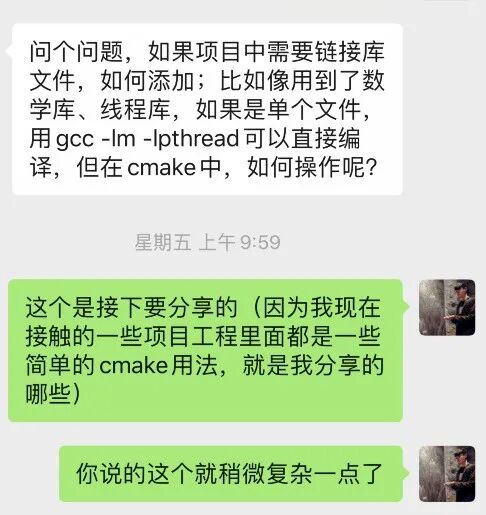
(If users have any practical needs, they can message me privately. As long as it is within my ability, I can write an article to share with everyone.) Those who are familiar with me know that I also started from the basics, sharing from very fundamental concepts. Although these are more theoretical, they are all accumulations of knowledge (sometimes, in actual project development, you may not learn much; more often, it is about relying on daily foundational accumulation and expansion. Therefore, overall, daily practice is very worthwhile!). Now, let’s get into the main topic:
1. Using src, include, and bin Directories (More Standardized):
1. First, create these three directory structures and place the corresponding files inside:
root@txp-virtual-machine:/home/txp/testmy# mkdir bin build src include
root@txp-virtual-machine:/home/txp/testmy# ls
bin  build  include  src
Place the files in the include directory (the contents of test1.h and test2.h continue from the previous article, so I will not repeat them):
root@txp-virtual-machine:/home/txp/testmy/include# ls
test1.h  test2.h
Place the files in the src directory (the contents of test1.c and test2.c continue from the previous article, so I will not repeat them):
root@txp-virtual-machine:/home/txp/testmy/src# ls
main.c  test1.c  test2.c
Finally, we need to create a CMakeLists.txt in both the testmy directory and the src directory:
/* CMakeLists.txt content in the testmy directory: */

cmake_minimum_required(VERSION 2.8)

project(main)

add_subdirectory(src)

/* CMakeLists.txt content in the src directory: */

aux_source_directory(. SRC_LIST)

include_directories(../include)

add_executable(main ${SRC_LIST})

set (EXECUTABLE_OUTPUT_PATH ${PROJECT_SOURCE_DIR}/bin)
Explanation of the unfamiliar statements in the first CMakeLists.txt:
-
add_subdirectory(src) means adding a subdirectory that contains the source files to the current project, and it can specify the intermediate binary and target binary storage locations (the subdirectory means a subdirectory, so it indicates that the src directory contains the source files. When executing cmake, it will enter the src directory to find the CMakeLists.txt in the src directory, so a CMakeLists.txt must also be established in the src directory). The official usage is as follows (though I won’t delve into it for now):
add_subdirectory
----------------

Add a subdirectory to the build.

::

  add_subdirectory(source_dir [binary_dir]
                   [EXCLUDE_FROM_ALL])

Add a subdirectory to the build.  The source_dir specifies the directory in which the source CMakeLists.txt and code files are located.  If it is a relative path it will be evaluated with respect to the current directory (the typical usage), but it may also be an absolute path.  The binary_dir specifies the directory in which to place the output files.  If it is a relative path it will be evaluated with respect to the current output directory, but it may also be an absolute path.  If binary_dir is not specified, the value of source_dir, before expanding any relative path, will be used (the typical usage).  The CMakeLists.txt file in the specified source directory will be processed immediately by CMake before processing in the current input file continues beyond this command.

If the EXCLUDE_FROM_ALL argument is provided then targets in the subdirectory will not be included in the ALL target of the parent directory by default, and will be excluded from IDE project files. Users must explicitly build targets in the subdirectory.  This is meant for use when the subdirectory contains a separate part of the project that is useful but not necessary, such as a set of examples.  Typically the subdirectory should contain its own project() command invocation so that a full build system will be generated in the subdirectory (such as a VS IDE solution file).  Note that inter-target dependencies supercede this exclusion.  If a target built by the parent project depends on a target in the subdirectory, the dependee target will be included in the parent project build system to satisfy the dependency.
Analysis of the second CMakeLists.txt content:
-
aux_source_directory(. SRC_LIST): This adds the source files in the current directory: main.c, test1.c, and test2.c to the variable SRC_LIST.
-
include_directories(../include): This includes the header files from the include directory.
-
set(EXECUTABLE_OUTPUT_PATH ${PROJECT_SOURCE_DIR}/bin): Here, EXECUTABLE_OUTPUT_PATH and PROJECT_SOURCE_DIR are predefined variables in CMake, and their functions are as follows:
-
EXECUTABLE_OUTPUT_PATH: The storage location for the target binary executable file.
-
PROJECT_SOURCE_DIR: The root directory of the project.
Thus, the generated ELF file (which is our final executable file) will be placed in the bin directory, while the build directory will contain some configuration intermediate files.
The specific steps are as follows:
root@txp-virtual-machine:/home/txp/testmy# vim CMakeLists.txt
root@txp-virtual-machine:/home/txp/testmy# cd src
root@txp-virtual-machine:/home/txp/testmy/src# ls
main.c  test1.c  test2.c
root@txp-virtual-machine:/home/txp/testmy/src# vim CMakeLists.txt
The final structure is as follows:
root@txp-virtual-machine:/home/txp/testmy# tree
.
├── bin
├── build
├── CMakeLists.txt
├── include
│   ├── test1.h
│   └── test2.h
└── src
    ├── CMakeLists.txt
    ├── main.c
    ├── test1.c
    └── test2.c
2. Compile and Run:
root@txp-virtual-machine:/home/txp/testmy# cd build
root@txp-virtual-machine:/home/txp/testmy/build# ls
Now, let’s execute cmake .. and make commands in the build directory:
root@txp-virtual-machine:/home/txp/testmy/build# cmake ..
-- The C compiler identification is GNU 4.8.4
-- The CXX compiler identification is GNU 4.8.4
-- Check for working C compiler: /usr/bin/cc
-- Check for working C compiler: /usr/bin/cc -- works
-- Detecting C compiler ABI info
-- Detecting C compiler ABI info - done
-- Check for working CXX compiler: /usr/bin/c++
-- Check for working CXX compiler: /usr/bin/c++ -- works
-- Detecting CXX compiler ABI info
-- Detecting CXX compiler ABI info - done
-- Configuring done
-- Generating done
-- Build files have been written to: /home/txp/testmy/build
root@txp-virtual-machine:/home/txp/testmy/build# make
Scanning dependencies of target main
[ 33%] Building C object src/CMakeFiles/main.dir/test2.c.o
[ 66%] Building C object src/CMakeFiles/main.dir/test1.c.o
[100%] Building C object src/CMakeFiles/main.dir/main.c.o
Linking C executable ../../bin/main
[100%] Built target main
root@txp-virtual-machine:/home/txp/testmy/build# cd ../bin
root@txp-virtual-machine:/home/txp/testmy/bin# ls
main
Note that you need to switch to the build directory to execute cmake. Why do we do this? Because we can see that the configuration files generated after executing cmake .. and make commands will be in this directory, not in other directories, making it look much cleaner and more organized:
root@txp-virtual-machine:/home/txp/testmy/build# ls
CMakeCache.txt  CMakeFiles  cmake_install.cmake  Makefile  src
Now the entire structure is as follows:
root@txp-virtual-machine:/home/txp/testmy# tree
.
├── bin
│   └── main
├── build
│   ├── CMakeCache.txt
│   ├── CMakeFiles
│   │   ├── 2.8.12.2
│   │   │   ├── CMakeCCompiler.cmake
│   │   │   ├── CMakeCXXCompiler.cmake
│   │   │   ├── CMakeDetermineCompilerABI_C.bin
│   │   │   ├── CMakeDetermineCompilerABI_CXX.bin
│   │   │   ├── CMakeSystem.cmake
│   │   │   ├── CompilerIdC
│   │   │   │   ├── a.out
│   │   │   │   └── CMakeCCompilerId.c
│   │   │   └── CompilerIdCXX
│   │   │       ├── a.out
│   │   │       └── CMakeCXXCompilerId.cpp
│   │   ├── cmake.check_cache
│   │   ├── CMakeDirectoryInformation.cmake
│   │   ├── CMakeOutput.log
│   │   ├── CMakeTmp
│   │   ├── Makefile2
│   │   ├── Makefile.cmake
│   │   ├── progress.marks
│   │   └── TargetDirectories.txt
│   ├── cmake_install.cmake
│   ├── Makefile
│   └── src
│       ├── CMakeFiles
│       │   ├── CMakeDirectoryInformation.cmake
│       │   ├── main.dir
│       │   │   ├── build.make
│       │   │   ├── C.includecache
│       │   │   ├── cmake_clean.cmake
│       │   │   ├── DependInfo.cmake
│       │   │   ├── depend.internal
│       │   │   ├── depend.make
│       │   │   ├── flags.make
│       │   │   ├── link.txt
│       │   │   ├── main.c.o
│       │   │   ├── progress.make
│       │   │   ├── test1.c.o
│       │   │   └── test2.c.o
│       │   └── progress.marks
│   ├── cmake_install.cmake
│   └── Makefile
├── CMakeLists.txt
├── include
│   ├── test1.h
│   └── test2.h
└── src
    ├── CMakeLists.txt
    ├── main.c
    ├── test1.c
    └── test2.c
3. Execute the final result:
root@txp-virtual-machine:/home/txp/testmy/bin# ./main
I like CMake
a=8
TXP Embedded
2. Learning Dynamic and Static Libraries:
This topic goes back to the requirement raised by the user at the beginning. However, we will start from the simple and gradually delve deeper. Sometimes we only need to compile dynamic libraries and static libraries for other programs to call. So how do we achieve this in CMake? The specifics are as follows:
Note that the source files (test1.c, test2.c, test1.h, test2.h, main.c) are the same for testing.
1. To keep things clear, I will create a new directory project for demonstration:
root@txp-virtual-machine:/home/txp# mkdir testcmake
root@txp-virtual-machine:/home/txp/testcmake# mkdir build lib lib_test
root@txp-virtual-machine:/home/txp/testcmake# ls
build  lib  lib_test
Then, place our source files test1.c and test1.h in the lib_test directory, and create a CMakeLists.txt in the lib_test directory; also create a CMakeLists.txt in the testcmake directory:
root@txp-virtual-machine:/home/txp/testcmake/lib_test# ls
CMakeLists.txt  test1.c  test1.h

/* CMakeLists.txt content in the lib_test directory: */

aux_source_directory(. SRC_LIST)

add_library(test1_shared SHARED ${SRC_LIST})
add_library(test1_static STATIC ${SRC_LIST})

set_target_properties(test1_shared PROPERTIES OUTPUT_NAME "test1")
set_target_properties(test1_static PROPERTIES OUTPUT_NAME "test1")

set (LIBRARY_OUTPUT_PATH ${PROJECT_SOURCE_DIR}/lib)
Explanation:
-
add_library: Generates a dynamic or static library (the first parameter specifies the library name; the second parameter determines whether it is dynamic or static; if not specified, it defaults to static; the third parameter specifies the source files for generating the library).
-
set_target_properties: Sets the output name and other functions, such as setting the library version number, etc.
-
LIBRARY_OUTPUT_PATH: The default output path for the library files, set to the lib directory under the project directory.
The CMakeLists.txt content in the testcmake directory is as follows:
cmake_minimum_required(VERSION 2.8)

project(main)

add_subdirectory(lib_test)
The final structure is as follows:
root@txp-virtual-machine:/home/txp/testcmake# ls
build  CMakeLists.txt  lib  lib_test
root@txp-virtual-machine:/home/txp/testcmake# tree
.
├── build
├── CMakeLists.txt
├── lib
└── lib_test
    ├── CMakeLists.txt
    ├── test1.c
    └── test1.h

3 directories, 4 files
2. Compilation Results:
root@txp-virtual-machine:/home/txp/testcmake/build# cmake ..
-- The C compiler identification is GNU 4.8.4
-- The CXX compiler identification is GNU 4.8.4
-- Check for working C compiler: /usr/bin/cc
-- Check for working C compiler: /usr/bin/cc -- works
-- Detecting C compiler ABI info
-- Detecting C compiler ABI info - done
-- Check for working CXX compiler: /usr/bin/c++
-- Check for working CXX compiler: /usr/bin/c++ -- works
-- Detecting CXX compiler ABI info
-- Detecting CXX compiler ABI info - done
-- Configuring done
-- Generating done
-- Build files have been written to: /home/txp/testcmake/build
root@txp-virtual-machine:/home/txp/testcmake/build# make
Scanning dependencies of target test1_shared
[ 50%] Building C object lib_test/CMakeFiles/test1_shared.dir/test1.c.o
Linking C shared library ../../lib/libtest1.so
[ 50%] Built target test1_shared
Scanning dependencies of target test1_static
[100%] Building C object lib_test/CMakeFiles/test1_static.dir/test1.c.o
Linking C static library ../../lib/libtest1.a
[100%] Built target test1_static
root@txp-virtual-machine:/home/txp/testcmake/build# cd ../lib
root@txp-virtual-machine:/home/txp/testcmake/lib# ls
libtest1.a  libtest1.so
Note that the compilation rules have been discussed above, so I will not repeat them.
From the lib directory, we can see that both the static library and dynamic library have been generated: libtest1.a and libtest1.so.
3. Linking to the Library:
Now we will use the libraries we just generated. Clear the configuration files from the build directory, and simultaneously create bin and src directories in the testcmake directory (similar to what we discussed above):
root@txp-virtual-machine:/home/txp/testcmake# mkdir src bin
root@txp-virtual-machine:/home/txp/testcmake# ls
bin  build  CMakeLists.txt  lib  lib_test  src
root@txp-virtual-machine:/home/txp/testcmake# cd src
root@txp-virtual-machine:/home/txp/testcmake/src# vim main.c
And modify the CMakeLists.txt content in the testcmake directory:
cmake_minimum_required(VERSION 2.8)

project(main)

add_subdirectory(lib_test)

add_subdirectory(src)
In the src directory, create a CMakeLists.txt:
aux_source_directory(. SRC_LIST)

include_directories(../lib_test)

link_directories(${PROJECT_SOURCE_DIR}/lib)

add_executable(main ${SRC_LIST})

target_link_libraries(main test1)

set(EXECUTABLE_OUTPUT_PATH ${PROJECT_SOURCE_DIR}/bin)
Explanation:
— link_directories: Adds non-standard shared library search paths.
— target_link_libraries: Links the target file with the library file.
3. Compilation:
root@txp-virtual-machine:/home/txp/testcmake/build# cmake ..
-- The C compiler identification is GNU 4.8.4
-- The CXX compiler identification is GNU 4.8.4
-- Check for working C compiler: /usr/bin/cc
-- Check for working C compiler: /usr/bin/cc -- works
-- Detecting C compiler ABI info
-- Detecting C compiler ABI info - done
-- Check for working CXX compiler: /usr/bin/c++
-- Check for working CXX compiler: /usr/bin/c++ -- works
-- Detecting CXX compiler ABI info
-- Detecting CXX compiler ABI info - done
-- Configuring done
-- Generating done
-- Build files have been written to: /home/txp/testcmake/build
root@txp-virtual-machine:/home/txp/testcmake/build# make
Scanning dependencies of target test1_shared
[ 33%] Building C object lib_test/CMakeFiles/test1_shared.dir/test1.c.o
Linking C shared library ../../lib/libtest1.so
[ 33%] Built target test1_shared
Scanning dependencies of target test1_static
[ 66%] Building C object lib_test/CMakeFiles/test1_static.dir/test1.c.o
Linking C static library ../../lib/libtest1.a
[ 66%] Built target test1_static
Scanning dependencies of target main
[100%] Building C object src/CMakeFiles/main.dir/main.c.o
Linking C executable ../../bin/main
[100%] Built target main
root@txp-virtual-machine:/home/txp/testcmake/build# cd ../bin
root@txp-virtual-machine:/home/txp/testcmake/bin# ls
main
From the above, we can see that it executed successfully. Also, note that we have both dynamic and static libraries in the lib directory, and in the CMakeLists.txt in the src directory, target_link_libraries(main test1) defaults to using the dynamic library. If there is only a static library in the lib directory, this writing will link to the static library. You can also directly specify whether to use the dynamic or static library by writing: target_link_libraries(main libtest1.so) or target_link_libraries(main libtest1.a).
We can also check which library files the ELF file is using:
root@txp-virtual-machine:/home/txp/testcmake/bin# readelf -d ./main

Dynamic section at offset 0xe08 contains 26 entries:
  Tag        Type                         Name/Value
 0x0000000000000001 (NEEDED)             Shared library: [libtest1.so]
 0x0000000000000001 (NEEDED)             Shared library: [libc.so.6]
 0x000000000000000f (RPATH)              Library rpath: [/home/txp/testcmake/lib]
 0x000000000000000c (INIT)               0x4006a0
 0x000000000000000d (FINI)               0x400894
 0x0000000000000019 (INIT_ARRAY)         0x600df0
 0x000000000000001b (INIT_ARRAYSZ)       8 (bytes)
 0x000000000000001a (FINI_ARRAY)         0x600df8
 0x000000000000001c (FINI_ARRAYSZ)       8 (bytes)
 0x000000006ffffef5 (GNU_HASH)           0x400298
 0x0000000000000005 (STRTAB)             0x4004d8
 0x0000000000000006 (SYMTAB)             0x4002f8
 0x000000000000000a (STRSZ)              260 (bytes)
 0x000000000000000b (SYMENT)             24 (bytes)
 0x0000000000000015 (DEBUG)              0x0
 0x0000000000000003 (PLTGOT)             0x601000
 0x0000000000000002 (PLTRELSZ)           96 (bytes)
 0x0000000000000014 (PLTREL)             RELA
 0x0000000000000017 (JMPREL)             0x400640
 0x0000000000000007 (RELA)               0x400628
 0x0000000000000008 (RELASZ)             24 (bytes)
 0x0000000000000009 (RELAENT)            24 (bytes)
 0x000000006ffffffe (VERNEED)            0x400608
 0x000000006fffffff (VERNEEDNUM)         1
 0x000000006ffffff0 (VERSYM)             0x4005dc
 0x0000000000000000 (NULL)               0x0
3. Summary:
Now that we know how to use dynamic and static libraries, it will be easier to implement the requirement raised by the user. Due to space limitations, this test will be left for the next CMake article to experiment and see if it can be achieved (I have not done the experiment yet, but once I complete it, I will share it. This article took a long time to share, so everyone can digest it for now).
 Recommended Reading:
Embedded Programming Series
Linux Learning Series
C/C++ Programming Series


Long press to follow the public account in the image above