
Bodhi Linux is a lightweight Linux distribution based on Ubuntu LTS, created by American developer Jeff Hoogland in 2011. Its name is derived from the Buddhist term “Bodhi”, which means “awakening and insight.” The core philosophy of Bodhi Linux is: minimalism without compromise — providing a lightweight, clean system foundation that allows users to freely customize their desktop experience.
🏞️ Interface Preview
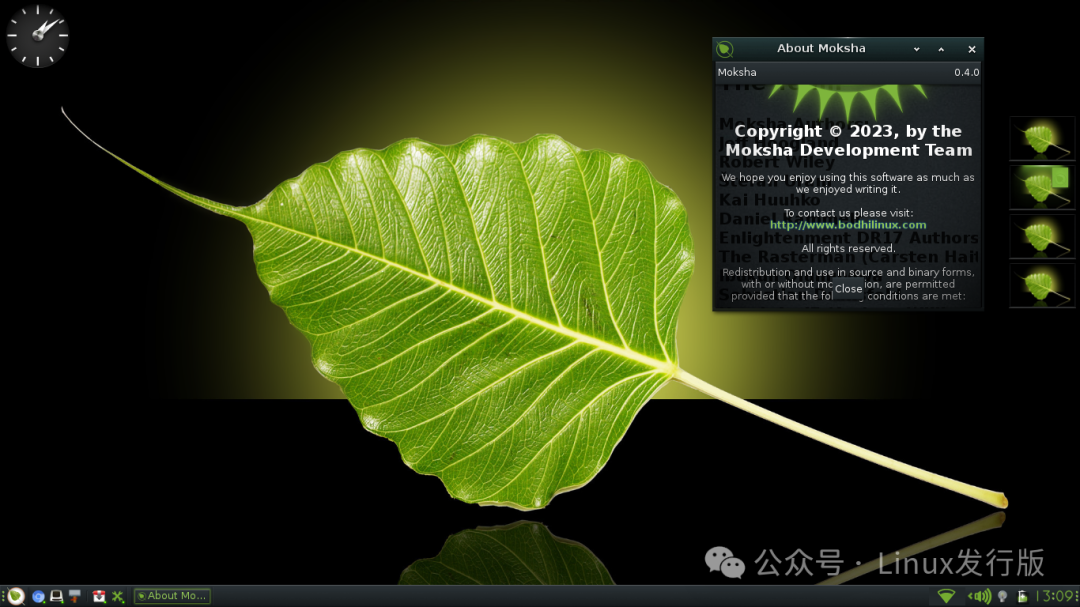
📜 Origin and Development
- • 🕰️ 2011: The first version of Bodhi Linux was released, based on Ubuntu 10.04.
- • 🧑💻 Design Goal: To provide a lightweight solution for older hardware and minimalist users.
- • 🔄 Version Evolution:
- • Early versions used the Enlightenment (E17) desktop environment.
- • From 2015, the Moksha desktop (an improved version based on E17) was developed and became the default environment.
- • 🆕 Latest Version: Bodhi Linux 7.0 (released in 2023), based on Ubuntu 22.04 LTS.
🎯 Core Design Philosophy
- • ⚡ Lightweight and Fast: Idle memory usage is only about 150–200MB, suitable for low-spec devices.
- • 🌱 Minimal and Clean: Very few default pre-installed applications, only providing basic tools like a browser, terminal, and text editor.
- • 🧩 Highly Customizable: The Moksha desktop supports themes, modules, and effects, allowing users to create a personalized desktop.
- • 🛡️ Stable and Reliable: Inherits the kernel and software repository from Ubuntu LTS, balancing compatibility and security.
- • 🎨 Aesthetic and Functional Balance: The Moksha desktop is both lightweight and supports rich visual effects.
🧩 Technical Features
| Category | Default Configuration/Supported Options | Feature Description |
| Desktop Environment | Moksha (based on Enlightenment) | Lightweight, elegant, customizable |
| Package Management | APT + dpkg | Fully compatible with Ubuntu software repositories |
| Kernel | Ubuntu LTS kernel (5.15+) | Stable, secure, with broad hardware support |
| File System | ext4 / Btrfs | Supports encryption and snapshots |
| Default Applications | Midori browser, Terminology terminal, ePad editor, ePhoto image viewer | Maintains minimalism, users can expand as needed |
| Installer | Ubiquity | Graphical installer, supports Chinese interface |
⚙️ Installation and Usage Guide
- 1. 💿 Download the Image: Official download page
- 2. 🔧 Create a Bootable Drive: Recommended to use Ventoy or BalenaEtcher.
- 3. 🖱️ Installation Process:
- • Graphical installer, supports UEFI and BIOS
- • Automatic/manual partitioning, supports Chinese interface
- • Set user, timezone, language
sudo apt update && sudo apt upgrade
sudo apt install firefox libreoffice vlc
👥 Target Audience and Typical Scenarios
- • 🧑🎓 Students and Educational Institutions: Reviving old computers, saving hardware costs
- • 🧑💻 Geeks and Customization Enthusiasts: Enjoy building a personalized desktop from scratch
- • 🖥️ Low-Spec Device Users: Can run on 512MB of RAM
- • 🧊 Minimalists: Pursuing a clean, no-frills system experience
✅ Advantages and ⚠️ Considerations
Advantages:
- • ⚡ Extremely lightweight, suitable for old devices
- • 🌱 Extremely minimal and clean, users can expand freely
- • 🧩 The Moksha desktop is beautiful and customizable
- • 🛡️ Based on Ubuntu LTS, stable and reliable
Considerations:
- • 📦 Very few default applications, beginners need to manually install common apps
- • 📚 The Chinese community is relatively small, learning resources are limited
- • 🧱 The interaction logic of the Moksha desktop differs slightly from mainstream desktops, requiring adaptation
📌 Summary: Who Should Choose Bodhi Linux?
If you have the following needs, Bodhi Linux would be an ideal choice:
- • 💻 Want to breathe new life into an old computer
- • 🧑💻 Enjoy minimalist systems and high customization
- • 🧊 Pursue a balance of lightweight and aesthetics
- • 🖥️ Hope to gain a cleaner experience within the Ubuntu ecosystem
In summary: Bodhi Linux is a derivative of Ubuntu that embodies “minimalism + aesthetics + lightweight,” suitable for geeks and lightweight desktop enthusiasts.
📎 Official Website: https://www.bodhilinux.com📥 Download Page: https://www.bodhilinux.com/download/