In-Depth Analysis of the Linux Slab Allocator: From Principles to Practice
1 Overview of the Linux Slab Allocator
1.1 What is the Slab Allocator
The slab allocator is an efficient small memory allocation mechanism in the Linux operating system kernel, specifically designed for managing the allocation and release of kernel objects. This mechanism was originally developed by Jeff Bonwick of Sun Microsystems for the Solaris operating system and was later ported to the Linux kernel, becoming one of the core components of Linux kernel memory management. The design of the slab allocator is based on the concept of object management, establishing object caches for frequently allocated and released kernel objects (such as process descriptors, file objects, semaphores, etc.), significantly improving memory allocation performance and utilization.
In practical operation, the slab allocator acts as an object repository, pre-allocating and initializing a batch of commonly used kernel objects. When the kernel needs these objects, they can be quickly retrieved directly from the repository without going through the complex memory allocation process each time. It is similar to a large restaurant that prepares some common ingredients and semi-finished dishes in advance; when customers place orders, chefs can directly use these pre-prepared materials instead of starting from the raw ingredients each time, greatly improving the efficiency of meal preparation.
1.2 Design Goals and Problems Addressed
Before the slab allocator was introduced, the Linux kernel primarily used the buddy system for memory allocation. Although the buddy system effectively manages the allocation and release of physical page frames, it is mainly aimed at managing large blocks of memory (in page units). For the numerous small object allocations present in the kernel, directly using the buddy system can lead to significant issues:
- • Memory Fragmentation: Frequent allocation and release of small memory blocks can lead to a large number of non-contiguous small free memory blocks, which cannot satisfy larger memory allocation requests.
- • Performance Overhead: Each allocation requires calling complex buddy system algorithms, which incurs excessive overhead for small objects.
- • Initialization Overhead: Kernel objects often require initialization after allocation, and repeated initialization operations waste CPU time.
The slab allocator addresses the above issues in the following ways:
- • Object Caching: Establishing caches for commonly used kernel objects to avoid frequent memory requests to the buddy system.
- • Object Reuse: Released objects are not immediately returned to the buddy system but are retained in the cache for subsequent allocations.
- • Pre-initialization: Objects are initialized at the time of creation, eliminating the need for repeated initialization during subsequent allocations.
The slab allocator is particularly suitable for scenarios involving frequent allocation and release of objects of the same size, such as operations on process descriptors <span>task_struct</span> during process creation and destruction. Without the slab allocator, each process creation would require requesting memory from the buddy system and initializing the <span>task_struct</span>; however, with the slab allocator, it is only necessary to retrieve an already initialized object directly from the <span>task_struct</span> cache, greatly enhancing efficiency.
2 Architecture Design of the Slab Allocator
2.1 Three-Level Hierarchical Structure: Cache, Slab, Object
The slab allocator employs a clear three-level hierarchical structure to organize memory, consisting of cache, slab, and object. This design is akin to the management system of a large library, allowing us to understand the relationship between the three through this analogy.
Cache is like the book classification area in a library (such as the science section, literature section, history section), with each cache dedicated to storing a specific type of kernel object. In the kernel, each cache is responsible for managing a specific size of objects, for example, the <span>task_struct</span> cache specifically manages process descriptors, while the <span>inode_cache</span> manages inode objects, etc. Each cache maintains three slab linked lists: full, partially full, and empty, similar to the fully borrowed, partially borrowed, and fully stocked bookshelves in a library classification area.
Slab is the basic management unit of the cache, equivalent to a bookshelf in the classification area. Each slab consists of one or more contiguous physical page frames (usually one page), which are divided into multiple equally sized object storage slots. Just as a bookshelf can hold multiple books of the same type, a slab contains multiple objects of the same type. Slabs can be in three states: full (all objects allocated), empty (all objects free), and partial (some objects allocated, some free), which is similar to the fully loaded, empty, and partially loaded states of a bookshelf.
Object is the smallest allocation unit of the slab allocator, equivalent to a single book on a shelf. Each object is an actual memory block that can be allocated for kernel use, with its size determined by the associated cache. When the kernel needs to allocate an object, it is akin to a reader borrowing a book; when releasing an object, it is like returning the book to the original shelf.
The following Mermaid diagram clearly illustrates the hierarchical relationship between cache, slab, and object:
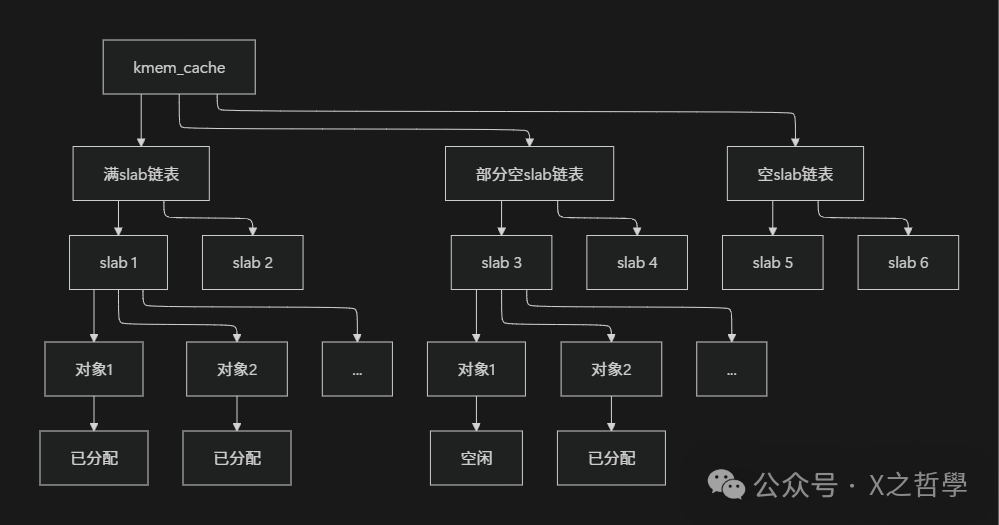
Figure: Schematic diagram of the three-level structure of the slab allocator
2.2 Core Data Structure kmem_cache
The core of the slab allocator is the <span>kmem_cache</span> data structure, which acts as the “brain” of the entire allocator, responsible for managing a specific type of object cache. This structure is defined in the Linux kernel’s <span>include/linux/slub_def.h</span>, and the following are its key fields and their meanings:
struct kmem_cache {
    struct kmem_cache_cpu __percpu *cpu_slab;    /* Per-CPU slab information */
    slab_flags_t flags;                          /* Cache flags */
    unsigned long min_partial;                   /* Minimum number of empty slabs to retain */
    unsigned int size;          /* Total size of the object (including metadata) */
    unsigned int object_size;   /* Original size of the object */
    unsigned int offset;        /* Free pointer offset */
    unsigned int cpu_partial;   /* Maximum number of partially empty slabs per CPU */
    struct kmem_cache_order_objects oo;  /* Contains order and number of objects */
    /* More fields: slab size settings, allocation flags, constructors, etc. */
    const char *name;           /* Cache name */
    struct list_head list;      /* Cache linked list */
    int refcount;               /* Reference count */
    void (*ctor)(void *);       /* Object constructor */
    unsigned int inuse;         /* Actual size of objects in use */
    unsigned int align;         /* Alignment size */
    // ...
};
<span>kmem_cache</span> structure key field explanations:
- •
<span>cpu_slab</span>: This is a per-CPU variable, with each CPU having its own independent slab, thus avoiding lock contention in a multi-processor environment and improving performance. This is akin to a bank having a separate cash box for each teller, allowing tellers to directly access their own cash box without competing with others for the same cash box. - •
<span>size</span>and<span>object_size</span>:<span>object_size</span>is the original size of the object, while<span>size</span>is the aligned size, including padding bytes added for alignment and metadata space. For example, an object with an actual size of 30 bytes, after 8-byte alignment, may have a<span>size</span>of 32 bytes. - •
<span>oo</span>: This field encodes the number of pages per slab and the number of objects per slab. The high 16 bits store the number of pages (order), and the low 16 bits store the number of objects, making this encoding convenient for atomic operations. - •
<span>flags</span>: Control flags for slab behavior, such as whether to enable debugging or align with hardware caches.
2.3 Comparison of SLAB, SLUB, and SLOB Allocators
With the development of the Linux kernel, the slab allocator has evolved into three different implementations: SLAB, SLUB, and SLOB. These three allocators provide the same interface, but their internal implementations and performance characteristics differ.
The following table compares the characteristics of the three slab allocators:
| Feature | SLAB (Traditional) | SLUB (Default) | SLOB (Simple) |
|---|---|---|---|
| Design Goal | Stable and reliable | High performance, debuggability | Extremely simple, low memory usage |
| Data Structure Complexity | High (multiple queues, multiple linked lists) | Low (simplified linked list structure) | Very low (simple linked list) |
| Memory Overhead | Higher | Lower | Very low |
| Debugging Support | Basic | Rich | Limited |
| Applicable Scenarios | Enterprise-level systems requiring stability | Most general systems | Embedded, memory-constrained systems |
| Kernel Default | Old version kernels | New version kernels default | Embedded kernel configurations |
SLAB is the original implementation, relatively complex in design, using multiple linked lists to manage slab states. Its advantages include long-term testing and stability, but its disadvantages are higher memory overhead and relatively lower performance.
SLUB (Unqueued Slab Allocator) is the default allocator for the current Linux kernel, simplifying the design of SLAB, reducing management overhead, and improving performance. The core idea of SLUB is to reduce the use of linked lists, prioritizing allocation from each CPU’s local slab, only obtaining from the node’s partially empty linked list when the local slab is exhausted. This aligns better with modern multi-core processor architectures.
SLOB (Simple List Of Blocks) is an extremely simple allocator, mainly used for memory-constrained embedded systems. It uses a simple first-fit algorithm, minimizing management overhead, but is prone to fragmentation. Unless the system memory is very tight, SLOB is generally not recommended.
All three allocators can be selected through kernel configuration options, allowing developers to weigh functionality against resource consumption based on actual needs.
3 Core Algorithms and Working Principles of the Slab Allocator
3.1 Initialization Process
The initialization of the slab allocator is a gradual process that occurs during the kernel startup phase. This process is completed by the <span>kmem_cache_init()</span><span> function, marking the official activation of the kernel memory management system. The initialization process faces a "chicken and egg" challenge: the slab allocator itself requires memory to store its management data structures, but these data structures need to be allocated through the slab allocator.</span>
To solve this problem, the kernel adopts a bootstrapping strategy:
- 1. Static Initialization: First, use statically allocated
<span>kmem_cache</span>and<span>kmem_cache_node</span>structures, which have reserved space during kernel compilation. - 2. Simple Allocation Phase: In the early stages of system startup, use a temporary bitmap-based allocator to allocate memory for the initial few slab caches.
- 3. Full Functionality Activation: Once the basic slab caches are ready, switch to the full slab allocator, at which point all types of kernel objects can be normally allocated.
This process is akin to building a factory: first manually creating a few simple machines, then using those machines to manufacture more complex machines, and finally using the complex machines for mass production of various products.
During the initialization process, the kernel creates a series of general caches, where the object sizes are typically powers of two or geometrically distributed, ranging from tens of bytes to several megabytes. When the kernel uses the <span>kmalloc()</span><span> function to request memory, it selects the most suitable general cache based on the requested size. This is like having a set of standard-sized containers; regardless of the shape of the cargo, the most suitable size of container is chosen for loading.</span>
3.2 Object Allocation Algorithm
When the kernel requests to allocate an object, the slab allocator searches for available objects in the following order, a strategy similar to how customers choose queues at a supermarket checkout:
- 1. Fast Path: First, attempt to allocate from the current CPU’s slab (
<span>kmem_cache_cpu</span>). This is like customers prioritizing the checkout lane with the fewest people. Since this is a lock-free operation (involving only the current CPU), it is the fastest. - 2. Slow Path One: If there are no free objects in the current CPU’s slab, obtain a slab from the CPU’s partially empty slab linked list (if it exists) as a new CPU slab. This is similar to customers choosing another lane with available capacity when the current checkout lane temporarily closes.
- 3. Slow Path Two: If the CPU’s partially empty linked list is also empty, obtain a slab from the node’s partially empty slab linked list. This is akin to reallocating cashiers from other checkout areas to the current area.
- 4. Slow Path Three: If the node’s partially empty linked list also has no available slabs, request new memory pages from the buddy system to create a brand new slab. This is like a supermarket deciding to open a new checkout lane when all existing lanes are at full capacity.
The following Mermaid flowchart illustrates the complete process of object allocation:
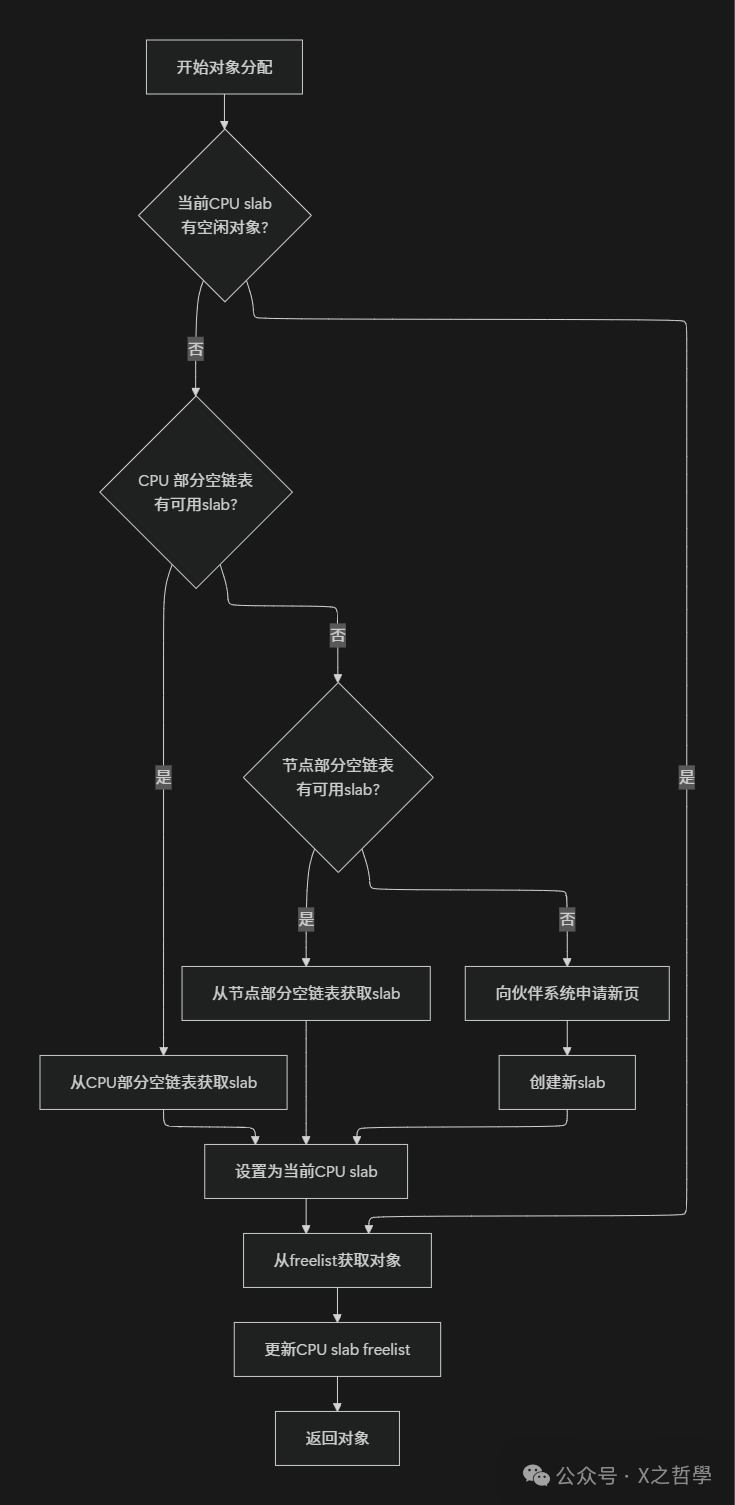
Figure: Object allocation algorithm flowchart
During the allocation process, the SLUB allocator uses the <span>freelist</span> pointer to track free objects. Each free object internally stores the address of the next free object, forming an implicit linked list. This design avoids additional memory overhead for storing free linked lists, improving memory utilization.
3.3 Object Release and Cache Management
The object release process corresponds to the allocation process but also has its special optimization strategies:
- 1. Fast Release: If the released object belongs to the current CPU’s slab and that slab is not full, the object is directly placed back into the CPU’s freelist. This is like a cashier putting change back into their familiar cash box location.
- 2. Partial Full Handling: If the released object causes a slab to transition from full to partially full, that slab needs to be added to the corresponding linked list.
- 3. Complete Release: If the entire slab becomes empty after releasing the object, consider whether to return the empty slab to the buddy system. However, to enhance performance, the slab allocator will retain a certain number of empty slabs (controlled by the
<span>min_partial</span>parameter) to avoid frequent requests for memory allocation and release from the buddy system.
The slab allocator optimizes performance through a delayed release strategy: released objects are not immediately returned to the buddy system but are retained in the cache for subsequent allocations. This is similar to a courier company’s packaging box recycling strategy, where used boxes are not immediately discarded but are organized and saved for future shipments, conserving resources and improving efficiency.
The three states of slabs—full, partially full, and empty—dynamically change with the allocation and release of objects. The following diagram illustrates the state transitions of slabs:
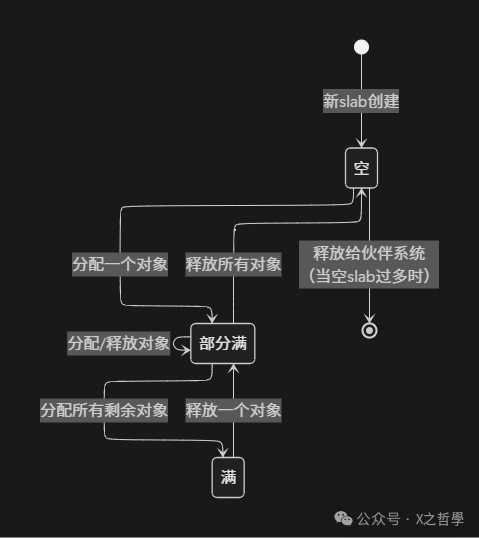
Figure: Slab state transition diagram
4 Code Examples and Practices of the Slab Allocator
4.1 Creating and Managing Slab Caches
In actual kernel development, we often need to create slab caches for specific kernel objects. Below is a complete example demonstrating how to create, use, and destroy a slab cache.
Assuming we need to create a slab cache for a simple “message object,” where each message object structure is as follows:
struct my_message {
    int id;
    char content[128];
    long timestamp;
    struct list_head list;
};
The complete code for creating and using this slab cache is as follows:
#include <linux/slab.h>
#include <linux/init.h>
#include <linux/module.h>

static struct kmem_cache *my_cachep;

// Module initialization function
static int __init my_init(void)
{
    void *msg;
    struct my_message *message;

    /* Create slab cache */
    my_cachep = kmem_cache_create("my_message_cache",
                                 sizeof(struct my_message),
                                 0,  // Alignment requirements
                                 SLAB_HWCACHE_ALIGN | SLAB_PANIC,
                                 NULL);  // Constructor

    if (!my_cachep) {
        printk(KERN_ERR "Failed to create slab cache\n");
        return -ENOMEM;
    }

    printk(KERN_INFO "Successfully created slab cache: my_message_cache\n");

    /* Allocate object from cache */
    msg = kmem_cache_alloc(my_cachep, GFP_KERNEL);
    if (!msg) {
        printk(KERN_ERR "Failed to allocate object\n");
        kmem_cache_destroy(my_cachep);
        return -ENOMEM;
    }

    /* Use object */
    message = (struct my_message *)msg;
    message->id = 1;
    strcpy(message->content, "Hello from slab allocator!");
    message->timestamp = jiffies;

    printk(KERN_INFO "Allocated message: id=%d, content=%s, time=%ld\n",
           message->id, message->content, message->timestamp);

    /* Free object */
    kmem_cache_free(my_cachep, msg);

    return 0;
}

// Module exit function
static void __exit my_exit(void)
{
    /* Destroy slab cache */
    kmem_cache_destroy(my_cachep);
    printk(KERN_INFO "Slab cache destroyed\n");
}

module_init(my_init);
module_exit(my_exit);
MODULE_LICENSE("GPL");
Key Function Explanations:
- •
<span>kmem_cache_create()</span>: Creates a new slab cache, with parameters including cache name, object size, alignment requirements, flags, and constructor. - •
<span>kmem_cache_alloc()</span>: Allocates an object from the specified cache. - •
<span>kmem_cache_free()</span>: Releases an object back to the cache. - •
<span>kmem_cache_destroy()</span>: Destroys a slab cache that is no longer needed.
Flag Selection:
- •
<span>SLAB_HWCACHE_ALIGN</span>: Ensures that objects are aligned with hardware cache lines, improving cache performance. - •
<span>SLAB_PANIC</span>: Causes a kernel panic if allocation fails, suitable for critical caches. - •
<span>SLAB_RECLAIM_ACCOUNT</span>: Indicates that the cache can be reclaimed by the memory reclamation mechanism.
4.2 Batch Operations and Performance Optimization
For scenarios requiring a large number of allocations of the same object, the slab allocator provides batch operation interfaces that can significantly improve performance. These interfaces reduce the number of lock acquisitions and function call overhead, similar to how wholesale purchasing is more efficient than retail.
The following example demonstrates batch allocation and release of objects:
// Batch allocation example
#define BATCH_SIZE 16

void batch_alloc_example(void)
{
    void *objects[BATCH_SIZE];
    int i, count;

    /* Batch allocate objects */
    count = kmem_cache_alloc_bulk(my_cachep, GFP_KERNEL, BATCH_SIZE, objects);

    if (count < BATCH_SIZE) {
        printk(KERN_WARNING "Requested %d, but only allocated %d objects\n",
               BATCH_SIZE, count);
    }

    /* Use objects */
    for (i = 0; i < count; i++) {
        struct my_message *msg = objects[i];
        msg->id = i;
        snprintf(msg->content, sizeof(msg->content), "Message #%d", i);
        msg->timestamp = jiffies;
    }

    /* Batch release objects */
    kmem_cache_free_bulk(my_cachep, count, objects);
}
Batch operations are particularly suitable for scenarios such as networking and file systems that need to handle large amounts of the same data structure. According to actual tests, batch operations can improve performance by 30%-50% compared to allocating each object individually.
4.3 Debugging and Diagnostic Techniques
The slab allocator provides rich debugging features to help developers diagnose memory-related issues. Here are some common debugging techniques:
1. View status through /proc/slabinfo
cat /proc/slabinfoThis command outputs detailed information about all slab caches, including:
- • Cache name and object size
- • Number of active objects
- • Total number of objects
- • Number of objects per slab
- • Number of pages, etc.
2. Use slabtop for real-time monitoring
slabtopSimilar to the <span>top</span> command, <span>slabtop</span> provides real-time updates on slab cache usage, sorted by memory usage or number of objects.
3. Kernel Parameter Tuning
Slab allocator parameters can be adjusted through files in the <span>/proc/sys/vm</span> directory:
# Adjust minimum number of empty slabs to retain
echo 10 > /proc/sys/vm/min_slab_ratio

# View slab reclaimable statistics
cat /proc/sys/vm/slab_reclaimable
4. Debugging Memory Leaks
By enabling the kernel configuration option <span>CONFIG_SLUB_DEBUG</span>, the following commands can be used to detect memory leaks:
# Enable debugging for all slab caches
echo 1 > /proc/sys/kernel/slab_debug

# Check red zones and object tracking for a specific cache
echo "cache_name" > /sys/kernel/slab/cache_name/validate
5. Common Issues and Solutions
| Issue Phenomenon | Possible Cause | Solution |
|---|---|---|
| Kernel panic: slab error | Memory out of bounds, double free | Enable SLAB_DEBUG detection |
| Excessive memory usage | Memory leaks, too many caches | Check balance of object allocation and release |
| Performance degradation | Fragmentation, low cache efficiency | Adjust cache parameters, use batch operations |
5 Performance Optimization and Advanced Features of the Slab Allocator
5.1 Hardware Cache Alignment and Coloring
In modern processor architectures, hardware cache has a crucial impact on performance. The slab allocator optimizes cache utilization through various techniques, the most important of which are cache alignment and cache coloring.
Cache alignment is enabled by the <span>SLAB_HWCACHE_ALIGN</span> flag, ensuring that each object’s starting address is aligned with the processor’s cache line boundary. This avoids the false sharing problem—when multiple CPUs access different variables within the same cache line, it can lead to cache line invalidation, forcing memory to reload.
Consider an analogy: suppose a cache line is a shelf partition, with a fixed number of positions per partition. If an item (object) spans two partitions, accessing it requires operations on both partitions, which is inefficient. Alignment ensures that each item is fully contained within one partition.
Cache coloring is a more advanced optimization technique. Due to the limited size of hardware caches, different memory addresses may map to the same cache location. If multiple frequently used objects happen to map to the same cache location, it can lead to cache conflicts, reducing hit rates.
Slab coloring distributes objects more evenly in the cache by adding different-sized offsets (colors) between objects. This is like a library dispersing similar books across different shelves to avoid congestion in the same area.
The following table compares the effects of different cache optimization techniques:
| Optimization Technique | Principle | Applicable Scenarios | Performance Impact |
|---|---|---|---|
| Cache Alignment | Object starting address aligned with cache line | Multi-core environments, frequent object access | Reduces false sharing, improves by 10-15% |
| Cache Coloring | Adjusts object offsets within the slab | Large objects, large capacity cache systems | Improves cache distribution, enhances by 5-10% |
| Per-CPU Cache | Each CPU has an independent cache for objects | High concurrency scenarios | Reduces lock contention, improves by 20-30% |
5.2 Memory Reclamation and Fragmentation Management
As an important component of Linux memory management, the slab allocator needs to closely cooperate with the system’s memory reclamation and fragmentation management mechanisms.
When system memory pressure is high, the kernel’s memory reclamation mechanism attempts to reclaim reclaimable slab caches. Slab caches are divided into two categories:
- • Reclaimable Caches: Containing temporary objects, such as directory entry caches (dentry) and inode caches, which can be safely released when memory is low.
- • Non-Reclaimable Caches: Containing critical kernel objects, such as process descriptors, which are typically not reclaimed.
The status of these two types of caches can be viewed through <span>/proc/slabinfo</span>:
grep -E "(dentry|inode_cache)" /proc/slabinfoFragmentation management is another important feature of the slab allocator. Although the slab design reduces internal fragmentation, external fragmentation may still occur after long-term operation. The SLUB allocator reduces fragmentation through the following methods:
- • CPU Local Cache: Keeps active objects concentrated, improving locality.
- • Slab Merging: Merges adjacent slabs when they are both free.
- • Mobile Allocation: Rearranges slab locations under certain conditions.
5.3 Optimization Strategies for Different Architectures
The slab allocator requires different optimization strategies for different processor architectures:
x86 Architecture:
- • Cache line size is typically 64 bytes.
- • Supports multiple page sizes (4KB, 2MB, 1GB).
- • Focuses on multi-core scalability and NUMA optimization.
ARM Architecture:
- • Cache line sizes may vary (32 bytes, 64 bytes, etc.).
- • Higher memory access latency requires more aggressive caching strategies.
- • In embedded scenarios, memory usage efficiency is emphasized.
Large NUMA Systems:
- • Considers node locality, prioritizing memory allocation from local nodes.
- • Uses
<span>__GFP_THISNODE</span>flag to restrict allocations to specific nodes. - • Implements cross-node cache balancing.
The following Mermaid diagram illustrates the hierarchical structure of the slab allocator in a NUMA system:
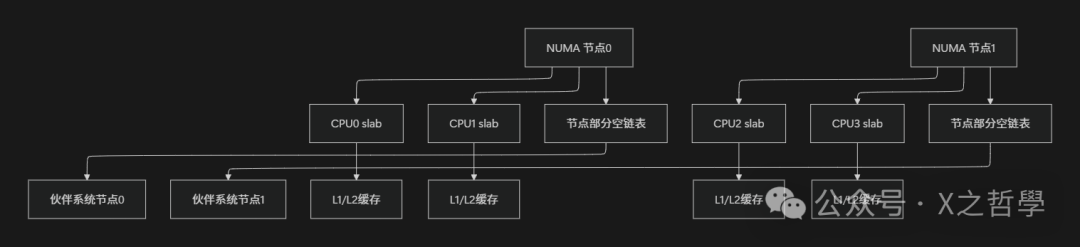
Figure: Hierarchical structure of the slab allocator in a NUMA system
6 Conclusion
Over the years, the Linux slab allocator has developed and optimized into a core component of kernel memory management, with its technical advantages primarily reflected in the following aspects:
- • Outstanding Performance: Through object reuse, per-CPU caches, and hardware cache optimizations, the slab allocator significantly reduces memory allocation overhead, especially suitable for scenarios involving frequent allocation of small objects.
- • Fragmentation Control: Object-based management and slab state tracking effectively reduce memory fragmentation, improving memory utilization.
- • Scalability: The design of the SLUB allocator supports large-scale multi-processor systems, achieving good scalability by reducing lock contention and optimizing local caches.
- • Debugging Support: Rich debugging features and status monitoring interfaces help developers diagnose and resolve memory-related issues.
- • Flexibility: Supports multiple allocator implementations (SLAB, SLUB, SLOB), adapting to various scenarios from embedded devices to large servers.
The following table compares the advantages of the slab allocator with traditional memory allocation methods:
| Feature | Slab Allocator | Buddy System | Simple Allocator |
|---|---|---|---|
| Small Object Allocation Efficiency | High | Low | Medium |
| Memory Fragmentation | Low | High | Very High |
| Initialization Overhead | One-time initialization for multiple uses | Needs initialization each time | Needs initialization each time |
| Concurrency Performance | High (per-CPU cache) | Medium (requires locks) | Low (global lock) |
| Memory Overhead | Medium | Low | Very Low |
| Applicable Scenarios | Kernel object management | Large block memory allocation | Severely memory-constrained |