Python is a simple, easy-to-learn, and powerful programming language, suitable for beginners. Below is a detailed guide to help you start learning Python from scratch.
1. Install Python
-
Download Python: Visit the official Python website to download the latest version of Python.
-
Install Python: Follow the installation wizard to complete the installation, ensuring you check the “Add Python to PATH” option.
-
Verify Installation: Open the command line (cmd on Windows, Terminal on Mac/Linux), type
<span><span>python --version</span></span>, and check if the Python version is displayed.
2. Choose Development Tools
-
IDLE: A simple development environment that comes with Python, suitable for beginners.
-
VS Code: A lightweight yet powerful code editor that supports Python plugins.
-
PyCharm: A professional Python IDE, suitable for intermediate to advanced developers.
-
Jupyter Notebook: Suitable for data analysis and interactive programming.
3. Learn Python Basic Syntax
3.1 Variables and Data Types
-
Python supports various data types, such as integers, floats, strings, booleans, etc.
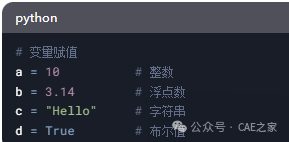
# Variable Assignment
a = 10 # Integer
b = 3.14 # Float
c = “Hello” # String
d = True # Boolean
3.2 Input and Output
-
Use
<span><span>input()</span></span>to get user input, and<span><span>print()</span></span>to output content.
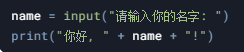
name = input(“Please enter your name: “)
print(“Hello, ” + name + “!”)
3.3 Conditional Statements
-
Use
<span><span>if</span></span>,<span><span>elif</span></span>, and<span><span>else</span></span>for conditional judgment.
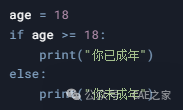
age = 18
if age >= 18:
print(“You are an adult”)
else:
print(“You are not an adult”)
3.4 Loops
-
Use
<span><span>for</span></span>and<span><span>while</span></span>for looping operations.
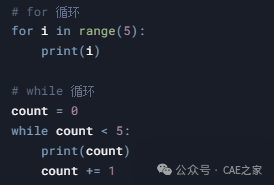
# for Loop
for i in range(5):
print(i)
# while Loop
count = 0
while count < 5:
print(count)
count += 1
3.5 Functions
-
Use
<span><span>def</span></span>to define functions.
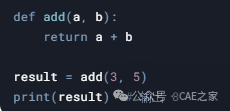
def add(a, b):
return a + b
result = add(3, 5)
print(result) # Outputs 8
3.6 Lists and Dictionaries
-
Lists are used to store a collection of data, while dictionaries are used to store key-value pairs.
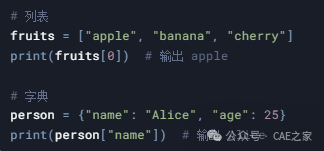
# List
fruits = [“apple”, “banana”, “cherry”]
print(fruits[0]) # Outputs apple
# Dictionary
person = {“name”: “Alice”, “age”: 25}
print(person[“name”]) # Outputs Alice
4. Learn Common Python Libraries
-
NumPy: Used for numerical calculations.
-
Pandas: Used for data processing and analysis.
-
Matplotlib: Used for data visualization.
-
Requests: Used for network requests.
-
OS: Used for file operations.
5. Practice Small Projects
Consolidate knowledge through practice; here are some beginner-friendly projects:
-
Calculator: Implement addition, subtraction, multiplication, and division functions.
-
Guess the Number Game: Randomly generate a number for the user to guess.
-
Simple Web Scraper: Use
<span><span>requests</span></span>and<span><span>BeautifulSoup</span></span>to scrape web content. -
Data Analysis: Use Pandas and Matplotlib to analyze data and generate charts.
6. Recommended Learning Resources
-
Books:
-
“Python Programming: From Beginner to Practice”
-
“Learn Python the Hard Way”
-
Online Tutorials:
-
Official Python Documentation
-
Rookie Tutorial
-
Codecademy
-
Video Courses:
-
Python beginner tutorials on Bilibili.
-
Python courses on Coursera.
7. Join the Community
-
Forums: Python communities on Stack Overflow and Reddit.
-
QQ/WeChat Groups: Join Python study groups.
-
Open Source Projects: Participate in or learn from open source projects on GitHub.
8. Continuous Learning
-
Advanced Content: Learn about object-oriented programming, exception handling, file operations, etc.
-
Frameworks and Tools: Learn Flask/Django (Web development), PyQt (GUI development), etc.
-
Algorithms and Data Structures: Improve programming skills.
9. Sample Learning Plan
-
Week 1: Learn Python basic syntax (variables, conditions, loops).
-
Week 2: Learn functions, lists, and dictionaries.
-
Week 3: Learn file operations and exception handling.
-
Week 4: Complete a small project (like the guess the number game).
-
Week 5: Learn NumPy and Pandas.
-
Week 6: Learn Matplotlib and complete a data analysis project.
By following these steps, you can quickly master the basics of Python programming and gradually enhance your programming skills. Consistent learning and practice are key!
 [Disclaimer]This article comes from DS, and the copyright belongs to the original author. It is only for learning purposes, and the views expressed are neutral. If you believe there are discrepancies in the source attribution, please inform us, and we will promptly revise or delete it. Thank you for your attention!