With hands, we sow the seeds of fortune, and looking down, we see the sky reflected in the water.
Hello everyone, I am from the Book House.Introduction:Some time ago, while riding to work, I was daydreaming and thinking about the many projects in the coding world. I wondered if there were any interesting projects that had not yet been discovered.Suddenly, a light bulb went off: in our daily work, we sometimes use video conferencing. Although various translation technologies are highly developed now, it seems there is still no free, offline software that can translate speech into another language in real-time.When dealing with foreign clients, they might not understand the profound Chinese language. Wouldn’t it be amazing if there were a software that could recognize our spoken Chinese into text, translate that text into English, and then embed it into video subtitles, ultimately outputting the video stream as a virtual camera? This way, during conversations with foreigners, they could see a subtitled video call.General Implementation Idea: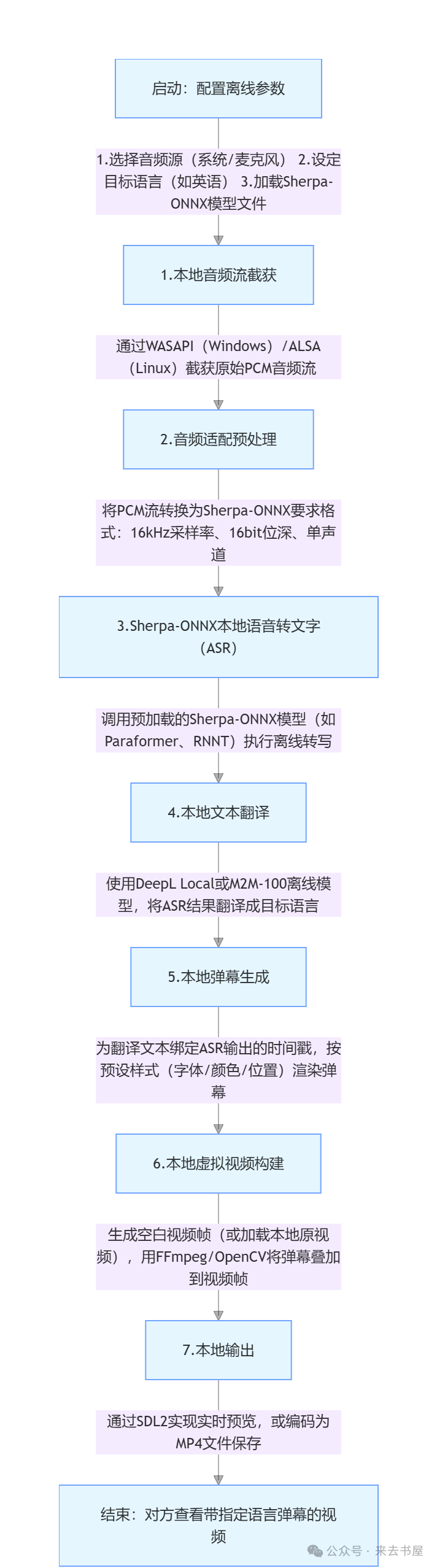 This is the general flow; the final output will be a virtual camera. You just need to select this virtual camera during video conferencing to allow the other party to see the subtitled video call.Local Deployment of SHERPA-ONNX:Next, we need to implement offline language-to-text conversion, which we will achieve using sherpa-onnx. Compared to the similarly offline and streaming capable whisper.cpp (which defaults to recognizing traditional Chinese), it is much easier to use.Step 1: DownloadThe sherpa-onnx library can be found at https://github.com/k2-fsa/sherpa-onnx. I am deploying on Windows 10, so I chose the sherpa-onnx-v1.12.10-win-x64-shared.tar.bz2 download from this link.Next, download the model from this link.Create a CMake project using VS2022, place the previously downloaded sherpa-onnx library in the project directory, and configure the corresponding paths in the CMake file.
cmake_minimum_required(VERSION 3.8)
project(testonnx)
set(CMAKE_CXX_STANDARD 17)
set(CMAKE_CXX_STANDARD_REQUIRED ON)

# Set Sherpa-ONNX path
set(SHERPA_ONNX_DIR "${CMAKE_CURRENT_SOURCE_DIR}/sherpa-onnx")

# Include header files
include_directories("${SHERPA_ONNX_DIR}/include")

# Library directory
link_directories("${SHERPA_ONNX_DIR}/lib")

# Generate executable file
add_executable(testonnx "testonnx.cpp" "testonnx.h")

# Link C API library
target_link_libraries(testonnx PRIVATE sherpa-onnx-c-api)

# Compilation options
if (MSVC)
    add_compile_options(/W4)
else()
    add_compile_options(-Wall -Wextra -Werror)
endif()
Test Code:
#include "sherpa-onnx/c-api/c-api.h"
#include <vector>
#include <iostream>
#include <fstream>
#include <windows.h>
void SetConsoleUtf8() {
// Set input and output encoding to UTF-8
SetConsoleCP(CP_UTF8);
SetConsoleOutputCP(CP_UTF8);
// Attempt to set console font to support UTF-8 (effective on some systems)
CONSOLE_FONT_INFOEX fontInfo = { 0 };
fontInfo.cbSize = sizeof(fontInfo);
fontInfo.dwFontSize.Y = 16; // Font size
wcscpy_s(fontInfo.FaceName, L"Consolas"); // Use a font that supports UTF-8
SetCurrentConsoleFontEx(GetStdHandle(STD_OUTPUT_HANDLE), FALSE, &fontInfo);
}
// Read WAV file (16kHz mono 16-bit PCM, convert to float[-1,1])
std::vector<float> ReadWav(const std::string& filename) {
std::ifstream fin(filename, std::ios::binary);
if (!fin) {
std::cerr << "Unable to open audio file: " << filename << std::endl;
return {};
}
// Skip WAV file header (standard 44 bytes, only applicable to PCM format)
fin.seekg(44);
// Read 16-bit PCM data
std::vector<int16_t> pcm_data;
int16_t sample;
while (fin.read(reinterpret_cast<char*>(&sample), sizeof(sample))) {
pcm_data.push_back(sample);
}
// Convert to float in the range [-1, 1]
std::vector<float> float_data(pcm_data.size());
for (size_t i = 0; i < pcm_data.size(); ++i) {
float_data[i] = static_cast<float>(pcm_data[i]) / 32768.0f;
}
return float_data;
}
int main() {
// 1. Configure fire-red-asr model parameters (matching official command line parameters)
SherpaOnnxOfflineRecognizerConfig cfg{};
cfg.model_config.model_type = "paraformer";
cfg.model_config.paraformer.model = "./model.onnx"; // Replace with actual model path after downloading and extracting
cfg.model_config.tokens = "./tokens.txt";
// Key: Specify model type as fire-red-asr
//cfg.model_config.model_type = "fire-red-asr";
// Configure fire-red-asr specific encoder and decoder (corresponding to official command line parameters)
/*cfg.model_config.fire_red_asr.encoder = "./encoder.int8.onnx";
cfg.model_config.fire_red_asr.decoder = "./decoder.int8.onnx";
cfg.model_config.tokens = "./tokens.txt";*/
// Inference configuration (matching official command line parameters)
cfg.model_config.num_threads = 16; // Official example uses 1 thread
cfg.model_config.provider = "cpu"; // CPU inference
// Feature extraction configuration
cfg.feat_config.sample_rate = 16000;
cfg.feat_config.feature_dim = 80;
// 2. Create offline recognizer
const SherpaOnnxOfflineRecognizer* recognizer =
SherpaOnnxCreateOfflineRecognizer(&cfg);
if (!recognizer) {
std::cerr << "Failed to create recognizer! Please check if the model path is correct" << std::endl;
return -1;
}
// 3. Create recognition stream
const SherpaOnnxOfflineStream* stream =
SherpaOnnxCreateOfflineStream(recognizer);
if (!stream) {
std::cerr << "Failed to create recognition stream!" << std::endl;
SherpaOnnxDestroyOfflineRecognizer(recognizer);
return -1;
}
// 4. Read test audio file (using official example audio)
std::vector<float> audio_data = ReadWav("./0.wav"); // Replace with actual audio path, the downloaded model includes test audio
if (audio_data.empty()) {
std::cerr << "Failed to read audio file!" << std::endl;
SherpaOnnxDestroyOfflineStream(stream);
SherpaOnnxDestroyOfflineRecognizer(recognizer);
return -1;
}
// 5. Feed audio data
SherpaOnnxAcceptWaveformOffline(
stream,
16000,
audio_data.data(),
static_cast<int32_t>(audio_data.size())
);
// 6. Decode
SherpaOnnxDecodeOfflineStream(recognizer, stream);
// 7. Get result
const SherpaOnnxOfflineRecognizerResult* result =
SherpaOnnxGetOfflineStreamResult(stream);
if (result && result->text) {
SetConsoleUtf8();
std::cout << "Recognition result: " << result->text << std::endl;
} else {
std::cerr << "No recognition result obtained!" << std::endl;
}
// 8. Release resources
SherpaOnnxDestroyOfflineRecognizerResult(result);
SherpaOnnxDestroyOfflineStream(stream);
SherpaOnnxDestroyOfflineRecognizer(recognizer);
return 0;
} The recognition accuracy is quite high, though… it lacks punctuation, so I will need to run a punctuation model later.Problem Analysis and Insights:1. This is something I have never encountered before, and I had no idea what each model meant. Therefore, the process was filled with some twists and turns. However, after repeated attempts and with the help of AI, I managed to get through.2. The main issue arose from a lack of understanding in unfamiliar areas. By surfing the web and trying things out, solutions will eventually emerge.3. If you encounter an error indicating that the offline language recognition xxx.dll is missing, copy the corresponding xxx.lib file from the Sherpa-ONNX lib directory to the generated .exe directory.Professional Terminology Explanation:
Paraformer: An efficient end-to-end Automatic Speech Recognition (ASR) model proposed by Alibaba’s DAMO Academy team, primarily used for converting speech signals directly into text. It features high recognition accuracy, fast speed, and low computational cost, making it very suitable for offline scenarios (such as deployment in the Sherpa-ONNX framework).
ASR: Stands for Automatic Speech Recognition, which is a technology that enables machines to “understand” human speech and automatically convert speech signals into text, essentially giving machines “ears” and the ability to “understand speech”.
It is a core technology for speech interaction, offline speech-to-text scenarios, etc. For example, the daily use of “voice input methods”, “smart speaker command recognition”, and “meeting recordings converted to text” all fundamentally rely on ASR technology.
Well… with that said, at least it shows that I have made some progress. If you like it, please follow me.