👆Click toFollow and Reply『Newcomer Gift』Get Learning Package👆
The simplicity and power of Python make it the preferred language for many developers. This article will introduce 36 commonly used classic Python code examples. These examples cover basic syntax, common tasks, and some advanced features.
【TutorialGet Method at the End of the Article!!】
1. Basic Syntax Cases
-
Hello World Program
-
This is the first case when learning any programming language. In Python, you can simply use the
<span>print()</span>function. -
The code is as follows:
print("Hello, World!")
-
The output will display
<span>Hello, World!</span>in the console, this case is mainly to familiarize beginners with Python’s basic output statement.
-
Using Variables
-
Define variables and perform simple calculations. For example, calculate the sum of two numbers.
-
The code is as follows:
a = 5
b = 3
sum_result = a + b
print(sum_result)
-
Here, the variables
<span>a</span>and<span>b</span>are defined, and their sum is assigned to<span>sum_result</span>, with the final output being<span>8</span>. This demonstrates the use of variable definition and basic operations.
-
Data Type Conversion
-
For example, convert a string type number to an integer type for calculations.
-
The code is as follows:
num_str = "10"
num_int = int(num_str)
double_num = num_int * 2
print(double_num)
-
First, the string
<span>"10"</span>is converted to an integer<span>10</span>, then multiplied by<span>2</span>, resulting in an output of<span>20</span>. This case helps understand the importance of data type conversion in Python.
2. String Manipulation Cases
-
String Concatenation
-
Join two or more strings together.
-
The code is as follows:
first_name = "John"
last_name = "Doe"
full_name = first_name + " " + last_name
print(full_name)
-
The output is
<span>John Doe</span>, demonstrating how to use the<span>+</span>operator to concatenate strings.
-
String Slicing
-
Extract a substring from a string.
-
The code is as follows:
text = "Python is great"
sub_text = text[0:6]
print(sub_text)
-
The output is
<span>Python</span>, here<span>[0:6]</span>indicates starting from index<span>0</span>(inclusive) to index<span>6</span>(exclusive) for the substring.
-
String Search and Replace
-
Find the position of a substring in a string and perform a replacement operation.
-
The code is as follows:
sentence = "I love Python programming"
find_result = sentence.find("Python")
new_sentence = sentence.replace("Python", "Java")
print(find_result)
print(new_sentence)
-
<span>find()</span>function returns the starting index position of the substring<span>"Python"</span>(which is<span>7</span>), and the<span>replace()</span>function replaces<span>"Python"</span>in the string with<span>"Java"</span>and returns the new string.
3. List Manipulation Cases
-
Creating and Accessing Lists
-
Create a list and access its elements.
-
The code is as follows:
fruits = ["apple", "banana", "cherry"]
print(fruits[0])
-
The output is
<span>apple</span>, demonstrating how to create a list and access its elements by index.
-
Adding and Removing List Elements
-
Add new elements to the list and remove existing elements.
-
The code is as follows:
numbers = [1, 2, 3]
numbers.append(4)
print(numbers)
numbers.remove(2)
print(numbers)
-
<span>append()</span>function adds the element<span>4</span>to the end of the list, outputting<span>[1, 2, 3, 4]</span>, and the<span>remove()</span>function removes the element<span>2</span>from the list, outputting<span>[1, 3, 4]</span>.
-
Sorting Lists
-
Sort the elements in the list.
-
The code is as follows:
unsorted_list = [3, 1, 4, 1, 5, 9, 2, 6, 5, 3, 5]
unsorted_list.sort()
print(unsorted_list)
-
<span>sort()</span>function sorts the list<span>unsorted_list</span>, outputting<span>[1, 1, 2, 3, 3, 4, 5, 5, 5, 6, 9]</span>.
4. Loop Structure Cases
-
For Loop to Traverse a List
-
Use the
<span>for</span>loop to traverse each element in the list. -
The code is as follows:
colors = ["red", "green", "blue"]
for color in colors:    print(color)
-
This will sequentially output
<span>red</span>,<span>green</span>, and<span>blue</span>, demonstrating the use of the<span>for</span>loop in traversing iterable objects like lists.
-
While Loop to Calculate Cumulative Sum
-
Use the
<span>while</span>loop to calculate the cumulative sum from 1 to 10. -
The code is as follows:
n = 1
sum_value = 0
while n <= 10:    sum_value += n    n += 1
print(sum_value)
-
Calculating the cumulative sum from 1 to 10, the output is
<span>55</span>, reflecting the cumulative operation under the control of the<span>while</span>loop.
-
Nested Loop to Print Multiplication Table
-
Use nested
<span>for</span>loops to print the multiplication table. -
The code is as follows:
for i in range(1, 10):
    for j in range(1, i + 1):        print(f"{j}*{i}={i*j}", end="\t")    print()
-
The outer loop controls the number of rows, while the inner loop controls the number of columns in each row. The
<span>end="\t"</span>is used to control the output format, allowing the multiplication table to be neatly arranged.
5. Function Cases
-
Defining and Calling Simple Functions
-
Define a function to calculate the product of two numbers and call it.
-
The code is as follows:
def multiply(a, b):
    return a * b
result = multiply(3, 4)
print(result)
-
A function
<span>multiply</span>is defined, which takes two parameters<span>a</span>and<span>b</span>and returns their product. Calling the function<span>multiply(3, 4)</span>outputs<span>12</span>.
-
Default Parameters in Functions
-
Set default parameters when defining functions for convenient calls.
-
The code is as follows:
def greet(name = "World"):
    print(f"Hello, {name}!")
greet()
greet("Alice")
-
The function
<span>greet</span>has a default parameter<span>name</span>with a default value of<span>"World"</span>. When called without passing a parameter, it outputs<span>Hello, World!</span>, and when passing the parameter<span>"Alice"</span>, it outputs<span>Hello, Alice!</span>.
-
Recursive Function Calls
-
For example, calculate factorial to demonstrate recursive function calls.
-
The code is as follows:
def factorial(n):
    if n == 0 or n == 1:        return 1    else:        return n * factorial(n - 1)
print(factorial(5))
-
Calculating the factorial of
<span>5</span>, the function<span>factorial</span>will call itself until<span>n</span>equals<span>0</span>or<span>1</span>, outputting<span>120</span>.
6. File Operation Cases
-
Reading Files
-
Read the contents of a text file and print it.
-
The code is as follows:
with open("test.txt", "r") as file:
    content = file.read()    print(content)
-
Assuming the
<span>test.txt</span>file exists, the<span>with</span>statement will automatically manage the opening and closing of the file, and the<span>read()</span>function reads all the content of the file and prints it.
-
Writing to Files
-
Write content to a file.
-
The code is as follows:
with open("output.txt", "w") as file:
    file.write("This is a test.")
-
Open the
<span>output.txt</span>file (creating it if it doesn’t exist), using the<span>write()</span>function to write<span>This is a test.</span>. Note that the<span>w</span>mode will overwrite the existing content of the file.
-
Appending to Files
-
Append content to the end of a file.
-
The code is as follows:
with open("output.txt", "a") as file:
    file.write("\nAppend this line.")
-
Open the
<span>output.txt</span>file in<span>a</span>(append) mode, adding the line<span>Append this line.</span>at the end of the file.
7. Module and Package Cases
-
Creating and Using Custom Modules
-
Create a simple module containing a function, and then use this module in another Python file.
-
Assuming you create a module named
<span>my_module.py</span>, with the following content:
def add_numbers(a, b):
    return a + b
-
Use this module in another file:
import my_module
result = my_module.add_numbers(3, 4)
print(result)
-
First import the
<span>my_module</span>module, then call the<span>add_numbers</span>function, outputting<span>7</span>.
-
Using Standard Library Modules (e.g. math)
-
Use the
<span>math</span>module for mathematical calculations, such as calculating square roots. -
The code is as follows:
import math
number = 9
square_root = math.sqrt(number)
print(square_root)
-
After importing the
<span>math</span>module, use the<span>sqrt</span>function to calculate the square root of<span>9</span>, outputting<span>3</span>.
-
Creating and Using Python Packages
-
Create a Python package containing multiple modules, and use this package in other programs.
-
Assuming you create a package named
<span>my_package</span>, which contains<span>module1.py</span>and<span>module2.py</span>two modules. -
In
<span>module1.py</span>there is a function<span>function1</span>, and in<span>module2.py</span>there is a function<span>function2</span>. -
To use this package, you need to properly import the modules in the
<span>__init__.py</span>file (the package initialization file) (for example,<span>from . import module1</span>and<span>from . import module2</span>). -
Then in other files you can use it like this:
from my_package import module1, module2
result1 = module1.function1()
result2 = module2.function2()
print(result1)
print(result2)
8. Object-Oriented Programming Cases
-
Defining Classes and Creating Objects
-
Define a simple class with properties and methods, then create objects.
-
The code is as follows:
class Dog:
    def __init__(self, name, age):        self.name = name        self.age = age
    def bark(self):        print(f"{self.name} says Woof!")
my_dog = Dog("Buddy", 3)
print(my_dog.name)
my_dog.bark()
-
Defined the
<span>Dog</span>class with two properties<span>name</span>and<span>age</span>, and the<span>bark</span>method prints the dog’s barking message. Created an object<span>my_dog</span>of the<span>Dog</span>class, accessed the object’s property<span>name</span>and called the<span>bark</span>method.
-
Class Inheritance
-
Define a subclass that inherits from a parent class and overrides a method.
-
The code is as follows:
class Animal:
    def move(self):        print("Animal is moving.")
class Cat(Animal):
    def move(self):        print("Cat is running.")
my_cat = Cat()
my_cat.move()
-
Defined the
<span>Animal</span>class and the<span>Cat</span>class inheriting from it, where the<span>Cat</span>class overrides the<span>move</span>method of the<span>Animal</span>class. Created an object<span>my_cat</span>of the<span>Cat</span>class and called the<span>move</span>method, outputting<span>Cat is running.</span>.
-
Demonstrating Polymorphism
-
Using polymorphism, different objects call the same method name to produce different behaviors.
-
The code is as follows:
class Bird:
    def fly(self):        print("Bird is flying.")
class Plane:
    def fly(self):        print("Plane is flying.")
def make_fly(obj):    obj.fly()
bird = Bird()
plane = Plane()
make_fly(bird)
make_fly(plane)
-
Defined the
<span>Bird</span>class and the<span>Plane</span>class, both having a<span>fly</span>method. The function<span>make_fly</span>accepts an object and calls its<span>fly</span>method. By passing<span>Bird</span>and<span>Plane</span>objects, polymorphism is demonstrated.
9. Data Structure Cases (Dictionaries, Sets)
-
Creating and Accessing Dictionaries
-
Create a dictionary and access corresponding values by keys.
-
The code is as follows:
student = {"name": "Tom", "age": 20, "major": "Computer Science"}
print(student["name"])
-
The output is
<span>Tom</span>, demonstrating how to create a dictionary and use keys to retrieve corresponding values.
-
Adding and Deleting Key-Value Pairs in Dictionaries
-
Add new key-value pairs to the dictionary and delete existing ones.
-
The code is as follows:
car = {"brand": "Toyota", "model": "Corolla"}
car["color"] = "Blue"
print(car)
del car["model"]
print(car)
-
First, add the key-value pair
<span>"color": "Blue"</span>, outputting<span>{"brand": "Toyota", "model": "Corolla", "color": "Blue"}</span>, then delete the key-value pair<span>"model"</span>, outputting<span>{"brand": "Toyota", "color": "Blue"}</span>.
-
Creating Sets and Basic Operations (Intersection, Union)
-
Create sets and perform intersection and union operations.
-
The code is as follows:
set1 = {1, 2, 3, 4}
set2 = {3, 4, 5, 6}
intersection_result = set1 & set2
union_result = set1 | set2
print(intersection_result)
print(union_result)
-
<span>&</span>operator is used for intersection, outputting<span>{3, 4}</span>, and<span>|</span>operator is used for union, outputting<span>{1, 2, 3, 4, 5, 6}</span>.
10. Exception Handling Cases
-
Simple Exception Handling (e.g., Division by Zero)
-
Catch division by zero exceptions to prevent program crashes.
-
The code is as follows:
try:
    result = 5 / 0
except ZeroDivisionError:    print("Cannot divide by zero")
-
When executing
<span>5/0</span>, a<span>ZeroDivisionError</span>exception will be raised, and the<span>except</span>block will catch this exception and print<span>Cannot divide by zero</span>, instead of crashing the program.
-
Handling Multiple Exceptions
-
Handle multiple different types of exceptions simultaneously.
-
The code is as follows:
try:
    num_str = "abc"
    num = int(num_str)
    result = 10 / num
except ValueError:    print("Cannot convert string to integer")
except ZeroDivisionError:    print("Cannot divide by zero")
-
Here, there may be two types of exceptions, one is the
<span>ValueError</span>when converting a non-numeric string to an integer, and the other is possible division by zero<span>ZeroDivisionError</span>. Execute the corresponding<span>except</span>block according to the different exception types.
-
Raising Exceptions (raise)
-
Proactively raise exceptions under specific conditions.
-
The code is as follows:
def divide(a, b):
    if b == 0:        raise ZeroDivisionError("The divisor cannot be zero")    return a / b
try:    result = divide(5, 0)
except ZeroDivisionError as e:    print(e)
-
The function
<span>divide</span>proactively raises a<span>ZeroDivisionError</span>exception when<span>b</span>is<span>0</span>, caught in the<span>try - except</span>block and prints the exception message.
11. Network Programming Cases (Simple TCP Communication)
-
Setting Up a Simple TCP Server
-
Create a simple TCP server that listens on a port and accepts client connections.
-
The code is as follows:
import socket
server_socket = socket.socket(socket.AF_INET, socket.SOCK_STREAM)
server_address = ('localhost', 8888)
server_socket.bind(server_address)
server_socket.listen(1)
print("Server is listening on port 8888...")
As the saying goes:Reading a hundred times is not as good as practicing!
Many students face this situation: they have learned a lot of theoretical knowledge, but when it comes to hands-on practice, they become confused and don’t know how to start.
Today, I have selected 23 Python project development cases (full-color HD PDF share) for you to use immediately! Covering8 development directions, 23 projects, gradually allowing readers to learn through practice and improve their actual development capabilities.
Students who need the complete PDF material can obtain it as per the method at the end of the article.
Directory
First Part Console Programs1. Student Information Management System2. Enterprise Code Generation SystemSecond Part Mini Games3. Simple Gobang4. Mary Adventure5. Color Version Airplane WarThird Part Practical Applications6. DIY Character Art7. Super Drawing Board8. Word Assistant9. Image Batch ProcessorFourth Part Web Crawlers10. RCQ Reader Library11. Train Ticket Analysis Assistant12. Gaode Map + 58 RentalFifth Part Data Analysis13. Happy Mahua Film and Television Works Analysis14. Excel Data AnalystSixth Part Artificial Intelligence15. Intelligent Parking Lot License Plate Recognition System16. AI Intelligent Contact ManagementSeventh Part WEB Development17. 51 Mall18. BBS Community19. Sweet Orange Music Network20. Smart Campus Examination SystemEighth Chapter WeChat, Mini Programs21. Guessing Idioms Mini Program22. What is Today Mini Program23. WeChat Bot
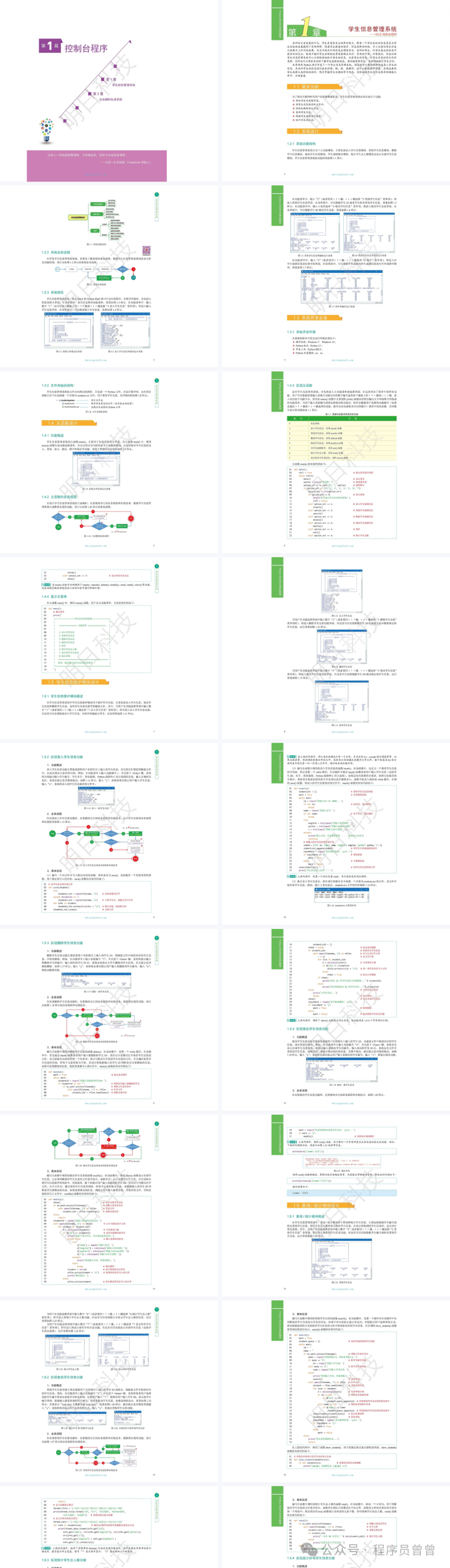
Content Features:
Each project starts from practical needs, detailing the development process of the project. It not only includes an overall design concept but also specific code implementations, as well as potential problems and solutions encountered during the development process. Through these cases, readers can gradually master Python’s application skills in different fields and improve their overall programming abilities.
For example, in a data analysis project, it will first introduce the source of the data and the analysis objectives, then explain how to use relevant Python libraries (such as NumPy, Pandas, Matplotlib, etc.) for data cleaning, processing, and visualization. During this process, issues such as data loss and format inconsistencies may arise, along with corresponding solutions.
Recommendation Reasons:
1. Suitable for Beginners: For Python learners without practical experience, this book provides a wealth of exercise projects that allow them to consolidate the basic knowledge learned in practice, understand the application scenarios of Python in actual development, and quickly improve programming and problem-solving abilities.
2. Strong Practicality: The project cases in the book are derived from actual development and have high practical value. Readers can master commonly used techniques and methods in actual project development through these cases, laying a solid foundation for future related work or independent project development.
3. Comprehensive Technology: Covers multiple fields of Python development, allowing readers to gain a comprehensive understanding of Python’s application scope and potential, broadening their technical horizons. No matter which field readers are interested in, they can find corresponding projects for learning and reference in the book.
4. High Reference Value: For actual developers, this book provides all source code and related files, while each program’s development flowchart details the development process, relevant technologies, key difficulties, etc., which developers can refer to as needed, helping to improve development efficiency.
How to Get
1. Like + View
2. Reply in the Background: Data