☝Click the blue text above to follow me.
I hope the suggestions at the end of the article will be helpful to you.
☝Click the blue text above to follow me.
I hope the suggestions at the end of the article will be helpful to you.
To be honest, when I first encountered PLC ladder diagrams, I was completely confused. When I first opened the software, the screen was filled with vertical lines, coils, and dots, and my eyes were almost crossed. There was a voice in my head:“Am I looking at a circuit diagram or some alien language?”
But I have to say, PLCs are really cool. Once you learn them, it feels like you have superpowers. So, I spent three days upgrading myself from “completely confused” to “able to write simple programs”. Today, I have organized my experience to share with you.
Day 1: Understand the Basic Concepts, Don’t Rush to Write Code
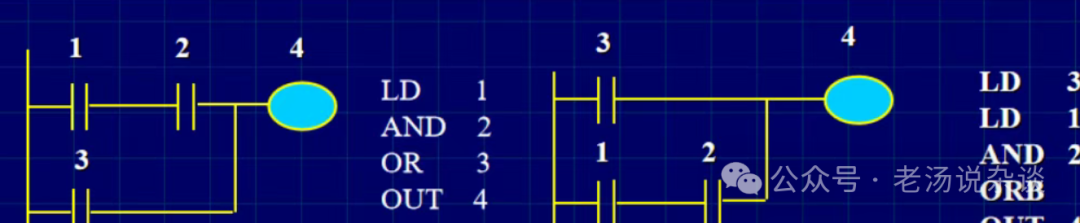
On the first day, I did the most important thing—understanding the logical structure of ladder diagrams. In simple terms, a ladder diagram isa visualization of electrical control logic, with the source on the left, the output on the right, and horizontal lines representing circuit connections.
I drew a few simple examples on paper:
- A switch controlling a light
- Two switches in series controlling a motor
- Two switches in parallel controlling an alarm
As I was drawing, I suddenly understood.It turns out those coils and contacts are simulating real circuit logic. I remember sitting in front of my desk, the light shining on my notebook, feeling a little excited—it’s not that difficult after all.
I set a rule for myself:
Don’t rush to write programs; just aim to “understand”.
- Remember the meaning of each symbol and each line.
- Ask yourself: Does what this program does reflect how it would be done in reality?
Day 2: Start Writing Simple Programs, Gradually Understand the Logic
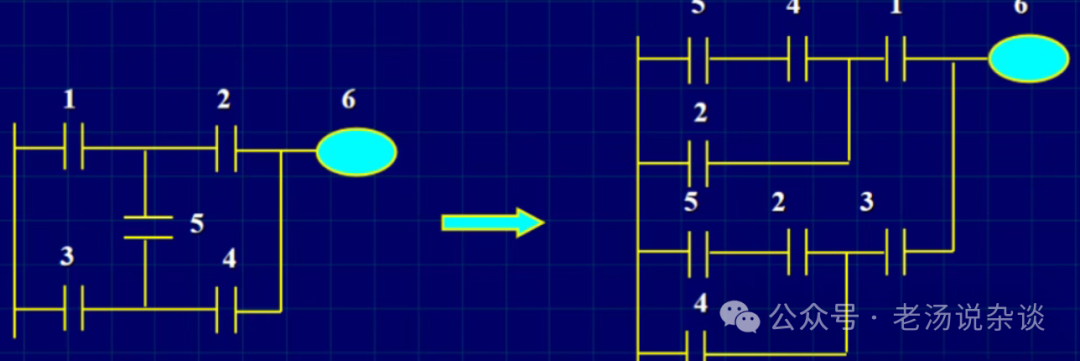
On the second day, I directly opened the PLC simulation software and started writing programs. I was still nervous: “Can I really write this?”
I started with the simplest case—a single switch controlling a light. I input the contact, output the coil, simulated it, and wow, the light turned on! At that moment, I felt a little excited, as if I had cracked a code.
Then I tried something a bit more complex:two switches in series controlling a motor, and thenparallel control of an alarm. It was slow, and I kept getting errors, but that was okay; I noted down the reasons for each error, and gradually, patterns emerged.
I realized that the process of writing programs was much more efficient than just reading books. You find that understanding the logic in books doesn’t mean you can write it out.Writing, making mistakes, and correcting them is the key to mastery..
Day 3: Comprehensive Practice, Simulating Real Scenarios
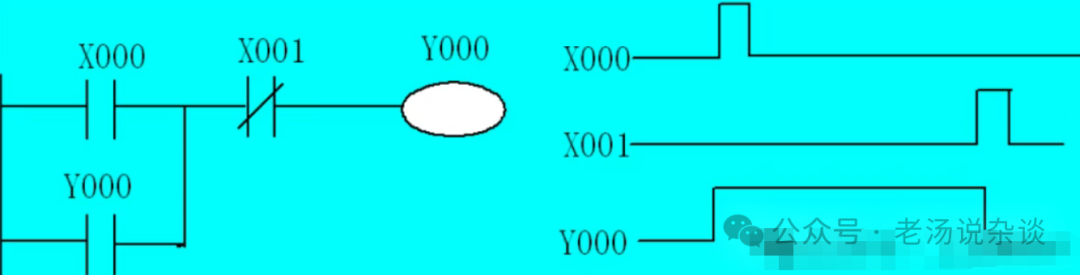
On the third day, I combined what I learned in the first two days and started a small project: simulatingthe control of a conveyor belt’s start and stop, with an emergency stop button and signal light.
At first, I was a bit flustered, connecting contacts and coils in order. Sometimes the simulation light wouldn’t turn on, and sometimes the motor kept running. I thought to myself:“Forget it, I’m done with this.”
But I slowly recalled the logic from the previous two days:
- Which is in series, and which is in parallel?
- Which is normally open, and which is normally closed?
- The logic of the signal light must match the motor’s state.
Gradually, the simulation ran successfully; the motor started, and when the emergency stop was pressed, it stopped immediately, and the signal light turned on and off correctly. At that moment, I felt a little excited—from completely confused to being able to achieve simple automatic control, it really felt rewarding..
I summarized one experience:Simulating real scenarios is much faster than rote memorization of symbols.. You will find that PLCs are not as mysterious as they seem; as long as the logic is clear, and you take it step by step, you will gradually get there.
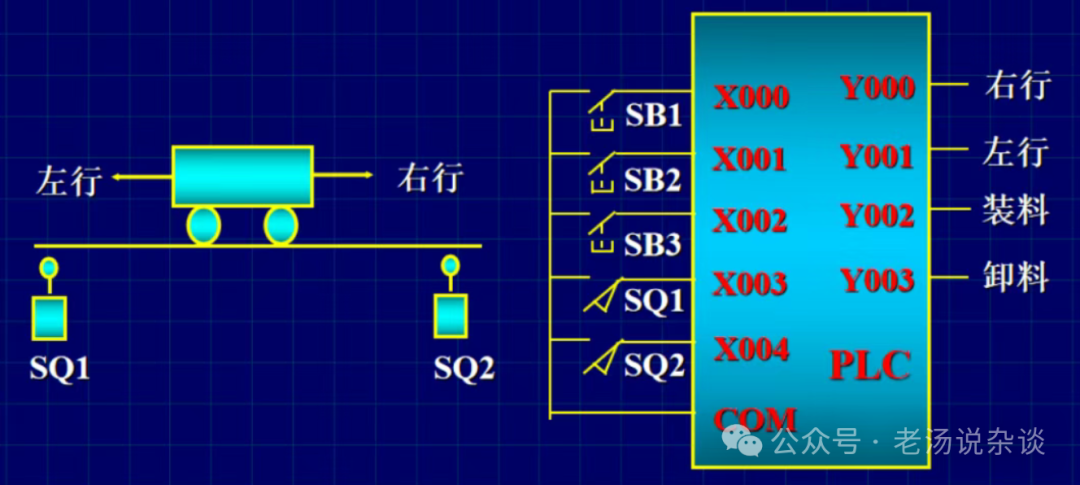
Insights for Beginners
-
Understand the logic first, then practice Don’t rush to write complex programs; first, understand what each symbol and line does.
-
Start with simple cases and practice repeatedly Single switches, series and parallel connections, first master small cases, then build up.
-
Simulate real scenarios to turn theory into practice The more the practice resembles real operations, the deeper the understanding.
-
Errors are friends; don’t be afraid to make mistakes Every error is an opportunity to deepen your understanding; don’t fear failure.
-
Develop a habit of recording I record errors and solutions daily, making it easier for future reviews and reducing repeated mistakes.
In short, although three days is a short time, the key isif the method is right, the efficiency will be high. PLCs are not difficult; the hard part is being intimidated by symbols and circuits at first, and then being afraid you won’t understand.
I have come through this step by step, from drawing lines on paper to simulation, and then to small projects, gradually turning “confused” into “able to program”. You can too, as long as you follow this rhythm,even beginners can get started in three days..
Finally, a reminder: PLCs are very practical; practice more, think more, and if you don’t understand, look up information and don’t hesitate to ask questions. Brothers, have you tried small projects? Share your experiences in the comments; I would love to hear your stories.

END
Welcome to like, share, and support me
If you find this article useful, please consider a small donation, and I will share more with you next time~
👇👇Follow me👇👇