Introduction to SSH
SSH (Secure Shell Protocol) is an encrypted network transmission protocol used for data transfer in insecure network environments. In addition to remote login, it provides a complete set of network security transmission tools, with common functions as follows.
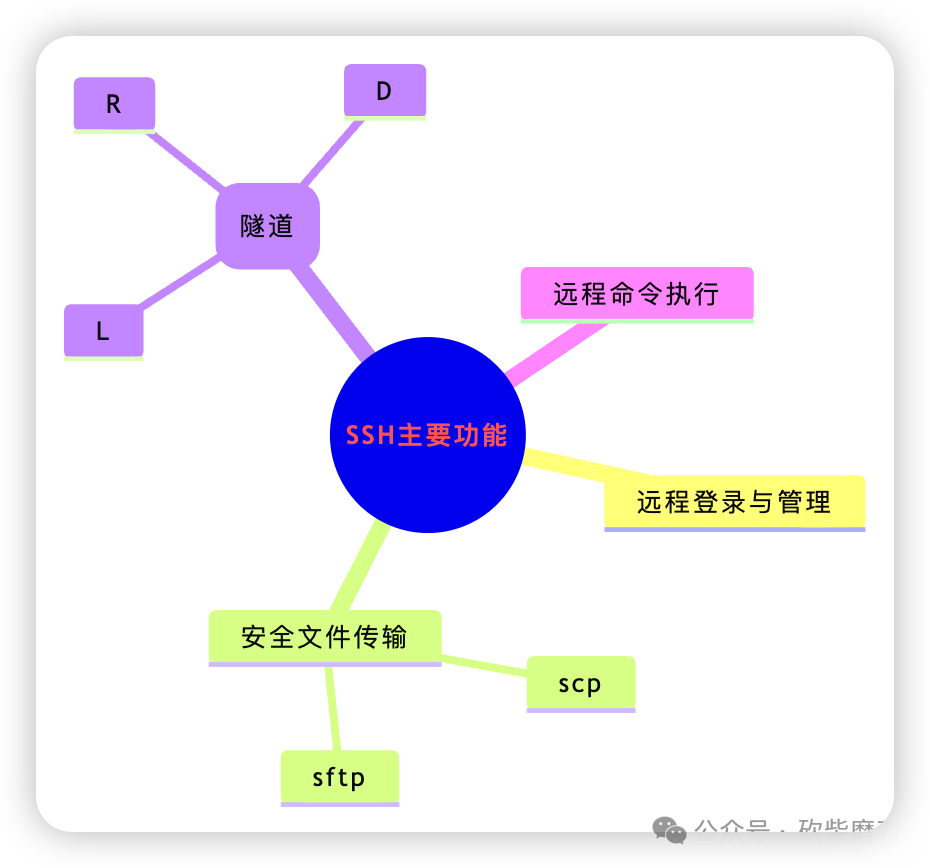
Encryption in SSH
The security of SSH comes from its powerful encryption system.
Asymmetric Encryption and Key Roles
Asymmetric encryption uses a pair of keys: a public key and a private key. These keys play different roles in different scenarios.
Used for Signing to Verify Identity
This is the method used during SSH key login. Its purpose is to prove who you are.
- • Private key is used for signing. You sign a piece of data sent by the server with your private key. This signature is like your handwritten signature, which cannot be forged by others.
- • Public key is used for verification. The server uses the public key you provided earlier to verify this signature. If the verification passes, it proves that you are indeed the owner of the private key.
Used for Encryption to Protect Content
This method is used in scenarios requiring confidential communication. Its purpose is to ensure that only designated individuals can understand the information.
- • Public key is used for encryption. If you want to send confidential information to someone, you encrypt it using that person’s public key.
- • Private key is used for decryption. The recipient uses their own private key to decrypt the information after receiving it, allowing them to see the original text.
In simple terms, during signing, the private key is used to create the signature, and the public key is used to verify it. During encryption, the public key is used to create the encrypted message, and the private key is used to decrypt it.SSH login authentication mainly uses the signing function.
Hybrid Encryption in SSH
Asymmetric encryption is computationally intensive and not suitable for encrypting large amounts of data. Therefore, SSH uses a hybrid mode for actual communication.
When a connection is first established, asymmetric encryption is used to negotiate a temporary symmetric key.
All subsequent data is encrypted using this symmetric key. Symmetric key encryption is fast, ensuring both security and efficiency.
SSH Configuration Methods
The behavior of SSH is determined by the configuration files of the client and server.
Differences Between Client and Server Configuration
The client configuration file is <span>~/.ssh/config</span>. It is on your computer and defines your own connection habits. For example, you can set an alias for the server or specify which username and private key to use for the connection.
The server configuration file is <span>/etc/ssh/sshd_config</span>. It is on the remote server and set by the server administrator. It defines the security rules of the server, such as who is allowed to log in and how they can log in.
Client Configuration Options
This file can help simplify commands.
- •
<span>Host</span>is used to define a server alias, such as<span>my-server</span>. - •
<span>HostName</span>is the real IP address or domain name of the server. - •
<span>User</span>is the username used for login. - •
<span>Port</span>is the port number, default is 22. - •
<span>IdentityFile</span>is used to specify the private key file used for the connection.
Server Configuration Options
This file is the center of the server’s security policy.
- •
<span>Port 22</span>sets the port that the SSH service listens on. - •
<span>PermitRootLogin no</span>prohibits direct login by the root user, which is safer. - •
<span>PasswordAuthentication no</span>prohibits password login, forcing users to use keys. - •
<span>PubkeyAuthentication yes</span>allows key authentication. - •
<span>AllowUsers alice bob</span>only allows users alice and bob to log in. - •
<span>Subsystem sftp /usr/lib/openssh/sftp-server</span>specifies which program provides the sftp service. - •
<span>GatewayPorts yes</span>allows other machines to access ports created by remote forwarding.
After modifying the server configuration, the SSH service must be restarted for the changes to take effect.
Common Scenarios for SSH
scp Bidirectional File Transfer
<span>scp</span> is a file copying tool based on SSH. It is simple and suitable for automatic execution in scripts. Its logic is to copy files from one place to another and then finish.
The basic command for uploading files is <span>scp [local_file] [user]@[remote_host]:[remote_path]</span>.The basic command for downloading files is <span>scp [user]@[remote_host]:[remote_file] [local_path]</span>.If you want to copy an entire directory, you need to add the <span>-r</span> parameter.
sftp File Management
<span>sftp</span> provides an interactive file management session. Its logic is like logging into the server, allowing you to manage remote files as if they were local. It has more features, allowing browsing, uploading, downloading, renaming, and deleting files.
You just need to run <span>sftp user@remote_host</span> to enter the sftp interactive interface. You can use <span>get</span> to download files, use <span>put</span> to upload files, and also use commands like <span>ls</span> and <span>cd</span> to operate. sftp is a subsystem of SSH, so as long as the SSH service is running, it can be used.
SSH Port Forwarding
This is an advanced use of SSH, forwarding network data through an encrypted tunnel.
| Forwarding Type | Parameter | Core Purpose | Typical Scenario |
|---|---|---|---|
| Local Forwarding | -L | Pull to local | Access company intranet database from home |
| Remote Forwarding | -R | Push to remote | Demonstrate locally developed applications to clients |
| Dynamic Forwarding | -D | Become a proxy | Secure internet access on public Wi-Fi |
Appendix
Common Examples of SSH Login
# Basic login
ssh [email protected]

# Login specifying non-standard port 2222
ssh -p 2222 [email protected]

# Login using a specific private key file
ssh -i ~/.ssh/id_ed25519 dev@dev-server

# Using configuration file, my-server is the server alias in the config file
ssh my-server

# Remotely execute a single command to check disk space
ssh [email protected] "df -h"
Common Examples of SSH Port Forwarding
# Local forwarding, mapping remote intranet database to local port 3307
ssh -fN -L 3307:10.0.1.50:3306 user@jump-server

# Remote forwarding, exposing local development website to public server's port 8000
ssh -fN -R 8000:localhost:8080 [email protected]

# Dynamic forwarding, opening a SOCKS5 proxy on local port 1080
ssh -fN -D 1080 user@secure-gateway
The <span>-f</span> parameter here indicates running in the background, while <span>-N</span> indicates not executing remote commands, specifically for establishing tunnels.
Common Examples of scp
# Upload local log file to the server's logs directory
scp ./app.log user@remote-server:/home/user/logs/

# Upload the packaged dist directory of the website to the server's web root directory
scp -r ./dist webadmin@prod-server:/var/www/my-app/

# Download the Nginx configuration file from the server to the current directory
scp admin@prod-server:/etc/nginx/nginx.conf .

# Download the entire log directory from the server for backup
scp -r syslog@app-server:/var/log/app/ ~/app-logs-backup/
Common Examples of sftp
# Connect to the server to enter an interactive session
sftp user@data-server

# --- The following commands are executed at the sftp> prompt ---

# View remote and local files
ls
lls

# Switch remote and local directories
cd /var/www/uploads
lcd ~/Downloads

# Download data files and upload configuration files
get report-2025.csv
put settings.json

# Download the entire invoice directory and upload the entire image assets directory
get -r invoices/
put -r assets/