Follow “Coder Loves Learning“, and set it as a “Starred Official Account“
1 Introduction to Simple Database
A database is a collection of data organized, stored, and managed according to a specific structure. In embedded software development, if it is inconvenient to introduce a professional database but you want to manage some data conveniently, and if the data volume is not large, you can consider implementing a simple database to manage the data.
The data can be stored in a file, and the basic operations of the database are addition, deletion, modification, and query.
For a simple database, the data storage format is typically key-value pairs, where a key corresponds to a value. Additionally, the value can support multiple types. In programming, the commonly used types are integer, float, and string.
2 Code Implementation
2.1 Data Structure
The data storage format uses a binary file, which helps save space and improve read/write efficiency. Each record contains the key name, value type, value length, and value data.
Supported data types: int, float, and string.
The data type is defined as an enumeration of ValueType.
The value of the data can be defined as a union type of Value, since a key will only have one type.
For the KVDB structure of the database, a database name and a corresponding file handle (FILE *) are required.
The storage format in the database is such that each line stores one piece of data, and the structure of the data is FileRecord.
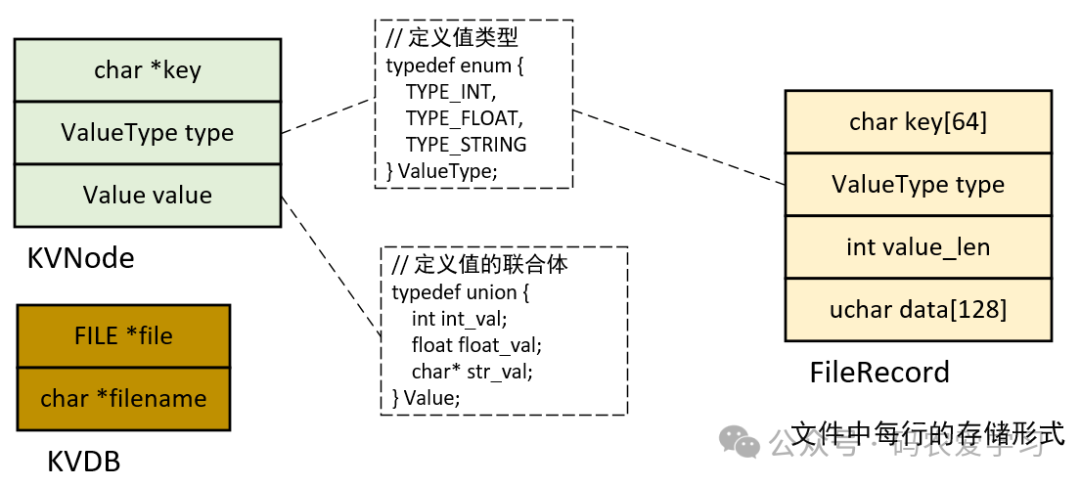
The specific code is as follows.
2.1.1 Database Structure
// Define value types
typedef enum {
    TYPE_INT,
    TYPE_FLOAT,
    TYPE_STRING
} ValueType;

// Define value union
typedef union {
    int int_val;
    float float_val;
    char* str_val;
} Value;

// Define key-value pair structure
typedef struct {
    char* key;      // key
    ValueType type; // Data type
    Value value;    // Value of the data
} KVNode;

// Database structure
typedef struct {
    FILE* file;     // File handle
    char* filename; // File name
} KVDB;
2.1.2 Structure of Each Data in the File
#define KEY_NAME_LEN   (64)
#define VALUE_DATA_LEN (128)

// Storage format of each record in the file
typedef struct {
    char key[KEY_NAME_LEN];             // Key name, max 63 characters
    ValueType type;                     // Value type
    int value_len;                      // Length of the value (mainly for strings)
    unsigned char data[VALUE_DATA_LEN]; // Data storage
} FileRecord;
2.2 Access Interfaces
For the database, some basic interfaces need to be provided:
- Open / Close database
- Insert / Update key-value pair (kvdb_set)
- Query key-value pair (kvdb_get)
- Delete key-value pair (kvdb_delete)
- Iterate through all key-value pairs (kvdb_iterate)
// Open database
KVDB* kvdb_open(const char* filename);

// Close database
void kvdb_close(KVDB* db);

// Insert or update key-value pair
bool kvdb_set(KVDB* db, const char* key, ValueType type, Value value);

// Get value corresponding to the key
bool kvdb_get(KVDB* db, const char* key, KVNode* result);

// Delete key-value pair
bool kvdb_delete(KVDB* db, const char* key);

// Iterate through all key-value pairs
void kvdb_iterate(KVDB* db);
2.2.1 Open/Close Database
To open the database, the basic steps are:
- Construct the KVDB information based on the provided filename.
- Then attempt to fopen the db file. If it does not exist (first use), create an empty db file.
- Finally, return the KVDB for subsequent use.
// Open database (pass in the DB file name)
KVDB* kvdb_open(const char* filename)
{
    KVDB* db = (KVDB*)malloc(sizeof(KVDB));
    if (!db)
    {
        return NULL;
    }

    db->filename = (char*)malloc(strlen(filename) + 1);
    if (!db->filename)
    {
        free(db);
        return NULL;
    }
    strcpy(db->filename, filename);

    // Open file in read/write mode, create if it does not exist
    db->file = fopen(filename, "rb+");
    if (!db->file)
    {
        db->file = fopen(filename, "wb+");
        if (!db->file)
        {
            printf("[%s] db file:%s not exist, create fail\n", __func__, filename);
            free(db->filename);
            free(db);
            return NULL;
        }
        printf("[%s] db file:%s not exist, create ok\n", __func__, filename);
    }
    printf("[%s] db file:%s exist, open ok\n", __func__, filename);

    return db;
}
Close database
// Close database
void kvdb_close(KVDB* db)
{
    if (db)
    {
        if (db->file)
        {
            fclose(db->file); // Close file
        }
        free(db->filename); // Free file name
        free(db); // Free KVDB structure
    }
}
2.2.2 Insert/Update
The basic steps for inserting or updating data are:
- Construct a FileRecord based on the key, type, and value to be inserted or updated.
- Access each line in the db file according to KVDB, matching whether it is an existing key.
- If the key exists, update the value of this data.
- If the key does not exist, insert this data at the end of the file.
// Insert or update key-value pair
bool kvdb_set(KVDB* db, const char *key, ValueType type, Value value)
{
    if (!db || !db->file || !key)
    {
        printf("[%s] NULL ptr\n", __func__);
        return false;
    }

    // Check key length
    if (strlen(key) >= KEY_NAME_LEN)
    {
        printf("[%s] key:%s len > %d\n", __func__, key, KEY_NAME_LEN);
        return false;
    }

    FileRecord record;
    strcpy(record.key, key);
    record.type = type;
    memset(record.data, 0, sizeof(record.data));

    // Handle value based on type
    switch (type)
    {
        case TYPE_INT:
        {
            record.value_len = sizeof(int);
            memcpy(record.data, &value.int_val, sizeof(int));
            break;
        }
        case TYPE_FLOAT:
        {
            record.value_len = sizeof(float);
            memcpy(record.data, &value.float_val, sizeof(float));
            break;
        }
        case TYPE_STRING:
        {
            if (!value.str_val) return false;
            record.value_len = strlen(value.str_val) + 1; // Include terminator
            if (record.value_len > sizeof(record.data)) return false;
            strcpy((char*)record.data, value.str_val);
            break;
        }
        default:
            return false;
    }

    // Try to find and replace existing record
    fseek(db->file, 0, SEEK_SET);
    long pos;
    while ((pos = ftell(db->file)) != EOF)
    {
        FileRecord existing;
        if (fread(&existing, sizeof(FileRecord), 1, db->file) != 1)
        {
            break;
        }

        if (strcmp(existing.key, key) == 0)
        {
            // Found the same key, replace record
            fseek(db->file, pos, SEEK_SET);
            if (fwrite(&record, sizeof(FileRecord), 1, db->file) == 1)
            {
                print_db_set_info(__func__, key, type, value, 0, 1);
                fflush(db->file);
                return true;
            }
            print_db_set_info(__func__, key, type, value, 0, 0);
            return false;
        }
    }

    // If not found, add new record at the end of the file
    fseek(db->file, 0, SEEK_END);
    if (fwrite(&record, sizeof(FileRecord), 1, db->file) == 1)
    {
        fflush(db->file);
        print_db_set_info(__func__, key, type, value, 1, 1);
        return true;
    }
    print_db_set_info(__func__, key, type, value, 1, 0);

    return false;
}
void print_db_set_info(const char *func, const char *key, ValueType type, Value value, int is_insert, int is_success)
{
    char *state = is_success ? "ok" : "fail";
    char *insertOrUpdate = is_insert ? "insert" : "update";

    if (TYPE_INT == type)
    {
        printf("[%s] %s key:%s value:%d [%s]\n", func, insertOrUpdate, key, value.int_val, state);
    }
    else if (TYPE_FLOAT == type)
    {
        printf("[%s] %s key:%s value:%f [%s]\n", func, insertOrUpdate, key, value.float_val, state);
    }
    else if (TYPE_STRING == type)
    {
        printf("[%s] %s key:%s value:%s [%s]\n", func, insertOrUpdate, key, value.str_val, state);
    }
}
2.2.3 Query
The basic steps for querying data are:
- Access each line in the db file according to KVDB (first store in FileRecord), matching whether it is an existing key.
- If the key exists, copy the data to the KVNode type result and return.
- If the key does not exist, return failure.
// Get value corresponding to the key
bool kvdb_get(KVDB* db, const char* key, KVNode* result)
{
    if (!db || !db->file || !key || !result)
    {
        printf("[%s] NULL ptr\n", __func__);
        return false;
    }

    fseek(db->file, 0, SEEK_SET);
    FileRecord record;

    while (fread(&record, sizeof(FileRecord), 1, db->file) == 1)
    {
        // Found the key
        if (strcmp(record.key, key) == 0)
        {
            result->key = (char*)malloc(strlen(record.key) + 1);
            if (!result->key)
            {
                printf("[%s] db no key:%s\n", __func__, key);
                return false;
            }
            // Assign value to result->key
            strcpy(result->key, record.key);
            // Assign value to result->type
            result->type = record.type;
            // Assign value to result->value
            switch (record.type)
            {
                case TYPE_INT:
                {
                    memcpy(&result->value.int_val, record.data, sizeof(int));
                    break;
                }
                case TYPE_FLOAT:
                {
                    memcpy(&result->value.float_val, record.data, sizeof(float));
                    break;
                }
                case TYPE_STRING:
                {
                    result->value.str_val = (char*)malloc(record.value_len);
                    if (!result->value.str_val)
                    {
                        print_db_get_info(__func__, key, result, 0);
                        free(result->key);
                        return false;
                    }
                    strcpy(result->value.str_val, (char*)record.data);
                    break;
                }
                default:
                {
                    print_db_get_info(__func__, key, result, 0);
                    free(result->key);
                    return false;
                }
            }

            print_db_get_info(__func__, key, result, 1);
            return true;
        }
    }

    // Key not found
    return false;
}
void print_db_get_info(const char *func, const char *key, const KVNode* result, int is_success)
{
    if (is_success)
    {
        if (TYPE_INT == result->type)
        {
            printf("[%s] get key:%s value:%d [ok]\n", func, key, result->value.int_val);
        }
        else if (TYPE_FLOAT == result->type)
        {
            printf("[%s] get key:%s value:%f [ok]\n", func, key, result->value.float_val);
        }
        else if (TYPE_STRING == result->type)
        {
            printf("[%s] get key:%s value:%s [ok]\n", func, key, result->value.str_val);
        }
    }
    else
    {
        if (TYPE_INT == result->type)
        {
            printf("[%s] get key:%s [fail]\n", func, key);
        }
        else if (TYPE_FLOAT == result->type)
        {
            printf("[%s] get key:%s [fail]\n", func, key);
        }
        else if (TYPE_STRING == result->type)
        {
            printf("[%s] get key:%s [fail]\n", func, key);
        }
    }
}
2.2.4 Delete
The basic steps for deleting data are:
- Create a temporary file.
- Access each line in the db file according to KVDB (first store in FileRecord), matching whether it is the key to be deleted.
- If it is not the key to be deleted, copy that line of data to the temporary file.
- If it is the key to be deleted, skip it.
- After processing all data lines, delete the original db file.
- Rename the temporary db file to the original db file name and reopen the db file.
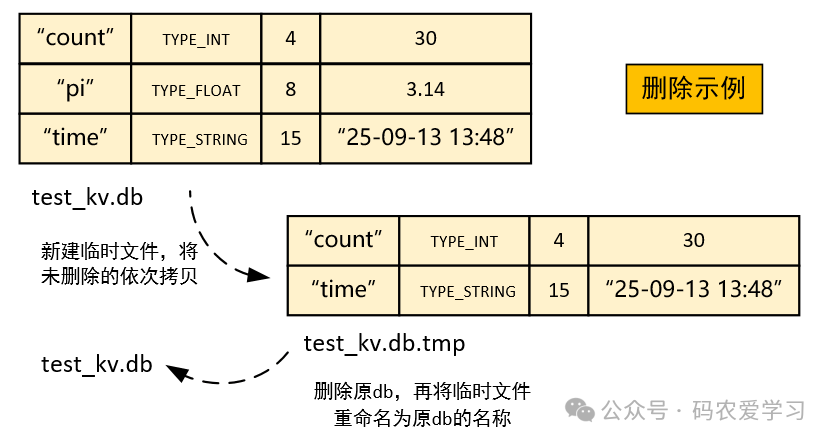
// Delete key-value pair
bool kvdb_delete(KVDB* db, const char* key)
{
    if (!db || !db->file || !key)
    {
        printf("[%s] NULL ptr\n", __func__);
        return false;
    }

    // Create a temporary file
    char temp_filename[256];
    sprintf(temp_filename, "%s.tmp", db->filename);
    FILE* temp_file = fopen(temp_filename, "wb+");
    if (!temp_file)
    {
        printf("[%s] fopen tmp file:%s fail\n", __func__, temp_filename);
        return false;
    }

    bool found = false;
    fseek(db->file, 0, SEEK_SET);
    FileRecord record;

    // Copy all non-matching records to the temporary file
    while (fread(&record, sizeof(FileRecord), 1, db->file) == 1)
    {
        if (strcmp(record.key, key) != 0)
        {
            fwrite(&record, sizeof(FileRecord), 1, temp_file);
        }
        else
        {
            printf("[%s] delete key:%s\n", __func__, key);
            found = true;
        }
    }

    // Close files
    fclose(db->file);
    fclose(temp_file);

    // Delete original file, rename temporary file
    printf("[%s] remove old db, then rename tmp db to normal db\n", __func__);
    remove(db->filename);
    rename(temp_filename, db->filename);

    // Reopen database file
    db->file = fopen(db->filename, "rb+");
    if (!db->file)
    {
        return false;
    }

    return found;
}
2.2.5 Iterate Through Database
To facilitate observing what data is saved in the db, a function can be written to print all data in the db sequentially.
// Iterate through all key-value pairs
void kvdb_iterate(KVDB* db)
{
    if (!db || !db->file)
    {
        return;
    }

    fseek(db->file, 0, SEEK_SET);
    FileRecord record;
    KVNode node;

    while (fread(&record, sizeof(FileRecord), 1, db->file) == 1)
    {
        node.key = record.key;
        node.type = record.type;

        switch (record.type)
        {
            case TYPE_INT:
            {
                memcpy(&node.value.int_val, record.data, sizeof(int));
                break;
            }
            case TYPE_FLOAT:
            {
                memcpy(&node.value.float_val, record.data, sizeof(float));
                break;
            }
            case TYPE_STRING:
            {
                node.value.str_val = (char*)record.data;
                break;
            }
        }

        print_node(&node);
    }
}
// Print key-value pair
void print_node(KVNode* node)
{
    if (!node)
    {
        return;
    }

    printf("Key: %s,\t Type: ", node->key);
    switch (node->type)
    {
        case TYPE_INT:
        {
            printf("int,\t Value: %d\n", node->value.int_val);
            break;
        }
        case TYPE_FLOAT:
        {
            printf("float,\t Value: %.2f\n", node->value.float_val);
            break;
        }
        case TYPE_STRING:
        {
            printf("string,\t Value: %s\n", node->value.str_val);
            break;
        }
        default:
            printf("unknown\n");
    }
}
2.3 Test Code
You can write a test code to verify the functionality:
int main()
{
    char *db_file = "test_kv.db";
    // Open database
    KVDB* db = kvdb_open(db_file);
    if (!db)
    {
        printf("[%s] Unable to open database file\n", __func__);
        return 1;
    }
    printf("[%s] open db file:%s ok\n", __func__, db_file);

    Value val;

    // Insert some data
    val.int_val = 20;
    kvdb_set(db, "count", TYPE_INT, val);

    val.float_val = 3.14159f;
    kvdb_set(db, "pi", TYPE_FLOAT, val);

    val.str_val = "25-09-13 13:48";
    kvdb_set(db, "time", TYPE_STRING, val);

    // Query and print data
    KVNode result;
    if (kvdb_get(db, "count", &result))
    {
        printf("[%s] Queried age: %d\n", __func__, result.value.int_val);
        free(result.key); // Free allocated memory
    }

    if (kvdb_get(db, "pi", &result))
    {
        printf("[%s] Queried pi: %.2f\n", __func__, result.value.float_val);
        free(result.key);
    }

    if (kvdb_get(db, "time", &result))
    {
        printf("[%s] Queried time: %s\n", __func__, result.value.str_val);
        free(result.value.str_val); // Free string memory
        free(result.key);
    }

    // Update data
    val.int_val = 30;
    kvdb_set(db, "count", TYPE_INT, val);
    if (kvdb_get(db, "count", &result))
    {
        printf("[%s] After update count: %d\n", __func__, result.value.int_val);
        free(result.key);
    }

    // Iterate through all data
    printf("\nAll data:\n");
    kvdb_iterate(db);

    // Delete data
    kvdb_delete(db, "pi");
    printf("\nAfter deleting pi, all data:\n");
    kvdb_iterate(db);

    // Close database
    kvdb_close(db);
    return 0;
}
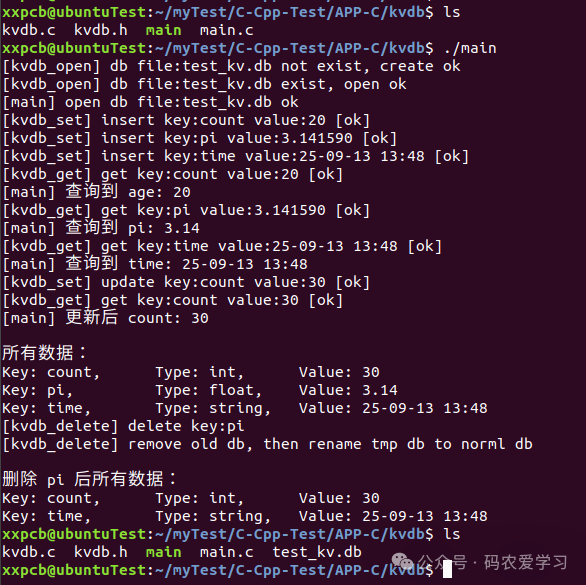
3 Running Test
The running effect is as follows:
4 Conclusion
This article implements a basic key-value type simple database in C language, supporting the storage of int, float, and string data types, and finally verifies the running effect of the program through actual execution.
Recommended Articles
i.MX6ULL Embedded Linux Development – U-Boot Porting PracticeHow to Add Color, Timestamp, Filename, Line Number, and Function Name to printf OutputLinux Program Crash Generates Core File and DebuggingFile Transfer Between Linux and Windows via TFTPCommon Linux Commands