 Arduino Sensor: HS-S01A Infrared SensorArduino Sensor: HS-S02P Infrared Sensor (Obstacle Avoidance)Arduino Sensor: HS-S03P Ultraviolet SensorArduino Sensor: HS-S05P Sound SensorArduino Sensor: HS-F07P Active BuzzerArduino Sensor: HS-S08P Flame SensorArduino Sensor: HS-S09LB Raindrop SensorArduino Sensor: HS-S09PC Soil Moisture Sensor
Arduino Sensor: HS-S10P Mist Sensor
Arduino Sensor: HS-S11-L Gas Sensor
Arduino Sensor: HS-S20P Ambient Light Sensor
Arduino Sensor: HS-S21P Tilt SensorArduino Sensor: HS-S22P Grayscale SensorArduino Sensor: HS-S24P Digital Temperature SensorArduino Sensor: HS-S26A Temperature and Humidity SensorArduino Sensor: HS-S28P Rotary Potentiometer
Arduino Sensor: HS-S31P Touch Sensor
Arduino Sensor: HS-S37PS Water Level Sensor
Arduino Sensor: HS-S38P Human Body Sensor
Arduino Sensor: HS-S40P Hall Magnetic Sensor
Arduino Sensor: HS-S45P Pressure Sensor
Arduino Sensor: HS-S46P Weighing Sensor
Arduino Sensor: HS-S59P Slot Photoelectric Sensor
Arduino Sensor: HS-S70P Heart Rate and Blood Oxygen Sensor
Arduino Sensor: Photoresistor Sensor
Arduino Sensor: Infrared Receiver Module
Arduino Sensor: Infrared Transmitter Module
Arduino Sensor: Clock Module
Arduino Sensor: Rotary Encoder Module
Arduino Sensor: Dual-Axis Joystick Module
Arduino Sensor: Gyroscope Module
Arduino Sensor: Voice Broadcast Module
Arduino Sensor: Voice Recognition Control Module
Arduino Communication Module: Bluetooth Module
Arduino Power Module: Motor Driver Module
Arduino Control Module: Self-Locking Button ModuleArduino Storage Module: SD Card Module
Arduino Control Module: Conductive Switch Module
Arduino Execution Module: Electromagnet Module
Arduino Detection Module: Ultrasonic ModuleArduino Interaction Module: Button Switch Module
01Basic Knowledge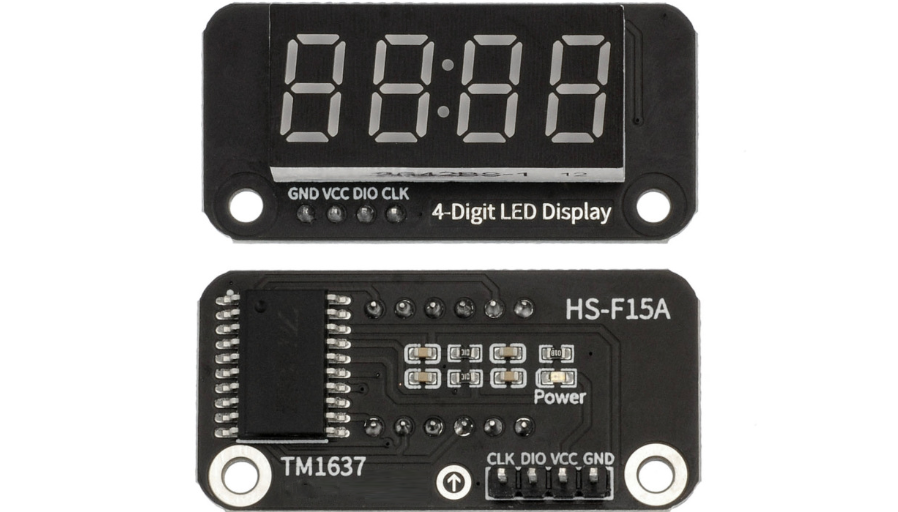 Model:HS-F15AName: Four-Digit Clock Digital TubeSeries: Display ModuleDescription:It is a digital display module that integrates a 12-pin four-digit 7-segment common anode digital tube with a TM1637 driver control chip. The TM1637 chip supports a two-wire communication protocol similar to I2C, requiring only 2 Arduino pins to achieve a four-digit display from 0000 to 9999, while also supporting independent control of the decimal point/separator and 7-level brightness adjustment. The module features minimal pin usage, simplified control logic, stable display, and low power consumption, making it widely applicable in time display, stopwatch timing, and various digital parameter visualization scenarios, making it an ideal component for lightweight Arduino display projects.Usage Scenarios:Smart home electronic clock (displaying real-time time in living room/bedroom, achieving accurate timing with HS-S30P clock module); student schedule timer (e.g., countdown for morning reading (04:59), break reminder (00:10)); industrial equipment timing display (e.g., equipment running time (12:30), process interval time (00:45)); primary and secondary school science experiments (exploring clock display principles, time encoding logic), in line with the “General Education Guidelines for Artificial Intelligence in Primary and Secondary Schools (2025 Edition)” practical requirements; interactive toy devices (e.g., role-playing clock toys, game countdown (03:00)); portable time reminder (designed for visually impaired individuals, combined with voice broadcast module, displaying time through digital tube + voice broadcast every hour).Disciplinary Integration:Physics, MathematicsMaterials ScienceInformation TechnologyEthical Education:The clock digital tube display must ensure “accurate timing” to avoid user misjudgment due to time deviation (e.g., being late for school, equipment process delays); module production must comply with environmental standards, reducing the use of heavy metals (such as lead, cadmium) and minimizing the impact of electronic waste on the environment; for different groups (such as the elderly, children), it is necessary to optimize the brightness of the separator (to avoid being overly bright and dazzling) and the size of the digits (to ensure clear readability from a distance), reflecting inclusive design; the flicker frequency of the separator must meet the comfort level of the human eye (1Hz is appropriate), avoiding high-frequency flickering that causes visual fatigue; if user schedule data (such as wake-up time) is involved in project development, privacy must be protected, and data should not be uploaded or shared indiscriminately.Note: Images are sourced from the internet, and the product is based on the actual purchase.
02Technical Parameters
Working Principle:
The core of the module consists of a “12-pin four-digit 7-segment common anode digital tube” and a “TM1637 driver chip,” using a simplified two-wire communication control logic: Driver chip functions: TM1637 integrates segment drive, digit selection drive, brightness adjustment, and data storage functions, and can directly receive serial data sent by Arduino without additional shift registers or complex scanning logic; Communication protocol: Communication is achieved through DIO (data input/output) and CLK (clock) pins, with Arduino sending “command bytes” (such as brightness settings, display on/off) and “data bytes” (such as segment data for each digit) to TM1637 in a specific timing; Common anode display logic: The common terminal of the common anode digital tube is connected to a high level, and TM1637 lights up the corresponding segment by pulling down the corresponding segment pin, with segment data needing to match the common anode encoding rules (opposite to the common cathode segment code table); Brightness adjustment: TM1637 supports 7 levels of brightness adjustment (from dim to bright), which can be flexibly switched based on ambient light or usage scenarios through program commands.
Parameter Analysis:
G(GND): Power input negative/cathodeV(VCC): Power input positive/anode levelSDA(Data Input/Output):Bidirectional transmission of display data and status informationSCL(Clock):Provides synchronous timing for data transmissionDigital tube specifications: 12-pin four-digit 7-segment common anode digital tube (each segment contains 1 LED, supports decimal point display)Display range: 0000-9999 (decimal), 0000-FFFF (hexadecimal), supports special symbols such as “-” and “_”Brightness levels: 7 adjustable levels (controlled by TM1637 commands, default medium brightness)Communication method: TM1637 dedicated two-wire communication (similar to I2C, non-standard I2C protocol)Working current: Static display ≤30mA (all four digits lit at medium brightness), ≤10mA in low brightness modeResponse time: ≤500ns (TM1637 data processing response), no display delay03Code Example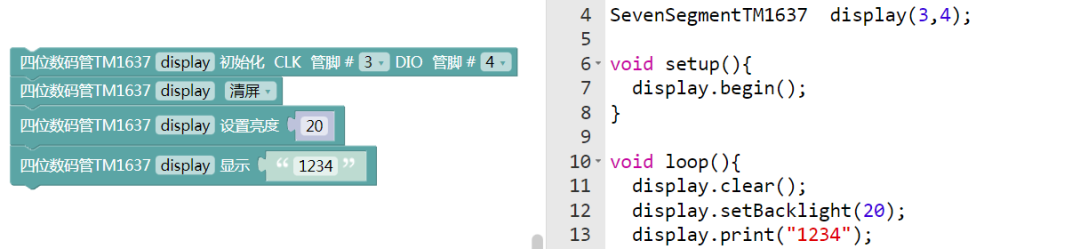
Connect pins to SDA\3; SCL\4.
04Safety Measures
1. Power off before wiring, confirm that the VCC voltage (3.3V/5V) matches the Arduino output to avoid high voltage (e.g., connecting 5V to a 3.3V module) which could burn out the TM1637 chip;
2. Do not scratch the surface of the digital tube with sharp objects (such as tweezers, scissors), as this will damage the LED light-emitting layer, causing partial segment failure or blurry display;
3. Avoid prolonged use in high temperature (>85℃) or high humidity (relative humidity >80%) environments: high temperatures accelerate the aging of the TM1637 chip, and high humidity can cause oxidation of module pins, affecting communication stability;
4. When soldering module pins, the soldering iron temperature should be ≤300℃, and the soldering time for a single pin should be ≤3 seconds, with the soldering iron tip not directly touching the TM1637 chip to prevent high temperatures from damaging the driver circuit;
5. If there is garbled display or no response during debugging: first check if the DIO and CLK pin connections are correct, then confirm if the TM1637 library is correctly imported, and finally check if the segment code table matches the common anode digital tube;
6. Avoid short-circuiting the DIO and CLK pins, as a short circuit can cause communication failure, and in severe cases, may damage the Arduino pin due to excessive current;
7. For long-term storage, the module should be packaged in an anti-static sealed bag and placed in a dry, cool environment (temperature 10-30℃, humidity ≤60%), to avoid aging of the digital tube or static discharge damaging the chip.
05Expansion
Students can try the following methods:
1. Create a “Smart Time Stopwatch Integrated Machine”: in conjunction with the HS-S30P clock module, supporting switching between “clock mode” (displaying real-time time 19:45) and “stopwatch mode” (timing 03:21.8), with mode switching through the button module, and the stopwatch triggering the HS-F07P active buzzer alarm when finished;2. Build a “Temperature and Humidity Digital Display”: in conjunction with the HS-S26A temperature and humidity sensor, the four-digit digital tube cycles to display temperature (25.5℃, showing 25.5) and humidity (48%, showing 0048), automatically switching brightness based on data from the HS-S20P ambient light sensor using the TM1637 brightness adjustment function;3. Design a “Counting Reward Device”: in conjunction with the HS-S31P touch sensor, counting +1 for each touch (displaying 0001→0002…), and when the count reaches multiples of 10 (e.g., 0010, 0020), controlling the HS-F01P RGB LED module to light up a green light, and using the voice broadcast module to prompt “counting standard met”;4. Develop a “Countdown Reminder”: setting the countdown duration (e.g., 05:00) using the rotary encoder module, with the digital tube displaying countdown progress (05:00→04:59…→00:00), and upon countdown completion, the TM1637 drives the digital tube to flash and triggers the electromagnet module to engage (e.g., popping up a reminder card).

— Previous Recommendations —