 Arduino Sensor: HS-S01A Infrared SensorArduino Sensor: HS-S02P Infrared Sensor (Obstacle Avoidance)Arduino Sensor: HS-S03P Ultraviolet SensorArduino Sensor: HS-S05P Sound SensorArduino Sensor: HS-F07P Active BuzzerArduino Sensor: HS-S08P Flame SensorArduino Sensor: HS-S09LB Raindrop SensorArduino Sensor: HS-S09PC Soil Moisture Sensor
Arduino Sensor: HS-S10P Mist Sensor
Arduino Sensor: HS-S11-L Gas Sensor
Arduino Sensor: HS-S20P Ambient Light Sensor
Arduino Sensor: HS-S21P Tilt SensorArduino Sensor: HS-S22P Grayscale SensorArduino Sensor: HS-S24P Digital Temperature SensorArduino Sensor: HS-S26A Temperature and Humidity SensorArduino Sensor: HS-S28P Potentiometer
Arduino Sensor: HS-S31P Touch Sensor
Arduino Sensor: HS-S37PS Water Level Sensor
Arduino Sensor: HS-S38P Human Body Sensor
Arduino Sensor: HS-S40P Hall Magnetic Sensor
Arduino Sensor: HS-S45P Barometric Pressure Sensor
Arduino Sensor: HS-S46P Weighing Sensor
Arduino Sensor: HS-S59P Slot Type Photoelectric Sensor
Arduino Sensor: HS-S70P Heart Rate and Blood Oxygen Sensor
Arduino Sensor: Photoresistor Sensor
Arduino Sensor: Infrared Receiver Module
Arduino Sensor: Infrared Transmitter Module
Arduino Sensor: Clock Module
Arduino Sensor: Rotary Encoder Module
Arduino Sensor: Dual-axis Joystick Module
Arduino Sensor: Gyroscope Module
Arduino Sensor: Voice Broadcast Module
Arduino Sensor: Voice Recognition Control Module
Arduino Communication Module: Bluetooth Module
Arduino Power Module: Motor Driver Module
Arduino Control Module: Self-locking Button ModuleArduino Storage Module: SD Card Module
Arduino Control Module: Conductive Switch Module
Arduino Execution Module: Electromagnet Module
Arduino Detection Module: Ultrasonic ModuleArduino Interaction Module: Button Switch ModuleArduino Display Module: Single Digit DisplayArduino Display Module: Four Digit DisplayArduino Display Module: 8*8 Dot Matrix Display— Previous Recommendations —

01Basic Understanding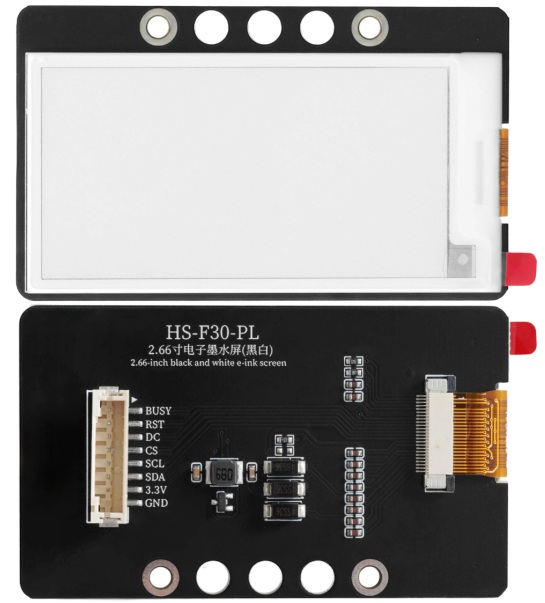 Model:HS-F19-LName:Electronic InkScreenSeries:Display ModuleDescription: This is a display module equipped with a 2.66-inch electronic ink screen (E-Ink), supporting black and white two-color display, with a resolution of 296×152 pixels. The core uses a hybrid I2C/SPI communication protocol and communicates with Arduino through 8 pins: G (GND), V (VCC), SDA (data), SCL (clock), CS (chip select), DC (data/command), RST (reset), and BUSY (busy signal). The module featureslow power consumption(only consumes power during refresh, with static display power consumption approaching zero),power-off display retention(the image remains for a long time after power-off),sunlight visibility(non-reflective, similar to paper display), among other core advantages. It can display text, graphics, QR codes, etc., making it a core component for low-power data dashboards and portable recorders for Arduino.Usage Scenarios:Smart home data dashboards (e.g., long-term display of indoor temperature and humidity historical curves, electricity consumption statistics for smart meters); industrial equipment status indicators (e.g., displaying device numbers, fault codes, without continuous power supply); primary and secondary school science experiments (exploring the principles of electronic ink display, low-power circuit design), in line with the “General Guidelines for Artificial Intelligence Education in Primary and Secondary Schools (2025 Edition)” practical requirements; portable detection devices (e.g., displaying pressure change trends with HS-S45P barometric pressure sensor, recording weighing data with HS-S46P weighing sensor); electronic price tags/indicators (e.g., shelf product prices, laboratory equipment names, content can be remotely updated via Arduino); outdoor environmental monitoring terminals (e.g., park temperature and humidity display screens, suitable for bright light environments, no backlight required).Interdisciplinary Integration:Physics, Mathematics,Art,InformationTechnologyEthical Education:The low power characteristics of electronic ink screens align with environmental protection concepts, reducing device energy consumption and carbon emissions; displayed content must be accurate and truthful to avoid misleading users due to data errors (e.g., industrial fault code display deviations); module production must comply with RoHS environmental standards to reduce harmful substances in electronic waste; for visually impaired individuals, a combination with voice modules can achieve “display + voice” dual output, reflecting inclusive design; when used outdoors, displayed content must adhere to public ethics to avoid disseminating harmful information; during long-term storage, the screen must be kept clean to avoid dust covering affecting display quality and prolonging module lifespan.Note: Images are sourced from the internet, and products are based on actual purchases.
02Technical Parameters
Operating Principle:
The core of the module consists of a “2.66-inch electronic ink screen panel” and a “dedicated driving circuit,” achieving low-power display through multi-pin coordination: Display principle: The electronic ink screen contains millions of microcapsules, with positively charged white particles and negatively charged black particles inside the capsules. By applying different polarities of voltage to the pixel points through the driving circuit, the particles move up and down, forming black and white images. After refreshing, no voltage is needed to maintain the display, achieving power-off retention; Communication and control: Basic control signals are transmitted through SDA (I2C data) and SCL (I2C clock), the CS (chip select) pin selects the driver chip to communicate with, the DC (data/command) pin distinguishes whether the transmitted signal is a “display command” (e.g., clear screen, refresh) or “image data” (e.g., pixel black and white information), the RST (reset) pin is used for module initialization (e.g., reset when the image freezes), and the BUSY (busy signal) pin feeds back the module status (high level indicates refreshing, low level indicates ready); Power consumption logic: Only consumes about 5V/100mA current during the “screen refresh” phase (approximately 1-3 seconds), with static display current ≤1μA, suitable for low-power projects powered by batteries.
Parameter Analysis:
G(GND):Power input negative/cathodeV(VCC):Powerinput positive/anodeSDA(Serial Data):I2C data pinSCL(Serial Clock):I2C clock pinCS(Chip Select):Chip select pinDC(Data/Command):Data/command pinRST(Reset):Reset pinBUSY(Busy Indicator):Busy signal pinScreen Specifications: 2.66-inch electronic ink screen, resolution 296×152 pixels, black and white two-color display, viewing angle ≥170° (clear at all angles)Refresh Time: Single full-screen refresh takes about 1.5 seconds (black and white switching), partial refresh takes about 0.5 seconds (some models support)Storage Characteristics: The image can be retained for ≥1 year after power-off (without direct strong light exposure, high humidity environment)Operating Temperature: 0℃~50℃ (avoid low temperatures that freeze the screen and high temperatures that accelerate aging)Interface Type: I2C (default) + SPI (compatible, requires hardware mode switching)03Code Example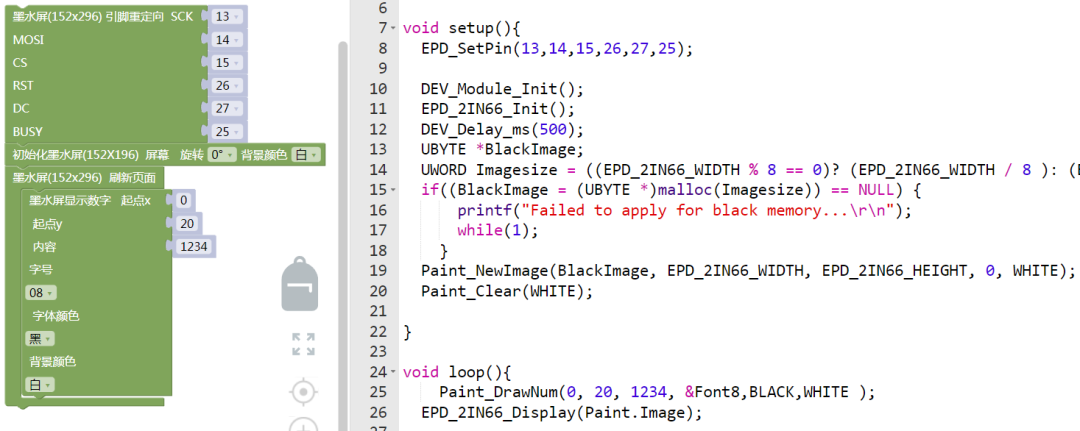
Connect the pins as follows: SCL\D13; SDA\D14; CS\D15; RST\D26; DC\D27; BUSY\D25.
Note: Library files need to be installed, and make sure to program with ESP32.
04Safety Measures
1. Power must be turned off before wiring, and pin functions must be strictly distinguished: Do not connect VCC (5V) to GND or other signal pins (such as SDA, RST), reverse connection will directly burn the driver chip and ink screen panel;
2. Do not press or scratch the surface of the ink screen with hands: The internal structure of the screen is microcapsules, and pressing will cause particle misalignment, resulting in permanent black spots or white blocks on the display;
3. Avoid using in extreme environments: Do not use in temperatures below -10℃ (the screen will freeze and cannot refresh) or above 60℃ (accelerating ink aging), high humidity (>80% RH) environments will cause pin oxidation;
4. Take precautions when soldering pins: Soldering iron temperature ≤300℃, single pin soldering time ≤3 seconds, the soldering iron tip should not touch the ink screen panel, it is recommended to solder the pin header first and then connect the screen;
5. Refresh operations must follow timing: Must wait for the BUSY pin to go low (module ready) before sending new commands, forced sending will cause communication confusion, and reset through the RST pin is required;
6. Avoid frequent screen refreshes: The refresh lifespan of electronic ink screens is about 100,000 times, frequent refreshing (e.g., once per second) will shorten the lifespan, it is recommended to refresh as needed (e.g., update every 30 seconds / 1 minute);
7. Pay attention to protection during long-term storage: The screen should display a white image (to avoid local pixels being powered for a long time), placed in a dry and cool environment (temperature 10-30℃, humidity ≤60%), cover the screen with a soft cloth to prevent dust.
05Expansion
Students can try the following methods:
1. Create a “low-power environmental data dashboard”: Link with HS-S26A Temperature and Humidity Sensor and HS-S45P Barometric Pressure Sensor, refresh the electronic ink screen every 5 minutes to display temperature and humidity curves, pressure values, and update time, powered by 2 AA batteries can last over 3 months;2. Build a “smart electronic calendar”: In conjunction with HS-S30P Clock Module, display the current date, week, and real-time time on the ink screen, supporting button module to switch between “Gregorian/Lunar” display modes, the date image can still be retained after power-off;3. Design a “weighing record recorder”: In conjunction with HS-S46P Weighing Sensor and HX711 module, automatically record “weight + time” (e.g., “08:30 500g”) on the ink screen after each weighing, can store 100 records, and export data via serial port;4. Develop a “QR code information board”: Generate device information QR codes (e.g., laboratory equipment number, usage instructions link) through Arduino, display on the ink screen, and scan with a mobile phone to view details, suitable for fixed asset identification, no continuous power supply required.