Attempting to solve some basic MATLAB problems
Basics
For a 3×3 matrix A in MATLAB, the element at linear index 4 is located at which row and column? How can we obtain this result using code:
In MATLAB, the linear index starts from 1, and is arranged in column-major order (i.e., filling the first column first, then the second column, and so on).
1. Answer
The element at linear index 4 is located at row 1 and column 2.
2. Code Implementation
Method 1: Directly access the element using the linear index, MATLAB automatically maps the row and column position
matlab
% Define a 3×3 example matrix<span>A </span><span><span>=</span></span><span><span>[</span></span><span><span>1</span></span><span><span>2</span></span><span><span>3</span></span><span><span>;</span></span><span><span>4</span></span><span><span>5</span></span><span><span>6</span></span><span><span>;</span></span><span><span>7</span></span><span><span>8</span></span><span><span>9</span></span><span><span>]</span></span><span><span>;</span></span><span><span>% Element at linear index 4</span></span><span>linear_idx </span><span><span>=</span></span><span><span>4</span></span><span><span>;</span></span><span>element </span><span><span>=</span></span><span><span>A</span></span><span><span>(</span></span><span>linear_idx</span><span><span>)</span></span><span><span>;</span></span><span><span>% Directly access the element using linear index</span></span><span><span>% Display result</span></span><span><span>fprintf</span></span><span><span>(</span></span><span><span>\</span></span><span><span>'</span></span><span>Linear index </span><span><span>%d corresponds to element value: %d\</span></span><span><span>\</span></span><span><span>'</span></span><span><span>,</span></span><span> linear_idx</span><span><span>,</span></span><span> element</span><span><span>)</span></span><span><span>;</span></span>
Method 2: Use the ind2sub function to convert the linear index to row and column indices (recommended, directly obtain row and column numbers) ind2sub function syntax:<span>[row, col] = ind2sub(matrix_size, linear_index)</span>
matlab
% Define a 3×3 matrix<span>A </span><span><span>=</span></span><span><span>[</span></span><span><span>1</span></span><span><span>2</span></span><span><span>3</span></span><span><span>;</span></span><span><span>4</span></span><span><span>5</span></span><span><span>6</span></span><span><span>;</span></span><span><span>7</span></span><span><span>8</span></span><span><span>9</span></span><span><span>]</span></span><span><span>;</span></span><span>linear_idx <span><span>=</span></span><span><span>4</span></span><span><span>;</span></span><span><span>% Get matrix size (3x3)</span></span><span>matrix_size </span><span><span>=</span></span><span><span>size</span></span><span><span>(</span></span><span>A</span><span><span>)</span></span><span><span>;</span></span><span><span>% Convert linear index to row and column index (ind2sub will automatically handle column-major logic)</span></span><span><span>[</span></span><span>row</span><span><span>,</span></span><span> col</span><span><span>]</span></span><span><span>=</span></span><span><span>ind2sub</span></span><span><span>(</span></span><span>matrix_size</span><span><span>,</span></span><span> linear_idx</span><span><span>)</span></span><span><span>;</span></span><span><span>% Display result</span></span><span><span>fprintf</span></span><span><span>(</span></span><span><span>\</span></span><span><span>'</span></span><span>Linear index </span><span><span>%d is located at row %d, column %d\</span></span><span><span>\</span></span><span><span>'</span></span><span><span>,</span></span><span> linear_idx</span><span><span>,</span></span><span> row</span><span><span>,</span></span><span> col</span><span><span>)</span></span><span><span>;</span></span><span><span>fprintf</span></span><span><span>(</span></span><span><span>\</span></span><span><span>'</span></span><span>Corresponding element value:</span><span><span>%d\</span></span><span><span>\</span></span><span><span>'</span></span><span><span>,</span></span><span><span>A</span></span><span><span>(</span></span><span>row</span><span><span>,</span></span><span> col</span><span><span>)</span></span><span><span>)</span></span><span><span>;</span></span></span>
3. Running Result
Linear index 4 is located at row 1, column 2<span>Corresponding element value: 2</span>
Key Explanation
The arrangement rule of MATLAB linear indexing (column-major): For a 3×3 matrix A, the correspondence between linear index and row-column is as follows:
| Linear Index | Row-Column Index (row, col) | Element Value |
|---|---|---|
| 1 | (1, 1) | 1 |
| 2 | (2, 1) | 4 |
| 3 | (3, 1) | 7 |
| 4 | (1, 2) | 2 |
| 5 | (2, 2) | 5 |
| 6 | (3, 2) | 8 |
| 7 | (1, 3) | 3 |
| 8 | (2, 3) | 6 |
| 9 | (3, 3) | 9 |
The above content is from AI
—————————————————————–
(1)Generate a random matrixA with 6 rows and 3 columns, where each element is a random integer in the range[50,100]. Below we assume that each row of matrixA represents a student, and the three columns correspond to the scores of three subjects;
A=reshape(50:100,6,3)×
A = randi([50, 100], 6, 3);√
(2)Assign the scores of the first subject of the six students to variableB, sortB in descending order, and denote the sorted vector asBB, returning the index vectorind of each element inB;
——————————————————–
Applying the above basics,
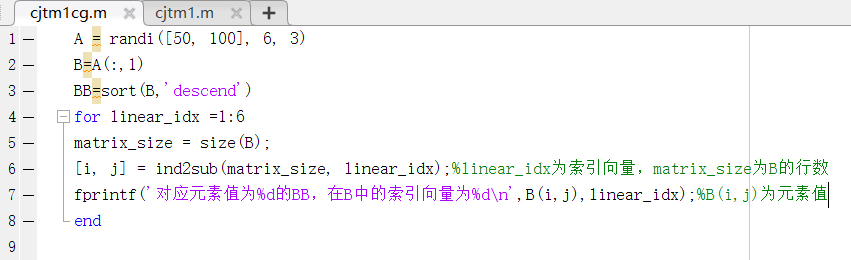
Running Result
>> cjtm1cg
A =
87 76 84
85 66 61
92 92 73
92 91 69
64 78 77
65 63 100
B =
87
85
92
92
64
65
BB =
92
92
87
85
65
64
For the corresponding element value of 87 in BB, the index vector in B is 1
For the corresponding element value of 85 in BB, the index vector in B is 2
For the corresponding element value of 92 in BB, the index vector in B is 3
For the corresponding element value of 92 in BB, the index vector in B is 4
For the corresponding element value of 64 in BB, the index vector in B is 5
For the corresponding element value of 65 in BB, the index vector in B is 6
>>
Extrapolate
Attempted to write a program:
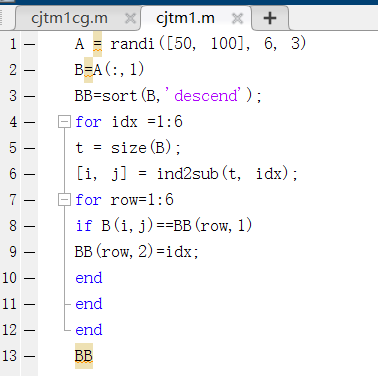
Draft
| B=76 | B(1,1) | 1 |
| 74 | B(2,1) | 2 |
| 90 | B(3,1) | 3 |
| 61 | B(4,1) | 4 |
| 75 | B(5,1) | 5 |
| 95 | B(6,1) | 6 |
| BB=95 | 6 | BB(1,1) |
| 90 | 3 | BB(2,1) |
| 76 | 1 | BB(3,1) |
| 75 | 5 | BB(4,1) |
| 74 | 2 | BB(5,1) |
| 61 | 4 | BB(6,1) |
Command line running result:
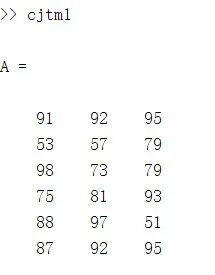
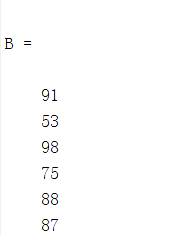
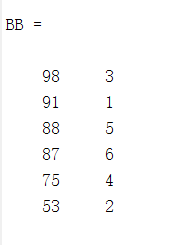
Upon reviewing the video, I found that it can be done in just one line. MATLAB has many function libraries that are already written, which can be used directly.
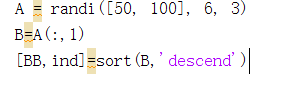 Running Result ↓
>> cjtm2
A =
88 80 77
100 93 60
61 100 61
76 97 66
52 70 54
88 50 88
B =
88
100
61
76
52
88
BB =
100
88
88
76
61
52
ind =
2
1
6
4
3
5
————————————————————————
This is a simple application of MATLAB.