Wi-Fi is commonly referred to in Chinese as “wireless broadband.” It is a technology that allows electronic devices to connect to the internet or communicate with each other wirelessly within a local area. This differs from mobile communication’s wide area networks, as its coverage is limited, typically within small indoor or outdoor areas such as homes, offices, cafes, or airports. The Wi-Fi technology standard is a set of protocols defined by the IEEE (Institute of Electrical and Electronics Engineers) under the 802.11 series. This means that all devices adhering to this standard, regardless of brand, can be compatible and communicate with each other. The commonly referred Wi-Fi 4/5/6/7 are generational names for these standards.01 Origin of the Name Wi-FiIn 1999, an industry organization called the Wi-Fi Alliance (then known as WECA) was established. They needed a catchy and easily communicable name for this technology. “Wi-Fi” itself has no actual meaning; it is not an abbreviation for “Wireless Fidelity,” which was a marketing concept introduced later. The name was inspired by the popular term “Hi-Fi” (high fidelity), intended to evoke thoughts of high-quality, highly compatible wireless connections. Therefore, Wi-Fi is merely a brand name, representing the technology defined by the IEEE 802.11 protocol.02 Basic Functions of Wi-FiFunction One: Wireless Internet AccessThis is the most well-known function of Wi-Fi. It serves as the “last mile” wireless bridge between devices and the wide area network.
- Workflow: Internet service providers deliver broadband to your home via fiber optics, network cables, etc. Then, the optical modem or network cable connects to your wired router. The router converts the wired signal into radio waves and transmits it. Thus, your devices (such as smartphones) receive this radio wave through their wireless network cards, connecting to the internet.
- Application Scenarios: Wireless internet access at home, offices, schools, airports, hotels, etc., allowing devices like smartphones, tablets, and computers to browse the web, watch videos, and play online games.
Function Two: Wireless Communication Between DevicesEven without an internet connection, Wi-Fi allows devices to share data and resources directly, creating a local wireless network.
- Operating Modes: One is the router mode, where all devices connect to the same router and communicate under its management. For example, a computer sends print commands to a network printer, and a smartphone casts video to a smart TV. The other is the direct connection mode, such as Wi-Fi Direct technology, which allows two devices to establish a point-to-point Wi-Fi connection directly without a router. For instance, two smartphones can transfer large files directly, or a smartphone can cast its screen to a Miracast-supported TV.
- Application Scenarios: For example, file sharing, wirelessly transferring files between smartphones and computers. Media casting, projecting videos or photos from smartphones or tablets to a large TV screen. Network printing, multiple computers sharing the same network printer. Smart home interconnectivity, smart speakers, smart bulbs, cameras, etc., connect to the home gateway via Wi-Fi and collaborate with each other.
03Development History of Wi-Fi TechnologyThe following diagram provides a simple overview of the development history of Wi-Fi technology.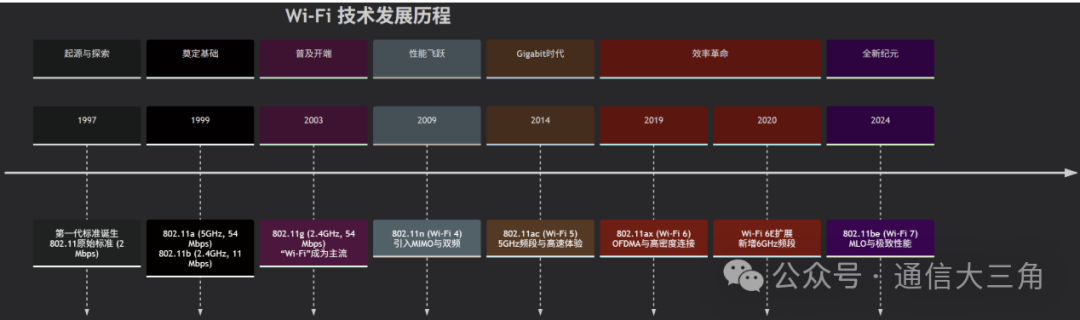 Prehistoric Era and Birth (1997-1999)
- 1997: The IEEE (Institute of Electrical and Electronics Engineers) introduced the first wireless local area network standard—IEEE 802.11. It operated in the 2.4GHz frequency band, with a maximum rate of only 1Mbps or 2Mbps. Although slow and expensive, it laid the foundation for Wi-Fi.
- 1999: The beginning of commercialization, first with 802.11a, which used the 5GHz frequency band, achieving a rate of 54Mbps. However, due to the high cost of 5GHz components and poor signal penetration, it did not gain widespread popularity. Meanwhile, 802.11b, which adhered to the 2.4GHz frequency band, achieved a rate of 11Mbps. Its lower cost and better coverage made it the first truly commercially successful Wi-Fi standard, leading to the popularity of wireless networks among businesses and early tech enthusiasts.
Widespread Adoption and Growth (2003-2007)
- 2003: The tipping point for the consumer market – 802.11g, which combined the advantages of the previous two generations, achieving 54Mbps speed in the 2.4GHz frequency band. This allowed it to maintain the good coverage and low cost of 802.11b while achieving speeds close to 802.11a.802.11g quickly became the absolute mainstream for home and office wireless routers, driving the popularity of built-in Wi-Fi features in laptops, and the term “Wi-Fi” became widely known.
- 2007: The release of the first-generation iPhone, although not a Wi-Fi standard, significantly changed the usage scenarios of Wi-Fi, transforming it from a computer accessory to a necessity for mobile devices, increasing the demand for public and home Wi-Fi coverage.
Performance Leap (2009-2014)
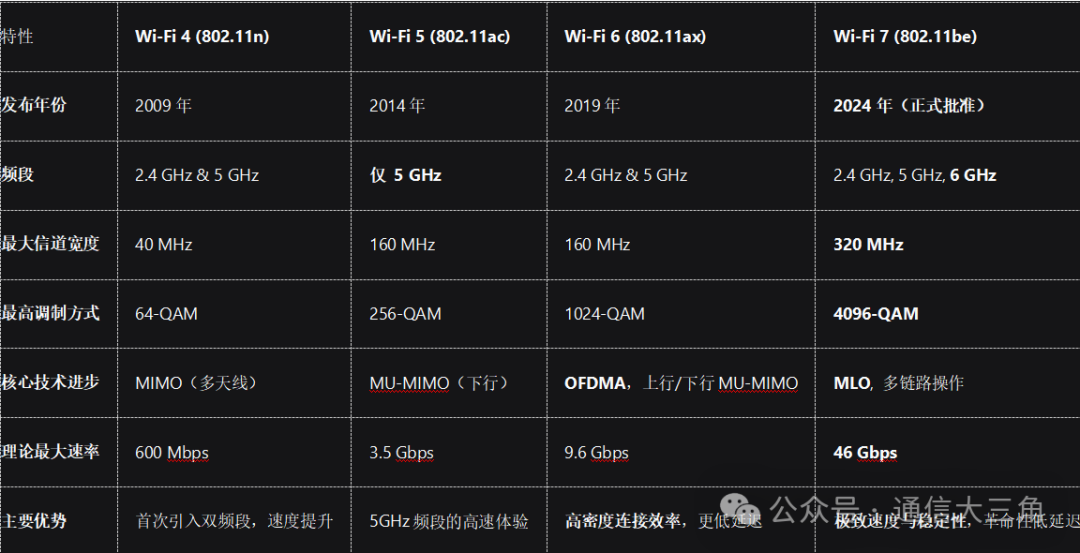
- 2009: Wi-Fi 4 (802.11n) – The first significant leap, this was the first generation officially named “Wi-Fi 4” (the naming was retroactive). It introduced the core technology of MIMO (Multiple Input Multiple Output), allowing routers to use multiple antennas to send and receive data streams simultaneously. It also first supported dual-band operation at 2.4GHz and 5GHz. The theoretical maximum rate reached 600Mbps, bringing Wi-Fi into the hundred-megabit era.
Gigabit Era (2014-2019)
- 2014: Wi-Fi 5 (802.11ac) – The king of speed, achieving wider channels, supporting 80MHz and 160MHz channel widths. It adopted 256-QAM high-order modulation. At the same time, it introduced multi-user MIMO (MU-MIMO), allowing routers to communicate with multiple devices simultaneously (but only for downlink). It focused on the 5GHz frequency band to pursue extreme speed. The theoretical maximum rate exceeded 3.5Gbps, marking the arrival of the gigabit Wi-Fi era.
Revolution in Efficiency (2019-2024)
- 2019: Wi-Fi 6 (802.11ax) – Designed for high-density scenarios, based on Wi-Fi 6, it added the 6GHz frequency band, providing a large number of clean, interference-free new channels, marking another milestone in Wi-Fi development. It utilizes OFDMA technology, allowing a channel to be divided into multiple smaller sub-channels, serving multiple devices simultaneously, significantly reducing latency. It supports MU-MIMO for both uplink and downlink, upgrading from Wi-Fi 5, supporting both uplink and downlink. The focus shifted from enhancing the speed of a single device to improving the overall network efficiency and capacity when multiple devices are connected. The theoretical maximum rate can reach 9.6Gbps.
- 2021: Wi-Fi 6E, based on Wi-Fi 6, added the 6GHz frequency band, providing a large number of clean, interference-free new channels, marking another milestone in Wi-Fi development.
A New Era (From 2024)
- 2024: Wi-Fi 7 (802.11be) – The king of ultimate performance and stability, it employsMLO technology, allowing devices to transmit data simultaneously across multiple frequency bands and channels (for example, using two channels at 5GHz and 6GHz simultaneously), achieving higher throughput, lower latency, and extremely high reliability. It supports 320MHz ultra-wide channels and 4096-QAM higher-order modulation. The theoretical maximum rate can reach 46 Gbps. It is designed to support next-generation applications with high bandwidth and low latency requirements, such as 8K video streaming, VR/AR, real-time gaming, and remote collaboration.
04Differences Between Wi-Fi 4, 5, 6, and 7