This article is included in the collection: “Adapting FreeRTOS from Scratch Based on GD32F4xx”;01 | IntroductionIn the previous article, we discussed how to trim the kernel and what FreeRTOS tasks are. These were all conceptual topics, so this article will begin with practical operations, creating a FreeRTOS task to control the LED on the development board to blink at a frequency of 500ms.Previous article review: “Adapting FreeRTOS from Scratch Based on GD32F450 (4) – Introduction to Tasks, Priorities, etc.”; 02 | Environment DescriptionAdaptation environment, tools, versions:· System version: Win 11;· Keil version: V5.36;· FreeRTOS kernel version: V11.1.0;03 | Task CreationBefore officially creating tasks, several macros for FreeRTOS need to be managed, which are located in the FreeRTOSConfig.h header file; the macro definitions and their meanings are as follows:
/* Disable static memory */#define configSUPPORT_STATIC_ALLOCATION 0/* Enable dynamic memory allocation */#define configSUPPORT_DYNAMIC_ALLOCATION 1/* Total heap size: 36KB */#define configTOTAL_HEAP_SIZE ((size_t)(36*1024))There are two ways to create tasks in FreeRTOS:· Static creation: This method requires the user to first define a static global array, and then during task creation, the address of the array is passed to the task control block. The variables and task environment during the subsequent task execution are stored in this global array.· Dynamic creation: This method allows FreeRTOS to automatically create a large array internally, and then allocate and reclaim memory automatically based on the selected memory management scheme, without user intervention. The previously mentioned heap_4.c, heap_5.c, etc., are memory management schemes provided by FreeRTOS.Both methods have their pros and cons; here we will use the second method for task creation.First step, just like bare-metal development, peripheral initialization is required;
/* In main.c source file, create a peripheral initialization function */static void BSP_Init(void){ /* Allocate interrupt group, only needs to be allocated once */ nvic_priority_group_set(NVIC_PRIGROUP_PRE4_SUB0); /* Since this task is for blinking, only the GPIO port for the LED needs to be initialized */ gd_eval_led_init(LED1);}Second step, add the peripheral initialization to the main() function;
/* Add peripheral initialization function to main function */int main(void){ BSP_Init(); while(1){} /* Normally will not execute here */}Third step, create task handles. Since dynamic creation is used, we do not know exactly which memory address the task will be allocated to, so the task handle is essentially a pointer that points to the task memory. When we need to delete the task or perform other operations, we can directly manipulate the task handle.
/* Create two task handles */static void AppTaskCreate(void); // Used for creating tasksstatic void CPU_LED_Task(void* pvParameters); // LED_Task implementationFourth step, create the LED task, implementing the LED blinking logic. Each task is a while(1) loop that runs continuously. The vTaskDelay() is FreeRTOS’s delay, not a user-defined delay function. It is the key to task switching; only by entering the delay can the task block, allowing the kernel to switch to other tasks for execution. Otherwise, the task will run continuously, and if this task is of the highest priority, other tasks will never get executed.
/* Task1: CPU LED flicker */static void CPU_LED_Task (void* parameter){ uint32_t idx_count = 0; while(1) { /* Blinking business logic code */ if(idx_count < 5) { gd_eval_led_on(LED1); } else if(idx_count < 10) { gd_eval_led_off(LED1); } idx_count++; if(idx_count>10) { idx_count=0; } /* The delay function here is FreeRTOS kernel's delay */ vTaskDelay(200); /* delay 200ms */ }}Fifth step, create the App task. This task is similar to the LED task, but it serves as a wrapper to encapsulate similar LED tasks, making it easier to manage tasks and improving code readability.In the App task, you can see that there is no while(1), because the App task is just a “prologue”. Once all tasks are created, the App task can be deleted.
/* Task creation function: All tasks are created here. */static void AppTaskCreate(void){ /* Define a return value for creation information, default is pdPASS */ BaseType_t xReturn = pdPASS; /* Enter critical section to protect system resources */ taskENTER_CRITICAL(); /* Create LED_Task task */ xReturn = xTaskCreate((TaskFunction_t )CPU_LED_Task, /* Task entry function */ (const char* )"LED_Task",/* Task name */ (uint16_t )1024, /* Task stack size */ (void* )NULL, /* Task entry function parameters */ (UBaseType_t )1, /* Task priority */ (TaskHandle_t* )&CPU_LED_Task_Handle);/* Task control block pointer */ if(pdPASS == xReturn) { // error handle } /* Delete AppTaskCreate task */ vTaskDelete(AppTaskCreate_Handle); /* Exit critical section to protect system resources */ taskEXIT_CRITICAL(); }Sixth step, create the App task in the main() function and start the task scheduler. The entire execution logic is as follows: after executing to main(), similar to bare-metal, initialize various peripherals; then create the App task. After successful creation, start the FreeRTOS task scheduler; then begin executing the first task, which is the App task, creating the LED task within the App task. After successful creation, delete the App task; subsequent execution will be the business logic, with various tasks switched by the scheduler.
int main(void){ BaseType_t xReturn = pdPASS;/* Define a return value for creation information, default is pdPASS */ BSP_Init(); /* Create AppTaskCreate task */ xReturn = xTaskCreate((TaskFunction_t )AppTaskCreate, /* Task entry function */ (const char* )"AppTaskCreate",/* Task name */ (uint16_t )512, /* Task stack size, 256*4byte=1KB */ (void* )NULL,/* Task entry function parameters */ (UBaseType_t )1, /* Task priority */ (TaskHandle_t* )&AppTaskCreate_Handle);/* Task control block pointer */ /* Start task scheduling */ if(pdPASS == xReturn) vTaskStartScheduler(); /* Start tasks, enable scheduling */ else return -1; while(1){} /* Normally will not execute here */}Seventh step, compile and download to the development board, and you can observe that the LED blinks at intervals of 500ms.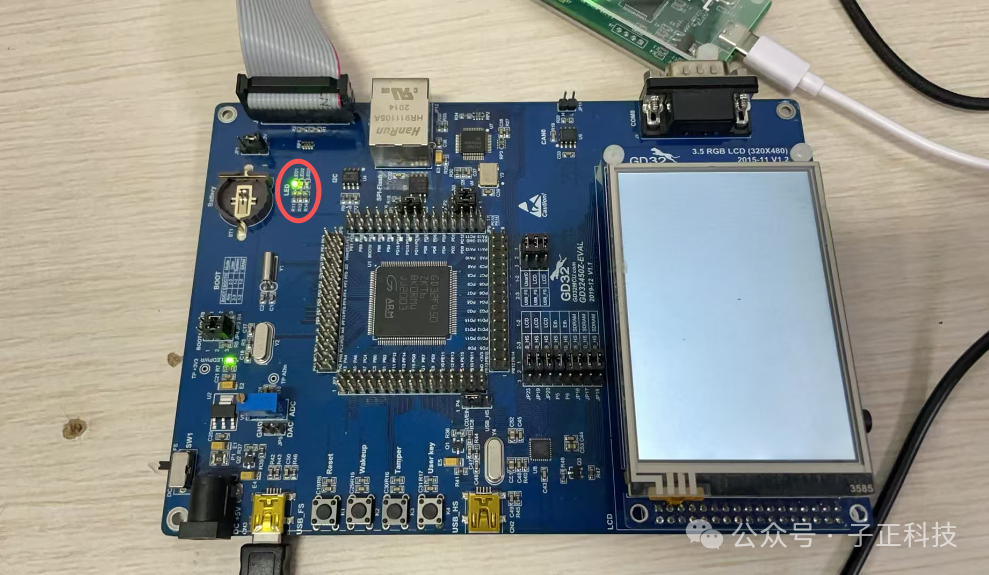 This is the complete process of creating a FreeRTOS task.04 | Complete source code of main.c file
#include "gd32f4xx.h"#include "systick.h"#include <stdio.h>#include "main.h"#include "gd32f450z_eval.h"/* FreeRTOS include .h file */#include "FreeRTOS.h"#include "task.h"/* Create task handles */static TaskHandle_t AppTaskCreate_Handle = NULL;/* LED task handle */static TaskHandle_t CPU_LED_Task_Handle = NULL;/* Function declaration */static void AppTaskCreate(void); // Used for creating tasksstatic void CPU_LED_Task(void* pvParameters); // LED_Task implementation/* Initial configuration of hardware */static void BSP_Init(void);/* main function */int main(void){ BaseType_t xReturn = pdPASS;/* Define a return value for creation information, default is pdPASS */ BSP_Init(); /* Create AppTaskCreate task */ xReturn = xTaskCreate((TaskFunction_t )AppTaskCreate, /* Task entry function */ (const char* )"AppTaskCreate",/* Task name */ (uint16_t )512, /* Task stack size, 256*4byte=1KB */ (void* )NULL,/* Task entry function parameters */ (UBaseType_t )1, /* Task priority */ (TaskHandle_t* )&AppTaskCreate_Handle);/* Task control block pointer */ /* Start task scheduling */ if(pdPASS == xReturn) vTaskStartScheduler(); /* Start tasks, enable scheduling */ else return -1; while(1){} /* Normally will not execute here */}/* Initial configuration of hardware */static void BSP_Init(void){ /* Interrupt priority grouping: there can only be one group. */ nvic_priority_group_set(NVIC_PRIGROUP_PRE4_SUB0); gd_eval_led_init(LED1);}/* Task creation function: All tasks are created here. */static void AppTaskCreate(void){ BaseType_t xReturn = pdPASS;/* Define a return value for creation information, default is pdPASS */ taskENTER_CRITICAL(); // Enter critical section /* Create LED_Task task */ xReturn = xTaskCreate((TaskFunction_t )CPU_LED_Task, /* Task entry function */ (const char* )"LED_Task",/* Task name */ (uint16_t )1024, /* Task stack size */ (void* )NULL, /* Task entry function parameters */ (UBaseType_t )1, /* Task priority */ (TaskHandle_t* )&CPU_LED_Task_Handle);/* Task control block pointer */ if(pdPASS == xReturn) { // error handle } vTaskDelete(AppTaskCreate_Handle); // Delete AppTaskCreate task taskEXIT_CRITICAL(); // Exit critical section}/* Task1: CPU LED flicker */static void CPU_LED_Task (void* parameter){ uint32_t idx_count = 0; while(1) { if(idx_count < 5) { gd_eval_led_on(LED1); } else if(idx_count < 10) { gd_eval_led_off(LED1); } idx_count++; if(idx_count>10) { idx_count=0; } vTaskDelay(200); /* delay 200ms */ }}The above is the complete content of the main.c source file, which can be used as a reference.05 | Final ThoughtsAll notes above can provide the original project files, including FreeRTOS source code, GD standard library source code, and experimental source code. Please message me privately for download links for the 【FreeRTOS examples】. I hope these notes can be helpful to friends; if there are any errors, please correct me.