
Toolbox Overview
This script tool is designed for quickly changing sources, one-click installation of BBR, Baota panel, etc., testing server return routes, IP quality, streaming media unlocking, and server performance, providing various operation menus to achieve system, network, file transfer, and other functions.
Download and Installation
Universal Command for Linux System Copy ①:
curl -O http://linux.beycn.com/linux1.sh && chmod +x linux1.sh && ./linux1.shUniversal Command for Linux System Copy ②:
curl -O http://linux.beycn.com/linux2.sh && chmod +x linux2.sh && ./linux2.shFunction Overview
1. System Menu
- Restart Server: Users can restart the server through this function to ensure normal system operation.
- Change Password: Provides a one-click function to change the server login password, enhancing security.
- Sync Shanghai Time: Synchronizes server time by installing ntpdate, ensuring time accuracy.
- Change SSH Port: Users can easily change the SSH port to enhance security.
- Change DNS: Supports one-click modification of DNS settings to improve domain resolution speed.
- Enable/Disable SSH Login: Can disable or enable SSH login functionality to enhance system security.
- Update System Version: Supports one-click updates for CentOS, Ubuntu, and Debian systems to the latest version, ensuring system stability and security.
- Change Source: Provides the function to change different operating system sources to Alibaba Cloud mirrors, ensuring software package updates and stability.
- Create Users and Administrators: Allows users to create new users and set permissions to meet multi-user environment management needs.
- View Current Connected IP: Displays the current IP addresses connected to the server, aiding in network security management.
- Change Hostname: Allows users to change the server’s hostname for easier management and identification.
2. Network Menu
- Restart Network Card: Restarts the network interface card to resolve network connection issues.
- Ping Test: One-click to enable or disable Ping testing for a specified IP to check network connectivity.
- Additional IP Binding: Adds or removes additional IP addresses for the server, enhancing network flexibility.
- View Geolocation: Displays the geographical location information of the server, helping users understand its physical location.
- View Original IP: Displays the server’s original IP address for network configuration and management.
- Check UDP Blocking: Detects and displays whether the UDP protocol is blocked, ensuring data transmission integrity.
- VPS IP Mapping: Maps the VPS’s IP address to an independent server for load balancing and high availability.
- Layer 4 Port Forwarding: Supports layer 4 port forwarding functionality to improve internal network access to the external network.
- Close Layer 4 Port Forwarding: One-click to close set forwarding rules, ensuring network security.
- View Used Ports: Lists the currently used port information for easier network monitoring and management.
- Bandwidth Usage: Shows which IP is consuming bandwidth, helping optimize network resource allocation.
3. File Menu
- Upload Files to Remote Server: One-click to upload local files for easy data backup and sharing.
- Download Files to Local: Downloads files from the remote server to local for easier data retrieval and management.
- View Hard Disk Partition Information: Displays all hard disk partition information, helping users understand storage status.
- Custom Mount Data Disk: Allows users to customize mount paths for flexible storage management.
- Unmount Data Disk: One-click to unmount the mounted data disk, freeing up storage resources.
- Format Data Disk: Formats the selected data disk to prepare a new storage environment.
- Repair Bad Blocks: Detects and repairs super bad blocks on the hard disk, extending its lifespan.
- Set Boot Startup Script: Sets scripts to execute automatically at boot, improving automation management.
- Keyword Content Review: Queries file content for specific keywords for review and management.
- Clear SSH Command History: Clears SSH session history to protect user privacy.
4. Baota Menu
- Official One-Click Mount Disk Script from Baota: Simplifies the hard disk management process.
- Install Baota Host Security System: Enhances server security.
- Install Stable Version of CentOS/OpenCloud/Alibaba: Provides stable support for Baota products.
- Install Stable Version of Ubuntu/Deepin Baota: Provides installation options for different Linux systems.
- Install Stable Version of Debian Baota: Supports Baota product installation under Debian systems.
- Install Latest Official Version of Baota Panel: Keeps system management modernized.
- One-Click Install Latest Version of Baota WAF: Deploys the latest Web Application Firewall to enhance website security.
5. Host Machine Menu
- One-Click Enable Cloud Server Virtualization: Enhances resource utilization and flexibility.
- Custom Set SWAP Virtual Memory: Users can freely set SWAP size to optimize memory management.
- One-Click Disable SWAP Virtual Memory: Disables SWAP to free physical memory.
- One-Click Enable/Disable KSM Memory Recycling: Improves memory usage efficiency.
- One-Click Disable SELinux: Disables SELinux module to enhance system flexibility.
6. Quick Functions
- BBR One-Click Script: Optimizes TCP parameters to enhance network speed.
- Return Route Visualization Script: Displays server return route information.
- IP Quality Detection Script: Detects the quality of the server’s IP address.
- Streaming Media Unlock Detection Script: Checks the status of streaming media unlocking.
- Fusion Monster VPS Testing Script: Tests VPS performance and stability.
- Linux System One-Click Change Source (Default Version): Changes the default software source to speed up updates.
- Linux System One-Click Change Source (Education Network): Uses EDU source to speed up updates in campus network environments.
- Universal One-Click Install Latest Official Version of Baota: Quickly installs the latest version of the Baota panel.
Effect Preview
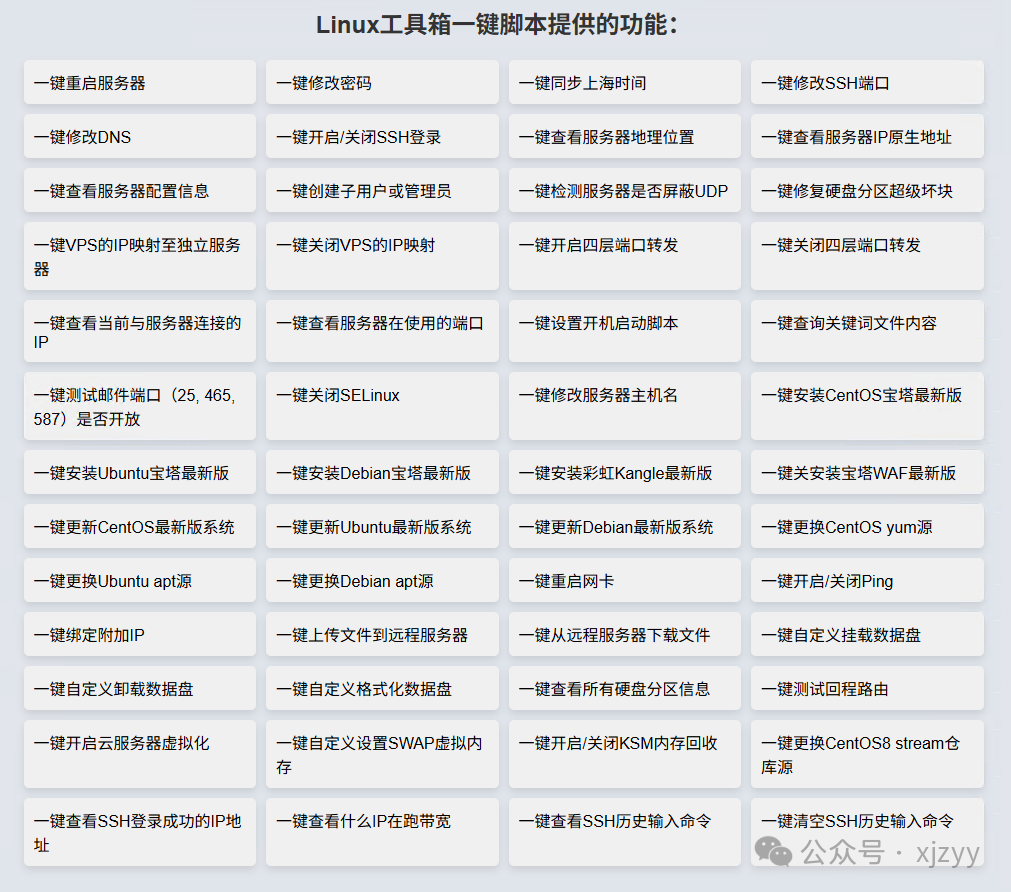
Related Links
🔗 Official Website:https://linux.beycn.com/
⚠️ Usage Recommendation: Please run in a test environment for the first time to confirm the script source is safe, applicable to CentOS / Ubuntu / Debian.
Summary
This <span>Linux</span> toolbox script covers comprehensive functions such as system management, network configuration, disk maintenance, and software updates. For operational personnel, it not only saves time but also reduces operational risks.
🔔 Follow me for more technical insights and open-source project sharing!
If this article has helped you, feel free to 👍like / ⭐bookmark / 📣share with friends!
🎁 Previous Highlights
-
🧰 One command to activate the JetBrains suite, supporting Win, Linux, macOS
-
⭐ GitHub Stars Manager: AI-driven Star repository management tool
-
🪁 An open-source, lightweight Kubernetes Dashboard
-
🔐 EasyTier: A simpler tool for intranet penetration than Zerotier
-
⚙️ Xiaomi Car Order Monitoring Script: Say goodbye to manual refresh, keep track of delivery progress in real-time
-
🐳 Build a private ZeroTier Planet network with Docker, a tool for remote networking
-
💻 A tool for one-click downloading and packaging Docker images
-
🐳 A one-stop Docker image & GitHub repository acceleration tool
-
📊 Ansible batch automation inspection generating beautiful HTML system reports
-
🚫 Completely disable Windows automatic updates! One trick to do it permanently!