In addition to the much-discussed exciting free-threading model and Just-In-Time compiler, I am particularly drawn to the new improvements in the type system.
Building on the powerful type system introduced in earlier versions, Python 3.13 will introduce seven new type features that are expected to enhance code reliability and developer productivity.
In this article, we will try out these exciting new features and explore how they can simplify our code and elevate our programming practices to new heights.
All code snippets in this article have been tested on the latest release version of Python 3.13.0rc2, which is the final release preview of Python 3.13. The official release of 3.13.0 is scheduled for Tuesday, October 1, 2024.
1. ReadOnly Type
Define items as read-only
The new ReadOnly type, as the name suggests, is a special type construct used to mark items in a TypedDict as read-only.
from typing import TypedDict, ReadOnly

class Leader(TypedDict):
    name: ReadOnly[str]
    age: int

author: Leader = {'name': 'Yang Zhou', 'age': 30}
author['age'] = 31  # no problem to change
author['name'] = 'Yang'  # Type check error: "name" is read-only
The code above demonstrates its usage. Since we defined the name property as ReadOnly[str] type, changing its value will trigger a type inconsistency warning in the integrated development environment or other static type checking tools.
Note: The “ReadOnly” type can only be used in “TypedDict”.
If you prefer a simpler way to define TypedDict, you can also use the ReadOnly type:
from typing import TypedDict, ReadOnly

Leader = TypedDict("Leader", {"name": ReadOnly[str], "age": int})

author: Leader = {'name': 'Yang Zhou', 'age': 30}
author['age'] = 31  # no problem to change
author['name'] = 'Tim'  # Type check error: "name" is read-only
2. @warnings.deprecated
New decorator to indicate that an object has been deprecated
Good software continuously improves. This means not only adding new content but also removing outdated content.
However, directly removing functions or classes in the next new version is not user-friendly. We should not do this.
If you strictly adhere to Python’s official documentation, you will find that Python’s gradual removal strategy for obsolete objects is the industry standard:
-
Marking relative objects as deprecated, informing developers in advance about which objects will be removed in the future. But these objects can still be used in the next few versions. -
After several versions, fully informed objects will be completely removed from Python’s latest version.
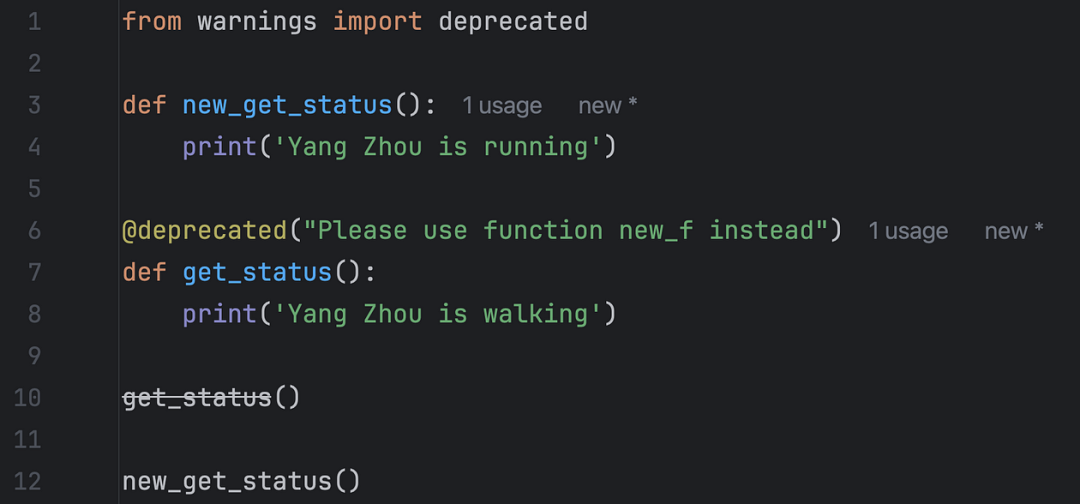
Python 3.13 provides us with a more convenient way to mark deprecated objects – a new decorator named @warnings.deprecated.
As long as an object is equipped with this decorator, static type checking tools or integrated development environments will remind us that we are using deprecated objects.
For example, I used a deprecated object in the program below, and the integrated development environment (PyCharm) reminds me with a noticeable strikethrough:
Simple and easy to use, this is yet another classic Pythonic design!
3. TypeIs
Making type narrowing easier
The new “TypeIs” concept aims at “type narrowing”, which is described in its official documentation as a technique used by static type checkers to determine the more precise type of expressions in the program code flow.
However, the likelihood of using it in our application code is not high. But we need to understand what it is:
In short, the form
def foo(arg: TypeA) -> TypeIs[TypeB]: ...means that iffoo(arg)returnsTrue, thenargis an instance ofTypeB, and if it returnsFalse, then it is not an instance ofTypeB.
4. is_protocol
A new function to quickly check if a class belongs to a protocol type
This new function is_protocol is a convenient way to check if an object is of Protocol type.
We simply import this function from the typing module and use it directly:
from typing import is_protocol, Protocol


class PersonProto(Protocol):
    name: str
    age: int

print(is_protocol(PersonProto))
# True
print(is_protocol(int))
# False
5. get_protocol_members
Function to return the set of protocol members
The new get_protocol_members() function is used to quickly obtain all item names of a Protocol type. It returns a frozenset containing all names:
from typing import Protocol, get_protocol_members


class PersonProto(Protocol):
    name: str
    age: int

print(get_protocol_members(PersonProto))
# frozenset({'age', 'name'})
6. Default types for TypeVar, ParamSpec, and TypeVarTuple
In Python 3.13, type parameters (typing.TypeVar, typing.ParamSpec, and typing.TypeVarTuple) now support default types, and their usage is very simple.
For example, the code below shows how to easily set a default type for TypeVar:
from typing import TypeVar
T = TypeVar("T", default=int)  # This means that if no type is specified T is int
print(T.has_default())
# True
S = TypeVar("S")
print(S.has_default())
# False
Python 3.13 also adds the has_default() function to check whether TypeVar has a default type.
7. NoDefault
Indicates no default value
In addition to providing default support for some new type parameters, the typing module also introduces a new object called NoDefault to indicate that a type parameter has no default value.
from typing import TypeVar, NoDefault
T = TypeVar("T")
print(T.__default__ is NoDefault)
# True

S = TypeVar("S", default=None)
print(S.__default__ is NoDefault)
# False
As the code above demonstrates, if no type is set as the default, then the TypeVar‘s __default__ property will be NoDefault. But if its default value is None, it still has a default value.
Performance Improvements and Method Removals
The official documentation for Python 3.13 mentions that by removing dependencies on re and contextlib, the import time for the typing module has been reduced by about one-third.
We also need to note that from this new version of Python, some typing-related items will be removed:
Removal of the
typing.ioandtyping.renamespaces, which have been deprecated since Python 3.8. Items in these namespaces can be imported directly from thetypingmodule.Removal of the keyword argument method for creating
TypedDicttypes, which has been deprecated since Python 3.11.