Click the above “Beginner’s Guide to Vision”, select to add Star or “Pin”
Essential content delivered promptly
This article is reprinted from | Machine Learning Beginners
0. Introduction
Python is a cross-platform computer programming language. It is an object-oriented dynamic typing language, originally designed for writing automation scripts (shell). With continuous updates and the addition of new features, it is increasingly used for the development of independent, large-scale projects.
 Previously, I have written several quick introduction articles on the basics of AI. This article explains the basic parts of the Python language, which are also the foundation for subsequent content.
The code from this article can be downloaded from GitHub:
https://github.com/fengdu78/Data-Science-Notes/tree/master/1.python-basic
File name: Python_Basic.ipynb
1 Python Data Types
1.1 Strings
In Python, a character set enclosed in quotes is called a string, for example: ‘hello’, “my Python”, “2+3” are all strings. The quotes used in Python strings can be single quotes, double quotes, or triple quotes.
print ('hello world!')
hello world!
c = 'It is a "dog"!'
print (c)
It is a "dog"!
c1= "It's a dog!"
print (c1)
It's a dog!
c2 = """hello
world
!"""
print (c2)
hello
world
!
-
Escape Characters
The escape character \ can escape many characters, for example, \n represents a newline, \t represents a tab. The character \ itself also needs to be escaped, so \ \ represents the character \.
print ('It\'s a dog!')
print ("hello world!\nhello Python!")
print ('\\\t\\')
It's a dog!
hello world!
hello Python!
\	\
To output the string inside quotes as is, you can add r before the quote.
print (r'\\\t\\')
\\\t\\
-
Substrings and Operations
s = 'Python'
print( 'Py' in s)
print( 'py' in s)
True
False
There are two ways to extract substrings: using [] indexing or slicing method [:]. These two methods are widely used.
print (s[2])
t
print (s[1:4])
yth
-
String Concatenation and Formatting Output
word1 = '"hello"'
word2 = '"world"'
sentence = word1.strip('"') + ' ' + word2.strip('"') + '!'

print( 'The first word is %s, and the second word is %s' %(word1, word2))
print (sentence)
The first word is "hello", and the second word is "world"
hello world!
1.2 Integers and Floating-point Numbers
Integers
Python can handle integers of any size, including negative integers. The representation in the program is exactly the same as in mathematics.
i = 7
print (i)
7
7 + 3
10
7 - 3
4
7 * 3
21
7 ** 3
343
7 / 3#After Python 3, there is no difference between integer division and floating-point division
2.3333333333333335
7 % 3
1
7//3
2
Floating-point Number
7.0 / 3
2.3333333333333335
3.14 * 10 ** 2
314.0
Other Representation Methods
0b1111
15
0xff
255
1.2e-5
1.2e-05
More Operations
import math

print (math.log(math.e)) # More operations can be found in the documentation
1.0
1.3 Boolean Values
True
True
False
False
True and False
False
True or False
True
not True
False
True + False
1
18 >= 6 * 3 or 'py' in 'Python'
True
18 >= 6 * 3 and 'py' in 'Python'
False
18 >= 6 * 3 and 'Py' in 'Python'
True
1.4 Date and Time
import time

now = time.strptime('2016-07-20', '%Y-%m-%d')
print (now)
time.struct_time(tm_year=2016, tm_mon=7, tm_mday=20, tm_hour=0, tm_min=0, tm_sec=0, tm_wday=2, tm_yday=202, tm_isdst=-1)
time.strftime('%Y-%m-%d', now)
'2016-07-20'
import datetime

someDay = datetime.date(1999,2,10)
anotherDay = datetime.date(1999,2,15)
deltaDay = anotherDay - someDay
deltaDay.days
5
There are also other datetime formats 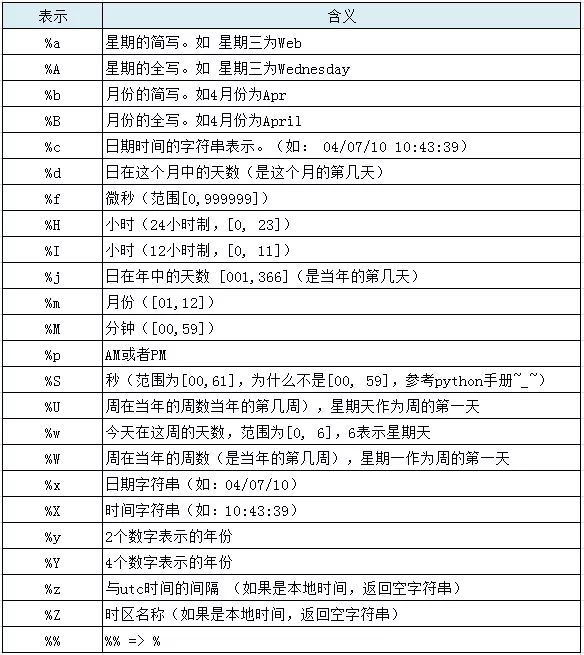
-
Check Variable Types
type(None)
NoneType
type(1.0)
float
type(True)
bool
s="NoneType"
type(s)
str
-
Type Conversion
str(10086)
'10086'
?float()
float(10086)
10086.0
int('10086')
10086
complex(10086)
(10086+0j)
2 Python Data Structures
List (list), Tuple (tuple), Set (set), Dictionary (dict)
2.1 List (list)
A container for storing a series of elements, represented by []. The types of elements can be different.
mylist= [0, 1, 2, 3, 4, 5]
print (mylist)
[0, 1, 2, 3, 4, 5]
List Indexing and Slicing
# Indexing starts from 0, inclusive left and exclusive right
print ('[4]=', mylist[4])
print ('[-4]=', mylist[-4])
print ('[0:4]=', mylist[0:4])
print ('[:4]=', mylist[:4])#dddd
print( '[4:]=', mylist[4:])
print ('[0:4:2]=', mylist[0:4:2])
print ('[-5:-1:]=', mylist[-5:-1:])
print ('[-2::-1]=', mylist[-2::-1])
[4]= 4
[-4]= 2
[0:4]= [0, 1, 2, 3]
[:4]= [0, 1, 2, 3]
[4:]= [4, 5]
[0:4:2]= [0, 2]
[-5:-1:]= [1, 2, 3, 4]
[-2::-1]= [4, 3, 2, 1, 0]
Modifying the List
mylist[3] = "Xiaoyue"
print (mylist[3])

mylist[5]="Xiaonan"
print (mylist[5])

mylist[5]=19978
print (mylist[5])
Xiaoyue
Xiaonan
19978
print (mylist)
[0, 1, 2, 'Xiaoyue', 4, 19978]
Inserting Elements
mylist.append('han') # Add to the end
mylist.extend(['long', 'wan'])
print (mylist)
[0, 1, 2, 'Xiaoyue', 4, 19978, 'han', 'long', 'wan']
scores = [90, 80, 75, 66]
mylist.insert(1, scores) # Add to a specified position
mylist
[0, [90, 80, 75, 66], 1, 2, 'Xiaoyue', 4, 19978, 'han', 'long', 'wan']
a=[]
Deleting Elements
print (mylist.pop(1)) # This function returns the popped element; if no argument is passed, the last element will be deleted
print (mylist)
[90, 80, 75, 66]
[0, 1, 2, 'Xiaoyue', 4, 19978, 'han', 'long', 'wan']
Checking if Elements are in the List, etc.
print( 'wan' in mylist)
print ('han' not in mylist)
True
False
mylist.count('wan')
1
mylist.index('wan')
8
The range function generates a list of integers.
print (range(10))
print (range(-5, 5))
print (range(-10, 10, 2))
print (range(16, 10, -1))
range(0, 10)
range(-5, 5)
range(-10, 10, 2)
range(16, 10, -1)
2.2 Tuple (tuple)
Tuples are similar to lists, and the elements inside tuples are also indexed. The values of elements in lists can be modified, while the values of elements in tuples cannot be modified, only read. The symbol for tuples is ().
studentsTuple = ("ming", "jun", "qiang", "wu", scores)
studentsTuple
('ming', 'jun', 'qiang', 'wu', [90, 80, 75, 66])
try:
    studentsTuple[1] = 'fu'
except TypeError:
    print ('TypeError')
TypeError
scores[1]= 100
studentsTuple
('ming', 'jun', 'qiang', 'wu', [90, 100, 75, 66])
'ming' in studentsTuple
True
studentsTuple[0:4]
('ming', 'jun', 'qiang', 'wu')
studentsTuple.count('ming')
1
studentsTuple.index('jun')
1
len(studentsTuple)
5
2.3 Set (set)
In Python, sets mainly have two functions: one is to perform set operations, and the other is to eliminate duplicate elements. The format of a set is: set(), where the () can contain lists, dictionaries, or strings, as strings are stored in the form of lists.
studentsSet = set(mylist)
print (studentsSet)
{0, 1, 2, 'han', 4, 'Xiaoyue', 19978, 'wan', 'long'}
studentsSet.add('xu')
print (studentsSet)
{0, 1, 2, 'han', 4, 'Xiaoyue', 19978, 'wan', 'long', 'xu'}
studentsSet.remove('xu')
print (studentsSet)
{0, 1, 2, 'han', 4, 'Xiaoyue', 19978, 'wan', 'long'}
mylist.sort()# This will throw an error
---------------------------------------------------------------------------

TypeError                                 Traceback (most recent call last)

<ipython-input-69-7309caa8a1d6> in <module>()
----> 1 mylist.sort()

TypeError: '<' not supported between instances of 'str' and 'int'
a = set("abcnmaaaaggsng")
print ('a=', a)
a= {'b', 'a', 'm', 'c', 'g', 's', 'n'}
b = set("cdfm")
print ('b=', b)
b= {'m', 'd', 'c', 'f'}
# Intersection
x = a & b
print( 'x=', x)
x= {'m', 'c'}
# Union
y = a | b
print ('y=', y)
# Difference
z = a - b
print( 'z=', z)
# Remove duplicates
new = set(a)
print (z)
y= {'b', 'a', 'f', 'd', 'm', 'c', 'g', 's', 'n'}
z= {'b', 'a', 'g', 's', 'n'}
{'b', 'a', 'g', 's', 'n'}
2.4 Dictionary (dict)
The dictionary (dict) in Python is also called an associative array, enclosed in braces {}, and is also known as a map in other languages. It uses key-value storage, with extremely fast lookup speeds, and keys cannot be duplicated.
k = {"name":"weiwei", "home":"guilin"}
print (k["home"])
guilin
print( k.keys())
print( k.values())
dict_keys(['name', 'home'])
dict_values(['weiwei', 'guilin'])
Adding and Modifying Items in the Dictionary
k["like"] = "music"
k['name'] = 'guangzhou'
print (k)
{'name': 'guangzhou', 'home': 'guilin', 'like': 'music'}
k.get('edu', -1) # Using the get method provided by dict, if the key does not exist, it can return None, or a value you specify
-1
Deleting key-value elements
k.pop('like')
print (k)
{'name': 'guangzhou', 'home': 'guilin'}
2.5 Converting Between Lists, Tuples, Sets, and Dictionaries
type(mylist)
list
tuple(mylist)
(0, 1, 2, 'Xiaoyue', 4, 19978, 'han', 'long', 'wan')
list(k)
['name', 'home']
zl = zip(('A', 'B', 'C'), [1, 2, 3, 4]) # zip can 'sew' lists, tuples, sets, and dictionaries together
print (zl)
print (dict(zl))
<zip object at 0x0000015AFAA612C8>
{'A': 1, 'B': 2, 'C': 3}
3 Python Control Flow
In Python, under normal circumstances, the execution of the program is from top to bottom, but sometimes we use control flow statements to change the execution order of the program. There are three types of control flow in Python: sequential structure, branching structure, and looping structure.
Additionally, Python can use a semicolon “;” to separate statements, but generally, line breaks are used to separate them; statement blocks do not use curly braces “{}” but use indentation (which can be four spaces) to indicate.
3.1 Sequential Structure
s = '7'
num = int(s) # Generally, this separation method is not used
num -= 1 # num = num - 1
num *= 6 # num = num * 6
print (num)
36
3.2 Branching Structure: The if statement in Python is used to determine which statement block to execute.
if <True or False expression>:
Execute statement block
elif <True or False expression>:
Execute statement block
else: # If none are satisfied
Execute statement block
# The elif clause can have multiple entries, and the elif and else parts can be omitted.
salary = 1000
if salary > 10000:
    print ("Wow!!!!!!!")
elif salary > 5000:
    print ("That's OK.")
elif salary > 3000:
    print ("5555555555")
else:
    print ("..........")
..........3.3 Loop Structure
While Loop
while <True or False expression>:
Loop execute statement block
else: # If the condition is not met
Execute statement block
# The else part can be omitted.
a = 1
while a < 10:
    if a <= 5:
        print (a)
    else:
        print ("Hello")
    a = a + 1
else:
    print ("Done")
1
2
3
4
5
Hello
Hello
Hello
Hello
Done
-
for Loop
for (condition variable) in (collection):
Execute statement block
“Collection” does not only refer to set, but also includes lists, tuples, dictionaries, and arrays that resemble sets.
Condition variables can have multiple entries.
heights = {'Yao':226, 'Sharq':216, 'AI':183}
for i in heights:
    print (i, heights[i])
Yao 226
Sharq 216
AI 183
for key, value in heights.items():
    print(key, value)
Yao 226
Sharq 216
AI 183
total = 0
for i in range(1, 101):
    total += i#total=total+i
print (total)
5050
3.4 break, continue, and pass
break: Break out of the loop
continue: Skip the current loop, continue to the next loop
pass: Placeholder, does nothing
for i in range(1, 5):
    if i == 3:
        break
    print (i)
1
2
for i in range(1, 5):
    if i == 3:
        continue
    print (i)
1
2
4
for i in range(1, 5):
    if i == 3:
        pass
    print (i)
1
2
3
4
3.5 List Comprehensions
Three forms
-
[<expression> for (condition variable) in (collection)] -
[<expression> for (condition variable) in (collection) if <‘True or False’ expression>] -
[<expression> if <‘True or False’ expression> else <expression> for (condition variable) in (collection) ]
fruits = ['"Apple', 'Watermelon', '"Banana"']
[x.strip('"') for x in fruits]
['Apple', 'Watermelon', 'Banana']
# Another way

test_list=[]
for x in fruits:
    x=x.strip('"')
    test_list.append(x)
test_list
['Apple', 'Watermelon', 'Banana']
[x ** 2 for x in range(21) if x%2]
[1, 9, 25, 49, 81, 121, 169, 225, 289, 361]
# Another way
test_list=[]
for x in range(21):
    if x%2:
        x=x**2
        test_list.append(x)
test_list
[1, 9, 25, 49, 81, 121, 169, 225, 289, 361]
[m + n for m in 'ABC' for n in 'XYZ']
['AX', 'AY', 'AZ', 'BX', 'BY', 'BZ', 'CX', 'CY', 'CZ']
# Another way
test_list=[]
for m in 'ABC':
    for n in 'XYZ':
        x=m+n
        test_list.append(x)
test_list
['AX', 'AY', 'AZ', 'BX', 'BY', 'BZ', 'CX', 'CY', 'CZ']
d = {'x': 'A', 'y': 'B', 'z': 'C' }
[k + '=' + v for k, v in d.items()]
['x=A', 'y=B', 'z=C']
# Another way
test_list=[]
for k, v in d.items():
    x=k + '=' + v
    test_list.append(x)
test_list
['x=A', 'y=B', 'z=C']
4 Python Functions
Functions are entities used to encapsulate specific functionalities, capable of operating on different types and structures of data to achieve predetermined goals.
4.1 Calling Functions
-
Python has many built-in functions that we can call directly. In most cases of data analysis, data is operated on by calling predefined functions.
str1 = "as"
int1 = -9
print (len(str1))
print (abs(int1))
2
9
fruits = ['Apple', 'Banana', 'Melon']
fruits.append('Grape')
print (fruits)
['Apple', 'Banana', 'Melon', 'Grape']
4.2 Defining Functions
When the built-in functions provided by the system are insufficient to complete the specified functionality, user-defined functions are needed to complete them. def function_name(): function content function content
def my_abs(x):
    if x >= 0:
        return x
    else:
        return -x

my_abs(-9)
9
It can also be without return.
def filter_fruit(someList, d):
    for i in someList:
        if i == d:
            someList.remove(i)
        else:
            pass

print (filter_fruit(fruits, 'Melon'))
print (fruits)
None
['Apple', 'Banana', 'Grape']
Multiple return values
def test(i, j):
    k = i * j
    return i, j, k

a , b , c = test(4, 5)
print (a, b , c)
type(test(4, 5))
4 5 20
tuple
4.3 Higher-order Functions
-
Passing another function as a parameter to a function is called a higher-order function.
Functions can also be assigned to variables, and functions have the same status as other objects.
myFunction = abs
myFunction(-9)
9
-
Passing Parameters to Functions
def add(x, y, f):
    return f(x) + f(y)

add(7, -5, myFunction)
12
-
Common Higher-order Functions
map/reduce: map applies the given function to each element of the sequence in turn and returns the result as a new list; reduce applies a function to a sequence [x1, x2, x3…] where the function must accept two parameters, and reduce continues to accumulate the result with the next element of the sequence.
myList = [-1, 2, -3, 4, -5, 6, 7]
map(abs, myList)
<map at 0x15afaa00630>
from functools import reduce
def powerAdd(a, b):
    return pow(a, 2) + pow(b, 2)

reduce(powerAdd, myList) # Is it calculating the sum of squares?
3560020598205630145296938
filter: filter() applies the given function to each element and decides whether to keep or discard the element based on whether the return value is True or False.
def is_odd(x):
    return x % 3  # 0 is judged as False, others are judged as True

filter(is_odd, myList)
<filter at 0x15afa9f0588>
sorted: Implements sorting of sequences, by default for two elements x and y, if x < y, it returns -1, if x == y, it returns 0, if x > y, it returns 1.
Default sorting: numerical size or alphabetical order (for strings).
sorted(myList)
[-5, -3, -1, 2, 4, 6, 7]
*Practice: Define a custom sorting rule function to sort the list of strings in alphabetical order, ignoring case. The list is [‘Apple’, ‘orange’, ‘Peach’, ‘banana’]. Hint: The method for converting letters to uppercase is some_str.upper(), and converting to lowercase is some_str.lower().
-
Returning Functions: Higher-order functions can not only accept functions as parameters but can also return functions as result values.
def powAdd(x, y):
    def power(n):
        return pow(x, n) + pow(y, n)
    return power

myF = powAdd(3, 4)
myF
<function __main__.powAdd.<locals>.power>
myF(2)
25
-
Anonymous Functions: When passing functions to higher-order functions, it is more convenient to directly pass anonymous functions instead of explicitly defining functions.
f = lambda x: x * x
f(4)
16
Equivalent to:
def f(x):
    return x * x
map(lambda x: x * x, myList)
<map at 0x15afaa1d0f0>
Anonymous functions can take multiple parameters.
reduce(lambda x, y: x + y, map(lambda x: x * x, myList))
140
Returning functions can also be anonymous functions.
def powAdd1(x, y):
    return lambda n: pow(x, n) + pow(y, n)

lamb = powAdd1(3, 4)
lamb(2)
25
Others
-
The first character of an identifier can only be a letter or an underscore; the first character cannot be a number or other characters; other parts of the identifier can be letters, underscores, or numbers; identifiers are case-sensitive, for example, name and Name are different identifiers. -
Python Specifications:
-
Class identifiers: the first letter of each character is capitalized; -
Object/variable identifiers: the first letter is lowercase, and the remaining capitalized, or use underscores ‘_’ to connect; -
Function naming is the same as ordinary objects.
-
Keywords
Keywords refer to identifiers with specific meanings that are built into the system.
# Check what keywords there are to avoid using keywords as custom identifiers
import keyword
print (keyword.kwlist)
['False', 'None', 'True', 'and', 'as', 'assert', 'break', 'class', 'continue', 'def', 'del', 'elif', 'else', 'except', 'finally', 'for', 'from', 'global', 'if', 'import', 'in', 'is', 'lambda', 'nonlocal', 'not', 'or', 'pass', 'raise', 'return', 'try', 'while', 'with', 'yield']
-
Comments
Comments in Python are generally made with #
-
Help
Comments in Python are generally made with ? to check help.
Discussion Group
Welcome to join the reader group of the public account to communicate with peers. Currently, there are WeChat groups for SLAM, 3D vision, sensors, autonomous driving, computational photography, detection, segmentation, recognition, medical imaging, GAN, algorithm competitions (these will be gradually subdivided in the future), please scan the WeChat ID below to join the group, note: “nickname + school/company + research direction”, for example: “Zhang San + Shanghai Jiao Tong University + Vision SLAM”. Please follow the format for the note, otherwise, it will not be approved. Successfully added will be invited into related WeChat groups based on research direction. Please do not send advertisements in the group, otherwise you will be removed, thank you for your understanding~