 Like
Like Share
Share Like
Like 01PARTWhy Do We Need Function Parameters? 🤔
Imagine you have a robot assistant 🤖 that can only do one fixed task – for example, it can only calculate 5 + 2.
This robot is too rigid! We want the same robot to be able to calculate the sum of any two numbers.
Function parameters are like the input keyboard for the robot⌨️, where you can input different numbers, and the robot will perform calculations based on the numbers you input.
In this way, the same robot can handle different calculation tasks!

In the previous lesson, we learned how functions can return values to the caller.
Now, let’s create a modular `getValueFromUser` function:
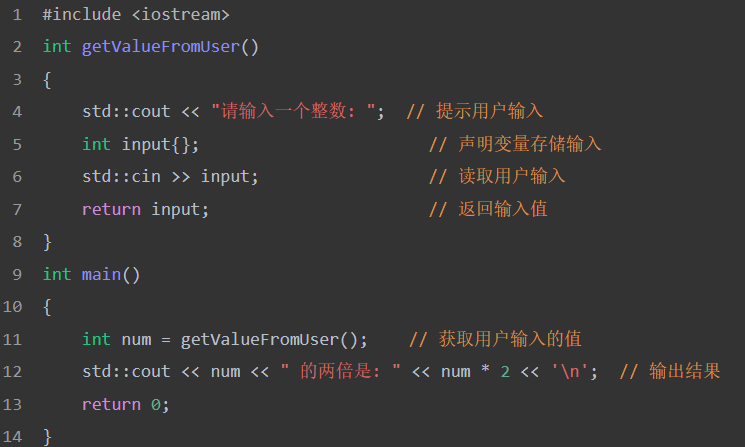
However, what if we want to put the output part into a separate function?
You might try to do this:
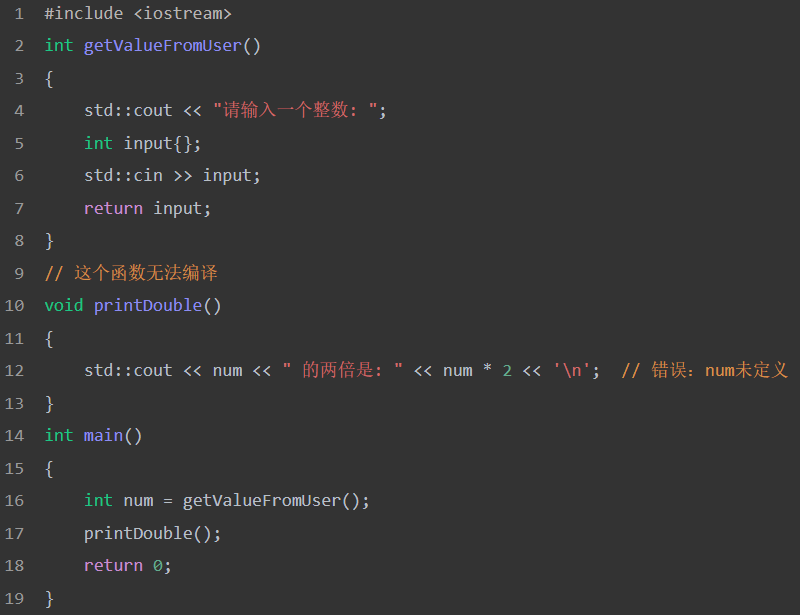
💡 The Problem: The `printDouble` function does not know what `num` is! This is as awkward as asking a friend to buy something without telling them what to buy. 😅
You might try to define `num` as a variable inside the `printDouble` function:
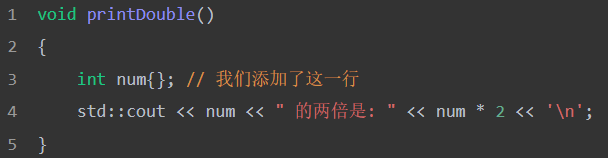
Although this resolves the compiler error and allows the program to compile, the program still does not work correctly (it always prints “0 doubled is: 0”).
The core of the problem is that the `printDouble` function has no way to access the value input by the user.
We need a way to pass the value of the variable `num` to the `printDouble` function so that `printDouble` can use this value within its body.
💡 Tips: Function parameters are like the “ears” of the function 👂, allowing the function to “hear” information from the outside!
In fact, this need for “passing data to functions” is very common in programming.

Next, let’s look at a simple example to understand this concept, and then return to solving the `printDouble` problem.
02PARTFunction Parameters and Arguments 📋
Imagine you want to create a “number adding” tool 🔧.
Then this tool needs to know which two numbers to add, right?

The function’s parameters are like the “input boxes” 📝 of the tool, where you can fill in the specific numbers to be processed.
For example:
-
If you want to calculate 3 + 5, you fill in 3 and 5 in the input box.
-
If you want to calculate 10 + 20, you fill in 10 and 20 in the input box.
In this way, the same “adding tool” can handle different numbers!
But how does this “input box” mechanism actually work? 🤔
To allow functions to receive different numbers, we need two important concepts: parameters and arguments.
-
Parameters: are the “empty input boxes” set during the function definition.
-
Arguments: are the “specific numbers” filled in when calling the function.
Only by understanding these two concepts can we truly master how to make functions handle different data!
01What Are Parameters?
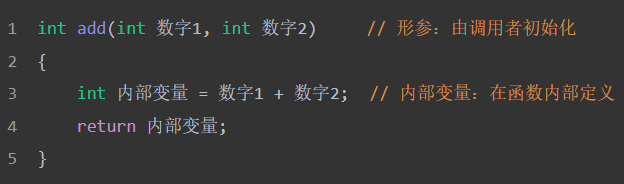
Parameters are the “input boxes” of the function, which are defined in the function’s header to receive data from the caller:
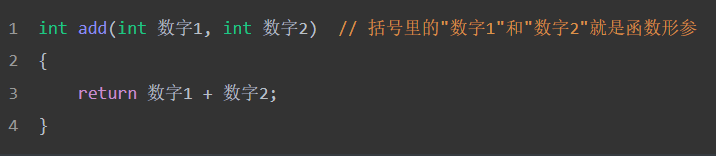
Key Points:
-
Location: Parameters are defined between the parentheses after the function name.
-
Multiple Parameters: Separated by commas.
-
Special Nature: Parameters are almost like variables defined inside the function, but with one important difference – they are initialized with values provided by the caller.
Comparative Understanding:
 02What Are Arguments?
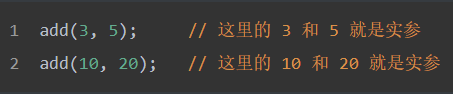
Arguments are the specific values you actually pass when calling the function, just like the real content you fill in the “input box”:
Key Points:
-
Passing Values: Arguments are the specific values passed to the function.
-
Provided During Call: Appear only during the function call.
-
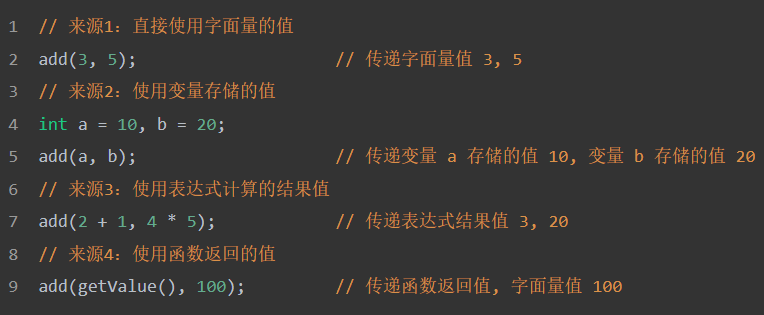
Diverse Sources: Can be literals, variable values, expression results, or function return values.
-
Passed in Order: Arguments are passed to the corresponding parameters in order.
Important Understanding: The essence of arguments is the passing of values, regardless of where this value comes from:
 03How Do Parameters and Arguments Work Together? 🤝
When a function is called, all of the function’s parameters are created as variables, and the value of each argument is copied into the corresponding parameter (using copy initialization).
This process is called pass by value.
Let’s look at a specific example:
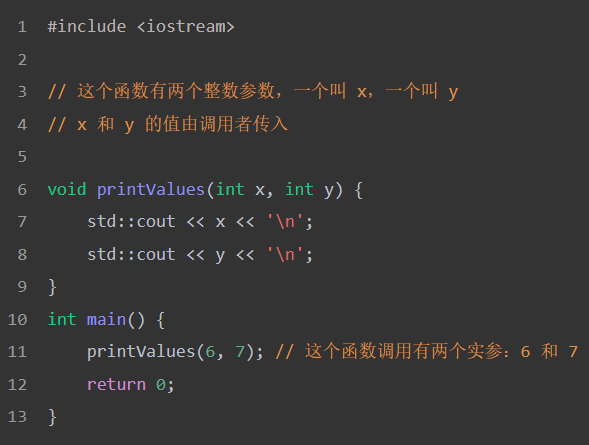
When the `printValues` function is called with arguments 6 and 7,
the parameter `x` is created and initialized with the value 6,
and the parameter `y` is created and initialized with the value 7.
Output Result:

💡 Important Note: The arguments passed to the function can be any valid expression (because arguments are essentially initializers for parameters, and initializers can be any valid expression).
Through all the examples above, we have grasped the concepts of parameters and arguments and how they work together.
Now let’s apply this knowledge to solve the initial `printDouble` problem!
 03PARTFixing Our Challenge Program01Using Parameters to Solve the Problem 🔧
The correction is as follows:
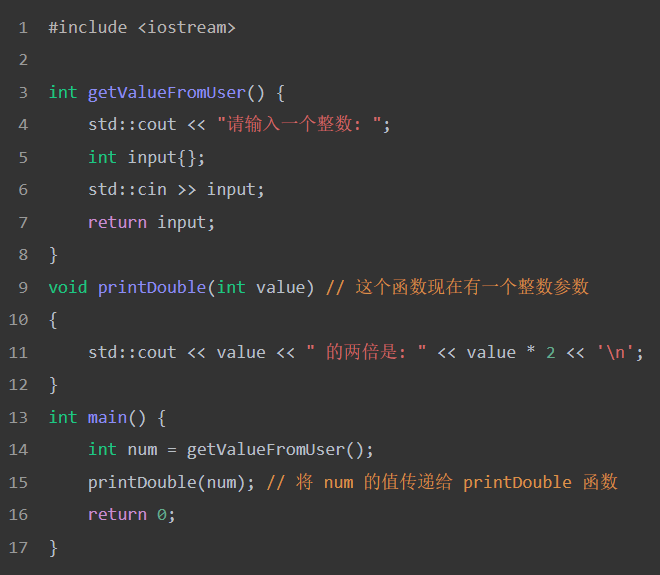
In this program:
-
The variable `num` is first initialized with the value input by the user.
-
Then the `printDouble` function is called, and the value of the argument `num` is copied into the `value` parameter of the `printDouble` function.
-
The `printDouble` function uses the value of the parameter `value`.
02Using Return Values as Arguments 🚀
In the above program, we can see that the variable `num` is only used once, to pass the return value of the `getValueFromUser` function as the argument for the `printDouble` function call.
We can simplify the above example a bit:
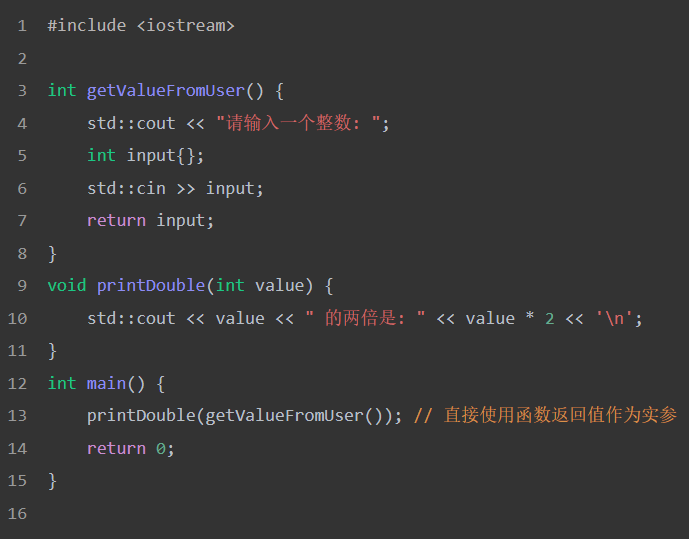
Now, we directly use the return value of the `getValueFromUser` function as the argument for the `printDouble` function!
💡 Programming Tip: While this program is more concise (and clearly indicates that the value read from the user will not be used for other purposes), you might find this “compact syntax” a bit hard to read.
If you are more accustomed to using the variable version, that is also fine.
03Cooperation of Parameters and Return Values 🎭
By using both parameters and return values simultaneously, we can create functions that accept data as input, perform some calculations, and then return values to the caller.
Here is a simple function example that adds two numbers and returns the result to the caller:
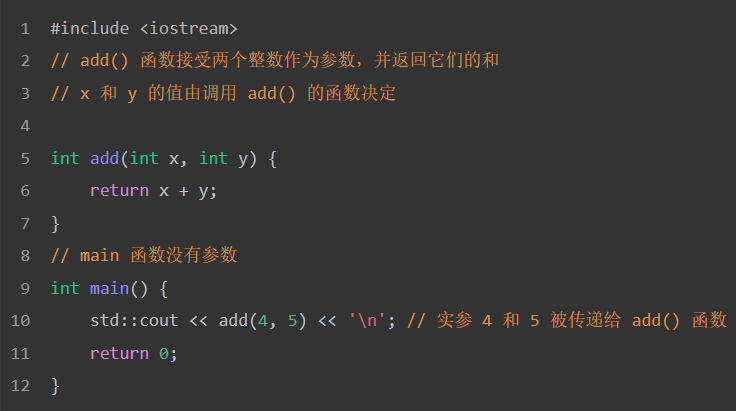
Execution starts from the top of the `main` function.
When `add(4, 5)` is evaluated:
-
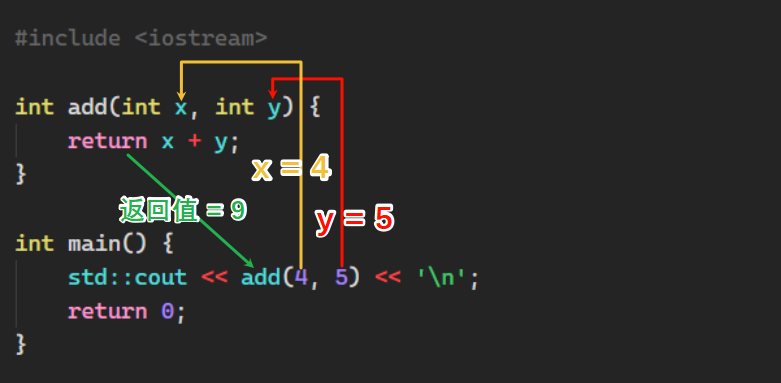
The `add` function is called, and the parameter `x` is initialized with the value 4, and the parameter `y` is initialized with the value 5.
-
The `return` statement in the `add` function calculates `x + y` to get the value 9, and then returns 9 to the `main` function.
-
The value 9 is sent to `std::cout` to be printed on the console.
Output Result:

If it still feels a bit abstract, don’t worry!

Let’s use a diagram to help understand:
 04More Examples 🌟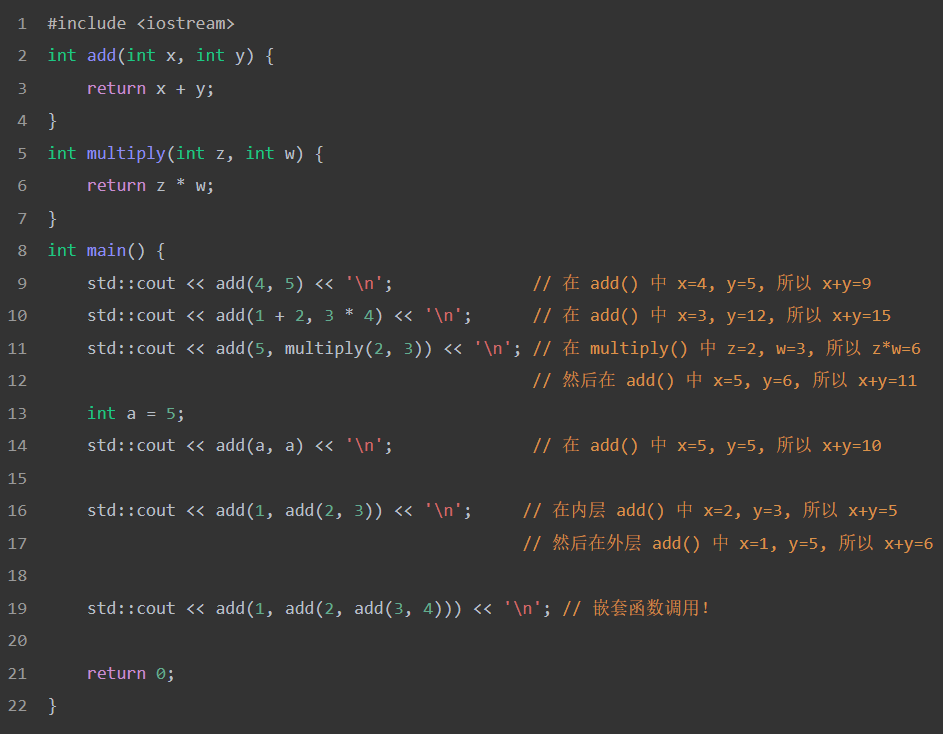
Output:
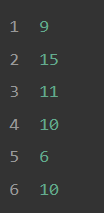
🎯 Tips: Functions can call each other, and the return value of the inner function can be used as an argument for the outer function. It’s like Russian nesting dolls, one layer inside another! 🪆
04PARTSummary and Key Points
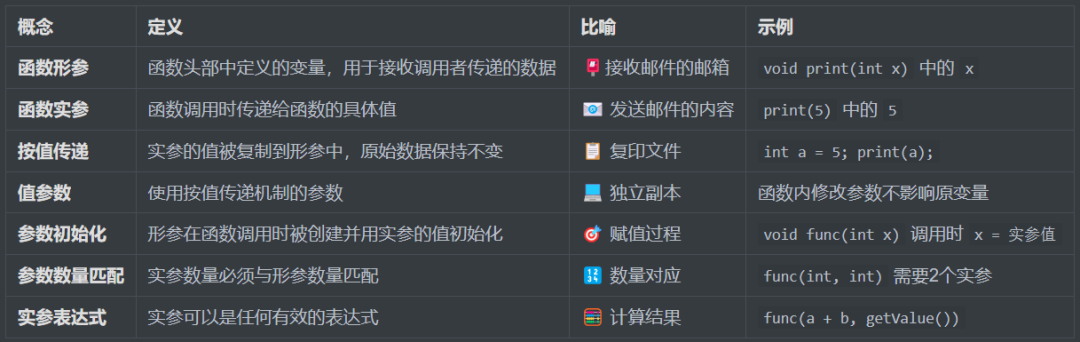
📚 Core Concept Summary
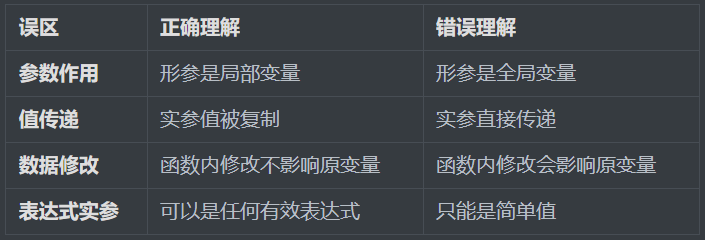
⚠️ Common Misconceptions Comparison
 05PARTChapter Exercises01Parameter Identification 🎮
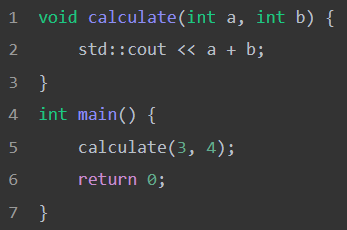
In the code below, which are parameters and which are arguments?
Click the blank area below to see the answer
▼
「Answer」
Parameters: `int a` and `int b` (in the function definition)
Arguments: `3` and `4` (in the function call)
「Analysis」
Parameters are the “placeholders” in the function definition, like parking spaces 🅿️; arguments are the actual parked cars 🚗. In `calculate(3, 4)`, 3 parks in the space for a, and 4 parks in the space for b.
02Function Call Chain Tracing 🔍
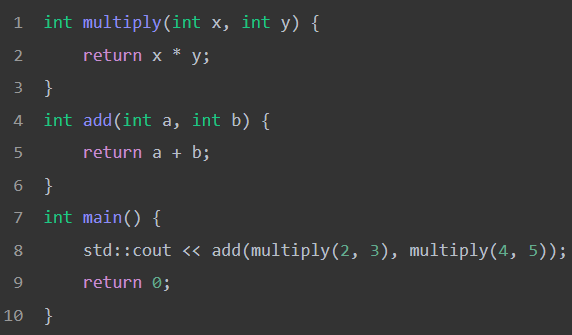
What is the output of the following code?
Click the blank area below to see the answer
▼
「Answer」
Output: 26
「Analysis」
-
`multiply(2, 3)` returns `6`
-
`multiply(4, 5)` returns `20`
-
`add(6, 20)` returns `26`
-
Final output is `26`
This is like substitution in mathematics, calculating the inner function first, then the outer function! 🧮
03Expressions as Arguments 🧮
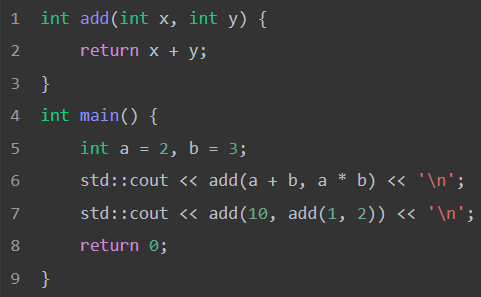
What is the output of the following code?
Click the blank area below to see the answer
▼
「Answer」

「Analysis」
-
First call: `a + b = 5`, `a * b = 6`, `add(5, 6) = 11`
-
Second call: inner `add(1, 2) = 3`, outer `add(10, 3) = 13`
Arguments can be any expression, including arithmetic operations and function calls! 🎯
END

Thank you for your support and recognition! If you find this article helpful, feel free to like, follow, and recommend it. Every interaction is the greatest encouragement for the author, and let’s continue to grow together on this creative journey!
Learning technology is never an overnight process; it requires continuous accumulation and practice. If you have any questions or suggestions during your reading, feel free to leave a comment. The charm of technology lies in collision and sharing, and different perspectives often bring new insights. Let’s support each other on the path of technology and progress together.