200 SMART TCP Communication
Last time, I introduced the TCP_CONNECT instruction of 200 SMART. This time, I will continue with the TCP_SEND and TCP_RECV instructions.
The TCP_SEND and TCP_RECV instructions are relatively simple, so I will introduce them together.
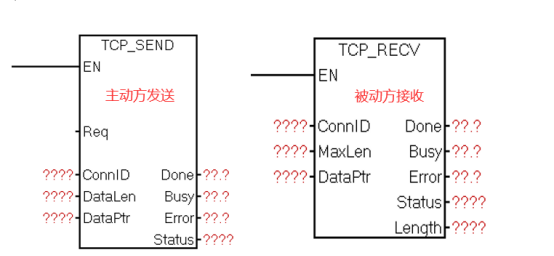
EN: Enable. For the receive instruction, it is recommended to trigger with a constant 1.
Req: The send instruction triggers the sending instruction, and it is recommended to use a rising edge trigger.
ConnID: Connection identifier, the same as the ConnID of the respective TCP_CONNECT.
DataLen: Length of data to be sent, up to 1024 bytes.
MaxLen: Maximum length of data to be received, up to 1024 bytes.
Length: Actual length of the received data.
DataPtr: Address pointer of the data to be sent, the starting address of the data to be sent.
Other statuses such as Done, Busy, etc. are the same as the TCP_CONNECT instruction.
Next, I will provide a detailed explanation of these parameters:
As shown in the figure, this is the call timing diagram for TCP_SEND. The blue line indicates the rising edge trigger of Req, and the red line indicates the level trigger of Req.
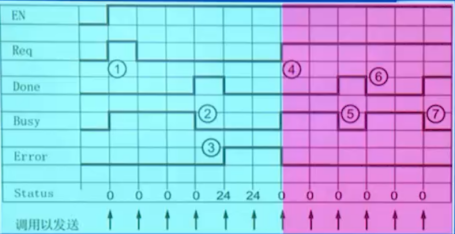
Using the rising edge trigger of Req → Busy=1 → After completion DONE=1 (one scanning cycle) → Error=1 and Status=24, then wait for the next rising edge trigger signal to cycle. Here Status=24 indicates that the instruction was called but the operation was not triggered, which does not represent an error.
Using the level trigger of Req → Busy=1 → After completion DONE=1 (one scanning cycle), then continuously loop between Busy and Done.
Here, it is recommended to use the rising edge trigger for the TCP_SEND instruction.
As shown in the figure, this is the call timing diagram for TCP_RECV. The blue line indicates the rising edge trigger of EN, and the red line indicates the level trigger of EN.
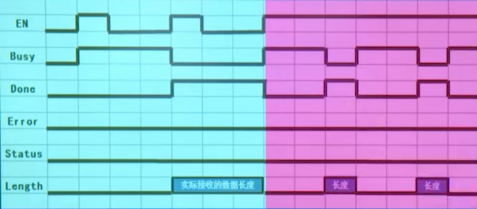
With the rising edge trigger of EN, it requires two triggers to receive data, and DONE remains 1 until the next rising edge arrives; whereas with the level trigger of EN, data is received when available, and most of the time it is in Busy, with Done being 1 for one cycle. Therefore, it is recommended to use the level trigger for the TCP_RECV instruction.
For TCP_RECV’s MaxLen, when MaxLen < length of data from the sender, it will receive according to the length set by MaxLen, discarding the excess part, and Done will not be set, while Error=1, Status=25.
Therefore, it is recommended that MaxLen = length of data from the sender. If the length from the sender varies, then MaxLen should be filled in according to the maximum length.
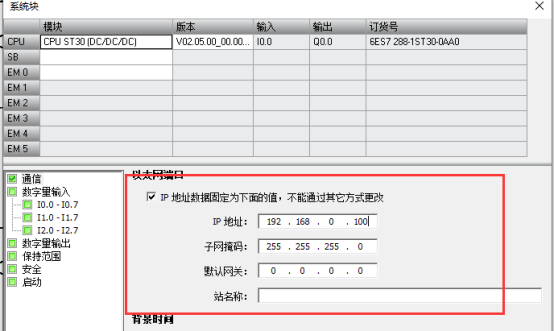
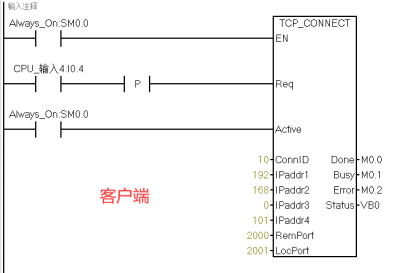
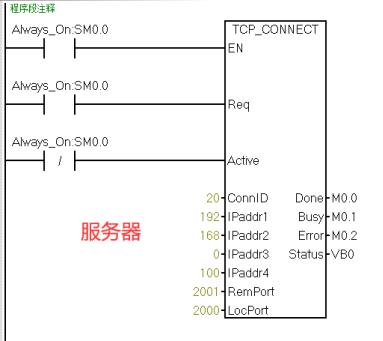
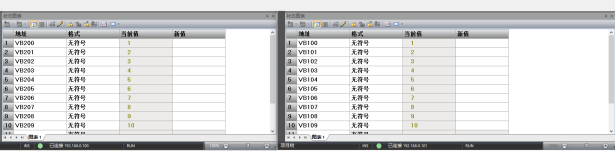
Finally, here is an example: The local client IP is 192.168.0.100, ConnID is 10, port number is 2000; the remote server IP is 192.168.0.101, ConnID is 20, port number is 2001, sending 10 bytes from VB200 of the local station to the 10 bytes starting at VB100 of the remote station.
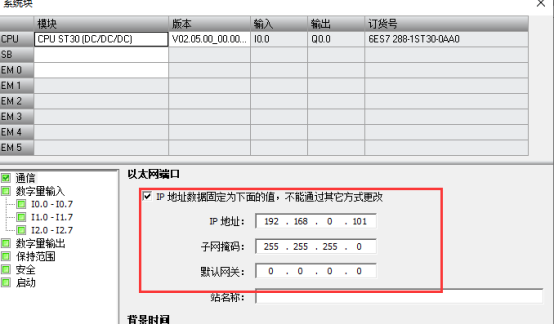
First, we set the IP addresses of the local and remote stations in the system block.
Then set the TCP_CONNECT parameters, as shown in the figure.
Next, set TCP_SEND and TCP_RECV respectively.
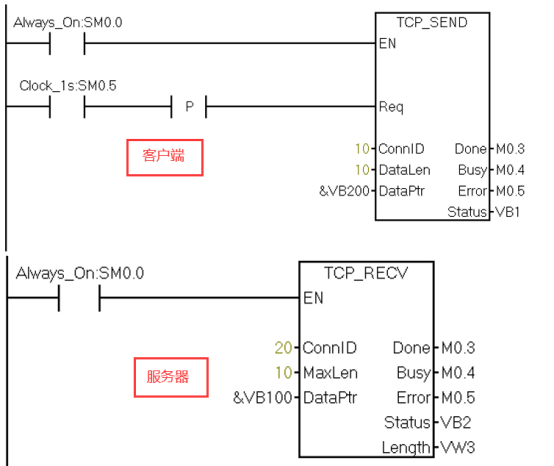
Press I0.4 to start the client TCP_CONNECT connection, and SM0.5 continuously triggers the SEND Req,
As shown in the figure, the data is successfully sent, and communication is successful.
 PLC Case Source Program · Free to Claim
This time, the editor not only brings 777 cases
but also added new cases for 200 SMART,
S7-1200, S7-1500
Colleagues in need should hurry to claim it~

Don’t forget to like + view!
 Click “Read Original” to learn PLC/Electrician courses for free.