Simulink is a visual simulation tool in Matlab, often used for multi-domain simulation and model-based design. Simulink is highly powerful, supporting system design, simulation, automatic code generation, and continuous testing and verification of embedded systems. Today, let’s review the basic modules in Simulink and their functions.
Generally speaking, the basic modules of Simulink include 9 sub-module libraries, and their functions are as follows:
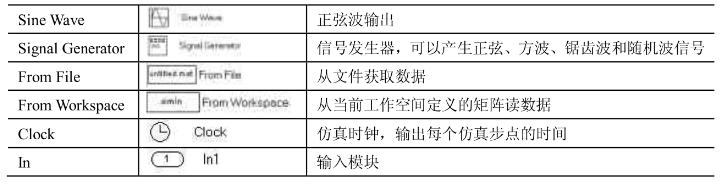
1. Input Signal Source Module Library (Sources)
The input signal source module is used to provide input signals to the model. Common input signal source modules are shown in the figure below:

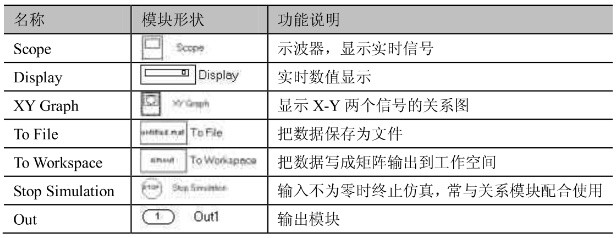
2. Receive Module Library (Sinks)
The receive module is used to receive signals from the modules. Common receive modules are shown in the figure below:
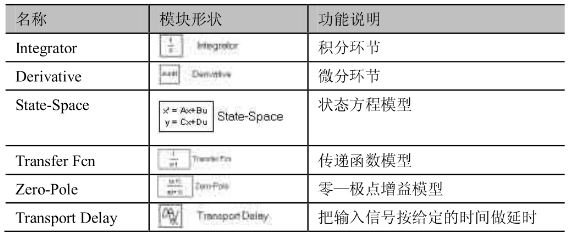
3. Continuous System Module Library (Continuous)
The continuous system module library consists of components that make up continuous systems. Common continuous system modules are shown in the figure below:
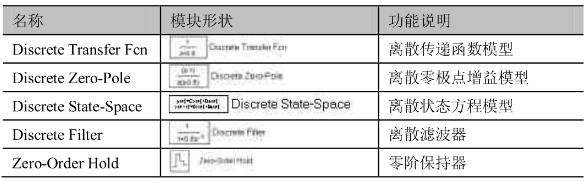
4. Discrete System Module Library (Discrete)
The discrete system module is used to form components of discrete systems. Common discrete system modules are shown in the figure below:

 END
END