
Author: Wedo Experimenter, Data Analyst; Loves life and writing
1. What is Celery
Celery is a simple, flexible, and reliable distributed task execution framework that supports the concurrent execution of a large number of tasks. Celery adopts a typical producer-consumer model. The producer submits tasks to the task queue, and numerous consumers take tasks from the task queue for execution.
1.1 Celery Architecture
Celery consists of the following three parts: Message Middleware (Broker), Task Execution Unit (Worker), Result Storage (Backend)
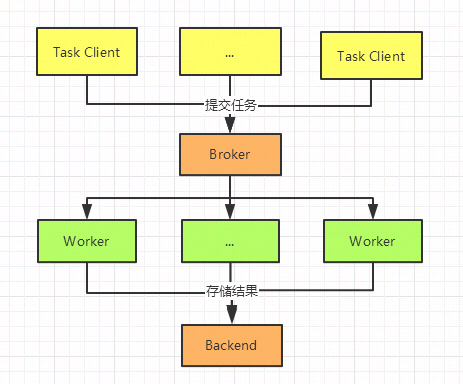
- The task invocation submits a task execution request to the Broker queue.
- If it is an asynchronous task, the worker will immediately take the task from the queue and execute it, saving the execution result in the Backend.
- If it is a scheduled task, the task is periodically sent to the Broker queue by the Celery Beat process, and the Worker monitors the message queue in real-time to obtain tasks from the queue for execution.
1.2 Application Scenarios
- Asynchronous execution of a large number of long-running tasks, such as uploading large files.
- Large-scale real-time task execution, supporting cluster deployment, such as high-concurrency machine learning inference.
- Scheduled task execution, such as sending emails at scheduled times or regularly scanning machine operation conditions.
2. Installation
Installing Celery is very simple. In addition to installing Celery, this article uses Redis as the message queue, which is the Broker.
# Install Celery
pip install celery
# Monitor Celery with Flower
pip install flower
pip install redis
# Install Redis
yum install redis
# Start Redis
redis-server /etc/redis.conf
3. Complete Example
Developing applications with Celery involves four parts:
- Initializing the Celery instance
- Defining tasks (scheduled and real-time tasks)
- Starting the task worker
- Calling tasks
3.1 Project Directory
# Project Directory
wedo
.
├── config.py
├── __init__.py
├── period_task.py
└── tasks.py
3.2 Initializing the Celery Instance
Initializing Celery mainly includes specifying the access methods for Broker and Backend, and declaring task modules, etc.
# Initialize Celery
# __init__.py
from celery import Celery
app = Celery('wedo')  # Create Celery instance
app.config_from_object('wedo.config')

# Configuration wedo.config
# config.py
BROKER_URL = 'redis://10.8.238.2:6379/0' # Broker configuration, using Redis as message middleware
CELERY_RESULT_BACKEND = 'redis://10.8.238.2:6379/0' # BACKEND configuration, here using Redis
CELERY_RESULT_SERIALIZER = 'json' # Result serialization scheme
CELERY_TASK_RESULT_EXPIRES = 60 * 60 * 24 # Task expiration time
CELERY_TIMEZONE='Asia/Shanghai'   # Timezone configuration
CELERY_IMPORTS = (     # Specify imported task modules, can specify multiple
    'wedo.tasks',
    'wedo.period_task'
)
3.3 Defining Tasks
In Celery, tasks are declared using the @task decorator, and other operations remain unchanged.
# Defining Tasks
# Simple Task  tasks.py
import celery
import time
from celery.utils.log import get_task_logger
from wedo import app

@app.task
def sum(x, y):
    return x + y

@app.task
def mul(x, y):
    time.sleep(5)
    return x * y
The difference between scheduled tasks and real-time tasks mainly lies in declaring when to execute the task. The task itself is also declared using the task decorator. There are two ways to specify when to execute the task:
- Specify frequency of execution: sender.add_periodic_task(time frequency unit s, task function, name=’to_string’)
- Crontab method: minute/hour/day/month/week granularity, supporting various scheduling options.
# Defining Tasks
# Scheduled Task  period_task.py
from wedo import app
from celery.schedules import crontab

@app.on_after_configure.connect
def setup_periodic_tasks(sender, **kwargs):
    sender.add_periodic_task(5.0, to_string.s("celery periodic task"), name='to_string') # Execute add every 5 seconds
    sender.add_periodic_task(
        crontab(minute='*/10'),      # Execute once every 10 minutes
        send_mail.s('hello, this is a celery'), name='send_mail'
    )

@app.task
def send_mail(content):
    print('send mail, content is %s' % content)

@app.task
def to_string(text):
    return 'this is a %s' % text
3.4 Starting the Task Worker
Starting tasks involves both starting the worker and the scheduled task beat.
# -A wedo is the application module
# -l is the log level
# -c is the number of processes
celery worker -A wedo  -l debug -c 4

# Start in the background
nohup celery worker -A wedo -l debug -c 4 > ./log.log  2>&1

# From the logs below, it can be seen that 4 tasks have been started
#   . wedo.period_task.send_mail
#   . wedo.period_task.to_string
#   . wedo.tasks.mul
#   . wedo.tasks.sum

 -------------- [email protected] v4.4.2 (cliffs)
--- ***** -----
-- ******* ---- Linux-3.10.0-327.28.3.el7.x86_64-x86_64-with-centos-7.2.1511-Core 2020-04-25 23:35:26
- *** --- * ---
- ** ---------- [config]
- ** ---------- .> app:         wedo:0x7f05af30d320
- ** ---------- .> transport:   redis://10.8.238.2:6379/0
- ** ---------- .> results:     redis://10.8.238.2:6379/0
- *** --- * --- .> concurrency: 4 (prefork)
-- ******* ---- .> task events: OFF (enable -E to monitor tasks in this worker)
--- ***** -----
 -------------- [queues]
                .> celery           exchange=celery(direct) key=celery

[tasks]
  . celery.accumulate
  . celery.backend_cleanup
...
  . wedo.period_task.send_mail
  . wedo.period_task.to_string
  . wedo.tasks.mul
  . wedo.tasks.sum
...
[2020-04-25 23:35:27,617: INFO/MainProcess] [email protected] ready.
[2020-04-25 23:35:27,617: DEBUG/MainProcess] basic.qos: prefetch_count->16
[2020-04-25 23:35:27,655: DEBUG/MainProcess] celery@12103675 joined the party
celery beat -A wedo.period_task

celery beat v4.4.2 (cliffs) is starting.
__    -    ... __   -        _
LocalTime -> 2020-04-25 23:37:08
Configuration ->
    . broker -> redis://10.8.238.2:6379/0
    . loader -> celery.loaders.app.AppLoader
    . scheduler -> celery.beat.PersistentScheduler
    . db -> celerybeat-schedule
    . logfile -> [stderr]@%WARNING
    . maxinterval -> 5.00 minutes (300s)
# Worker starts 4 processes
\_  /root/anaconda3/envs/post/bin/celery worker -A wedo -l debug -c 4
    \_  /root/anaconda3/envs/post/bin/celery worker -A wedo -l debug -c 4
    \_  /root/anaconda3/envs/post/bin/celery worker -A wedo -l debug -c 4
    \_  /root/anaconda3/envs/post/bin/celery worker -A wedo -l debug -c 4
    \_  /root/anaconda3/envs/post/bin/celery worker -A wedo -l debug -c 4
Stopping Workers and Beat
ps auxww | awk '/celery worker/ {print $2}' | xargs kill -9
ps auxww | awk '/celery beat/ {print $2}' | xargs kill -9
3.5 Calling Tasks
The task worker has been started, and tasks are passed to the broker (Redis) through task calls, returning the task execution results. There are mainly two ways to call tasks, which are essentially the same; delay is a wrapper for apply_async, while apply_async supports more task call configurations.
- task.apply_async(args=[arg1, arg2], kwargs={‘kwarg1’: ‘x’, ‘kwarg2’: ‘y’})
- task.delay(arg1, arg2, kwarg1=’x’, kwarg2=’y’)
apply_async and delay will return an asynchronous task result , which stores the task’s execution status and result. Common operations include:
value = result.get() # Task return value
print(result.__dict__) # Result information
print(result.successful()) # Success status
print(result.fail()) # Failure status
print(result.ready()) # Completion status
print(result.state) # State PENDING -> STARTED -> SUCCESS/FAIL
Regular Tasks:
from celery.utils.log import get_logger
from wedo.tasks import sum, mul, post_file
from celery import group, chain, chord
logger = get_logger(__name__)
try:
    result = mul.apply_async(args=(2, 2))
    value = result.get() # Wait for the task to complete before returning the task return value
    print(value)
except mul.OperationalError as exc: # Task exception handling
    logger.exception('Sending task raised: %r', exc)
Composite Tasks:
- Multiple tasks executed in parallel, group
- Multiple tasks executed in a chain, chain: the return value of the first task is used as the input parameter for the second, and so on.
result = group(sum.s(i, i) for i in range(5))()
result.get()
# [0, 2, 4, 6, 8]
result = chain(sum.s(1,2), sum.s(3), mul.s(3))()
result.get()
# ((1+2)+3)*3=18
4. Distributed Cluster Deployment
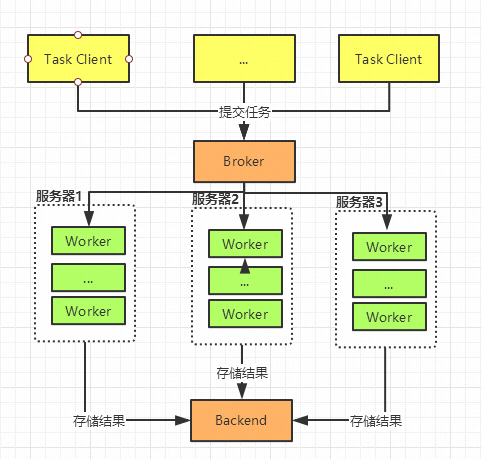
As a distributed task queue framework, Celery workers can execute on different servers. The deployment process is the same as starting on a single machine. Just copy the project code to other servers and use the same command. You may wonder how this is achieved. Right, it is done through a shared Broker queue. Using an appropriate queue, such as Redis, in a single-process, single-threaded manner can effectively prevent the same task from being executed by different workers simultaneously.
celery worker -A wedo -l debug -c 4
- The distributed cluster is as follows:
5. Advanced Usage
Having understood the main functions of Celery, it also provides extended functionalities for some special scenarios.
5.1 Task Status Tracking and Logging
Sometimes we need to monitor the execution status of tasks, such as notifying in case of failure.
- Celery provides a base parameter in the @app.task decorator, passing in a rewritten Task module, and rewriting on_* functions can control different task results.
- In @app.task, providing bind=True allows access to various parameters in the Task through self.
- self.request: Various parameters of the task
- self.update_state: Custom task status. The original task statuses are: PENDING -> STARTED -> SUCCESS. If you want to understand a status between STARTED and SUCCESS, such as execution percentage, you can achieve this through custom statuses.
- self.retry: Retry
import celery
import time
from celery.utils.log import get_task_logger
from wedo import app

logger = logger = get_task_logger(__name__)
class TaskMonitor(celery.Task):
    def on_failure(self, exc, task_id, args, kwargs, einfo):
        """failed callback"""
        logger.info('task id: {0!r} failed: {1!r}'.format(task_id, exc))

    def on_success(self, retval, task_id, args, kwargs):
        """success callback"""
        logger.info('task id:{} , arg:{} , successful !'.format(task_id,args))

    def on_retry(self, exc, task_id, args, kwargs, einfo):
        """retry callback"""
        logger.info('task id:{} , arg:{} , retry !  einfo: {}'.format(task_id, args, exc))

@app.task(base=TaskMonitor, bind=True, name='post_file')
def post_file(self, file_names):
    logger.info(self.request.__dict__)
    try:
        for i, file in enumerate(file_names):
            print('the file %s is posted' % file)
            if not self.request.called_directly:
                self.update_state(state='PROGRESS',
                    meta={'current': i, 'total': len(file_names)})
            time.sleep(2)
    except Exception as exec:
        raise self.retry(exc=exec, countdown=3, max_retries=5)
5.2 Specifying Specific Workers for Tasks
As a distributed system, Celery theoretically allows for unlimited expansion of workers. By default, after submitting a task, it will be placed in a queue named celery, and all online workers will fetch tasks from the task queue, where any worker can execute this task. However, sometimes due to the specificity of the task or limitations of the machine, certain tasks can only run on specific workers. Celery provides the queue to distinguish different workers, supporting this situation well.
- When starting a worker, use -Q to specify the task queue names supported by the worker; multiple queue names can be supported.
celery worker -A wedo -l debug -c 4 -Q celery,hipri
- When calling tasks, use
queue=*to specify the worker that needs to execute the task.
result = mul.apply_async(args=(2, 2), queue='hipri')
6. Task Queue Monitoring
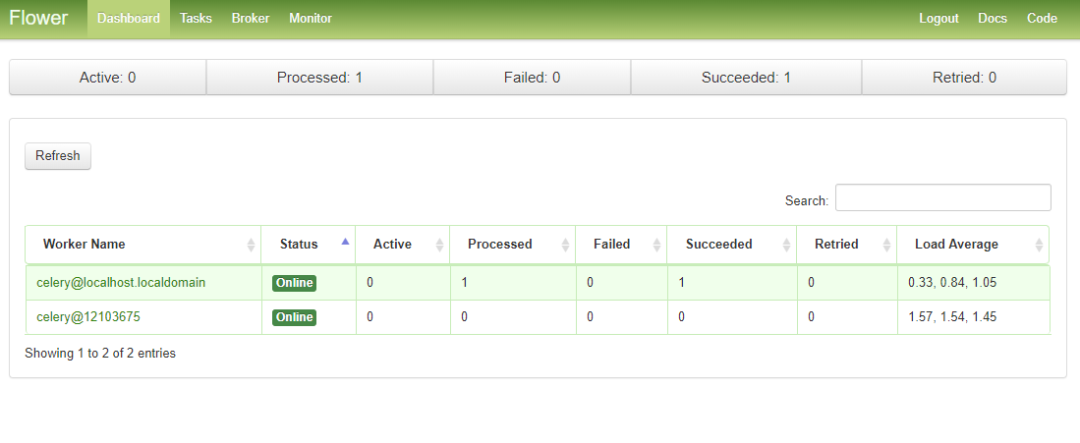
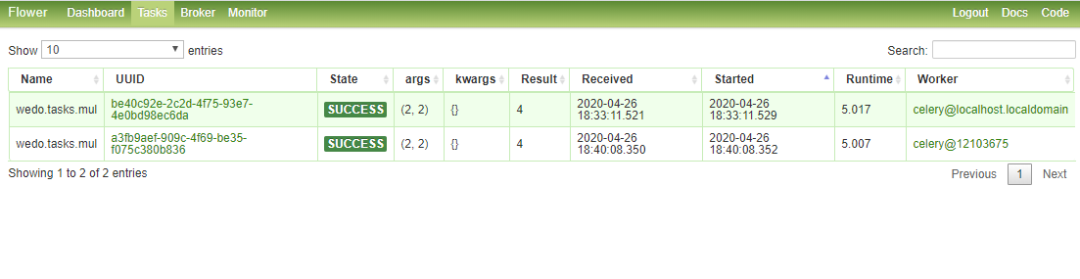
If you want to visualize everything in Celery, Flower provides a feasible solution that is very convenient.
flower -A wedo --port=6006
# Web access http://10.8.238.2:6006/
7. Summary
This article introduces the distributed queue Celery. It covers everything comprehensively. Feel free to communicate. To summarize:
- Celery is a distributed queue that connects task submissions and executors (workers) through a message queue, in a loosely coupled and scalable manner.
- Redis is recommended as the message queue for Celery.
- Celery transforms regular tasks into Celery Tasks through the @app.task decorator.
- Celery workers support specific workers consuming specific tasks through different queues.
- In @app.task, you can synchronize base and bind parameters to gain better control over the task lifecycle.
- Flower monitors the entire process of Celery.
- Celery documentation: https://docs.celeryproject.org/en/master/getting-started/index.html
Support the Author

The Python Chinese Community is a decentralized global technology community aiming to become the spiritual tribe of 200,000 Python Chinese developers worldwide. It currently covers major media and collaboration platforms, establishing extensive connections with well-known companies and technology communities in the industry, such as Alibaba, Tencent, Baidu, Microsoft, Amazon, Open Source China, CSDN, etc. It has tens of thousands of registered members from more than a dozen countries and regions, representing government agencies, research institutions, financial institutions, and well-known companies both domestically and internationally, with nearly 200,000 developers following across all platforms.

Recommended Reading:
Python Recruitment Internal Referral Channels for 2020 Are Now Open!
Veteran Driver Teaches You to Understand Python Decorators in 5 Minutes
Implementing Particle Swarm Algorithm with Python
Want to Buy the Dip in US Stocks? Analyze Actual Returns of US Stocks with Python

▼Click to Become a Community Member. If You Like It, Give It a Click to See