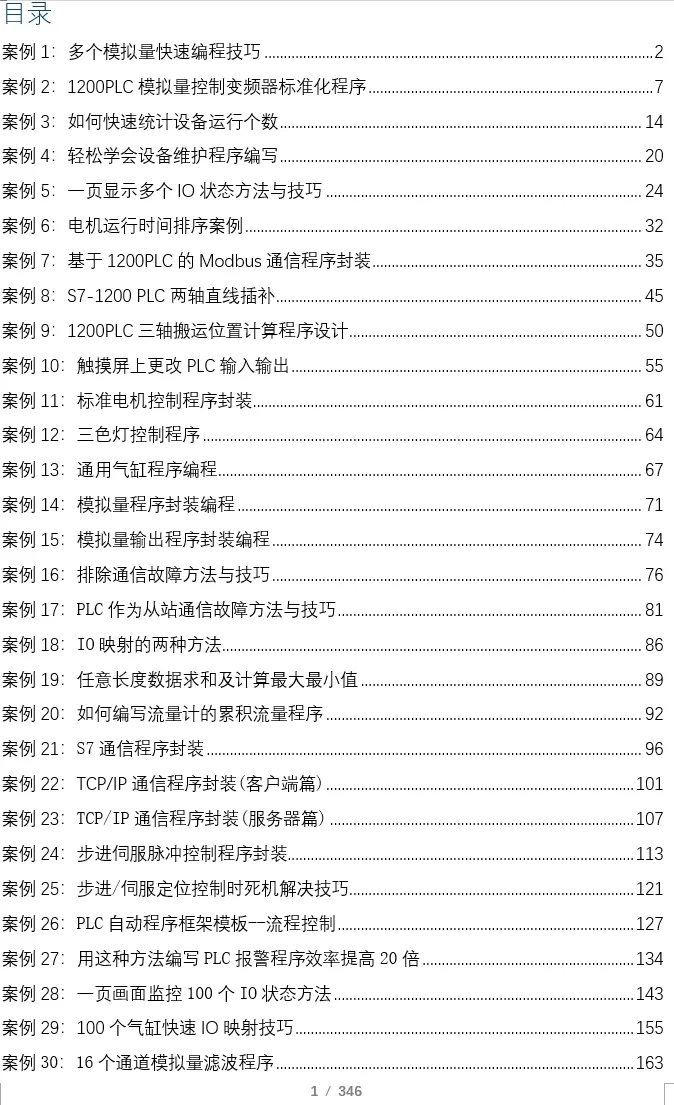
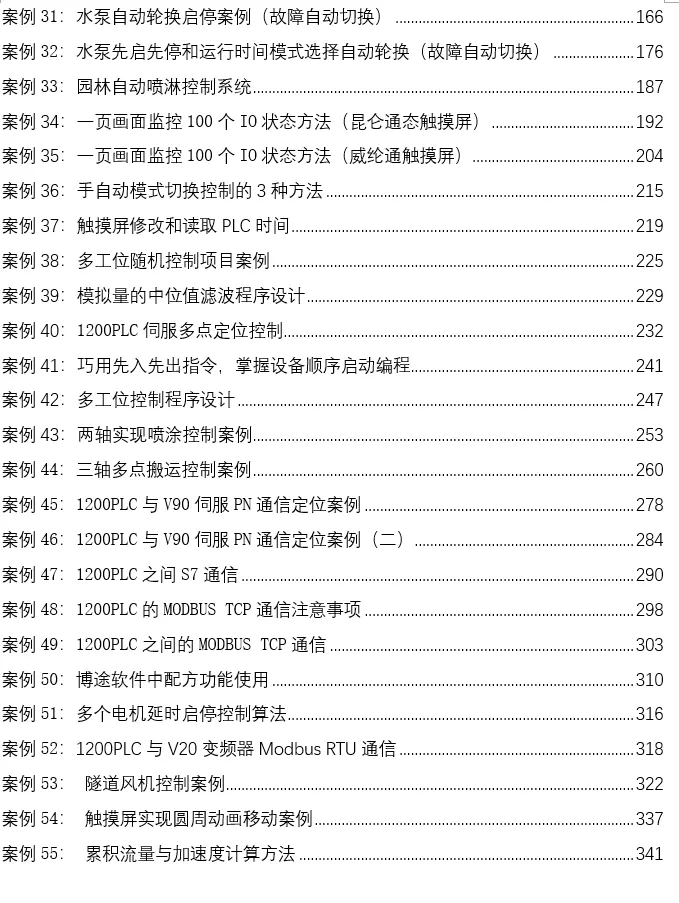
At the end of the article, there are 55 practical case materials
Introduction: For beginners learning PLC programming, understanding data is crucial. If the arrangement order and rules of the data are not correctly understood, the programs written may ultimately be unusable. This is particularly evident in communication issues; when the communication reads the PLC data format incorrectly, we need to rearrange the data. Therefore, the following knowledge must be understood:
1. High and Low Bytes
This concept is relatively simple. It describes the multi-byte data (such as Word, DWord, Int, DInt, Real, etc.) and the arrangement order of its various bytes when stored.
-
High Byte: Represents the higher-weight part of the data (similar to the “thousands” and “hundreds” in decimal).
-
Low Byte: Represents the lower-weight part of the data (similar to the “tens” and “units” in decimal).
For example, a 16-bit word (Word) with a value of <span>16#1234</span> (hexadecimal):
-
<span>12</span>is the high byte. -
<span>34</span>is the low byte.
In the PLC storage area (such as M storage area, DB block), this word occupies two consecutive byte addresses.
2. Byte Order (Endianness)
Byte order determines the physical storage order of the high and low bytes in memory. This is the key issue and can be easily confused.
-
Big Endian: The high byte is stored at a low address, and the low byte is stored at a high address.
-
This conforms to human reading habits, decreasing weight from left to right.
-
Little Endian: The low byte is stored at a low address, and the high byte is stored at a high address.
-
This is very common in CPU architectures like x86 and ARM.
Siemens PLC Byte Order (Key Point!)
Conclusion: Siemens PLC’s storage system uses “Big Endian”.
This means that for multi-byte data, its high byte is stored at a lower physical address.
Example Analysis
We define a DB block, assuming a 32-bit double word <span>16#12345678</span> starts from MD0.
-
Data:
<span>16#12</span><span>16#34</span><span>16#56</span><span>16#78</span> -
The highest byte is
<span>12</span> -
The lowest byte is
<span>78</span>
According to the Big Endian rule, its storage in PLC memory is as follows:

When viewed in the PLC, the representation of the data is consistent with our logical understanding:
-
If you access
<span>MD0</span>(DWord), you will see<span>16#12345678</span>. -
If you access
<span>MW0</span>(Word), you will see<span>16#1234</span>. -
If you access
<span>MW2</span>(Word), you will see<span>16#5678</span>. -
If you access
<span>MB0</span>(Byte), you will see<span>16#12</span>.
All of this is transparent in software like TIA Portal; you do not need to worry about the underlying storage when programming, as the system will handle it automatically.
When Do Problems Occur?
Problems arise when you need to exchange raw byte data with non-Siemens systems (especially those using Little Endian systems).
Common Scenarios:
-
Communicating with devices from other brands (such as instruments, robots, vision systems) via TCP/IP, Modbus TCP, Profinet.
-
Direct communication with upper computer software (such as C#, Python, Java programs) via Socket.
-
Parsing messages from third-party devices.
Conflict Example
Assume your Siemens PLC needs to send a 32-bit integer <span>16#12345678</span> via TCP to an x86 architecture PC.
-
PLC (Big Endian) sends the byte stream in the order:
<span>12 34 56 78</span> -
PC (Little Endian) upon receiving this byte stream will parse it according to its own Little Endian rules:
-
It considers the first byte
<span>12</span>as the lowest byte, and the last byte<span>78</span>as the highest byte. -
Thus, the value it reconstructs becomes
<span>16#78563412</span>.
This leads to data parsing errors!
Solution
The core of solving this problem is to perform byte order conversion at one end of the data transmission.
1. Perform Conversion on the PLC Side (Recommended)
Before sending data, convert it to network byte order (which is usually also Big Endian); after receiving data, convert it back from network byte order to PLC format.
Siemens provides specific libraries and instructions for conversion:
-
<span>SWAP</span>instruction: -
<span>SWAP_DWORD</span>will convert<span>16#12345678</span>to<span>16#78563412</span>(i.e., completely reversing the byte order). -
For example,
<span>16#1234</span>becomes<span>16#3412</span>after applying<span>SWAP</span>. -
<span>SWAP</span>: swaps the high and low bytes within a 16-bit word (Word). -
<span>SWAP_WORD</span>/<span>SWAP_DWORD</span>: in TIA Portal, these instructions can more clearly swap the byte order within Word or DWord.
Recently, many friends have asked for case books, saying that reading articles on mobile is not very convenient. I took some time to organize all 55 practical cases, which are quite typical, including cylinder control programs, alarm programs, program frameworks, motion control program encapsulation, analog control of frequency converters, communication, and other practical cases.If you need them, you can add me on WeChat: biao467524527. If you can’t add me, feel free to message me!

Previous Recommendations
Did you know that writing interpolation programs with PLC is so simple? Just a few instructions to get it done!
Building manual, semi-automatic, and fully automatic program frameworks using SCL language!!!
What to do if the servo motor position is lost after a power outage?
This article will help you understand the difference between parameterized and non-parameterized FB programming.
How to synchronize motion between two servos? Once you understand these concepts, it becomes very simple!
What does a complete project program framework look like? Today, I will take you step by step to break it down!
The most important statement in SCL programming is this! An article to help you understand it thoroughly!
Comparing automatic control programs (Ladder Diagram vs. SCL)
When learning PLC analog programming, these 3 programs must be saved; you will use them in the future!!!
No PLC? Modbus RTU communication can be simulated for testing!
[Recommended to Save]: Several fixed commonly used templates for SCL programming!!
Using UDT data programming can greatly improve efficiency!!
PLC automatic control programming “three axes”
[Content Sharing] Writing a program for 3 pumps to automatically rotate every 8 hours
This PLC instruction is rarely used, but it is very practical!!
How to achieve synchronization between two servos? Once you understand these concepts, it won’t be difficult!!
In-depth analysis: How to troubleshoot communication issues with the 1200 PLC?
S7-1200 PLC programming case for smooth acceleration and deceleration
Using ST language to write valve control cases