Many students who are new to embedded systems feel intimidated when they hear the term “driver engineer”: “Do I need to understand low-level assembly? Do I need to solder circuit boards? It seems 10 times harder than writing applications!” In fact, being a driver engineer is not as “unreachable” as it seems; it is essentially the “translator between hardware and software.” It involves converting register operations from the chip manual into code that the system can understand, making the screen light up, sensors run, and motors turn.1. C LanguagePointers: You need to not only use single-level pointers but also understand pointer arrays and array pointers. For example, when operating registers, you need to access memory addresses directly through pointers, such as *(volatile unsigned int *)0x12345678 = 0x01; this line of code writes a value to a certain register, and without pointers, it won’t work.
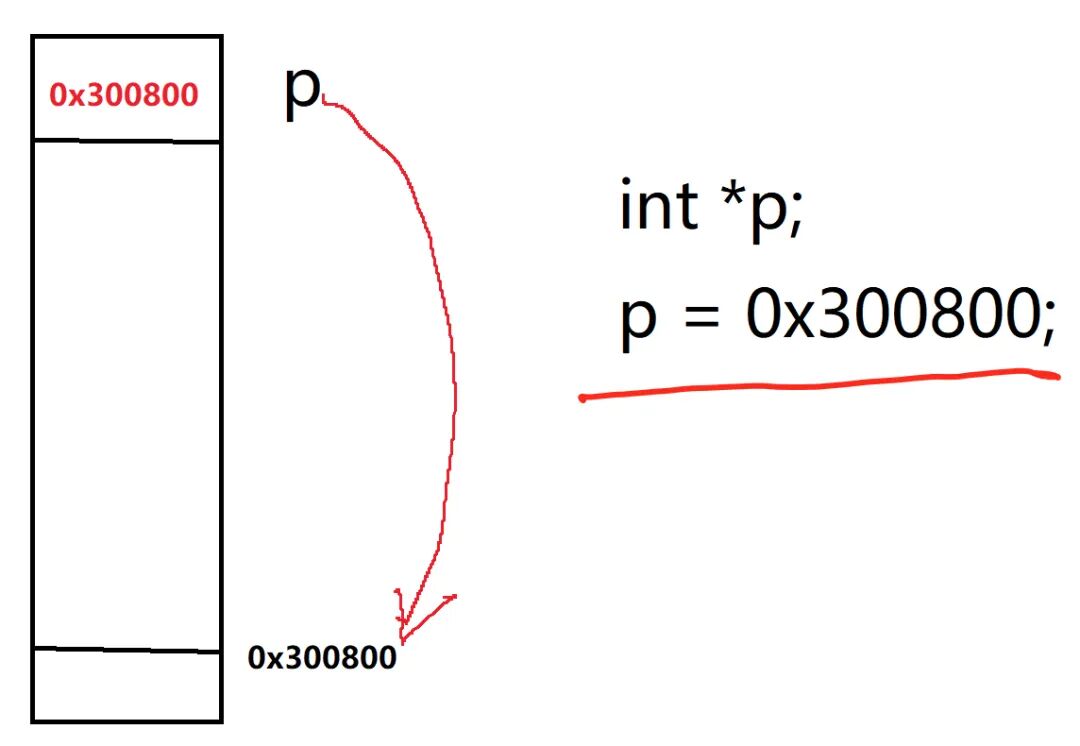
Structures + Bit Manipulation: Hardware registers are often divided by “functional groups,” such as configuration registers and data registers for GPIO ports. It is most convenient to encapsulate them in structures; bit manipulation is more commonly used, for example, modifying only certain bits of a register without affecting others, using operations like |=, &=, ~. For instance, GPIO->CRL &= ~(0x0F << 4); clears the configuration bits of a certain pin.
volatile Keyword: This is a must-remember! It tells the compiler, “This variable may be modified by hardware, do not optimize it.” If you forget it while writing drivers, the code may run into various mysterious bugs, such as a variable being assigned a value but not visible during debugging.You don’t need to learn all the features of C; focus on the parts that interact with hardware, such as the relevant chapters in “C and Pointers” and “C Traps and Pitfalls,” which are more useful than slogging through thick textbooks.
2. Computer Organization PrinciplesDrivers interact with hardware, so you need to know how the CPU, memory, and peripherals communicate. You don’t need to delve deeply into pipeline and cache architecture; focus on understanding three points:
Memory-Mapped I/O: The registers of peripherals are actually “disguised as memory addresses.” When the CPU accesses a certain address, it is actually communicating with the peripheral. For example, accessing 0x40010800 may be operating on the GPIO register. This is the core logic of driver development.
Interrupts: Peripherals do not “actively call the CPU.” For example, when a button is pressed or data is received via serial port, it is all done through “interrupts” to notify the CPU to handle it. You need to know how interrupts are triggered, how to configure priorities, and how to write interrupt service functions. For instance, after a button is pressed, the interrupt controller notifies the CPU, which pauses the current task to execute the button handling code, and then returns.
DMA: For example, if the serial port needs to send 1000 bytes, the CPU cannot send them one by one and do nothing in between; using DMA (Direct Memory Access), the CPU only needs to tell DMA, “Get data from memory address A and send it to the serial port, a total of 1000 bytes,” and DMA will handle it on its own, allowing the CPU to do other tasks. Understanding DMA is essential for handling large data transfers in drivers (such as cameras and SD cards). It is recommended to read the concise version of “Computer Organization Principles (Tang Shuo Fei)” or find embedded-oriented video courses to focus on understanding the “collaboration methods between CPU and peripherals,” which is better than rote memorization of theory.3. Basics of Operating SystemsNowadays, very few embedded devices have bare-metal (no system) drivers; most run on RTOS (Real-Time Operating System) or Linux. You need to first understand the basic concepts of operating systems: Task Scheduling: For example, if the system has “button handling tasks,” “display tasks,” and “sensor collection tasks,” how does the operating system arrange their execution order? Driver code cannot block the entire system; for instance, when reading sensor data, the CPU cannot wait indefinitely; it must use “interrupts” or “asynchronous notifications.”
Threads/Processes: Linux drivers will use kernel threads, while RTOS uses tasks; you need to understand their relationship with drivers. For example, drivers provide “interfaces” that tasks use to operate hardware. Synchronization and Mutual Exclusion: When multiple tasks operate on the same hardware (for example, both tasks need to write to the serial port), how to avoid conflicts? You need to understand semaphores and mutexes; for instance, when Task A uses the serial port, it takes a “lock,” and Task B must wait for A to release the “lock” before it can use it.Beginners can start with RTOS, such as FreeRTOS, as its kernel is simple and easy to understand concepts like tasks and semaphores, making the transition to the Linux kernel smoother.
1. Chip Manual: The “Instruction Manual” for Driver EngineersMany people feel overwhelmed when they receive a chip manual—hundreds of pages full of English and register tables, not knowing where to start. In fact, there are “tricks” to reading manuals; for example, if you want to write a GPIO driver, you only need to focus on these sections:Functional Description:What can this GPIO port do? Is it input or output? Can it be reused as a serial port or SPI?Register Address:Find the base address corresponding to GPIO, for example, the base address of GPIOA in STM32 is 0x40010800, and then look at the offset addresses of each register, such as the offset of the configuration register CRL is 0x00, and the offset of the data register ODR is 0x0C.Register Bit Definitions:For example, certain 4 bits of the CRL register correspond to a pin, and different values of these 4 bits represent modes like “push-pull output” and “pull-up input.” You need to know how to configure these bits. You don’t need to read the entire manual; just look up what you need. For example, when writing an I2C driver, check the I2C clock configuration, control register, and data register; when writing an SPI driver, check the SPI timing register and chip select signal configuration. It’s okay to be slow at first; the more you look up, the more familiar you will become.2. Peripheral Driver PracticeStep 1: GPIO Driver (Most Basic). The goal is to make the LED on the development board light up and the button trigger an interrupt. For example, configure a certain pin of GPIOA as push-pull output, and write code to toggle it every second (turning on and off alternately); configure a certain pin of GPIOB as pull-down input, and trigger an interrupt when the button is pressed, making the LED toggle in the interrupt service function.
Step 2: Serial Port Driver (Communication Type). The goal is to enable the development board to communicate with the computer via serial port, for example, when the computer sends “LED ON,” the development board lights up the LED; the development board sends sensor data (such as temperature) to the computer every second via serial port. You need to understand the baud rate configuration, data bits, stop bits, parity bits, as well as interrupt reception and DMA sending.
Step 3: Common Bus Drivers (I2C/SPI). Many sensors (such as the temperature and humidity sensor SHT30) and storage chips (such as EEPROM AT24C02) communicate via I2C or SPI. You need to learn how to configure the clock and timing for I2C/SPI, and write “read” and “write” functions, such as reading temperature data from SHT30 via I2C and reading stored content from EEPROM via SPI. Step 4: Complex Peripheral Drivers (Difficulty Upgrade). For example, ADC (Analog to Digital Converter, reading voltage), PWM (Pulse Width Modulation, controlling motor speed and LED brightness), SD card (file system), LCD screen (displaying images). These peripherals require combining interrupts, DMA, clock configuration, and understanding the corresponding protocols (such as the SPI protocol for SD cards and the SPI/8080 interface protocol for LCDs).3. Kernel Driver DevelopmentKernel Module Programming: Most Linux drivers are “kernel modules” that can be dynamically loaded into the kernel (for example, insmod xxx.ko) without recompiling the kernel.
You need to understand module initialization (module_init), unloading (module_exit), as well as kernel printing functions (printk) and memory allocation (kmalloc/kfree).Character Device Drivers (Most Common): Most peripherals (such as LEDs, serial ports, sensors) belong to “character devices,”and you need to understand:
Character device registration (cdev_init/cdev_add), device number allocation, file operation interfaces (file_operations,such as open/read/write/ioctl).
For example, writing a character device driver for an LED allows a user-space program to open the device through open and send commands to turn the LED on and off through write.
Interrupt and Concurrency Control: The Linux kernel is multitasking, and multiple processes may access a driver simultaneously. You need to understand interrupt requests (request_irq), releases (free_irq), and methods for concurrency control (such as spinlocks and mutexes) to avoid conflicts when multiple processes operate on hardware simultaneously.Kernel Debugging Tools: For example, use dmesg to view printk output, use gdb to debug kernel modules, use cat /proc/devices to view device numbers, and use lsmod to view loaded modules. Debugging Linux drivers is more challenging than bare-metal; you need to learn to use these tools to locate issues.4. Protocol Knowledge: Understanding Protocols to Interface with More PeripheralsMany peripherals have standard protocols, such as:
Communication Protocols: I2C, SPI, UART, CAN (commonly used in automotive electronics), Ethernet, USB.Storage Protocols: SDIO (SD card), NAND Flash, NOR Flash.Wireless Protocols: SPI (Wi-Fi modules), UART (Bluetooth modules), I2C (NFC modules).
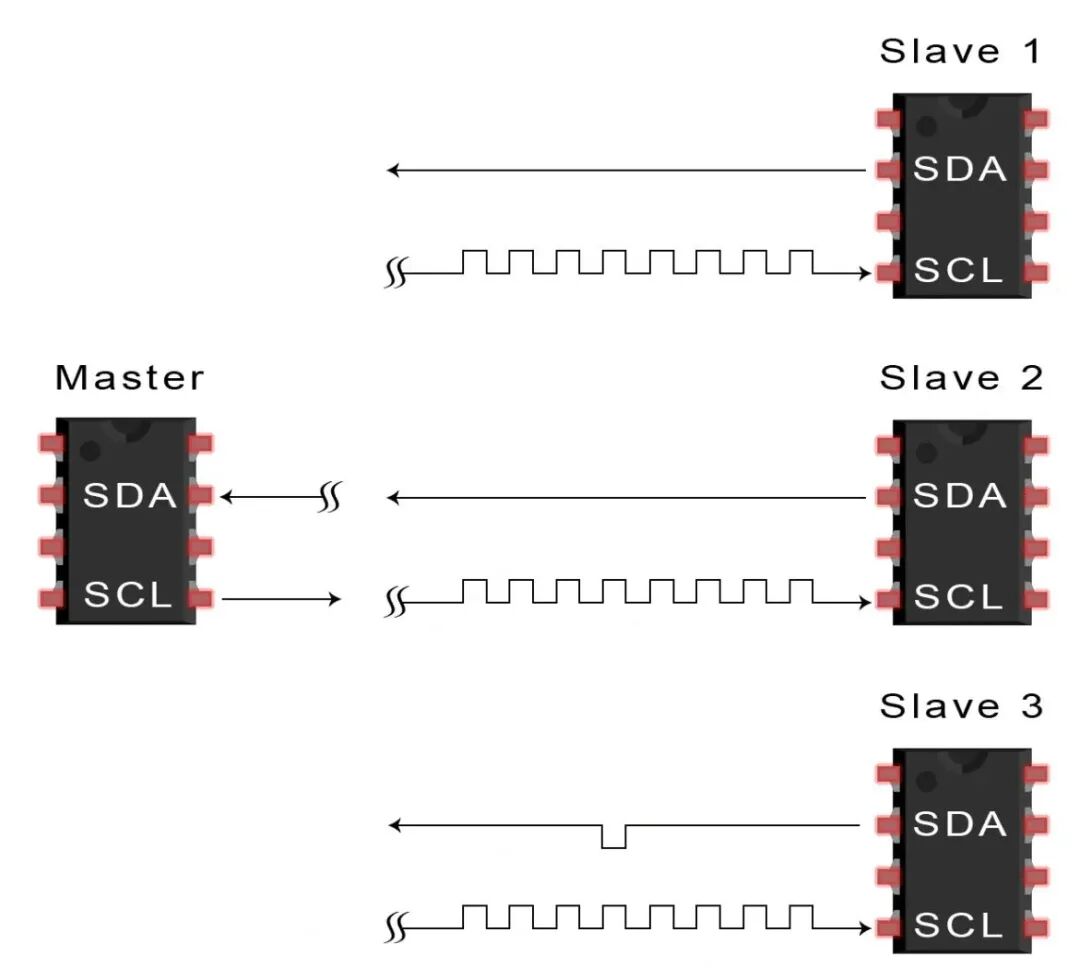
You don’t need to learn all protocols, but you should understand the commonly used ones. For example, when making IoT devices, you need to understand the drivers for Wi-Fi and Bluetooth modules and know how to communicate with the modules via SPI/UART; when working on automotive electronics, you need to understand the CAN bus protocol and know how to configure the CAN controller and send and receive CAN messages.