Linux | Red Hat Certification | IT Technology | Operations Engineer👇 Join our technical exchange QQ group with 1000 members Note: [Official Account] for faster approval

1. Relevant Knowledge
To complete this section’s tasks, you need to master the following knowledge:
Linux create user command
Linux delete user command
1.1 Linux Create User Command
1.1.1 Knowledge Explanation
In Linux, the useradd command is used to create a new user. The command format is:
useradd [command options] parametersCommon command options:
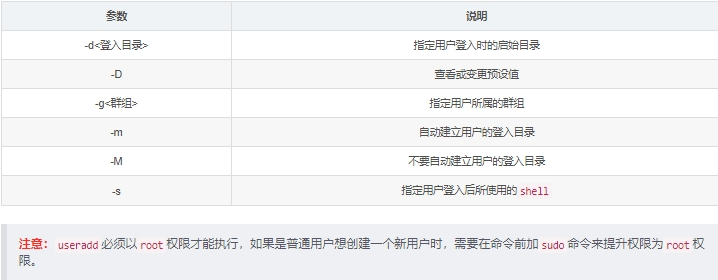
1.1.2 Case Demonstration
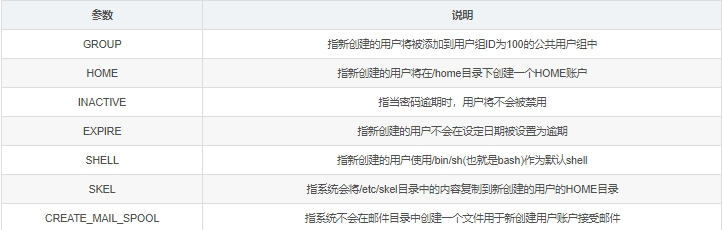
1. View the default properties of useradd system with the command useradd -D.
The system I am using is Ubuntu 16.04, and the default values of useradd are shown below:
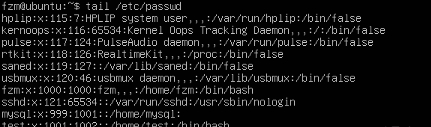
2. Use the useradd command to create a new user test and automatically create the user’s login directory.

In the background introduction, we learned that user information in Linux is stored in the /etc/passwd file. We can use the command tail /etc/passwd to check if the newly created test user information exists in the last 10 lines of the /etc/passwd file.
2.1 Linux Delete User Command
2.2.1 Knowledge Explanation
In Linux, the userdel command is used to delete an existing user. The command format is:
userdel [command options] parametersCommon command options:
-f: Force delete user, even if the user is currently logged in; -r: Delete the user along with all files related to the user. Note: userdel must be executed with root permissions. If a regular user wants to use this command, they need to prepend the command with sudo to elevate permissions to root.2.2.2 Case Demonstration
Use the userdel command to delete an existing user test and automatically delete its home directory files.
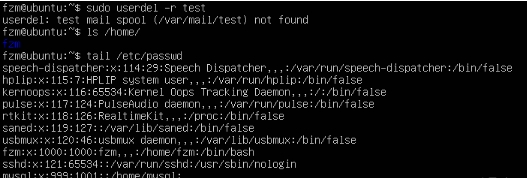
Since the system does not automatically create a folder for new users to receive emails, using the userdel -r command will prompt that the /var/mail/test folder does not exist.
3. Programming Requirements
The specific tasks for this section are as follows:
Create a new user newUser and automatically create its login directory; delete the existing user oldUser and automatically delete its associated login directory; switch the current working directory to the home directory of the newly created user newUser; use the pwd command to print the current working directory.4. Programming Answer
#!/bin/bash# Write the commands to complete the task here#!/bin/bash# Write the commands to complete the task here#***********begin*************#useradd -m newUseruserdel -r oldUsercd /home/newUserpwd#************end**************#
 For course inquiries, add: HCIE666CCIE↑ Or scan the QR code above ↑If you have any technical points or content you want to see,you can leave a message below to let us know!