0. Introduction
In previous articles, we introduced knowledge and practical cases related to processes. However, in the world of process management, merely understanding process creation and scheduling is insufficient. As applications transition from single-machine environments to containerization and from local usage to cloud deployment, the failure of resource isolation can lead to service anomalies or, in severe cases, system crashes. This article will introduce the kernel-level implementation and usage of process isolation and resource limitation, guiding readers to a deeper understanding of container technology.
1. Namespace
A Namespace is essentially a layer of encapsulation for globally visible resources to processes, allowing each process (or process group) to believe it has exclusive access to a set of independent resources. It provides various types of Namespaces to isolate different system resources:
PID │ Process ID Isolation → The first process in the container believes it is "init" (PID=1) NET │ Network Stack Isolation → The container has its own IP, ports, and routing table IPC │ Inter-Process Communication Isolation → Prevents shared memory communication across containers MNT │ Filesystem Isolation → `/` shows different content inside and outside the container UTS │ Hostname Isolation → The container can customize its hostname USER │ User Permission Isolation → "root" inside the container ≠ host machine root The core data structure of Namespace is nsproxy, and each process’s task_struct contains a pointer to nsproxy, pointing to its associated namespace:
struct nsproxy { atomic_t count; struct uts_namespace *uts; // UTS Namespace (hostname/domain name) struct ipc_namespace *ipc; // IPC Namespace (inter-process communication) struct mnt_namespace *mnt; // Mount Namespace (filesystem mount) struct pid_namespace *pid; // PID Namespace (process ID) struct net *net; // Network Namespace (network resources) ... // time-related struct cgroup_namespace *cgroup; // CGroup Namespace (cgroup view)};struct task_struct { // ... other fields ... struct nsproxy *nsproxy; // The namespace set to which the process belongs // ... other fields ...};For example, to create a new PID Namespace, we can callclone(CLONE_NEWPID | …) to create a new PID Namespace, which will then point the created task to the new nsproxy.
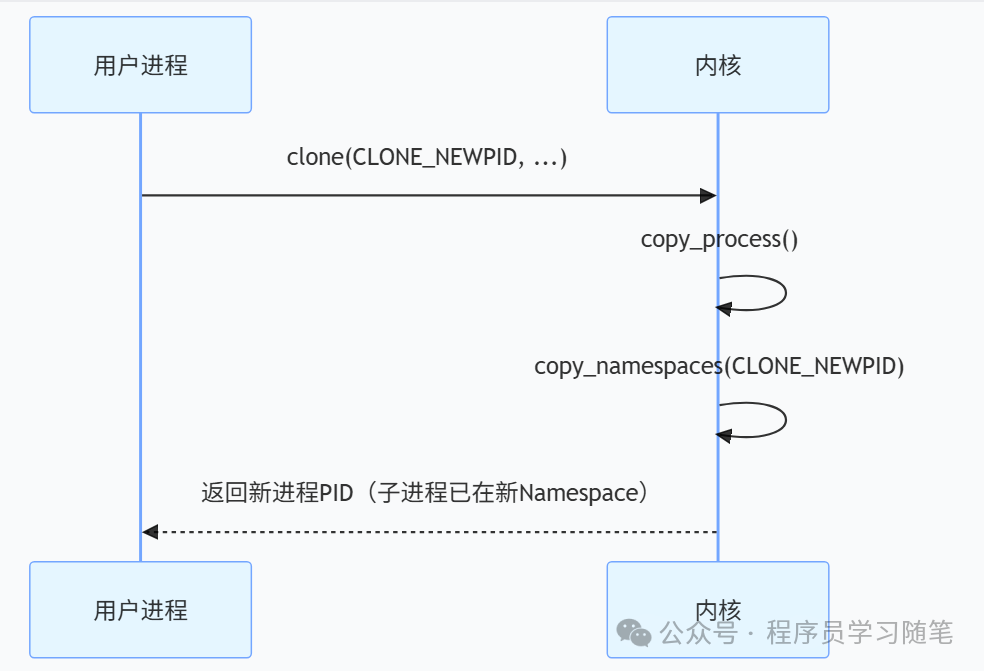
Let’s perform a practical operation using unshare (used to run programs in a new namespace) as an example. After using this, we can see only bash and ps -ef itself, and we cannot see the original host processes.
# Create an isolated environment where host processes are "invisible". --mount-proc allows the container to mount an independent /proc, making ps only see a "fake" process tree.sudo unshare --pid --fork --mount-proc /bin/bashps -efUID PID PPID C STIME TTY TIME CMDroot 1 0 0 20:10 pts/3 00:00:00 /bin/bashroot 8 1 0 20:10 pts/3 00:00:00 ps -efVarious isolations in containers are achieved through this method. Our programs can also use this method or function to achieve environmental isolation when needed.
2. CGroup
With Namespaces, containers can have their own operating environment. However, if a container consumes system resources (CPU, memory, etc.) without limits, it could potentially crash the entire machine. Therefore, a limiting mechanism is required, which is CGroup. CGroup (Control Group) is a mechanism for grouping processes and monitoring and limiting resources for each group.
The core concepts of CGroup are twofold:
1) Control Group: A collection of processes that can be hierarchical (child processes inherit limits from parent processes).
2) Subsystem: Each subsystem corresponds to a type of resource control, such as CPU, memory, IO, etc.
In Linux, the core structure for implementing CGroup is cgroup, which mainly contains the following content. In task_struct, there is a cgroup to which the process belongs:
struct cgroup { struct cgroup_subsys_state self; unsigned long flags; int level; // Current depth of the cgroup in the tree (root=0) /* Maximum allowed descent tree depth */ int max_depth; // Maximum allowed subtree depth ... struct kernfs_node *kn; /* cgroup kernfs entry */ struct cgroup_file procs_file; /* handle for "cgroup.procs" */ struct cgroup_file events_file; /* handle for "cgroup.events" */ ... // Subsystem state pointers struct cgroup_subsys_state __rcu *subsys[CGROUP_SUBSYS_COUNT]; struct cgroup_root *root; struct list_head cset_links; struct list_head e_csets[CGROUP_SUBSYS_COUNT]; struct cgroup *dom_cgrp; struct cgroup *old_dom_cgrp; /* used while enabling threaded */ // CPU statistics struct cgroup_rstat_cpu __percpu *rstat_cpu; struct list_head rstat_css_list; /* cgroup basic resource statistics */ struct cgroup_base_stat last_bstat; struct cgroup_base_stat bstat; struct prev_cputime prev_cputime; /* for printing out cputime */ struct list_head pidlists; struct mutex pidlist_mutex; /* used to wait for offlining of csses */ wait_queue_head_t offline_waitq; /* used to schedule release agent */ struct work_struct release_agent_work; /* used to track pressure stalls */ struct psi_group psi; /* used to store eBPF programs */ struct cgroup_bpf bpf; /* If there is block congestion on this cgroup. */ atomic_t congestion_count; /* Used to store internal freezer state */ struct cgroup_freezer_state freezer; // Array of ancestor cgroup IDs (for quick hierarchy checks) u64 ancestor_ids[];};struct task_struct { // ... other fields ... struct css_set *cgroups; // The cgroup set to which the process belongs // ... other fields ...};Next, let’s look at the implementation logic for resource limitation, taking CPU limitation as an example (the cpu subsystem controls CPU time slices through cpu.cfs_quota_us and cpu.cfs_period_us (e.g., quota=50000, period=100000 indicates 50% usage). The overall logic after setting is as follows:
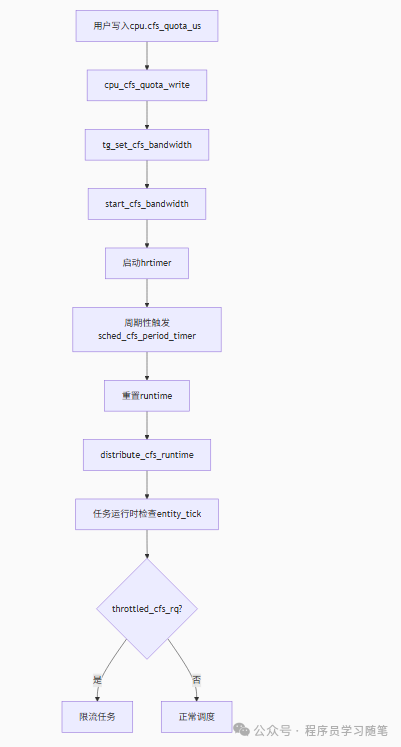
It can be limited using the following method:
# Create a memory limit groupmkdir /sys/fs/cgroup/memory/mygroupecho 104857600 > /sys/fs/cgroup/memory/mygroup/memory.limit_in_bytes # Limit to 100MBResource limitations in various containers (such as Docker) are also implemented through Cgroup. Various subsystems support limitations, and there are many types, which will not be listed here.
4. Conclusion
Namespaces create independent operating environments for containers (such as network, processes, files, etc.), achieving logical isolation; CGroup implements resource control (CPU, IO, etc.), achieving physical control, ensuring system stability and fairness. This design reflects Linux’s layered abstraction and demand-driven combination design philosophy. Finally, here is a pseudocode to start our own container (describing the main steps).
unshare(CLONE_NEWPID | CLONE_NEWNS) # Create Namespacecgroup = Cgroup(cpu_shares=512, memory_limit="1G") # Create Cgrouppivot_root("./alpine-rootfs") # Switch root filesystemexecv("/bin/bash") # Start container process