Pointers are the essence of the C language. Understanding memory can help better comprehend and learn about pointers. Before learning about pointers, it is advisable to refer to the Von Neumann architecture and the simple example of the Von Neumann architecture, as well as the basic understanding of operating systems. When you run a program, it is actually the operating system that loads the program into memory, turning the program into a series of instructions and variable values in memory, which the CPU then reads from memory to execute. Difference between physical memory and virtual memory: Physical memory is the actual memory that exists, which you can see in your system configuration as tangible hardware, commonly referred to as RAM. When buying a computer, you can see the size of the memory. Virtual memory is the memory that the operating system virtually allocates to executable programs. When an executable program actually needs to use physical memory, the operating system can map the virtual memory of the executable program to the actual physical memory through memory management. Executable programs correspond to virtual memory. Memory has addresses.Here, we introduce two symbols: the address-of operator & and the pointer * The address-of operator & is used to return the memory address of an operand. For example, if there is an integer variable var, then &var represents its address.
#include <stdio.h>
int main(int argc, char *argv[]){
    int var = 0;
    // You can use %p to print the memory address of var
    // Memory addresses are generally represented in hexadecimal
    printf("The memory address of variable var is: %p\n", &var);
    return 0;
}
Output:
The memory address of variable var is: 0x7ff7b52927cc
A pointer * variable is a variable that holds a memory address.
#include <stdio.h>
int main(int argc, char *argv[]){
    int var = 20;
    // int* indicates that paddr is a pointer to an int type
    // NULL indicates that paddr does not point to any memory address
    int* paddr = NULL;
    // Generally, int is 4 bytes
    printf("Size of var: %lu\n", sizeof(var));
    // Assign the memory address of variable var
    paddr  = &var;
    // The two printed addresses below are the same.
    printf("The memory address of variable var is: %p\n", &var);
    printf("The memory address of variable var printed using paddr is: %p\n", paddr);
    // *paddr is used to access the data pointed to by the pointer, which is actually var
    printf("Address pointed to by paddr: %p, the value stored at that address is: %d\n", paddr, *paddr);
    return 0;
}
Output:
Size of var: 4
The memory address of variable var is: 0x7ff7b04067cc
The memory address of variable var printed using paddr is: 0x7ff7b04067cc
Address pointed to by paddr: 0x7ff7b04067cc, the value stored at that address is: 20
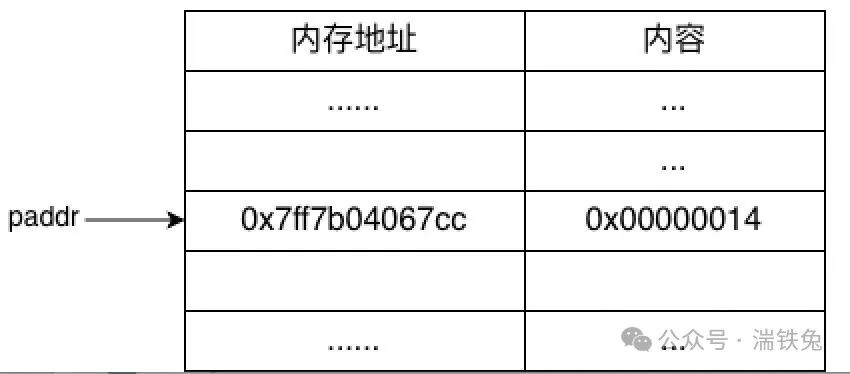 Memory addresses are like house numbers; knowing the address of var allows you to access var and retrieve its value (content) using *paddr.To understand memory more intuitively, you can try printing a segment of memory content.
#include <stdio.h>
void simple_memory_dump(const void *addr, size_t size) {
    const unsigned char *bytes = (const unsigned char *)addr;
    printf("%p: ", addr);
    for(size_t i = 0; i < size; i++) {
        printf("%02X ", bytes[i]);
        // New line every 16 bytes
        if ((i + 1) % 16 == 0 && (i+1) < size) {
            printf("\n%p: ", &bytes[i+1]);
        }
    }
    printf("\n");
}
int main(int argc, char *argv[]){
    int var = 20;
    int *paddr = &var;
    // Since int is 4 bytes, the actual paddr2 address value is 4*8=32 less than pvar
    int *paddr2 = paddr - 8;
    printf("paddr2=%p, paddr=%p\n", paddr2, paddr);
    simple_memory_dump(paddr2, 64);
    return 0;
}
Output: The left side 0x7ff7b8a77cc is paddr, pointing to the right 4 bytes of content in hexadecimal: 14 00 00 00This also involves another concept: byte storage orderEndianness refers to the two different orders in which multi-byte data is stored in memory in computers.
-
Big-endian: The high-order byte of data is stored at the low address, and the low-order byte is stored at the high address.
-
Little-endian: The low-order byte of data is stored at the low address, and the high-order byte is stored at the high address.
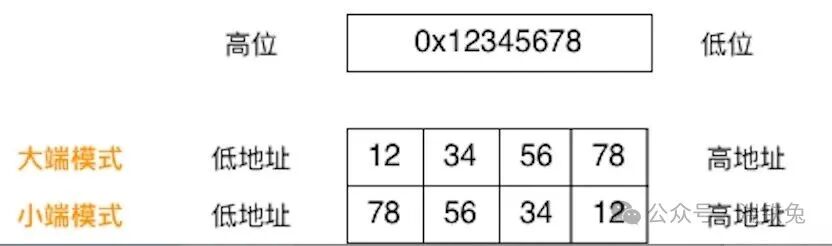 The above 14 00 00 00 is in little-endian format, and the actual value is 0x00 00 00 14 = 20Since it is a virtual memory address, the content pointed to by the same virtual memory address in different running programs is not the same. It is like 1 Renmin Road, Suzhou (program) and 1 Renmin Road, Harbin(program) having different contents at the same virtual memory address.