Hello everyone, I am Pi Zi Heng, a serious tech enthusiast. Today, I will introduce the NXP i.MXRT1xxx series MCU’s SD/eMMC card boot.
Recently, I supported a case about booting i.MXRT from an SD card on the NXP official community, which reminded me of an article I wrote a year ago titled “Booting i.MXRT600 from SD/eMMC.” That article focused on methods for creating, downloading, and booting programs based on eMMC devices. Although the boot processes for SD and eMMC are quite similar, there are still some differences in detail. Taking this opportunity, I will carefully outline the methods for creating, downloading, and booting programs from an SD card today:
- Note: The images and code in this article mainly use i.MXRT1050 as an example; the principles for other i.MXRT1xxx series are similar.
1. Supported SD/eMMC
The four-digit and three-digit i.MXRT series use the same peripheral to access SD/MMC cards, which is uSDHC. The peripheral itself supports SD3.0. However, the chip’s BootROM may not implement all uSDHC functionalities. The i.MXRT1050 BootROM mainly supports the following types of SD card boot:
• SDv2.0 or less
• eSDv2.10 rev-0.9, with or without FAST_BOOT
• SDXCv3.0
In comparison, the i.MXRT600 BootROM has slightly different support for SD card boot compared to the i.MXRT1050:
• SD Version 3.0 or earlier version
• SD: 1-bit/4-bit; SDR12, SDR25, SDR50 and SDR104.
All models in the MIMXRT10xx-EVK series are equipped with a MicroSD card slot, connected to the first uSDHC port, making it very convenient for us to test SD boot.
2. SD/eMMC Hardware Connection
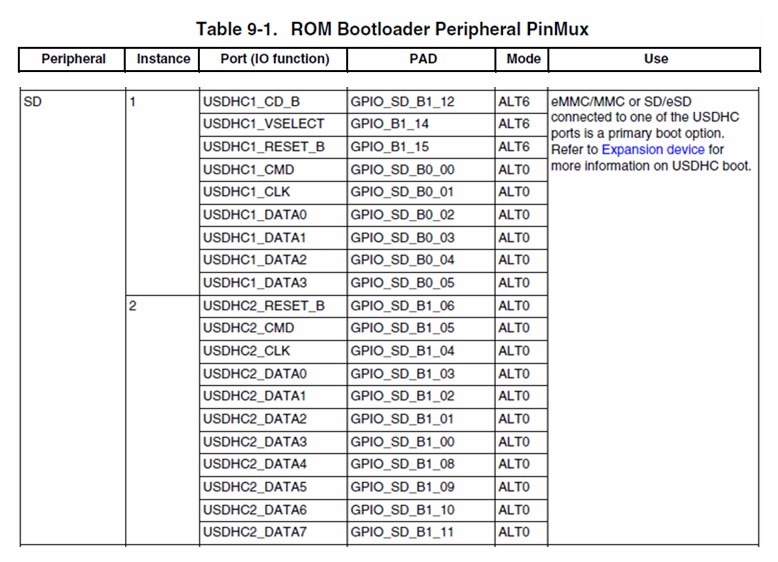
Except for the i.MXRT1010/1015, which do not include the uSDHC peripheral, all other i.MXRT1xxx have two uSDHC modules internally (note: uSDHC2 may not be available in some small packages). The i.MXRT1050 BootROM supports the following pinmux to connect the SD/eMMC card for boot:
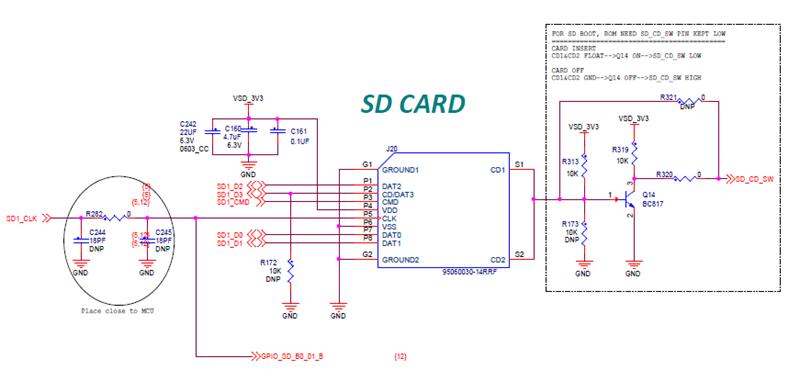
The following is the SD card slot connection design on the IMXRT1050-EVKB_Rev.A board. This slot can be used not only to test SD card read/write boot but also to test booting eMMC by connecting a MicroSD to eMMC adapter (must operate in 1/4bit bus width mode):
3. SD/eMMC Loading Boot Process
We know that only Non-XIP Applications can be placed in SD/eMMC devices (linked to internal SRAM or external RAM space). The boot loading process is similar to the one in the article “Boot Recovery from Serial (1-bit SPI) NOR/EEPROM” (see section 3 of that article).
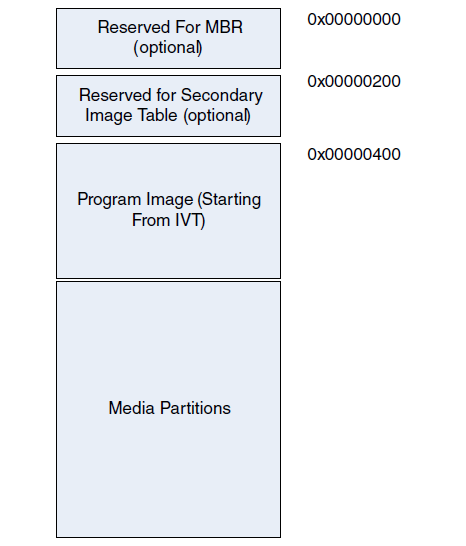
For SD card devices, the initial offset generally needs to store the system main boot record (MBR), which must be reserved. The BootROM will read the IVT boot header from the fixed offset address 0x400. Once the IVT is obtained, it can find the Application to load and boot (here, the four-digit and three-digit RT series differ).
4. Downloading Application to SD/eMMC
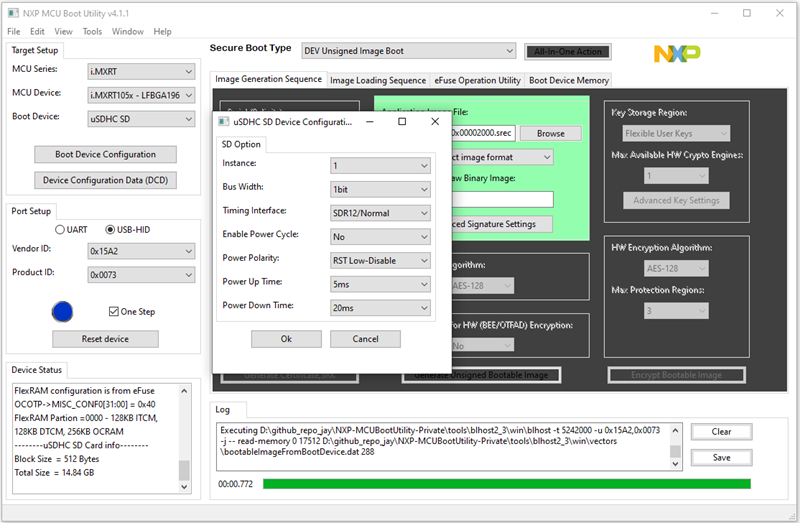
Now assume you have created a Bootable image and established basic communication with the blhost tool and Flashloader, and you are about to start downloading the Bootable image to the SD device. At this point, we only need to provide simplified 4-byte configuration data to complete the SD device configuration. Below is an example of Application download update:
// Temporarily store SD configuration data in SRAM
blhost -u -- fill-memory 0x20202000 0x4 0xD0000001 // 1bit, Normal Speed, uSDHC1

// Use SD configuration data to configure uSDHC interface
blhost -u -- configure-memory 0x120 0x20202000
In the above fill-memory command, the 0xD0000001 parameter is the simplified 4-byte configuration data. The organization of this configuration data is detailed in the table below:
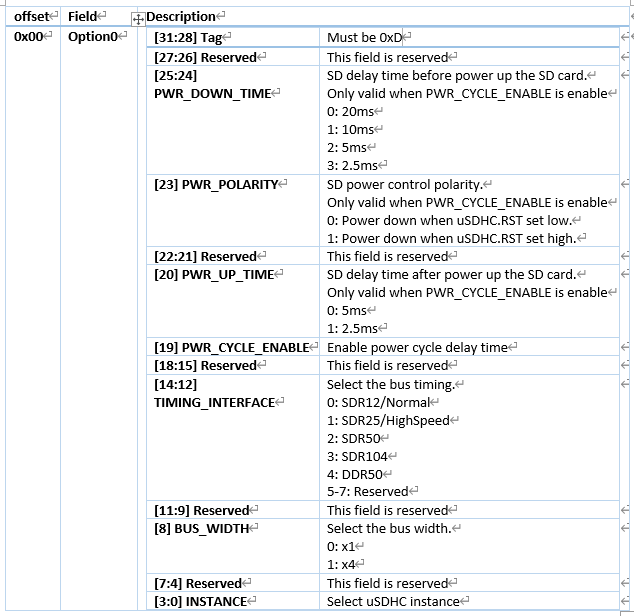
The 4-byte data provided in the table mainly contains configuration information for SD connection and attributes. Once the configure-memory command executes successfully, you only need to download the Bootable image starting from the SD offset address 0x400, with the specific steps as follows:
// Erase SD and download image to SD
blhost -u -- flash-erase-region 0x400 0x20000 0x120
blhost -u -- write-memory 0x400 bt_image.bin 0x120
Of course, all the complex command-line operations above can be completed with one click using the MCUBootUtility tool (v3.5 and above):
5. Entering SD/eMMC Boot Mode
After the Application has been successfully downloaded to the SD card, we can start setting the chip to boot from the SD.
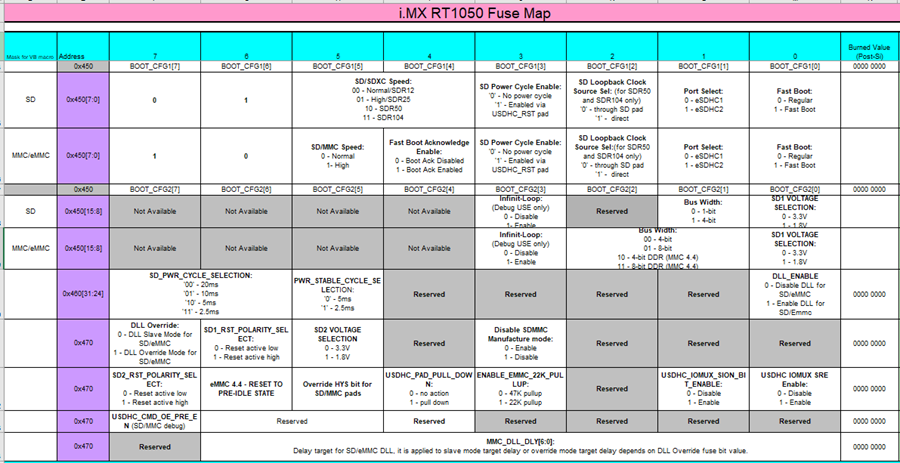
First, ensure that BOOT_MODE[1:0]=2’b10, meaning the chip is in Internal Boot mode. Then select the Boot Device, which is determined by the input status of four pins BOOT_CFG1[7:4]. The SD boot mode is 4’b01xx.
6. Configuring eFuse for SD/eMMC Boot
Once the chip boot mode is set to boot from SD, we need to pay attention to specific feature configurations related to SD/eMMC, mainly concentrated in the chip’s internal eFuse area from 0x470 to 0x450. The default all-0 value is suitable for 3.3V SD cards operating in 1bit Normal Speed mode, and it can also switch to 4bit SDR104 for faster speed if needed.
7. Some Notes
- The uSDHC numbering differs between the four-digit and three-digit RT series. The four-digit RT series uses uSDHC1-2, while the three-digit RT series uses uSDHC0-1, which is reflected in the option.instance setting in section four.
- The eMMC protocol is downward compatible with the SD protocol; therefore, if a MicroSD to eMMC small card is inserted into the official EVK board’s SD card slot for testing, the boot mode can normally boot the eMMC program whether in SD 1/4bit or eMMC 4bit mode.
- On the MIMXRT1170-EVKB Rev.B board, it needs to be set to 4bit mode (BOOT_CFG2[1]=1) to boot the program from the SD card normally.
After completing all the above steps, resetting the chip should allow you to see the Application you placed in the SD booting normally.
Thus, I have completed the introduction to the NXP i.MXRT1xxx series MCU’s SD/eMMC card boot. Where’s the applause~~~