
1. What is Assembly Language?
The only language that computers can truly understand is low-level language, which is specifically used to control hardware. Assembly language is a low-level language that directly describes and controls the operation of the CPU. If you want to understand what the CPU is doing and the steps of code execution, you must learn assembly language.Assembly language is not easy to learn, and even concise introductions are hard to find. Here, I attempt to write the most understandable assembly language tutorial, explaining how the CPU executes code.We know that the CPU is responsible only for computation and does not possess intelligence. When you input an instruction, it executes it once, then stops and waits for the next instruction.These instructions are in binary, known as opcodes; for example, the addition instruction is 00000011. The role of the compiler is to translate programs written in high-level languages into a series of opcodes.For humans, binary programs are unreadable, making it impossible to see what the machine has done. To solve the readability issue and occasional editing needs, assembly language was born.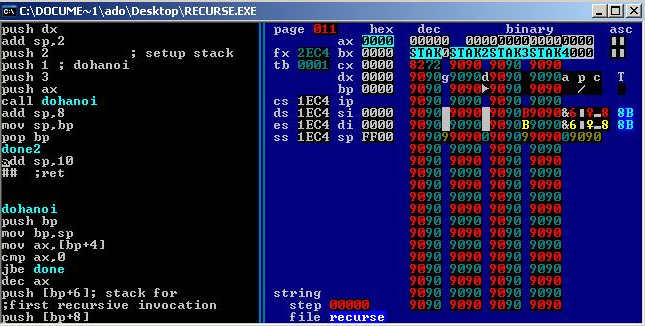 Assembly language is the textual form of binary instructions, with a one-to-one correspondence to the instructions. For example, the addition instruction 00000011 is written in assembly language as ADD. Once converted back to binary, assembly language can be directly executed by the CPU, making it the lowest level of low-level language.
2. Origins
In the early days, programming involved manually writing binary instructions and inputting them into the computer through various switches. For instance, to perform addition, one would press the addition switch. Later, the invention of the punch card machine allowed binary instructions to be automatically input into the computer by punching holes in a card.To address the readability issue of binary instructions, engineers wrote those instructions in octal. Converting binary to octal is straightforward, but octal is also not very readable. Naturally, it eventually returned to using text, with the addition instruction written as ADD. Memory addresses were no longer directly referenced but represented by labels.This added an extra step, requiring these textual instructions to be translated into binary, a process known as assembling, and the program that completes this step is called an assembler. The text it processes is naturally called assembly code. After standardization, it was referred to as assembly language, abbreviated as asm, which translates to 汇编语言 in Chinese.Each CPU has different machine instructions, and thus the corresponding assembly language also varies. This article introduces the most common x86 assembly language, which is used by Intel’s CPUs.
3. Registers
To learn assembly language, one must first understand two concepts: registers and memory models.First, let’s look at registers. The CPU is responsible only for computation and does not store data. Data is generally stored in memory, and the CPU reads and writes data from memory when needed. However, the CPU’s computation speed is much faster than the read/write speed of memory. To avoid being slowed down, the CPU has its own level 1 and level 2 caches. Essentially, CPU cache can be seen as faster memory for reading and writing.However, CPU cache is still not fast enough, and the addresses of data in the cache are not fixed, meaning the CPU must address each read/write operation, which can also slow down speed. Therefore, in addition to cache, the CPU also has registers to store the most frequently used data. This means that the most frequently read/written data (such as loop variables) will be placed in registers, allowing the CPU to prioritize reading/writing from registers before exchanging data with memory.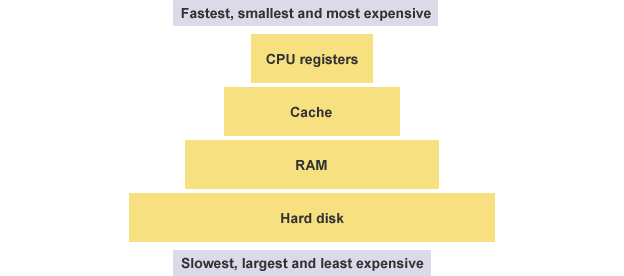 Registers do not distinguish data by address but by name. Each register has its own name, and we tell the CPU which specific register to retrieve data from, making this the fastest method. Some compare registers to the zero-level cache of the CPU.
4. Types of Registers
Early x86 CPUs had only 8 registers, each with different purposes. Now, there are over 100 registers, which have become general-purpose registers without specific designations, but the names of the early registers have been preserved.
- EAX
- EBX
- ECX
- EDX
- EDI
- ESI
- EBP
- ESP
Among these 8 registers, the first seven are general-purpose. The ESP register has a specific purpose, storing the address of the current stack (see the next section for details).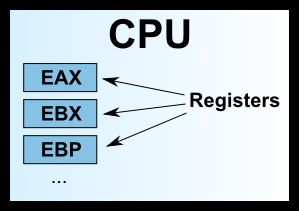 We often see names like 32-bit CPU and 64-bit CPU, which actually refer to the size of the registers. A 32-bit CPU has a register size of 4 bytes.
5. Memory Model: Heap
Registers can only hold a small amount of data; most of the time, the CPU needs to instruct registers to directly exchange data with memory. Therefore, in addition to registers, it is essential to understand how memory stores data.When a program runs, the operating system allocates a segment of memory to store the program and the data generated during execution. This segment of memory has a starting address and an ending address, for example, from 0x1000 to 0x8000, where the starting address is the smaller one and the ending address is the larger one.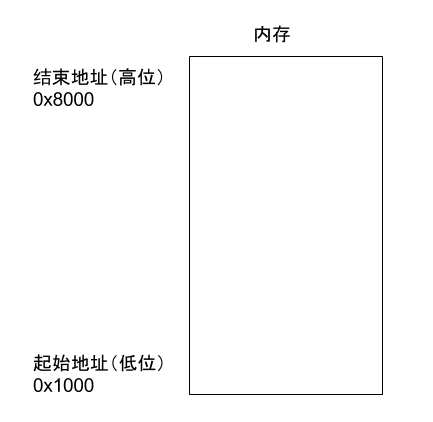 During program execution, for dynamic memory allocation requests (such as creating new objects or using the malloc command), the system will allocate a portion of the pre-allocated memory to the user, with specific rules starting from the starting address (in reality, the starting address will have a segment of static data, which is ignored here). For example, if the user requests 10 bytes of memory, it will be allocated starting from address 0x1000, extending to address 0x100A. If another request for 22 bytes is made, it will be allocated up to 0x1020.
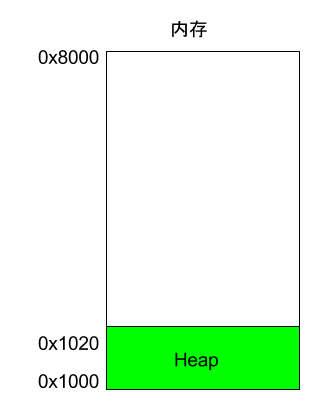 This memory area allocated due to user requests is called the Heap. It grows from the starting address upwards (from lower addresses to higher addresses). An important characteristic of the Heap is that it does not disappear automatically; it must be manually released or reclaimed by a garbage collection mechanism.
6. Memory Model: Stack
In addition to the Heap, other memory usage is called the Stack. Simply put, the Stack is the memory area temporarily occupied due to function execution.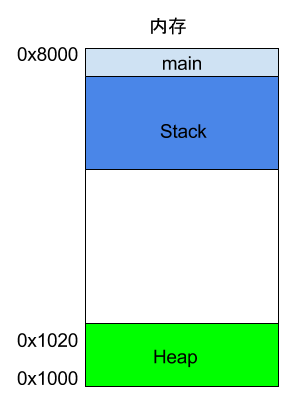 Consider the following example.
int main() { int a = 2; int b = 3; }In the above code, when the system starts executing the main function, it will create a frame in memory for it, where all internal variables of main (such as a and b) are stored. Once the main function finishes executing, that frame will be reclaimed, releasing all internal variables and no longer occupying space.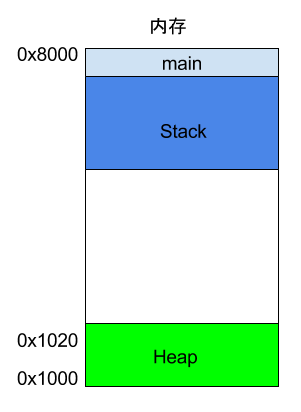 If a function calls another function internally, what happens?
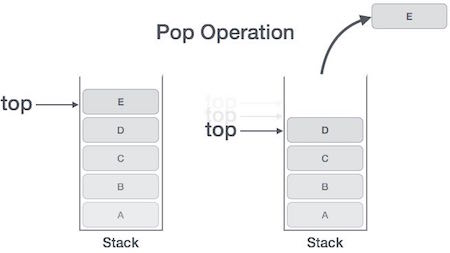
int main() { int a = 2; int b = 3; return add_a_and_b(a, b); }In the above code, the main function calls the add_a_and_b function. When executing this line, the system will also create a new frame for add_a_and_b to store its internal variables. This means that at this point, there are two frames: main and add_a_and_b. Generally, the number of frames corresponds to the number of layers in the call stack.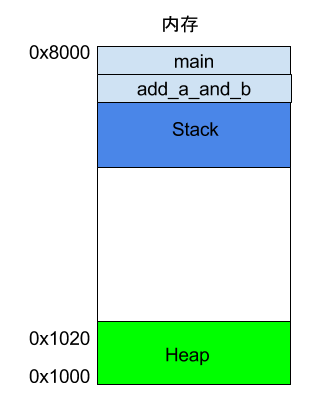 Once add_a_and_b finishes running, its frame will be reclaimed, and the system will return to the point where the main function was interrupted, continuing execution. This mechanism allows for layered function calls, with each layer able to use its own local variables.All frames are stored in the Stack. Since frames are stacked on top of each other, the Stack is called a stack. Creating a new frame is called “pushing” onto the stack; the English term is push. Reclaiming the stack is called “popping”; the English term is pop. The characteristic of the Stack is that the last frame pushed is the first to be popped (because the innermost function call ends first), which is known as a “last in, first out” data structure. Each time a function execution ends, a frame is automatically released, and when all functions finish executing, the entire Stack is released.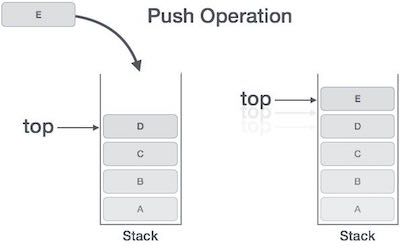
 The Stack is allocated from the end address of the memory area, growing from higher addresses to lower addresses. For example, if the end address of the memory area is 0x8000, and the first frame is assumed to be 16 bytes, the next allocation will start from 0x7FF0; if the second frame requires 64 bytes, the address will move to 0x7FB0.
7. CPU Instructions
7.1 An Example
After understanding registers and memory models, we can look at what assembly language really is. Below is a simple program example.c.
int add_a_and_b(int a, int b) { return a + b; } int main() { return add_a_and_b(2, 3); }gcc converts this program into assembly language.
$ gcc -S example.cAfter executing the above command, a text file example.s will be generated, containing assembly language with dozens of lines of instructions. To put it simply, a simple operation in a high-level language may be composed of several, or even dozens of CPU instructions at the lower level. The CPU executes these instructions sequentially to complete the operation.After simplification, example.s looks something like this.
_add_a_and_b: push %ebx mov %eax, [%esp+8] mov %ebx, [%esp+12] add %eax, %ebx pop %ebx ret _main: push 3 push 2 call _add_a_and_b add %esp, 8 retAs you can see, the two functions of the original program, add_a_and_b and main, correspond to the two labels _add_a_and_b and _main. Each label contains the CPU execution flow for that function.Each line represents one operation executed by the CPU. It can be divided into two parts; let’s take one line as an example.
push %ebxThis line contains the push instruction, and %ebx is the operand used by this instruction. A CPU instruction can have zero to multiple operands.Now, I will explain this assembly program line by line. It is recommended that readers copy this program into another window to avoid scrolling back up while reading.
7.2 push Instruction
By convention, the program starts executing from the _main label, at which point a frame for main will be established on the Stack, and the address pointed to by the Stack will be written into the ESP register. If there is data to be written into the main frame, it will be written at the address stored in the ESP register.Then, the first line of code begins execution.
push 3The push instruction is used to place an operand onto the Stack; here, it writes 3 into the main frame.Although it seems simple, the push instruction actually has a preceding operation. It first retrieves the address in the ESP register, subtracts 4 bytes from it, and then writes the new address into the ESP register. The subtraction is because the Stack grows from high to low addresses, and 4 bytes is because the type of 3 is int, which occupies 4 bytes. After obtaining the new address, 3 will be written into the four bytes starting from that address.
push 2The second line is similar; the push instruction writes 2 into the main frame, right next to where 3 was written. At this point, the ESP register will again subtract 4 bytes (cumulatively subtracting 8).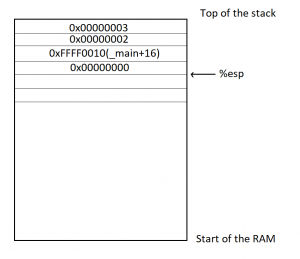
7.3 call Instruction
The call instruction in the third line is used to call a function.
call _add_a_and_bThe above code indicates a call to the add_a_and_b function. At this point, the program will look for the _add_a_and_b label and establish a new frame for that function.Next, the code for _add_a_and_b begins execution.
push %ebxThis line indicates that the value in the EBX register is written into the _add_a_and_b frame. This is because this register will be used later, so its value is retrieved first and will be written back after use.At this point, the push instruction will again subtract 4 bytes from the address in the ESP register (cumulatively subtracting 12).
7.4 mov Instruction
The mov instruction is used to write a value into a specific register.
mov %eax, [%esp+8]This line of code indicates that the address in the ESP register is increased by 8 bytes to obtain a new address, and then data is retrieved from the Stack at this address. Based on previous steps, it can be inferred that the value retrieved here is 2, which is then written into the EAX register.The next line of code does the same thing.
mov %ebx, [%esp+12]The above code adds 12 bytes to the value in the ESP register, retrieves data from the Stack at this address, which is 3, and writes it into the EBX register.
7.5 add Instruction
The add instruction is used to add two operands and write the result into the first operand.
add %eax, %ebxThe above code adds the value in the EAX register (which is 2) to the value in the EBX register (which is 3), resulting in 5, which is then written back into the first operand, the EAX register.
7.6 pop Instruction
The pop instruction is used to retrieve the most recently written value from the Stack (i.e., the value at the lowest address) and write it to the specified operand location.
pop %ebxThe above code indicates that the most recently written value from the Stack (i.e., the original value of the EBX register) is retrieved and written back into the EBX register (since the addition is complete, the EBX register is no longer needed).Note that the pop instruction will also add 4 bytes to the address in the ESP register, effectively reclaiming 4 bytes.
7.7 ret Instruction
The ret instruction is used to terminate the execution of the current function and return control to the upper function. In other words, the current function’s frame will be reclaimed.
retAs you can see, this instruction has no operands.With the termination of the add_a_and_b function, the system returns to the point where the main function was interrupted, continuing execution.
add %esp, 8The above code indicates that 8 bytes are manually added to the address in the ESP register and written back into the ESP register. This is because the ESP register points to the start address of the Stack, and the previous pop operation has already reclaimed 4 bytes, so here it reclaims another 8 bytes, effectively reclaiming all.
retFinally, the main function ends, and the ret instruction exits the program execution.http://www.ruanyifeng.com/blog/2018/01/assembly-language-primer.html