Efficiently and conveniently performing large model inference on the Ascend NPU has long been a core challenge faced by domestic developers. Although Huawei officially provides the high-performance MindIE inference engine, its high usage threshold and complex environment configuration have somewhat limited its rapid application and iteration within the broader developer community. This is not only a matter of technology selection but also a key factor concerning the overall prosperity of the Ascend ecosystem.
The open-source community is also actively promoting support for the Ascend NPU. Recently, the vLLM Ascend plugin jointly launched by Ascend and the vLLM community has emerged as a refreshing option for developers. With its open-source and active stance, it has quickly achieved support for the Atlas 800 A2 series (with support for Atlas 300i Duo expected in Q3 2025), and its active open-source ecosystem and rapid development momentum are gradually making it an undeniable force in the Ascend inference ecosystem.
So, how does the open-source vLLM Ascend compare to the official MindIE in terms of capabilities? Which can better meet the inference needs in different scenarios? To systematically evaluate the performance differences between vLLM Ascend and MindIE in actual inference scenarios, we conducted multi-dimensional tests based on the open-source model service platform GPUStack. The testing covered scenarios such as single-card inference, multi-card parallel processing, and multi-concurrent handling, involving different scale versions of the DeepSeek R1 Distill and Qwen3 models (7B, 14B, 32B).
GPUStackhttps://github.com/gpustack/gpustack is currently the most comprehensive open-source model service platform supporting the Ascend NPU. It integrates various inference backends such as MindIE, vLLM (vLLM Ascend), and llama-box (llama.cpp) out of the box, greatly simplifying the deployment process and avoiding repeated pitfalls and lengthy environment configuration processes for users. The platform natively supports various model types on Ascend, including large language models, multi-modal models, text embedding models, reordering models, and image generation models, while also being compatible with multi-machine and multi-card inference scenarios on Ascend, where vLLM and llama-box have already implemented multi-machine distributed inference support, and MindIE’s distributed functionality is also in the development plan.
Below are the official feature introductions of GPUStack:
-
Wide GPU Compatibility: Seamlessly supports various vendors’ GPUs (NVIDIA, AMD, Apple, Ascend, Haiguang, Moore Threads, Tianxu Zhixin) on Apple Mac, Windows PC, and Linux servers.
-
Extensive Model Support: Supports various models, including large language models (LLM), multi-modal models (VLM), image models, speech models, text embedding models, and reordering models.
-
Flexible Inference Backend: Supports flexible integration with various inference backends such as llama-box (llama.cpp and stable-diffusion.cpp), vox-box, vLLM, and Ascend MindIE.
-
Multi-Version Backend Support: Allows multiple versions of inference backends to run simultaneously to meet different operational dependencies of various models.
-
Distributed Inference: Supports single-machine and multi-machine multi-card parallel inference, including heterogeneous GPUs across vendors and operating environments.
-
Scalable GPU Architecture: Easily scalable by adding more GPUs or nodes to the infrastructure.
-
Robust Model Stability: Ensures high availability through automatic fault recovery, multi-instance redundancy, and load balancing of inference requests.
-
Intelligent Deployment Assessment: Automatically evaluates model resource requirements, backend and architecture compatibility, operating system compatibility, and other deployment-related factors.
-
Automatic Scheduling: Dynamically allocates models based on available resources.
-
Lightweight Python Package: Minimal dependencies and low operational overhead.
-
OpenAI Compatible API: Fully compatible with OpenAI’s API specifications for seamless migration and rapid adaptation.
-
User and API Key Management: Simplifies the management of user and API keys.
-
Real-Time GPU Monitoring: Real-time tracking of GPU performance and utilization.
-
Token and Rate Metrics: Monitors token usage and API request rates.
The following are the key configurations of the testing environment:
– Hardware: Ascend 910B, 4 NPU cards
– Software: GPUStack v0.6.2, supporting vLLM Ascend and MindIE
– Models: DeepSeek R1 Distill (7B, 14B, 32B) and Qwen3 (14B, 32B)
Debugging Ascend devices is far more complex in practical operations than in NVIDIA environments, especially in terms of dependency compilation and inference engine integration, which often hinders the development process. The significance of GPUStack lies in effectively shielding the environmental complexities during the deployment process, providing developers with a unified and stable inference platform, significantly lowering the threshold for model deployment and inference on Ascend devices.
Additionally, GPUStack also has a built-in model comparison feature, supporting intuitive comparisons of inference performance between MindIE and vLLM Ascend in a unified testing environment, providing direct data support for subsequent selection and optimization. Therefore, we will conduct systematic testing of the performance of the two inference backends on GPUStack.
Quick Installation of GPUStack
First, refer to the official GPUStack documentation to complete the installation (https://docs.gpustack.ai/latest/installation/ascend-cann/online-installation/). This article adopts a containerized deployment method. On the Ascend 910B server, after completing the installation of the corresponding version of the NPU driver and Docker runtime as required by the documentation, start the GPUStack service via Docker.
In this experiment, we mounted <span>/dev/davinci0</span> to <span>/dev/davinci3</span> for a total of four NPU cards, and the specific mounting method can be flexibly adjusted according to actual device resources. During runtime, specify the access port for the management interface using <span>--port 9090</span> (users of Atlas 300i Duo can refer to the installation documentation to select the corresponding 310P image; vLLM Ascend does not currently support 310P):
docker run -d --name gpustack \ --restart=unless-stopped \ --device /dev/davinci0 \ --device /dev/davinci1 \ --device /dev/davinci2 \ --device /dev/davinci3 \ --device /dev/davinci_manager \ --device /dev/devmm_svm \ --device /dev/hisi_hdc \ -v /usr/local/dcmi:/usr/local/dcmi \ -v /usr/local/bin/npu-smi:/usr/local/bin/npu-smi \ -v /usr/local/Ascend/driver/lib64/:/usr/local/Ascend/driver/lib64/ \ -v /usr/local/Ascend/driver/version.info:/usr/local/Ascend/driver/version.info \ -v /etc/ascend_install.info:/etc/ascend_install.info \ --network=host \ --ipc=host \ -v gpustack-data:/var/lib/gpustack \ crpi-thyzhdzt86bexebt.cn-hangzhou.personal.cr.aliyuncs.com/gpustack_ai/gpustack:v0.6.2-npu \ --port 9090
Check the container logs to confirm whether GPUStack is running normally (it should be noted that the Ascend NPU does not support sharing devices across multiple containers by default, and if other containers occupy the NPU device (mounted <span>/dev/davinci*</span>), it will cause GPUStack to be unable to use the NPU normally. In this case, you need to stop other containers occupying the NPU to free up device resources):
docker logs -f gpustack
If the container logs indicate that the service has started normally, use the following command to obtain the initial login password for the GPUStack console:
docker exec -it gpustack cat /var/lib/gpustack/initial_admin_password
Access the GPUStack console in a browser via the server IP and the custom port 9090 (<span>http://YOUR_HOST_IP:9090</span>), using the default username admin and the initial password obtained in the previous step to log in. After logging into GPUStack, you can view the recognized NPU resources in the resource menu:
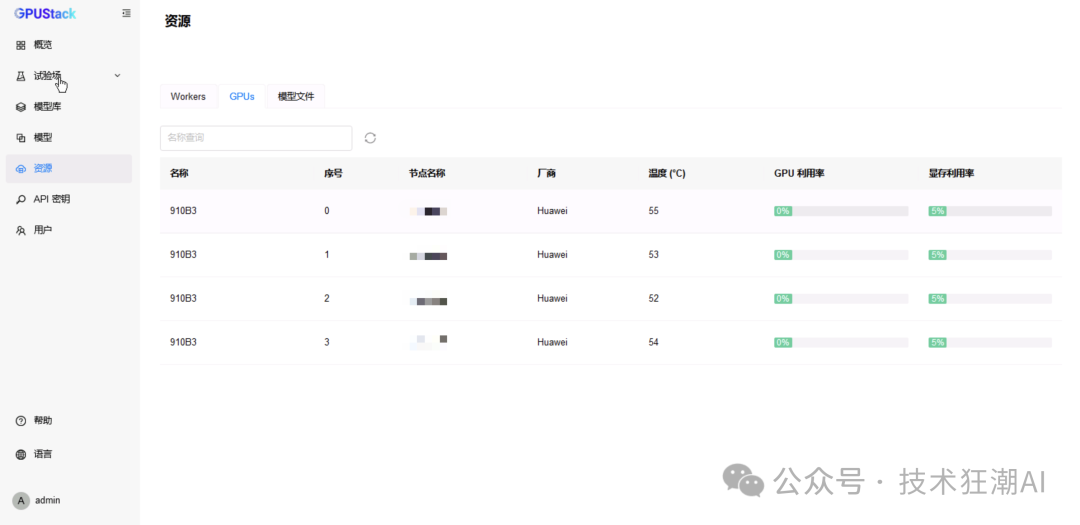
GPUStack also supports adding more worker nodes to build heterogeneous inference clusters. Since this article focuses on single-machine performance comparison, related cluster deployment content will not be elaborated on; interested readers can refer to the aforementioned official installation documentation for detailed instructions.
Deploying Models
GPUStack supports deploying models from Hugging Face, ModelScope, and local paths, with a recommendation to deploy from ModelScope for domestic networks. In the GPUStack UI, select <span>Model - Deploy Model - ModelScope</span> to deploy models.
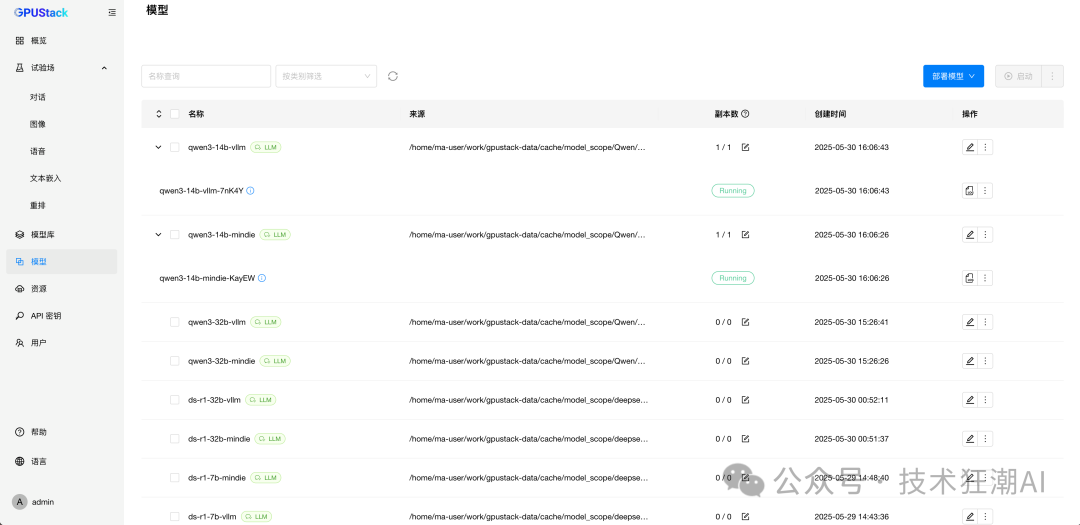
Deploy the following models from ModelScope, selecting MindIE and vLLM backends respectively to deploy model services for different backends. Due to the exclusive memory parameter settings of the MindIE and vLLM backends, the current resources are insufficient to run all models, and this article will flexibly stop and start different models as needed for testing.
GPUStack provides intelligent computing model resource demand assessment and automated scheduling for resource allocation. For the 7B and 14B models, it will only allocate a single card by default. If you want to force the allocation of more cards:
-
For the vLLM backend, you can set
<span>--tensor-parallel-size=2</span>or manually select 2 cards to allocate 2 NPU cards -
For the MindIE backend, you can manually select 2 cards to allocate 2 NPU cards
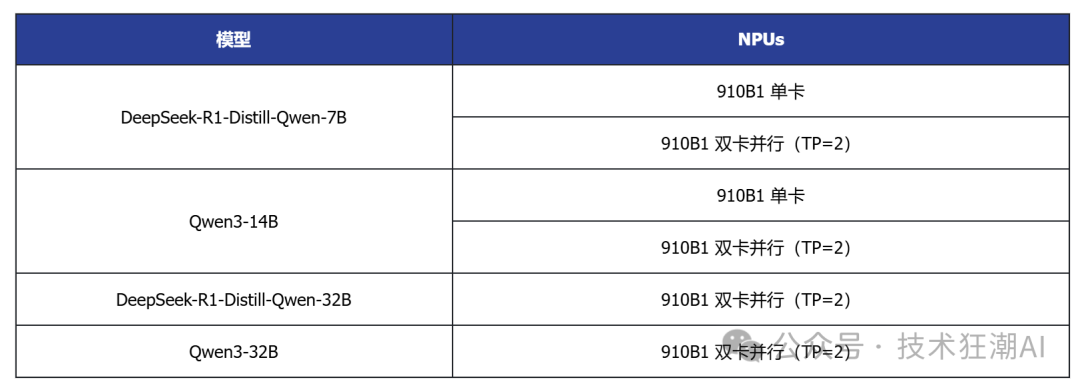
Once completed, the model runs as shown below (note: stop and start different models for testing as needed):
Testing DeepSeek-R1-Distill-Qwen-7B (Single Card)
-
In
<span>Experiment - Dialogue - Multi-Model Comparison</span>, select the<span>DeepSeek-R1-Distill-Qwen-7B</span>model running on both backends for comparison testing; -
Switch to 6 model comparisons, repeating the selection of the model running on vLLM Ascend for testing with 6 concurrent requests;
-
Change to the model running on MindIE for testing with 6 concurrent requests.
This article conducts performance comparison testing based on the capabilities of GPUStack, and more in-depth performance testing can be performed using tools like EvalScope.
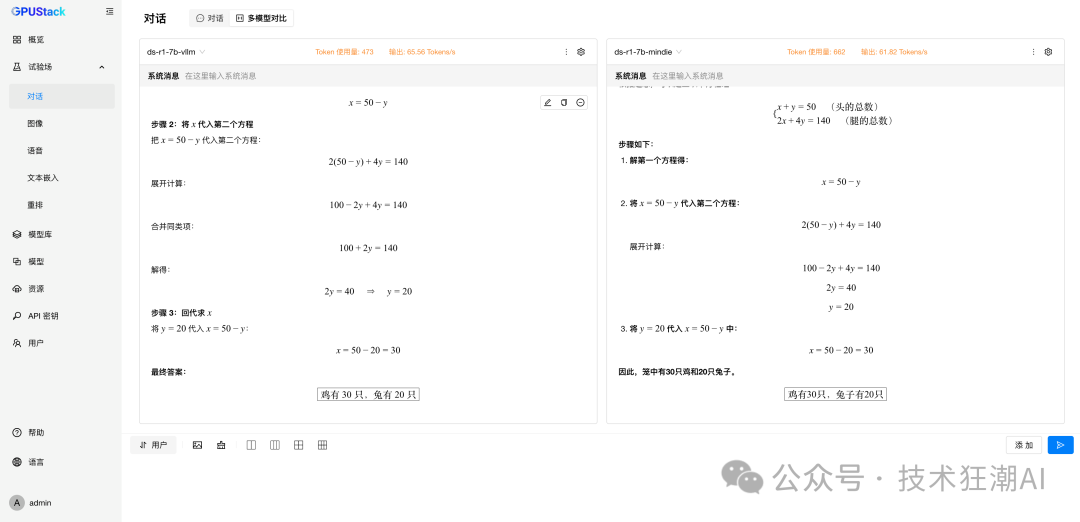
The following is the inference performance data comparison of the DeepSeek R1 Distill Qwen 7B model on the Ascend 910B:
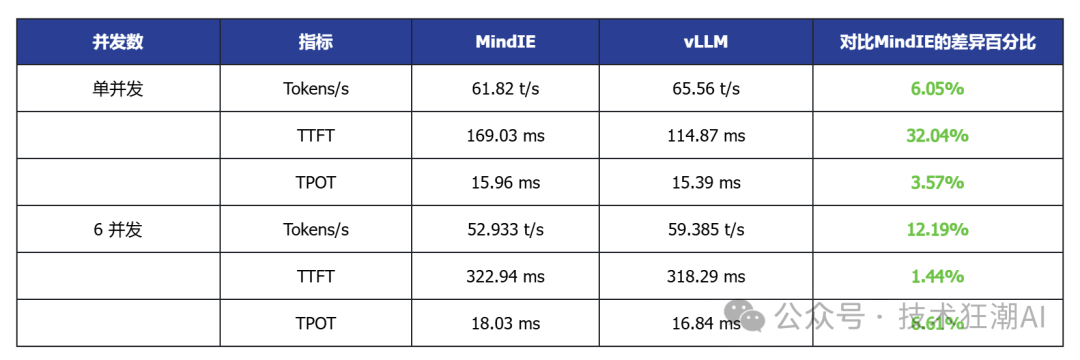
Single Concurrent vLLM Ascend vs MindIE
In the single-card deployment scenario, vLLM Ascend shows certain advantages in latency and throughput. For example, the DeepSeek R1 Distill 7B model generally has lower TTFT (first token latency) than MindIE, and some models also show slight improvements in throughput. This indicates that vLLM Ascend has better adaptability in latency-sensitive applications.
6 Concurrent MindIE Performance Data
To simulate a real-world high-load environment, we conducted a stress test with 6 concurrent requests on the DeepSeek-R1-7B model powered by the MindIE backend. We sent the same “chicken and rabbit in the same cage” mathematical logic problem to 6 independent sessions simultaneously, observing MindIE’s overall performance under pressure.
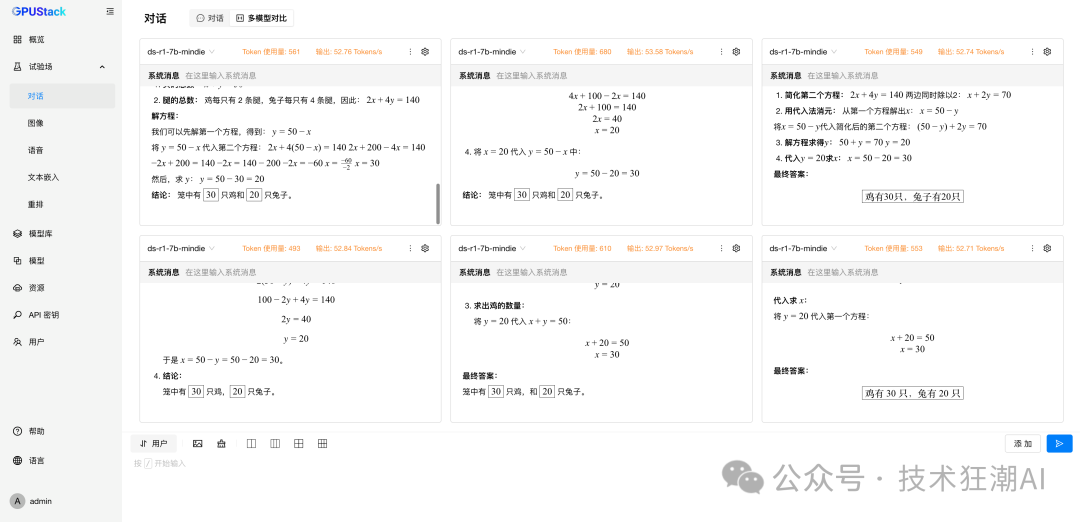
Faced with the 6 concurrent mathematical logic problems, the MindIE-driven model not only did not crash or produce errors but also consistently provided logically rigorous and correct answers (30 chickens, 20 rabbits). This ability to maintain high-quality output under pressure is a necessary reliability guarantee for enterprise-level applications.
Observing the performance metrics of each request, its throughput (Tokens/s) remained stable within a very narrow range of 52.7 t/s to 53.6 t/s, with an average throughput of 52.93 t/s. This slight performance fluctuation fully demonstrates that MindIE’s task scheduling and resource management mechanisms are very mature, capable of evenly distributing the load to ensure that each user receives a stable and predictable service experience.
6 Concurrent vLLM Ascend Performance Data
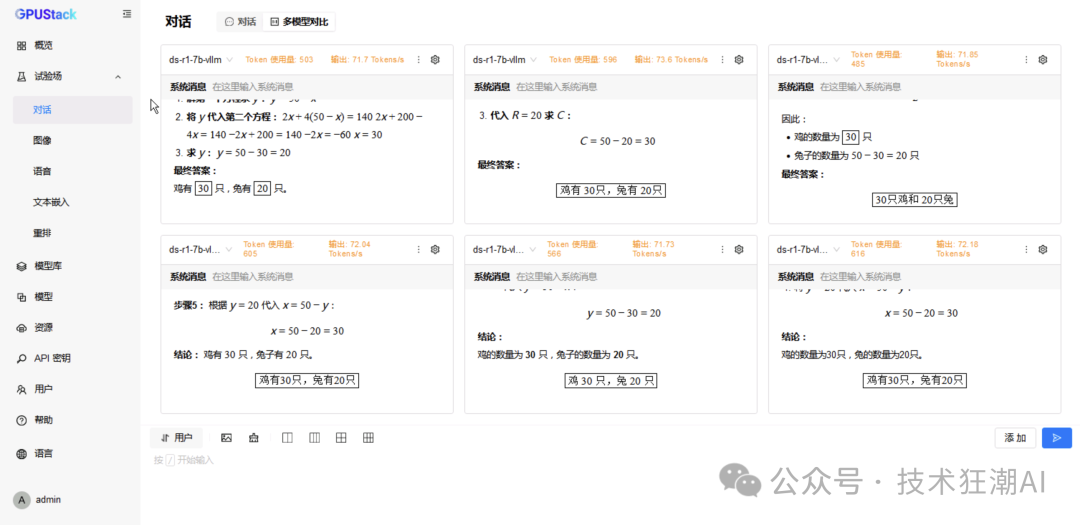
In the multi-concurrent test, vLLM Ascend achieved throughput performance comparable to or slightly higher than MindIE while maintaining low latency. This indicates that vLLM Ascend has strong scalability in concurrent request scheduling and resource utilization.
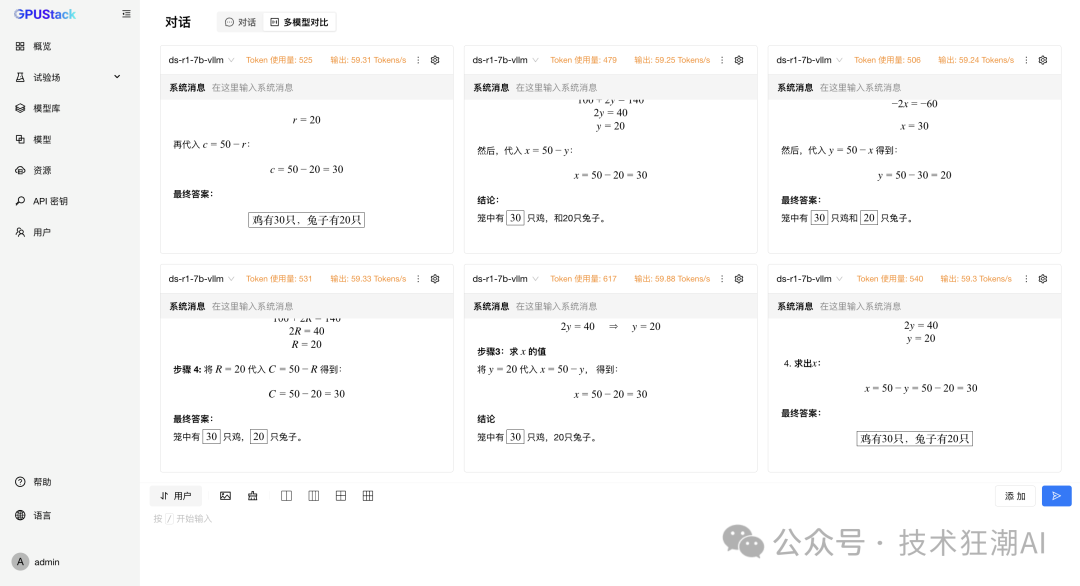
In summary, vLLM Ascend not only maintains stability and reliability comparable to MindIE in high-concurrency scenarios but also surpasses it in core throughput performance.
Testing DeepSeek-R1-Distill-Qwen-7B (Dual Card Parallel)
-
In
<span>Models</span>, select the<span>DeepSeek-R1-Distill-Qwen-7B</span>model running on both backends, modify the configuration to allocate 2 cards, and rebuild to take effect; -
In
<span>Experiment - Dialogue - Multi-Model Comparison</span>, select the<span>DeepSeek-R1-Distill-Qwen-7B</span>model running on both backends for comparison testing; -
Switch to 6 model comparisons, repeating the selection of the model running on vLLM Ascend for testing with 6 concurrent requests;
-
Change to the model running on MindIE for testing with 6 concurrent requests.
The following is the inference performance data comparison of the DeepSeek R1 Distill Qwen 7B model on dual-card Ascend 910B:
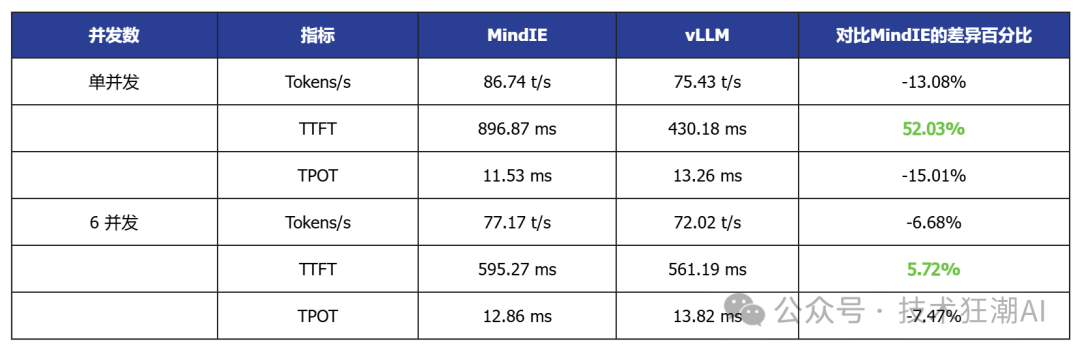
Single Concurrent vLLM Ascend vs MindIE

6 Concurrent MindIE Performance Data
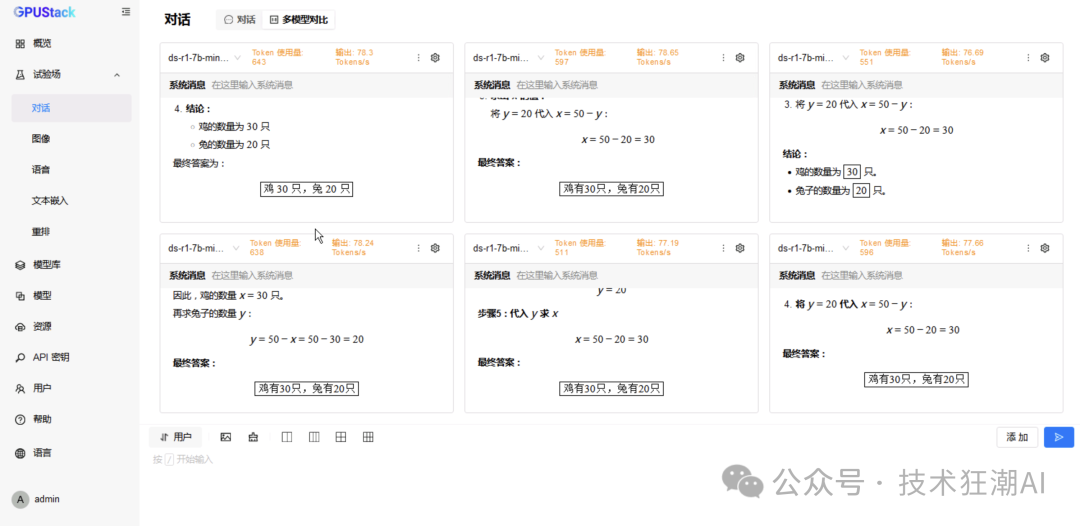
6 Concurrent vLLM Ascend Performance Data
Testing Qwen3-14B (Single Card)
-
In
<span>Experiment - Dialogue - Multi-Model Comparison</span>, select the<span>DeepSeek-R1-Distill-Qwen-14B</span>model running on both backends for comparison testing; -
Switch to 6 model comparisons, repeating the selection of the model running on vLLM Ascend for testing with 6 concurrent requests;
-
Change to the model running on MindIE for testing with 6 concurrent requests.
The following is the inference performance data comparison of the DeepSeek R1 Distill Qwen 14B model on a single-card Ascend 910B:
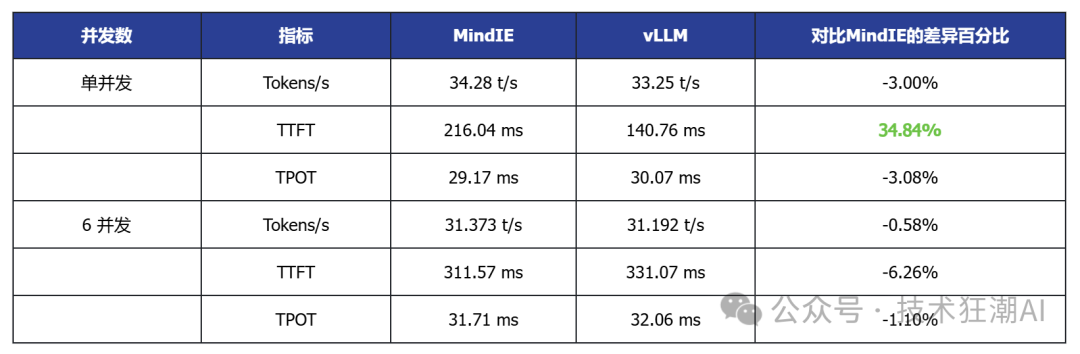
Single Concurrent vLLM Ascend vs MindIE
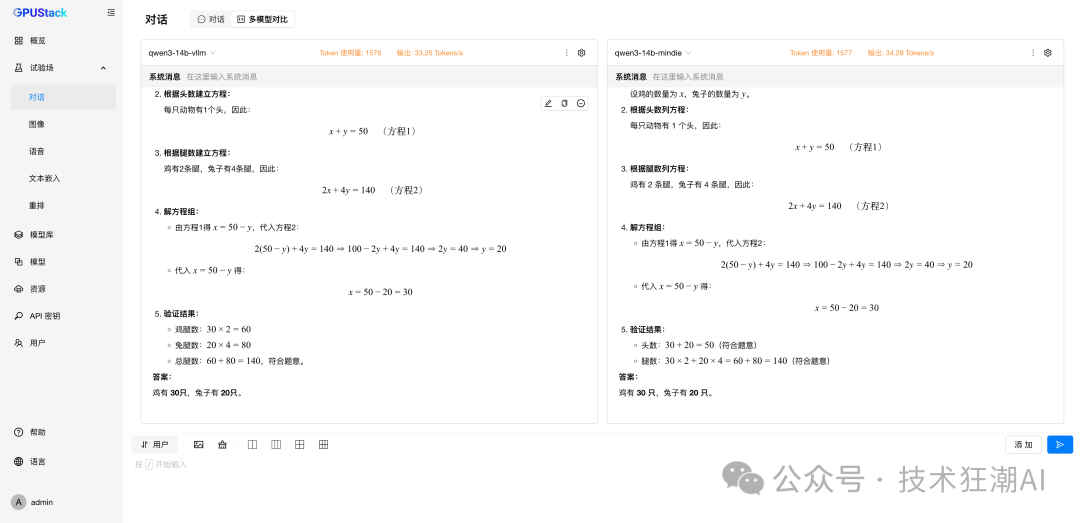
6 Concurrent MindIE Performance Data
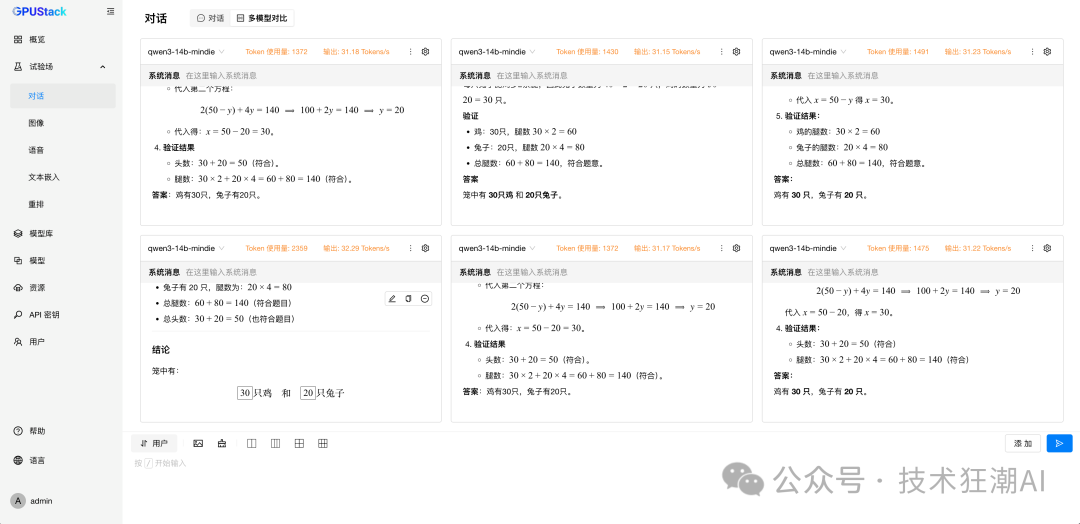
6 Concurrent vLLM Ascend Performance Data
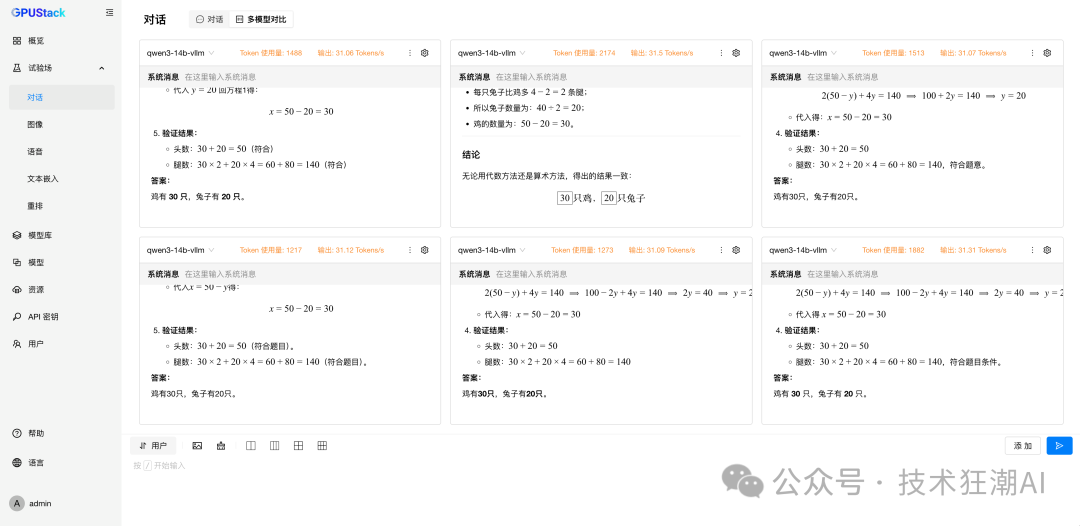
Testing Qwen3-14B (Dual Card Parallel)
-
In
<span>Models</span>, select the<span>DeepSeek-R1-Distill-Qwen-14B</span>model running on both backends, modify the configuration to allocate 2 cards, and rebuild to take effect; -
In
<span>Experiment - Dialogue - Multi-Model Comparison</span>, select the<span>DeepSeek-R1-Distill-Qwen-14B</span>model running on both backends for comparison testing; -
Switch to 6 model comparisons, repeating the selection of the model running on vLLM Ascend for testing with 6 concurrent requests;
-
Change to the model running on MindIE for testing with 6 concurrent requests.
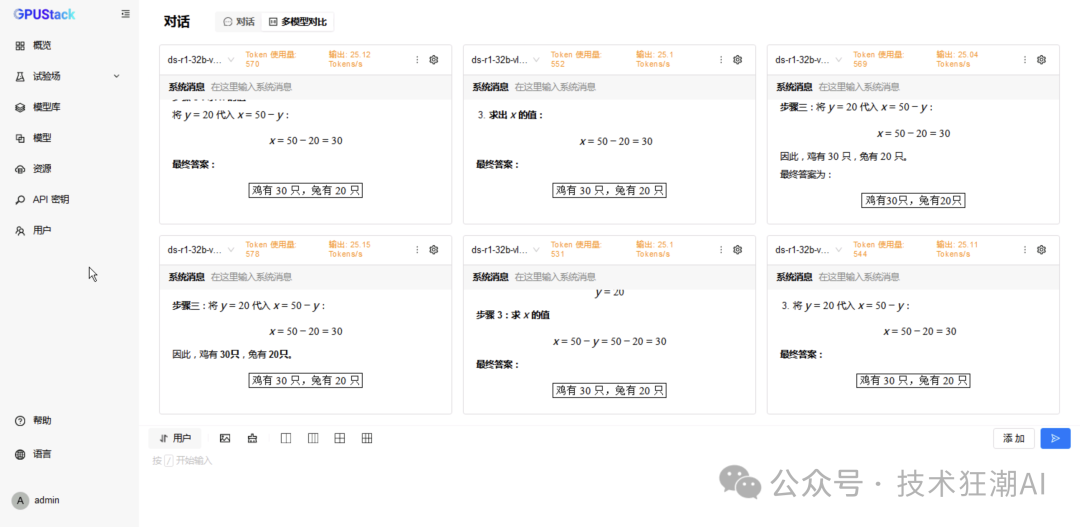
The following is the inference performance data comparison of the DeepSeek R1 Distill Qwen 14B model on dual-card Ascend 910B:
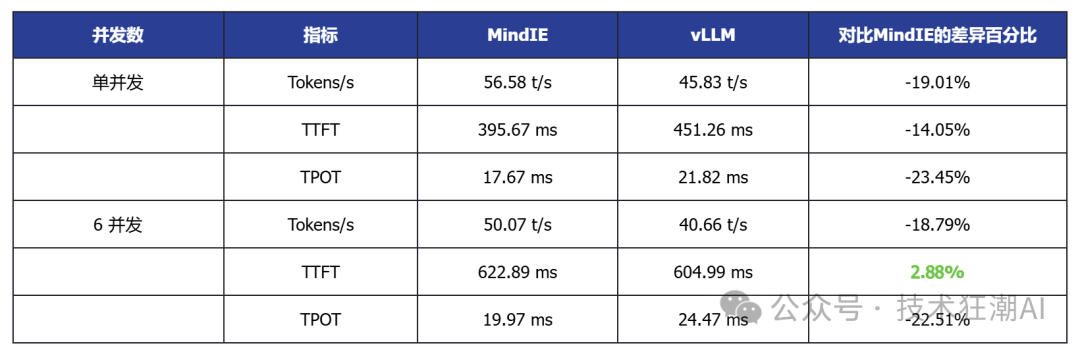
Single Concurrent vLLM Ascend vs MindIE
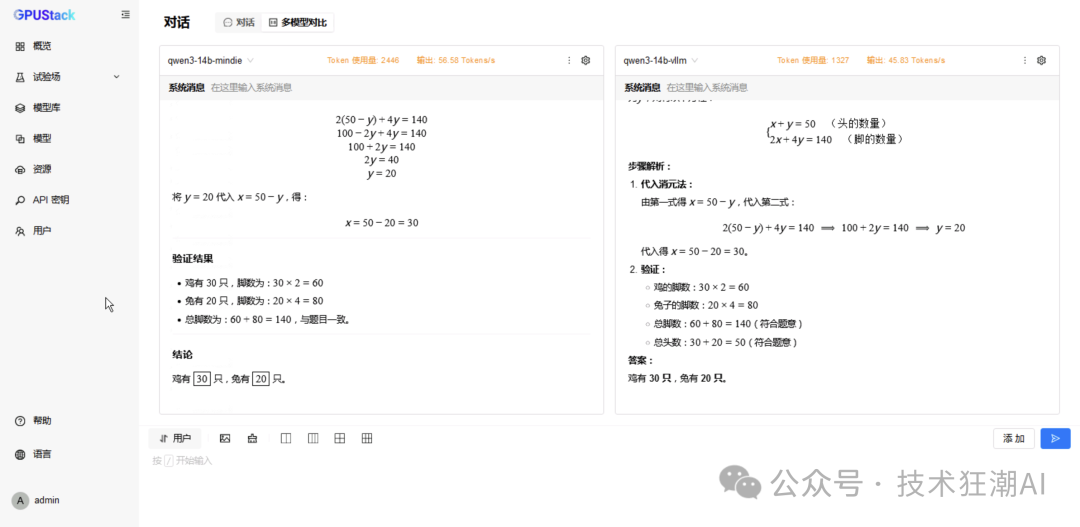
6 Concurrent MindIE Performance Data
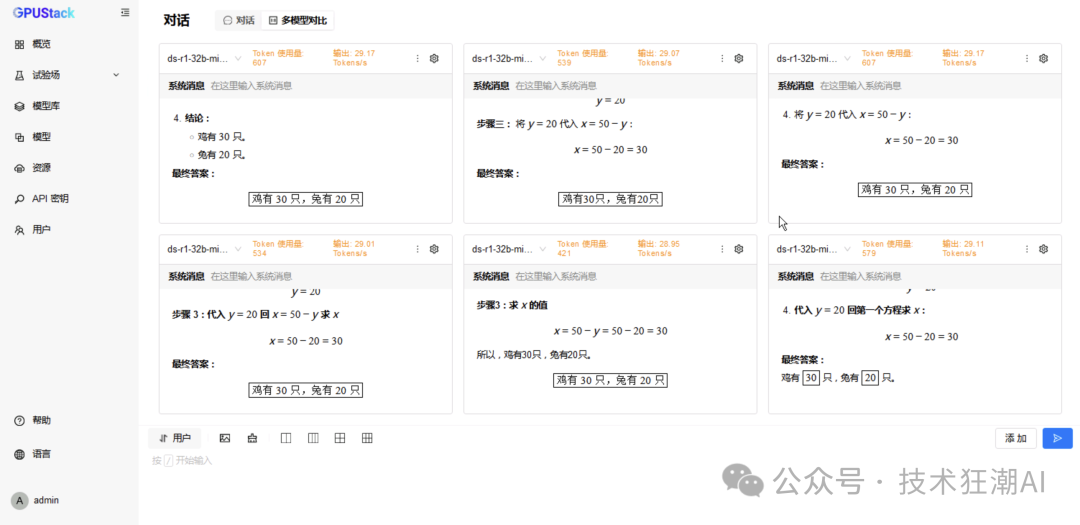
6 Concurrent vLLM Ascend Performance Data
Testing DeepSeek-R1-Distill-Qwen-32B (Dual Card Parallel)
-
In
<span>Experiment - Dialogue - Multi-Model Comparison</span>, select the<span>DeepSeek-R1-Distill-Qwen-32B</span>model running on both backends for comparison testing; -
Switch to 6 model comparisons, repeating the selection of the model running on vLLM Ascend for testing with 6 concurrent requests;
-
Change to the model running on MindIE for testing with 6 concurrent requests.
The following is the inference performance data comparison of the DeepSeek R1 Distill Qwen 32B model on dual-card Ascend 910B:
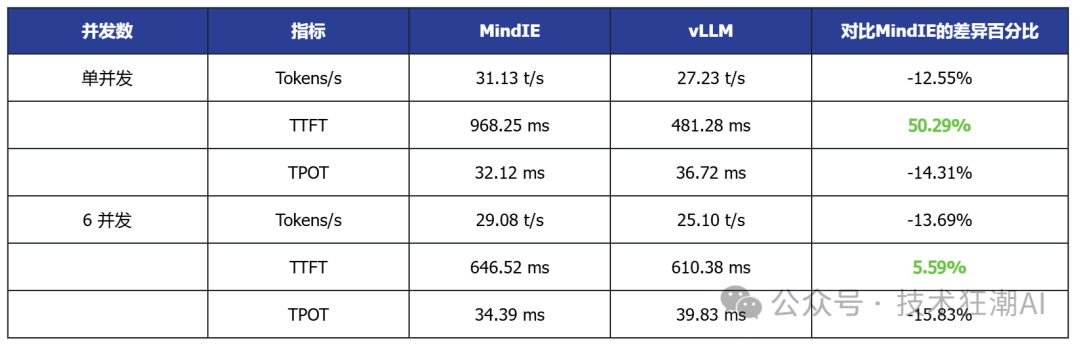
Single Concurrent vLLM Ascend vs MindIE

6 Concurrent MindIE Performance Data
6 Concurrent vLLM Ascend Performance Data
Testing Qwen3-32B (Dual Card Parallel)
-
In
<span>Experiment - Dialogue - Multi-Model Comparison</span>, select the<span>Qwen3-32B</span>model running on both backends for comparison testing; -
Switch to 6 model comparisons, repeating the selection of the model running on vLLM Ascend for testing with 6 concurrent requests;
-
Change to the model running on MindIE for testing with 6 concurrent requests.
The following is the inference performance data comparison of the Qwen3 32B model on dual-card Ascend 910B:
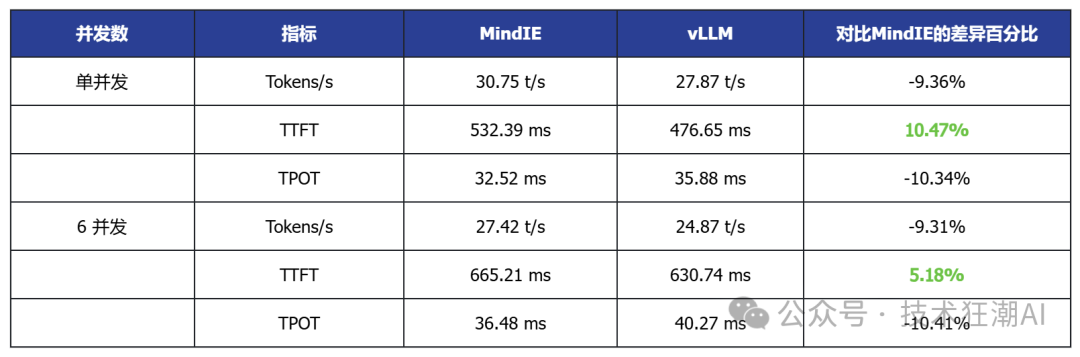
Single Concurrent vLLM Ascend vs MindIE
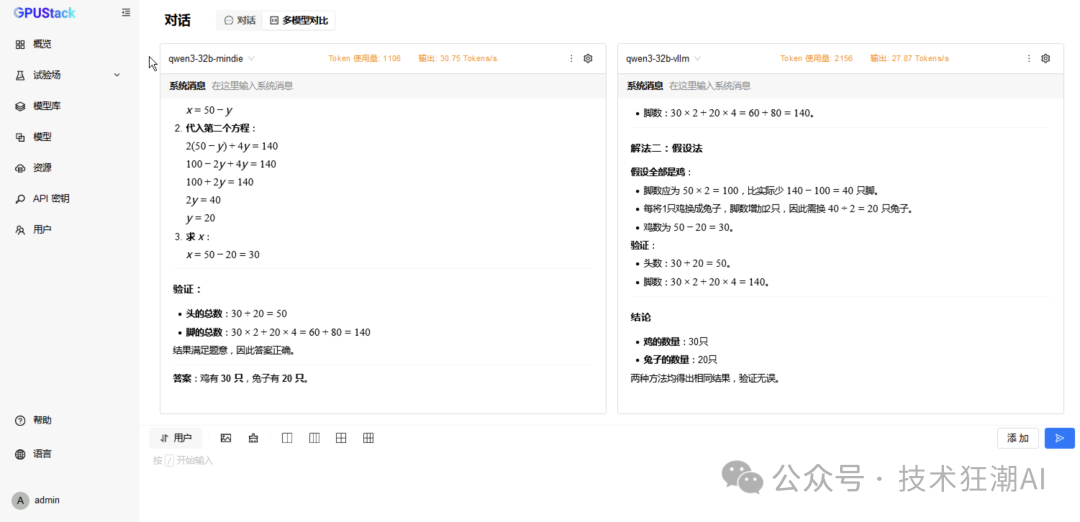
6 Concurrent MindIE Performance Data
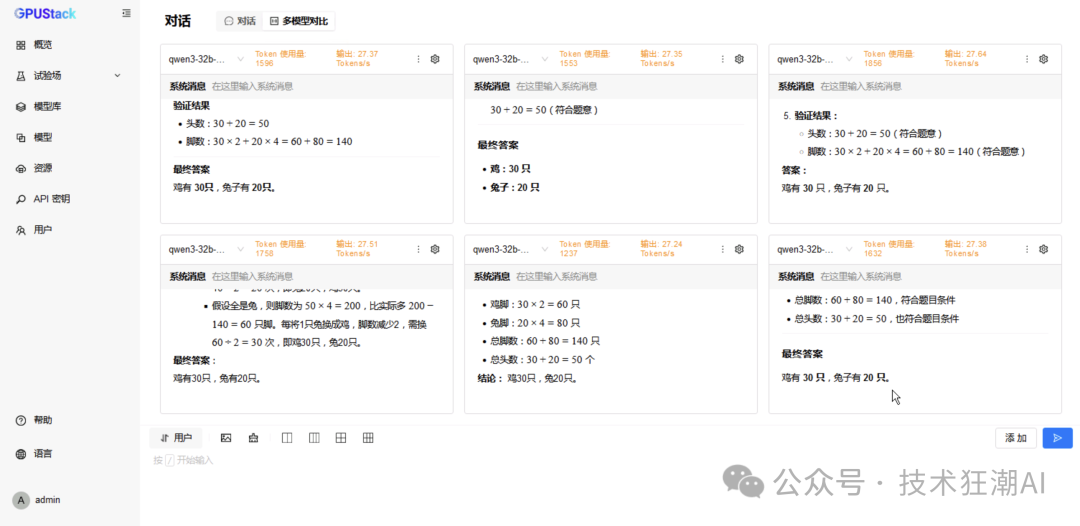
6 Concurrent vLLM Ascend Performance Data
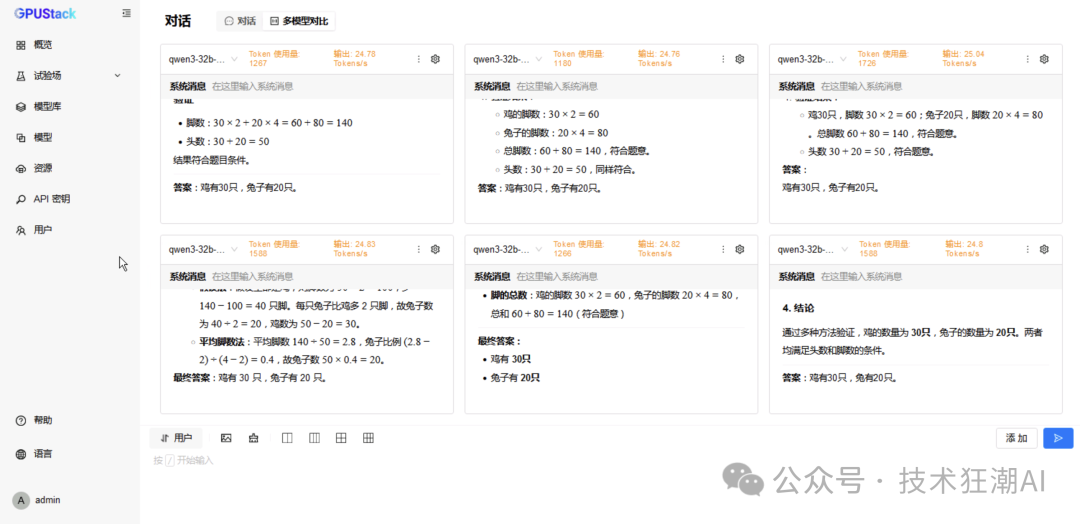
Data Summary and Analysis
The above testing data is summarized in the following table:
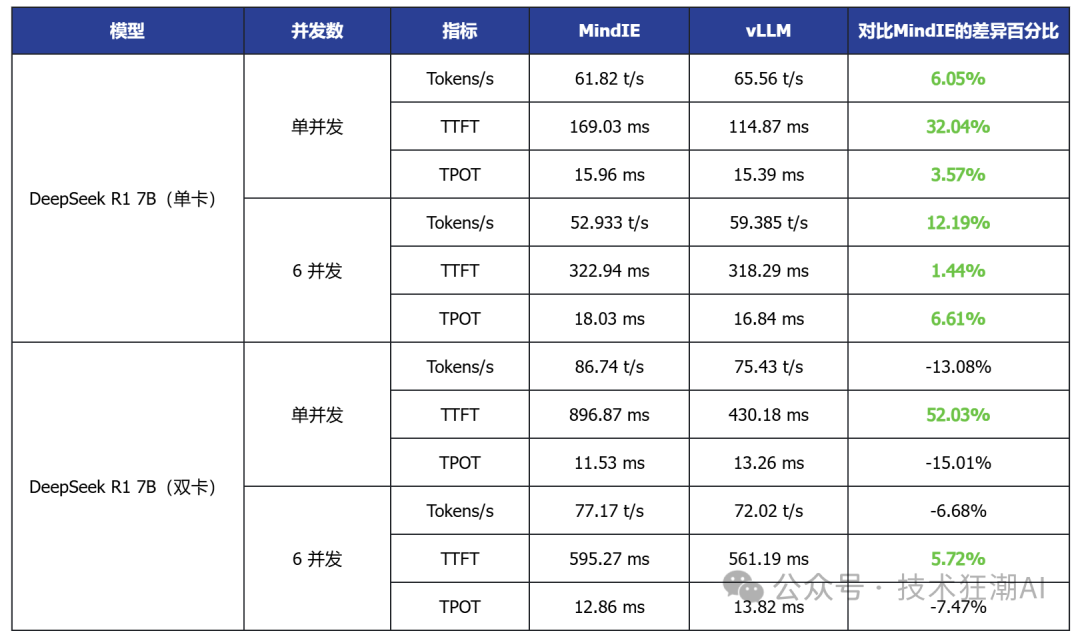
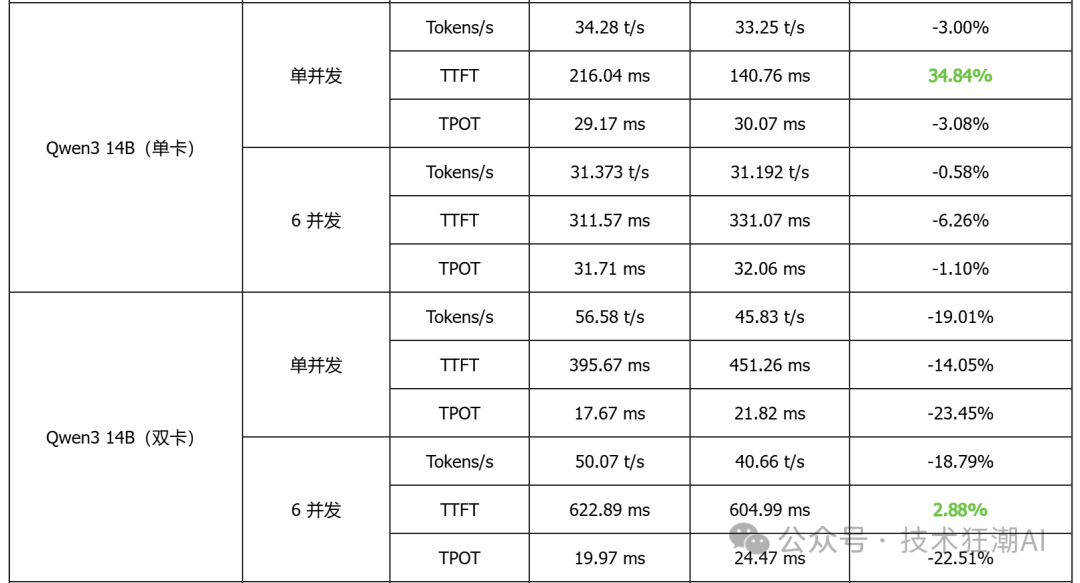
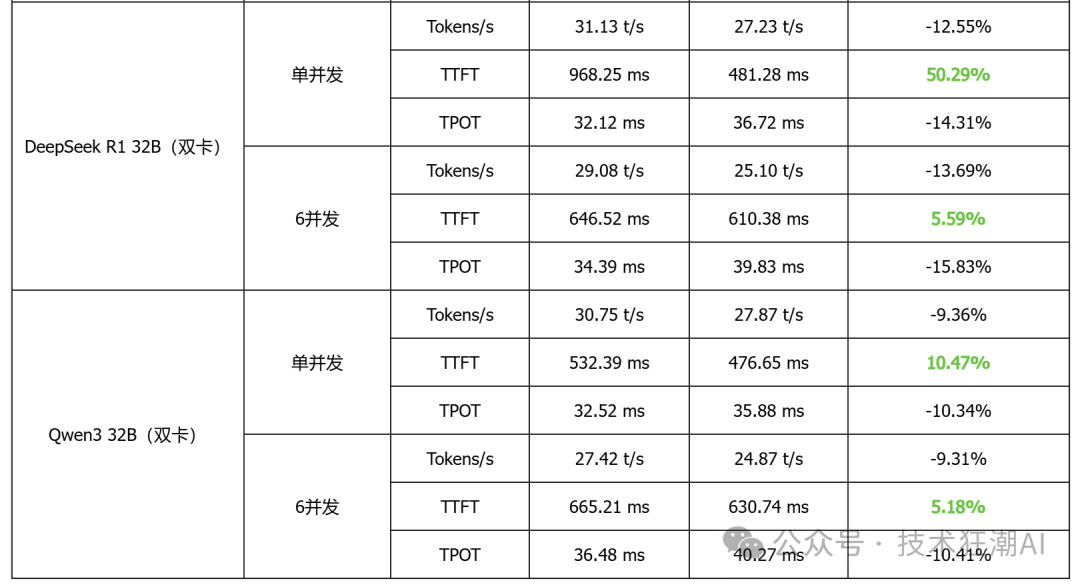
Based on the above performance data analysis, the following conclusions can be drawn:
1. In single-card deployment scenarios for small to medium models, vLLM performs better in terms of latency and throughput
Taking the single-card deployed DeepSeek R1 7B and Qwen3 14B as examples, vLLM generally has lower TTFT (first token latency) than MindIE, and some models also show slight improvements in throughput, indicating its advantages in latency-sensitive applications.
2. In high-concurrency scenarios, vLLM demonstrates good scalability
In multi-concurrent tests, vLLM can achieve throughput performance comparable to or slightly higher than MindIE while maintaining low latency, indicating its advantages in concurrent request scheduling and resource utilization.
3. In multi-card deployment scenarios, MindIE has a performance advantage
In various model tests with dual-card deployment, MindIE significantly outperforms vLLM in throughput, and TPOT latency also performs better. This gap mainly arises from MindIE’s optimization support for graph patterns and fused operators, while the current vLLM Ascend is still in a single-operator mode and has not fully released multi-card performance. With the community planning to release vLLM Ascend 0.9, this bottleneck is expected to improve.
4. Overall, both have their advantages in different deployment scenarios
vLLM is currently more suitable for small models that can run on a single card, latency-sensitive, and interactive application scenarios; while MindIE is more suitable for large model multi-card deployments that pursue throughput efficiency. Actual selection should comprehensively consider business needs, resource conditions, and ecosystem support.
Conclusion
This article explores the applicable scenarios and development potential of vLLM Ascend and MindIE through performance testing and analysis. From the test results, the inference performance of vLLM Ascend has begun to take shape, and although there are still certain gaps in scenarios such as multi-card parallelism, its development potential as an open-source project cannot be ignored. With continued collaboration between the community and manufacturers, further breakthroughs in performance are to be expected.
It is worth emphasizing that inference performance is just one dimension of measuring ecosystem maturity. Usability, maintainability, community activity, and the ability to support new models and new acceleration technologies are all indispensable elements in building a domestic AI inference ecosystem. vLLM Ascend is precisely such an exploratory beginning, providing more developers with the possibility to participate in the construction of the Ascend ecosystem.
In this testing process, to more efficiently deploy vLLM Ascend and MindIE inference services on Ascend hardware, the author used the open-source model service platform GPUStack. This platform has been adapted to various domestic GPU architectures such as Ascend and Haiguang, effectively simplifying the deployment and configuration processes of vLLM Ascend and MindIE, significantly reducing the time cost of environment configuration, allowing the testing work to focus on the performance and analysis of the models themselves.
As an open-source MaaS platform for heterogeneous GPU ecosystems, GPUStack aims to provide a stable intermediary layer between model inference, fine-tuning, and hardware adaptation. Currently, manufacturers such as Moore Threads, Tianxu Zhixin, and Cambricon have adapted based on this platform. In the future, we look forward to more domestic GPU manufacturers joining to jointly promote a more unified and efficient open-source AI infrastructure. If you are also concerned about the development of domestic AI infrastructure platforms, feel free to give this project a star at https://github.com/gpustack/gpustack, follow up on subsequent adaptation progress, or participate in ecosystem co-construction. Let us work together to push the domestic AI ecosystem to new heights!
The growth of the domestic AI computing ecosystem should not rely solely on closed official paths, but rather on an open, shared, and collaborative development model. From MindIE to vLLM, from underlying drivers to model service platforms, every open-source effort in each link is a real push towards an autonomous and controllable technology route.
In the future, we look forward to more projects gathering together in an open manner to jointly build a truly competitive domestic AI infrastructure system.