1. Introduction
In modern multithreaded systems, performance bottlenecks caused by data races and resource locking are common challenges for developers. Traditional mutexes (such as std::mutex) can resolve data races but also introduce performance overhead and deadlock risks. The drawbacks of locking mechanisms are mainly reflected in:
Performance Overhead: Lock operations can lead to thread blocking, reducing overall efficiency.
Deadlock Risks: The use of locks increases the likelihood of deadlocks, especially when lock management is improper.
Increased Code Complexity: Lock mechanisms require manual management of lifecycles, raising maintenance costs and the probability of errors.
To overcome these issues, double buffering technology has emerged as an important means of efficient data exchange.
2. Principles and Application Scenarios of Double Buffering
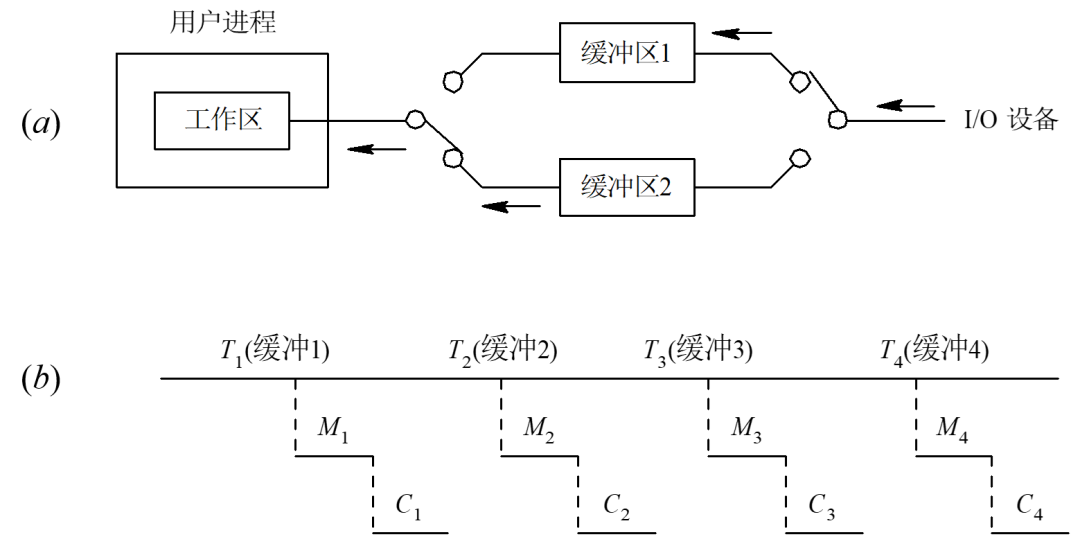
Double buffering is a technique that manages data read and write operations by setting up two independent buffers. In a double buffering mechanism, the system switches between read and write buffers, allowing producers and consumers to operate on different buffers, thus avoiding direct conflicts. The core idea is “read-write separation,” where the producer writes to one buffer while the consumer reads from another, with both periodically swapping roles.
2.1 Main Advantages
Elimination of Data Races: By separating read and write buffers, contention for the same data between producers and consumers is avoided.
Performance Improvement: Asynchronous read and write operations reduce wait times and increase system throughput.
Meeting Real-Time Requirements: In real-time systems, double buffering reduces flickering or interruptions caused by refreshes, enhancing response speed and stability.
2.2 Typical Application Scenarios
Graphics Rendering: In game development and UI design, double buffering is used for background rendering and foreground display, preventing screen flicker. As shown in the figure below:
graph LRA[Background Buffer] -- Rendering Complete --> B[Foreground Buffer]B -- Display on Screen --> C[User Visible]Audio Processing: Ensures continuous audio playback, with one buffer playing while another loads new data.
Data Acquisition: In high-frequency acquisition scenarios, separating acquisition from processing prevents data loss.
Multithreaded Producer-Consumer Model: Balances the speed differences between production and consumption, achieving thread-safe data exchange.
3. Double Buffering Implementation in C++
The following demonstrates a C++ template class for double buffering, implementing safe data exchange in a multithreaded environment:
#include<array>#include<atomic>template<typename T>class DoubleBuffer {public: DoubleBuffer() = default; ~DoubleBuffer() = default; void PushData(const T& data) { // Get the write buffer and add data auto will_write_index = (m_current_buffer_index + 1) % m_buffer_size; m_data_buffers[will_write_index] = data; m_current_buffer_index = will_write_index; } T GetData() { return m_data_buffers[m_current_buffer_index]; }private: static constexprint m_buffer_size = 2; std::array<T, m_buffer_size> m_data_buffers; std::atomic_int m_current_buffer_index{0};};Code Explanation:
Using std::array to define the double buffer, producers and consumers can operate in parallel.
m_current_buffer_index is an atomic variable, ensuring thread safety during buffer switching.
After the producer writes new data, the buffer index is switched, and the consumer always reads the latest data.
This design eliminates the need for explicit locking, greatly enhancing data exchange efficiency in multithreaded environments.
4. Double Buffering Practice in Graphics Rendering
In the field of graphics rendering, double buffering is a classic solution to eliminate screen flicker. Taking the Win32 API as an example, the implementation process of double buffering is as follows:
1) Create a background buffer (bitmap) in memory that is the same size as the window.
2) All drawing operations are first completed in the background buffer.
3) After drawing is complete, the contents of the background buffer are copied to the foreground display in one go (BitBlt).
Example Code Snippet (ReferenceCodeProject):
RECT ClientRect;GetClientRect(hWnd, &ClientRect);int width = ClientRect.right - ClientRect.left;int height = ClientRect.bottom - ClientRect.top;PAINTSTRUCT ps;HDC hdc = BeginPaint(hWnd, &ps);HDC memDC = CreateCompatibleDC(hdc);HBITMAP memBitmap = CreateCompatibleBitmap(hdc, width, height);SelectObject(memDC, memBitmap);// Draw all content on memDCBitBlt(hdc, 0, 0, width, height, memDC, 0, 0, SRCCOPY);DeleteObject(memBitmap);DeleteDC(memDC);EndPaint(hWnd, &ps);As shown above, all drawing operations are completed in the memory buffer memDC, and finally copied to the screen in one go via BitBlt, significantly reducing flicker.
5. C++ Stacktrace Technology
In debugging complex systems, stacktrace is a powerful tool for locating issues. C++ traditionally lacks built-in stack tracing capabilities, and developers often rely on third-party libraries such as Boost.Stacktrace or the std::stacktrace from the C++23 standard library.
5.1 Boost.Stacktrace Example
#include<boost/stacktrace.hpp>void Test() { std::cout << boost::stacktrace::stacktrace();}int main() { Test();}Boost.Stacktrace can output the current function call stack, helping to quickly locate the path of exceptions.
5.2 C++23 std::stacktrace
C++23 introduces std::stacktrace, which is designed based on Boost.Stacktrace but optimized for performance and storage. The basic usage is as follows:
#include<stacktrace>std::cout << std::stacktrace::current();std::stacktrace supports lazy decoding, dynamic storage, and custom allocators, making it suitable for various debugging needs.
Iterating Stack Frame Information
auto stack = std::stacktrace::current();for (const auto& entry : stack) { std::cout << entry << std::endl;}Each stacktrace_entry provides detailed information such as function names, file names, and line numbers, greatly enhancing the C++ debugging experience.
6. Conclusion
With the evolution of C++ standards, double buffering and stacktrace technologies continue to improve. Double buffering significantly enhances the performance and real-time capabilities of multithreaded systems by separating read and write operations, widely applied in graphics rendering, audio processing, data acquisition, and more. Stacktrace technology provides strong support for debugging and error localization in complex systems.
In the future, with the popularization of standard libraries like std::stacktrace, C++ developers will be able to build high-performance, maintainable multithreaded systems more efficiently.
7. References
https://mp.weixin.qq.com/s/5b7mYiJBkwtQB613qQ-Cjg
https://mp.weixin.qq.com/s/-jC_to_61OZzHrnUUD-uog