Long press the QR code to recognize and follow, get new skills every week.

Recently, while using the newly installed Keil 5 for programming, I often encountered the need to define a global variable at the top of the program file. During the subsequent programming process, I frequently needed to use this variable, and typing the variable name every time was particularly troublesome and time-consuming. I remembered that I had previously set up an auto-completion feature, so I searched for it online and now I’m sharing it with everyone.
01
Open MDK5
First, open the installed MDK5. For those who haven’t installed it yet, hurry up and do so! You can reply with the keyword “Keil5” or “keil” in the public account to get the download link.
Note! If you don’t have access to unlimited speed Baidu Netdisk, remember to reply with “Baidu Cloud” to get it.

02
Enable Code Completion Feature
This tutorial was tested on Windows 10 (1803) 64-bit. If you encounter any issues, please reply with your questions in the public account, and I will try to help resolve them.
Open the installed MDK5.
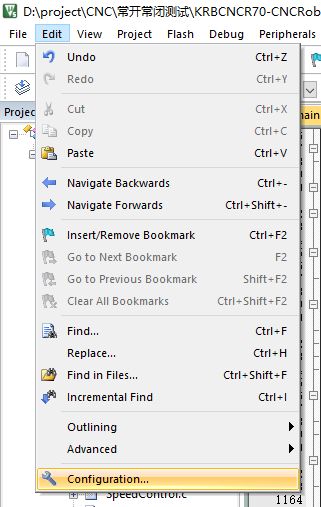
Click on the top left corner Edit, and select the last line Configuration.
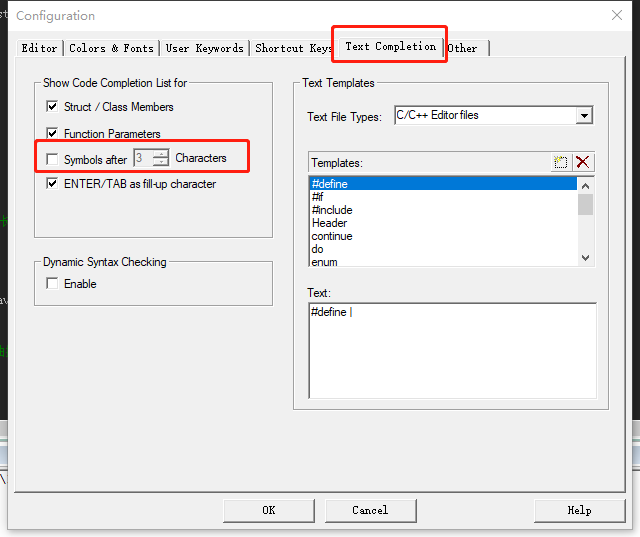
In the pop-up window, select Text Completion.
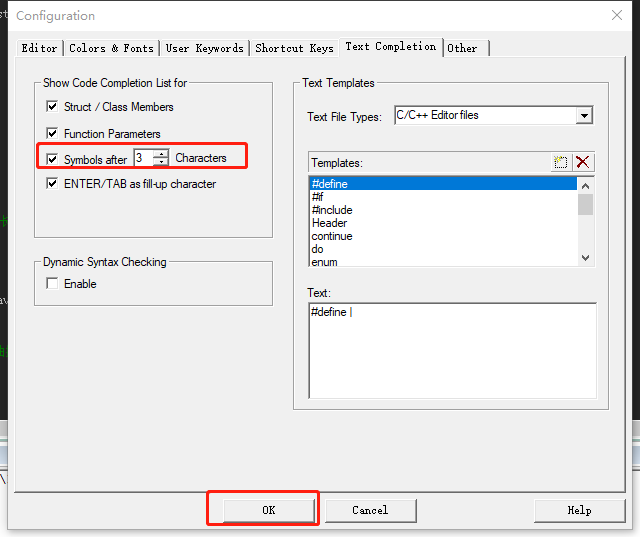
Check the option Symbols after …., and then click OK (by default, the completion options pop up after typing 3 characters, which can be modified).
03
Test
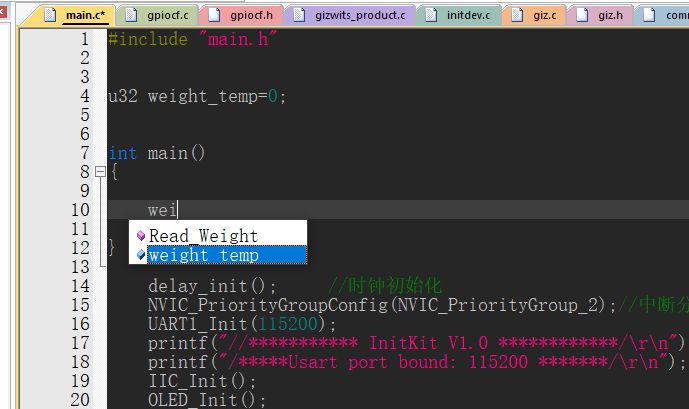
At this point, let’s define a global variable to test whether the auto-completion works.
After typing the three characters wei, the option weight_temp appeared automatically. Just select it and press enter, isn’t that very useful?
Guys, hurry up and enjoy coding~~

Resource List
Contents
Keywords
Baidu Netdisk unlimited speed
Baidu Cloud, PanDownload
KEIL5 (51 and DMK coexist)
keil5, keil
Altium Designer Collection
AD
Protues 8.1
protues
Multisim 13
Multisim
Office 2013
office2013
System Activation
System Activation
Resources are continuously being added, feel free to reply directly in the public account with the software you want, suggestions, etc. Daily dog head…