When using VMware to set up a virtual machine, I often encounter a question: How should the network of the virtual machine be configured? Why can it connect to the internet sometimes, but cannot ping the host machine at other times? Today, I will explain the three common network modes of virtual machines in simple terms, along with my real screenshots: NAT mode, Bridged mode, and Host-Only mode.
My computer is connected to my mobile hotspot, and the virtual machine is set to NAT mode. I will clarify this with my screenshots.
1. Comparison of Three Common Modes
1. NAT Mode
-
Principle: The virtual machine first connects to the host’s virtual network card (VMnet8), and the host acts as a proxy, helping the virtual machine “translate” network requests.
-
Characteristics:
-
The virtual machine can access the internet (through the host’s network).
-
The external network cannot see the virtual machine, only the host machine.
-
The virtual machine and the host can communicate with each other, but the virtual machine cannot directly communicate with devices on the external local area network (such as a colleague’s computer).
2. Bridged Mode
-
Principle: The virtual machine is directly “bridged” to the real network card, functioning like an independent computer.
-
Characteristics:
-
The host and the virtual machine are on the same subnet (for example, under the same WiFi router).
-
The external network can see two devices: one is the host machine, and the other is the virtual machine.
-
Both the host and the virtual machine can directly access each other and external devices.
3. Host-Only Mode
-
Principle: The virtual machine only connects to the host’s virtual network card (VMnet1), completely isolated from the external network.
-
Characteristics:
-
The virtual machine and the host can communicate with each other.
-
Cannot access the internet.
-
Suitable for creating testing environments.
2. Practical Case: NAT Mode
My computer is connected to a mobile hotspot, and the virtual machine is set to NAT mode. Let’s look at the IP configuration:
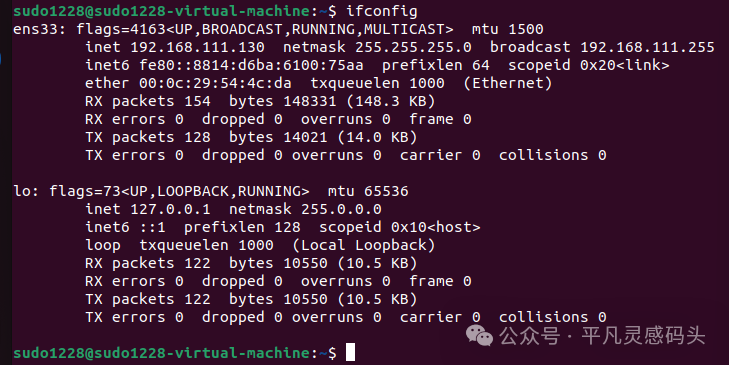
IP in the Virtual Machine (ifconfig)
ens33: inet 192.168.111.130 netmask 255.255.255.0 broadcast 192.168.111.255
This indicates that the virtual machine’s address is <span>192.168.111.130</span>, which belongs to the NAT subnet assigned by VMware.
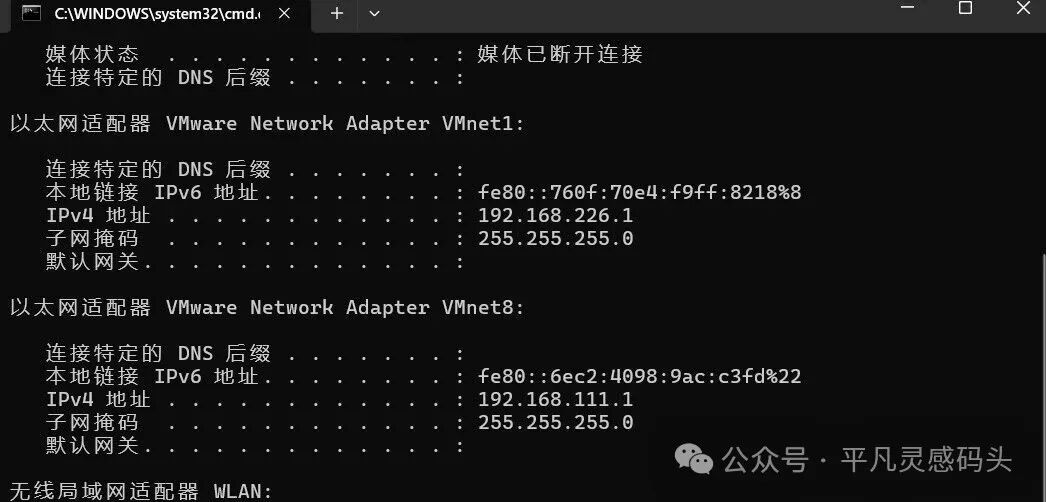
IP in the Host Machine (ipconfig)
-
VMnet8 (NAT Network Card):
<span>192.168.111.1</span> -
WLAN (Real Network Card, connected to mobile hotspot):
<span>172.xxx.xxx.xxx</span>
Explanation:
-
<span>192.168.111.1</span>is the NAT virtual gateway of the host machine. -
<span>192.168.111.130</span>(the virtual machine) accesses the external network through this gateway. -
The real internet-connected IP of the host machine is
<span>172.20.10.4</span>(assigned by the mobile hotspot).
Data Flow Diagram
Virtual Machine (192.168.111.130) ↓ Host NAT Gateway (192.168.111.1) ↓ Host Real External IP (172.xxx.xxx.xxx) ↓ Mobile Hotspot (172.xxx.xxx.xxx) ↓ Internet
The external world only knows <span>172.xxx.xxx.xxx</span> (the host’s IP) and is unaware of the virtual machine’s existence.
3. Summary Comparison of NAT and Bridged Modes
| Mode | Virtual Machine IP Source | Can the external network see the virtual machine directly? | Usage Scenario |
|---|---|---|---|
| NAT | Assigned by the host’s virtual network card | ❌ No | Daily use, internet access |
| Bridged | Assigned by router (mobile hotspot/switch) | ✅ Yes | Setting up LAN services, network testing |
| Host-Only | Assigned by the host’s virtual network card | ❌ No | Internal testing, no internet access |
4. Conclusion
-
NAT Mode: The virtual machine is hidden behind the host, using the host’s network to access the outside world, and the external world cannot see the virtual machine.
-
Bridged Mode: The virtual machine acts like an independent computer, directly connected to the local area network, and the external world can see it.
-
Host-Only Mode: The virtual machine and the host are isolated from the internet.
=