Dear friends following HPMicro, the <span>Zephyr v3.7.0 (LTS)</span> version and <span>hpm_sdk v1.6.0</span> version of <span>Zephyr SDK Glue v0.5.0</span> has been officially released.
The repository link is: https://github.com/hpmicro/zephyr_sdk_glue
Zephyr Development Package for HPMicro MCU
Zephyr is a general-purpose embedded real-time operating system with good scalability.Zephyr SDK Glue (abbreviated as ZSG) is an open-source software package developed by HPMicro Semiconductor based on the Zephyr project, covering all adaptation support files for HPMicro chips aimed at Zephyr project development, supporting development on Microsoft Windows, Linux, and macOS platforms.
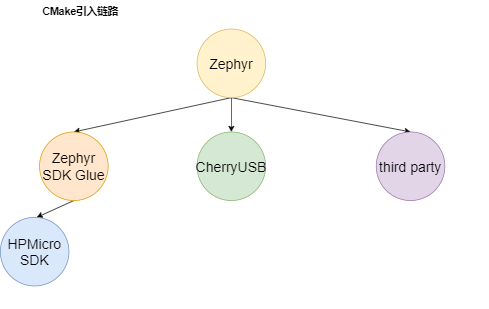
HPM_SDK IntegrationZSG utilizes the extensibility features of Zephyr, packaging itself as a Zephyr submodule to be included in the overall build of the project. Meanwhile, <span>HPM_SDK</span> is introduced by ZSG, forming the build chain of <span>Zephyr - ZSG - HPM_SDK</span>.
 ZSG also serves as a manifest repository for Zephyr, linking to the main Zephyr repository and obtaining verified Zephyr resources, compatible with most Zephyr applications and instances. The build order of the ZSG workspace differs from that of a typical Zephyr project, where the main Zephyr repository fetches the driver files for the SoC and various authorized third-party software libraries, with the driver abstraction layer included in the main Zephyr repository. ZSG builds its workspace starting from itself, fetching the main Zephyr repository and the required third-party software libraries, with the HPMicro driver abstraction layer files included in ZSG.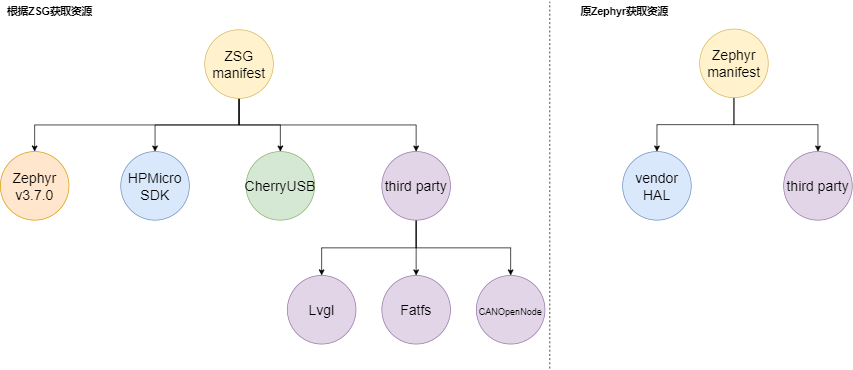
Zephyr VersionZSG is currently under incremental development and long-term maintenance on Zephyr v3.7.0 LTS. The version of Zephyr bound to ZSG will be updated with the release of new LTS versions.
Zephyr Third PartyZSG introduces third-party libraries from Zephyr, such as <span>CANOpenNode</span>, <span>Lvgl</span>, and <span>Fatfs</span>. In addition, it also includes additional libraries and drivers developed by HPMicro, such as <span>SDCard</span>.
Integration of CherryUSB In addition to implementing Zephyr’s USB driver (UDC), ZSG also provides the CherryUSB protocol stack and integration for HPMicro products, assisting users in developing USB HOST and DEVICE.
ScalabilityZSG supports user-created component integration, suitable for projects and applications of various scales and complexities.
Providing a Simplified Directory As a large open-source project, Zephyr contains a vast amount of code, with various vendors adding extensive code for the characteristics of their chips, which is unnecessary for a specific chip or development board. The chip description files for Zephyr are numerous and scattered across different folders, requiring developers to discern the ownership of files, increasing the development threshold. ZSG provides a mechanism to avoid the above issues, with HPMicro chips having their development files for Zephyr as a separate library, reducing the amount of code downloaded and making files clear at a glance.
Open Source Like Zephyr, ZSG is released as open-source software under the Apache-2.0 License.
Supported Development Boards
- HPM6750EVK2
- HPM6800EVK
Main Features Provided
-
Adaptation for the following components and drivers
- Communication peripherals:
<span>UART</span>,<span>I2C</span>,<span>SPI</span>,<span>PWM</span>,<span>UDC</span>,<span>Ethernet</span>,<span>CAN</span> - Analog peripherals:
<span>ADC12</span>,<span>ADC16</span> - Memory peripherals:
<span>SDHC</span> - Graphics peripherals:
<span>MIPI</span>,<span>LVDS</span>,<span>RGB</span>,<span>Camera</span> - Component classes:
<span>CANOpenNode</span>,<span>GUI LVGL</span>,<span>CherryUSB Device/Host</span>,<span>FatFs</span> -
Provided the following examples
- HPM6750EVK2:
<span>GPIO</span>,<span>CAN</span>,<span>Ethernet</span>,<span>PWM</span>,<span>USB</span>,<span>I2C</span>,<span>Video</span> - HPM6800EVK:
<span>GPIO</span>,<span>Ethernet</span>,<span>USB</span>,<span>I2C</span>,<span>Display</span>,<span>Video_MIPI</span>
Development Environment
It is recommended to use the Ubuntu system for project building, compiling, and flashing, and the Windows system for code writing and serial port printing.
If you need to support file sharing and editing between Linux and Windows, please install and configure common software such as Samba and Vim appropriately on the Linux device.
Setting Up the Ubuntu Development Environment
- Recommended Ubuntu 20.04 64-bit or higher version
Installing Software Dependencies
-
Install the required software
sudo apt install --no-install-recommends git cmake ninja-build gperf ccache dfu-util device-tree-compiler wget\ python3-dev python3-pip python3-setuptools python3-tk python3-wheel xz-utils file\ make gcc gcc-multilib g++-multilib libsdl2-dev libmagic1 -
Confirm the minimum version levels of the tools, mainly for CMake and DTC; if the versions are insufficient, they need to be upgraded.
◦ CMake
・3.20.5
◦ Python
・3.8
◦ Device Tree Compiler
・1.4.6
Building the Work Environment
- Install West, add
<span>~/.local/bin</span>to bashrc, ensuring that the terminal has this path in the<span>PATH</span>when starting up.
pip3 install --user -U west
echo 'export PATH=~/.local/bin:"$PATH"' >> ~/.bashrc
source ~/.bashrc
- Create the ${workspace} directory and obtain the source code
mkdir ${workspace}
cd ${workspace}
west init -m https://github.com/hpmicro/zephyr_sdk_glue.git --mr main
- Obtain the source code of the required repository, defaulting to GitHub; to switch to a domestic source, please enter the first command
west config manifest.file west_gitee.yml
west update
- Configure CMake variables
west zephyr-export
- Install the Python dependencies required by Zephyr
pip3 install --user -r ~/${workspace}/zephyr/scripts/requirements.txt
- Resolve some naming conflicts and add HPM_SDK related patches
west supplyInstalling the Zephyr Toolchain Package
-
Download the Zephyr compilation tools, link: https://github.com/zephyrproject-rtos/sdk-ng/tags/
-
Command line installation
cd ${workspace}
wget https://github.com/zephyrproject-rtos/sdk-ng/releases/download/v0.16.5/zephyr-sdk-0.16.5_linux-x86_64.tar.xz
wget -O - https://github.com/zephyrproject-rtos/sdk-ng/releases/download/v0.16.5/sha256.sum | shasum --check --ignore-missing
tar xvf zephyr-sdk-0.16.5_linux-x86_64.tar.xz
- Configure necessary variables for the toolchain
cd zephyr-sdk-0.16.5
source setup.sh
Downloading and Installing OpenOCD
-
It is recommended to compile from source, using the default installation path
<span>/usr/local/bin/openocd</span> -
Download link: https://github.com/hpmicro/riscv-openocd/releases/tag/hpm_xpi_v0.2.0
-
After extracting, please place the
<span>openocd</span>path in<span>/usr/local/bin/openocd</span>for script invocation.
Project Compilation
Viewing the Project
- View supported hardware devices
west boards | grep hpm
Compiling Samples
-
Compile the button sample for hpm6750evk2, the build directory can be placed anywhere in the workspace, recommended to be placed under the Zephyr directory.
◦ -p option, always recompiles, auto does incremental compilation.
cd ${workspace}/zephyr
west build -p always -b hpm6750evk2 samples/basic/button
Flashing and Debugging
1. Firmware flashing
west flash
2. Firmware debugging
west debug
Modifying Software Configuration
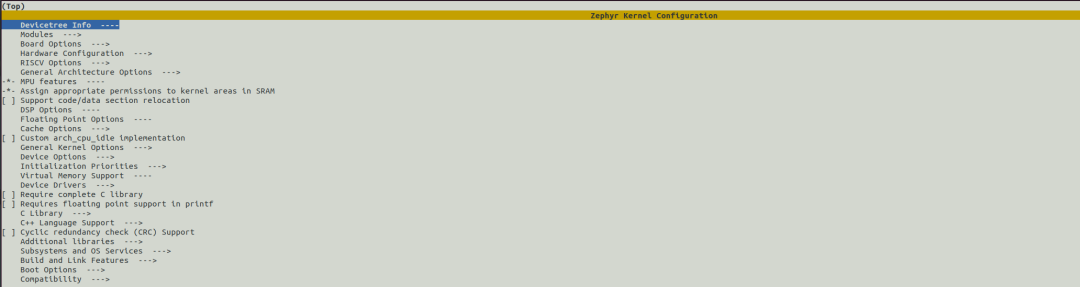
Zephyr configures software options through the <span>Kconfig</span> system, which can be modified through a graphical interface.
west build -t menuconfig
Resource Links
<span>Zephyr Official Documentation Center</span>https://docs.zephyrproject.org/3.7.0/<span>HPMicro Code Repository</span>https://github.com/hpmicro
Contact
If you have any questions during development, please ask in the repository [issues] https://github.com/hpmicro/zephyr_sdk_glue/issues .
– END –