Clickthe blue text to follow us
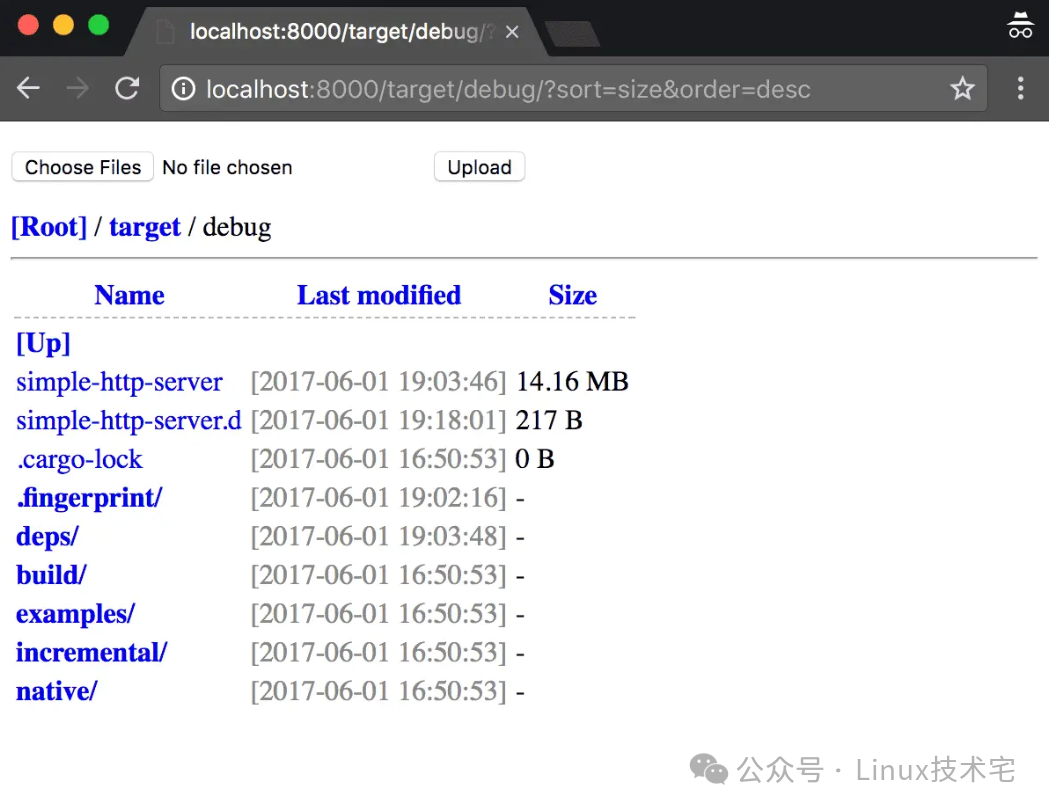
1. Core Features
1.Cross-Platform Support
• Compatible with Windows, macOS, and Linux, ensuring a consistent experience across multiple systems.• Colorful log output enhances debugging and monitoring efficiency.
2.High Performance and Security
•Multithreaded Architecture: Supports customizable worker thread count (default is 3), fully utilizing multicore resources.•Rust Ecosystem Advantages: Memory safety and no data races, suitable for high-concurrency scenarios.•HTTPS Support: Ensures data security through TLS/SSL certificate encryption.
3.Rich Feature Set
•Static File Service: Automatically recognizes MIME types, supports directory browsing and file downloads.•HTTP Cache Control: Sends <span>Last-Modified</span>/<span>ETag</span> headers to optimize bandwidth usage.•CORS Configuration: Implements cross-origin resource sharing via <span>Access-Control-Allow-Origin</span> header.•HTTP Basic Authentication: Supports username/password protection for the server.•File Upload: Enables CSRF token protection to ensure upload security.•Compression Support: Gzip/Deflate compresses responses to reduce data transmission volume.•HTTP 301 Redirect: Flexibly manages URL redirection.
4.Developer Friendliness
•One-Click Start: Set up the server with a single command, supporting custom root directory, port, and IP.•Bread Crumb Navigation: Optimizes the directory browsing interface, intuitively displaying file hierarchy.•Log Levels: Supports silent mode (<span>-s</span>) or detailed log output.
2. Deployment and Installation
1. Dependency Preparation
•Rust Environment: Ensure that the Rust compiler and Cargo package manager are installed.
curl --proto '=https' --tlsv1.2 -sSf https://sh.rustup.rs | sh
rustc --version  # Verify installation
cargo --version
2. Installation Methods
•Method 1: Cargo Installation (Recommended)
cargo install simple-http-serverAfter installation, the executable file is located at <span>~/.cargo/bin/simple-http-server</span> (this path needs to be added to the <span>PATH</span> environment variable).
•Method 2: Precompiled Binary Package Download the corresponding binary file for your system from GitHub Releases[1] and run it directly.
3. Starting the Server
•Basic Command:
simple-http-server [root directory] # Default port is 8000, current directory is root•Common Parameters:
simple-http-server -p 80 -i --compress gzip --threads 8 /path/to/folder•<span>-p 80</span>: Specify the port as 80.•<span>-i</span>: Enable automatic rendering of the homepage (e.g., <span>index.html</span><code><span>).</span>•<span>--compress gzip</span>: Enable Gzip compression.•<span>--threads 8</span>: Set 8 worker threads.
4. HTTPS Configuration
• Generate TLS certificate (self-signed example):
openssl req -x509 -newkey rsa:4096 -nodes -keyout key.pem -out cert.pem -days 365• Start HTTPS server:
simple-http-server --cert cert.pem --certpass yourpassword /path/to/folder3. Open Source Address and Community
•GitHub Repository:https://github.com/TheWaWaR/simple-http-server[2]
•Project Data:
•Stars: 3.3k+ (as of August 2025), high community activity.•Open Source License: MIT, allows free use, modification, and distribution.
•Feature Iteration Plan:
• Optimize performance for large file uploads.• Add WebSocket support.• Improve API documentation and examples.
4. Application Scenarios
1.Local Development
• Quickly set up a front-end development environment for real-time preview of HTML/CSS/JavaScript changes.• Example:
simple-http-server -p 3000 ./my-project2.File Sharing
• Share files within a local area network, supporting HTTPS encrypted transmission.• Example:
simple-http-server --auth user:pass --upload /shared/folder3.Static Website Hosting
• Temporarily deploy experimental static websites, supporting custom domains and redirection.• Example:
simple-http-server -p 80 --redirect https://example.com ./website4.Teaching Demonstrations
• Real-time display of code or projects in class without complex configuration.• Example:
simple-http-server -s --nocache ./demo-code5. Comparison with Traditional Tools
| Feature | Simple-http-server | Python SimpleHTTPServer | Node.js http-server |
| Language | Rust (high performance, secure) | Python (interpreted, slower) | Node.js (event-driven, suitable for I/O) |
| Multithreading | Supported (custom thread count) | Single-threaded | Single-threaded (can be extended via Cluster) |
| HTTPS | Native support | Requires additional configuration (e.g., <span>pyOpenSSL</span>) |
Requires additional modules (e.g., <span>https</span>) |
| File Upload | Supported (CSRF protection) | Not supported | Requires third-party middleware |
| Compression | Supports Gzip/Deflate | Not supported | Requires manual configuration |
| Cross-Platform | Supported | Supported | Supported |
6. Conclusion
Simple-http-server is built on Rust’s high performance and security, significantly enhancing the functionality and usability of lightweight HTTP servers through features like multithreading, HTTPS, and CORS. Whether for local development, file sharing, or static website hosting, it provides stable and efficient services. It is recommended to obtain the latest version from the GitHub repository, participate in community contributions or feedback, and jointly promote tool optimization.
References
<span>[1]</span> GitHub Releases: https://github.com/TheWaWaR/simple-http-server/releases<span>[2]</span>: https://github.com/TheWaWaR/simple-http-server
END
Like us

Share us

Like us