Hi~ This is Weekly Qt, dedicated to sharing valuable Qt knowledge.As projects grow larger, they need to be divided into multiple modules for development, reducing coupling and facilitating collaboration among multiple developers. At this point, it is inevitable to create static and dynamic libraries.This article introduces the CMake interface provided by Qt for creating static and dynamic libraries: qt_add_library().
Example program demonstrating how to display a button from a custom control library in a window. The project structure is as follows:
/BuildWidgetAppWithLib ✗ tree |-- CMakeLists.txt`-- src |-- app | |-- CMakeLists.txt | |-- main.cpp | |-- mainwindow.cpp | |-- mainwindow.h | `-- mainwindow.ui `-- libcontrols |-- CMakeLists.txt |-- cpushbutton.cpp `-- cpushbutton.h01 Creating Library FilesFirst, create a library file and add a custom button class to it. Let’s take a look at the CMakeLists.txt file for creating the library: BuildWidgetAppWithLib/src/libcontrols/CMakeLists.txt
qt_add_library(controls SHARED cpushbutton.cpp cpushbutton.h)target_link_libraries(controls PRIVATE Qt6::Widgets)target_include_directories(controls INTERFACE ${CMAKE_CURRENT_SOURCE_DIR})The qt_add_library() function creates a dynamic library, which is essentially a wrapper around CMake’s add_library(), adding some Qt-specific logic. This function has been supported since Qt 6.2, with the following prototype:
qt_add_library(target [STATIC | SHARED | MODULE | INTERFACE | OBJECT] [MANUAL_FINALIZATION] sources...)Common parameters include:
- STATIC: Indicates the creation of a static library
- SHARED: Indicates the creation of a dynamic library
target_link_libraries(controls PRIVATE Qt6::Widgets)Since the library uses content from QWidgets, it is necessary to add the corresponding dependency.
target_include_directories(controls INTERFACE ${CMAKE_CURRENT_SOURCE_DIR})target_include_directories() ensures that all targets using this library will include the specified path, making it easy to find the cpushbutton.h header file. From the project structure, we can see that cpushbutton.h is in the same directory as CMakeLists.txt, so we can simply add ${CMAKE_CURRENT_SOURCE_DIR}.
`-- libcontrols |-- CMakeLists.txt |-- cpushbutton.cpp `-- cpushbutton.hThe implementation of CPushButton is quite simple, inheriting from QPushButton and then writing a stylesheet to implement the custom button.

#include "cpushbutton.h"CPushButton::CPushButton(QWidget *parent) : QPushButton{parent}{ this->setStyleSheet(R"( QPushButton { background-color: #1b60e7; border-radius: 6px; color: white; padding: 6px; font-size: 14px; border-style: solid; border-width: 2px; border-color: #0541b2; } QPushButton:hover { background-color: #366ef4; } QPushButton:pressed { background-color: #0541b2; } )");}02 Using the Library
Next, use the custom control library in the executable project’s CMakeLists.txt:
BuildWidgetAppWithLib/src/app/CMakeLists.txt
find_package(QT NAMES Qt6 Qt5 REQUIRED COMPONENTS Widgets)find_package(Qt${QT_VERSION_MAJOR} REQUIRED COMPONENTS Widgets)set(PROJECT_SOURCES main.cpp mainwindow.cpp mainwindow.h mainwindow.ui)qt_add_executable(BuildWidgetAppWithLib MANUAL_FINALIZATION ${PROJECT_SOURCES})target_link_libraries(BuildWidgetAppWithLib PRIVATE controls Qt${QT_VERSION_MAJOR}::Widgets)We only need to focus on target_link_libraries(BuildWidgetAppWithLib PRIVATE controls…), which links the controls library, our previously defined library.
Then, use the custom control in our source code:
#include "mainwindow.h"#include "./ui_mainwindow.h"#include "cpushbutton.h"MainWindow::MainWindow(QWidget *parent) : QMainWindow(parent) , ui(new Ui::MainWindow){ ui->setupUi(this); auto button = new CPushButton(this); button->setText("CPushButton"); button->setObjectName("cpushButton"); ... ui->verticalLayout->addWidget(button, 0, Qt::AlignmentFlag::AlignHCenter);}03 Main Project File
Now, let’s take a look at the sub CMakeLists.txt added in the main project file, BuildWidgetAppWithLib/CMakeLists.txt
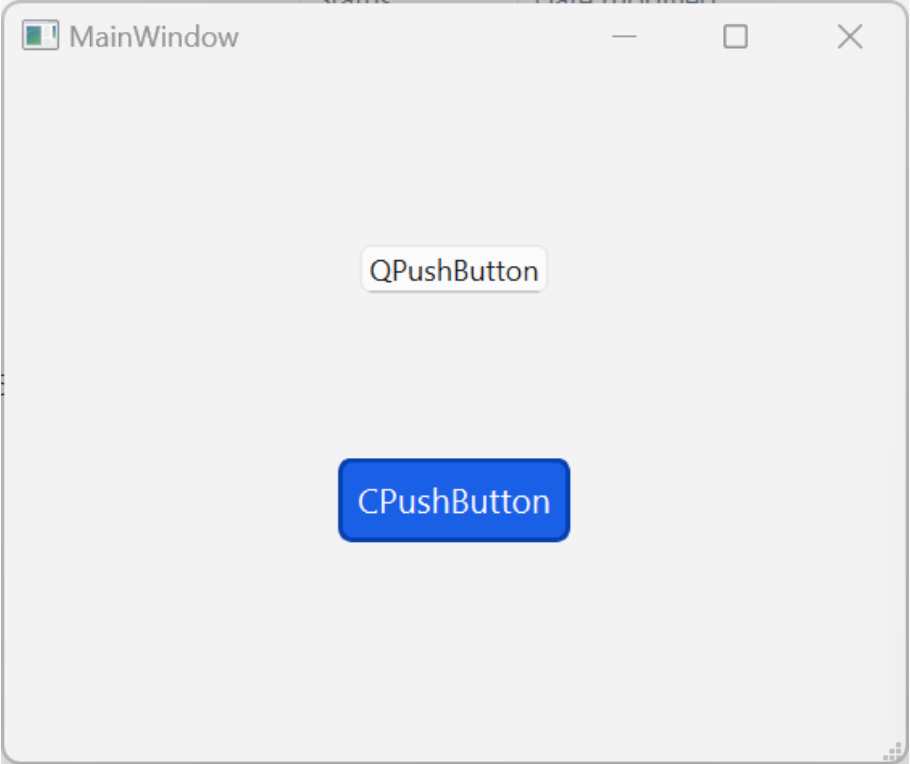
cmake_minimum_required(VERSION 3.16)project(BuildWidgetAppWithLib VERSION 0.1 LANGUAGES CXX)set(CMAKE_CXX_STANDARD 17)set(CMAKE_CXX_STANDARD_REQUIRED ON)find_package(QT NAMES Qt6 Qt5 REQUIRED COMPONENTS Widgets)find_package(Qt${QT_VERSION_MAJOR} REQUIRED COMPONENTS Widgets)qt_standard_project_setup()add_subdirectory(src/libcontrols)add_subdirectory(src/app)set_target_properties(BuildWidgetAppWithLib PROPERTIES WIN32_EXECUTABLE ON MACOSX_BUNDLE ON)After compiling and running, the effect is as follows:
References
[1]https://doc.qt.io/qt-6.8/en/cmake-get-started.html#building-libraries
We welcome submissions to [email protected], with no formatting requirements. Your best practices deserve to be seen!
Related Articles
Qt6 CMake: Goodbye qmake, Introduction to CMake
Qt6 CMake: Building QWidgets Applications
Qt6 CMake: Managing Qt Resource Files